

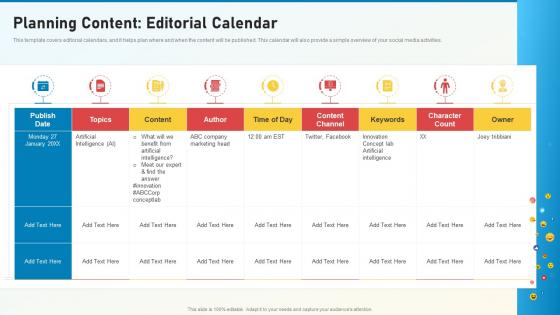
Social Media Playbook Planning Content Editorial Calendar




Try Before you Buy Download Free Sample Product
 Impress Your
 Audience
 100%
100% Editable
 Save Hours
 of Time


This template covers editorial calendars, and it helps plan where and when the content will be published. This calendar will also provide a simple overview of your social media activities.
People who downloaded this PowerPoint presentation also viewed the following :
Social Media Playbook Planning Content Editorial Calendar with all 6 slides:
Use our Social Media Playbook Planning Content Editorial Calendar to effectively help you save your valuable time. They are readymade to fit into any presentation structure.





FAQs for Social Media Playbook Planning
Okay so three things you gotta nail down: what you want them to actually DO after your presentation, who these people are and what keeps them up at night, and then how you'll walk them through your argument. Most people bomb because they skip figuring out their audience - like, why would someone care about your quarterly metrics if they're worried about layoffs? Pick 3-5 main points tops. Any more and people zone out. For each point, grab some solid examples or data that'll make it memorable. Oh and start with your end goal written out in one sentence. Sounds basic but it'll save you from rambling later.
Honestly, most content teams I've worked with just create stuff without thinking about the bigger picture - huge mistake. Map everything back to your actual marketing goals first. Lead gen campaign? Then your content should drive conversions, not just likes and shares. Track the same KPIs your marketing team uses, and do monthly performance reviews to see what's actually working. I'd also audit your existing content regularly - you might be surprised what's moving the needle vs. what's just... there. Oh, and make sure every single piece has a clear purpose that connects to your overall strategy.
Look, audience analysis is literally everything when it comes to your presentation. It drives your whole content strategy - what messages you focus on, how you structure things, your delivery style. Think about it: you wouldn't explain something technical the same way to your boss versus the engineering team, right? First, figure out who's actually going to be there. What do they already know? What keeps them up at night? Then ask yourself what you want them to DO after your presentation. That shapes everything - your tone, examples, how much detail to include. Honestly, I always sketch out quick personas before I even start outlining. Saves so much time later.
Honestly, visuals are a game-changer for content strategy. People absorb visual info like 60,000 times faster than text - which is actually insane when you think about it. Charts and infographics make heavy content way easier to digest. Plus they create emotional connections that plain text just can't do. I mean, nobody wants to stare at a wall of words, right? Your presentations will stick in people's heads way better when you match visuals with your key points. My advice? Pick your 3 main messages first, then hunt down visuals that actually support each one.
Honestly, I'd start simple and build from there. BuzzSumo or Ahrefs are solid for researching what's working in your space - I'm kinda obsessed with content audits using Screaming Frog, but that might be overkill at first. For structure, try the content pillar method or map everything to your buyer's journey. Google Analytics is obvious but necessary. Planning-wise, CoSchedule's great though I actually just use Notion for my editorial calendar because I'm weird like that. Don't overwhelm yourself - grab one research tool, one framework, and track with GA. You can always add more fancy stuff later once you've got the rhythm down.
Honestly, I'm obsessed with scroll depth - tells you if people actually read your stuff or just bounce. Time on page and social shares are solid indicators too. Comments matter way more than most people think. Your bounce rate will humble you real quick if content sucks. I always check how many people come back for more content because repeat visitors = you're doing something right. Set up some Google Analytics goals and peek at them monthly, but don't get crazy with data overload. Pick maybe 3-4 metrics that actually align with what you're trying to accomplish.
Honestly, the worst thing you can do is dump everything you know into one deck. Nobody wants that firehose approach. First figure out who's actually sitting there and what they give a shit about - I've watched so many people crash because they guessed wrong on audience knowledge. Build around one clear message instead of ping-ponging between random topics. Oh, and those text-heavy slides? Skip them entirely. Your slides should back up what you're saying, not be a novel people have to read. Start with your main point, then everything else falls into place way easier.
Every three months works well for content reviews, but don't be rigid about it - if your industry gets shaken up or your audience changes, jump on it immediately. Once a year, dig deeper into performance data and competitor analysis to see if your goals still make sense. Those quarterly check-ins can be pretty light though - just scan your metrics, peek at audience feedback, maybe spot some new trends. Honestly, I'd set those calendar reminders right now or you'll totally forget. Oh, and keep a running list of stuff that's bombing between reviews so you're not starting from scratch each time.
Honestly, just think of each section like a mini-story - problem, journey, solution. Start with what's actually bugging your customers, then show how you help them get to where they want to be. Real customer examples work way better than generic stats. Like, don't just say "30% improvement" - explain what that meant for Sarah's team or whatever. Most presentations are boring as hell anyway because they're all charts and bullet points. People remember stories, not data dumps. Oh, and skip the agenda slide - just jump right into a specific customer situation instead.
Honestly, SEO is huge for getting people to actually show up to your presentations. I learned this the hard way when nobody came to my webinars lol. Do keyword research first - see what your audience is searching for, then work those terms into your titles and descriptions naturally. Your presentation topics should match what people want to know about. The cool thing is you can repurpose everything later - turn slides into blog posts, pull quotes for social media, create video clips. All of it can be optimized for search. Don't make my mistake and skip this step!
Honestly, I just think of them like different tools for different jobs. Video's amazing for building that emotional connection - people actually get to see your personality. Blog posts? Perfect for SEO and when someone wants to really dig deep into details. Infographics are clutch for making boring data actually shareable (and way more fun to create than you'd think). You've gotta match the format to where people are mentally. Someone just starting their research wants that meaty blog post. But if they're ready to buy? Hit them with a demo video. I'd start by looking at what you already have, spot the gaps, then build out a content calendar that mixes all three.
Honestly, just don't be shady with your data - no cherry-picking stats to make yourself look better. Always cite where you got stuff from because people DO notice when you don't (learned that one the hard way). Be real about what you're actually delivering instead of overpromising. Fear tactics are gross and manipulative, so skip those entirely. Oh, and make sure people with different abilities can actually use your content - it's not that hard to do. Really though, it comes down to this: would you want someone pulling this crap on you? If not, don't do it to others.
Honestly, just start with your most engaged followers - they're usually down to help out. Create some branded hashtags or run contests asking people to share photos with your products. Super simple stuff. Make it easy for them to participate, then actually use what they send you! Repost their pics on your socials, feature customer stories in emails, maybe turn some into case studies. Oh and definitely ask permission first - learned that one the hard way lol. The trick is picking followers who already love interacting with your brand.
Don't just dump your slides online and call it a day - that's such a waste! Break your presentation into bite-sized pieces first. Turn individual slides into social posts, pull your best data points for infographics, transform key takeaways into blog content. Your speaker notes? Perfect for LinkedIn articles. Tweet the quotes that hit hardest. I've seen people just upload raw PowerPoints to SlideShare... ugh. Each piece needs to stand alone and actually provide value. Oh, and create some deeper follow-up resources too - people always want more after a good presentation.
Honestly? Cross-channel consistency makes or breaks your content strategy. I've seen brands totally confuse their audience by sounding corporate on LinkedIn but super casual on Instagram - it's jarring. Your voice and key messages should feel cohesive everywhere, even if the actual content differs. People need to recognize you whether they find your blog, email, or social posts. I'd start with a basic brand voice guide (nothing fancy) that everyone can actually use. Trust me, when everything clicks together, you'll notice people engaging way more because they know what to expect from you.
-
Innovative and Colorful designs.
-
Great designs, really helpful.