


Social Media Content Publishing Powerpoint Presentation Slides




Try Before you Buy Download Free Sample Product
 Impress Your
 Audience
 100%
100% Editable
 Save Hours
 of Time


Analyze and manage the content using this Social Media Content Publishing Powerpoint Presentation Slides. Showcase the tools and services of social media such as buffer, Hootsuite, Nuvi, meet Edgar, etc. Understand how your posts are performing with the pre-built report by using this social media analytics PPT slideshow. Plan an online marketing campaign by describing different types of marketing strategies using online advertising PowerPoint graphics. Maintain a continuous influx of new customers by taking the aid of media marketing strategy PPT templates. Present social media marketing plan graphically with the social network PPT slideshows. Use this social media roadmap PPT layouts to showcase how efficient each medium of marketing has been in the last few months. Highlight the steps for an effective social media plan by utilizing this media optimization PPT slides. Create and curate engaging content by downloading this social media content strategy PPT presentation
People who downloaded this PowerPoint presentation also viewed the following :
Content of this Powerpoint Presentation
Slide 1: This slide introduces Social Media Content Publishing. State Your Company Name and begin.
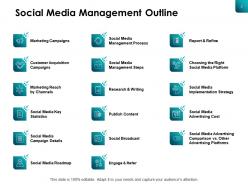
Slide 2: This slide shows Social Media Management Outline.
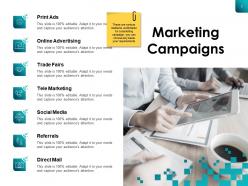
Slide 3: This slide shows Marketing Campaign mediums as- Social Media, Online Advertising, Print Ads, Direct Mail, Referrals, Trade Fairs, Tele Marketing.
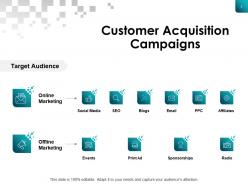
Slide 4: This slide presents Customer Acquisition Campaigns for both online and offline marketing.
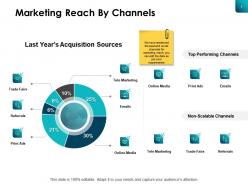
Slide 5: This slide displays Marketing Reach by Channels such as- Online Media, Emails, Printing Ads, Referrals, Trade Fairs, Tele Marketing.
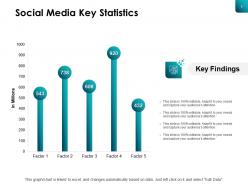
Slide 6: This slide represents Social Media Key Statistics with the help of bar graph.
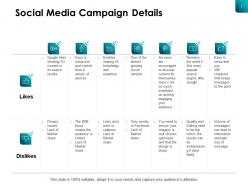
Slide 7: This slide showcases Social Media Campaign Details.
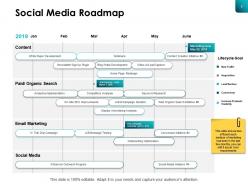
Slide 8: This slide shows Social Media Roadmap describing how each medium of marketing has been in the last few months.
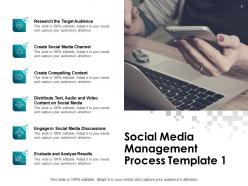
Slide 9: This slide presents Social Media Management Process Template describing- Create Social Media Channel, Create Compelling Content, Engage in Social Media Discussions, Research the Target Audience, Evaluate and Analyze Results, Distribute Text, Audio and Video Content on Social Media.
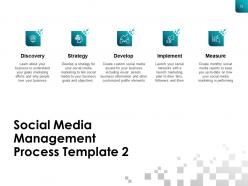
Slide 10: This is another template for Social Media Management Process describing- Discovery, Implement, Strategy, Measure, Develop.
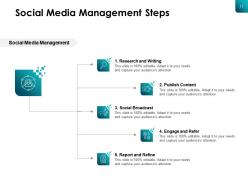
Slide 11: This slide displays Social Media Management Steps as- Research and Writing, Publish Content, Engage and Refer, Report and Refine, Social Broadcast.
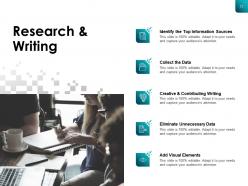
Slide 12: This slide represents Research & Writing describing- Identify the Top Information Sources, Collect the Data, Creative & Contributing Writing, Eliminate Unnecessary Data, Add Visual Elements.
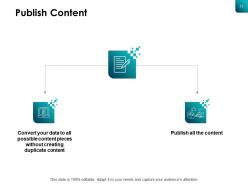
Slide 13: This slide showcases Publish Content with related imagery.
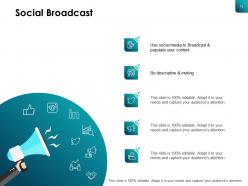
Slide 14: This slide shows Social Broadcast.
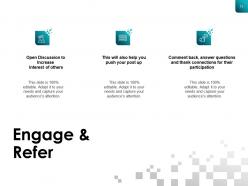
Slide 15: This slide presents Engage & Refer with related icons and imagery.
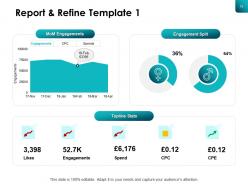
Slide 16: This slide displays Report & Refine Template 1 with the help of graphs.
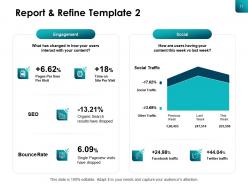
Slide 17: This slide represents Report & Refine Template 2 with SEO, bounce rate and social traffic.
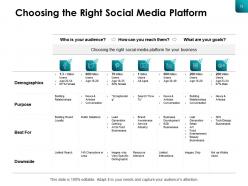
Slide 18: This slide showcases How to Choose the Right Social Media Platform.
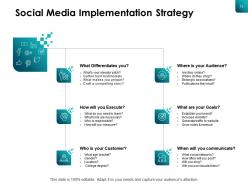
Slide 19: This slide shows Social Media Implementation Strategy.
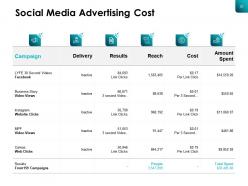
Slide 20: This slide presents Social Media Advertising Cost in tabular form.
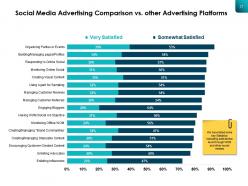
Slide 21: This slide displays Social Media Advertising Comparison vs. Other Advertising Platforms.
Slide 22: This slide reminds about 15 minutes coffee break.
Slide 23: This slide is titled as Additional Slides for moving forward.
Slide 24: This is Our Mission slide with related imagery and text.
Slide 25: This is Meet Our Awesome Team slide with names and designation.
Slide 26: This is About Us slide to show company specifications etc.
Slide 27: This is a Quotes slide to convey message, beliefs etc.
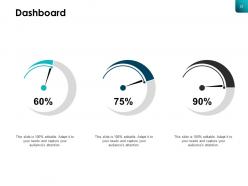
Slide 28: This is a Dashboard slide with text boxes.
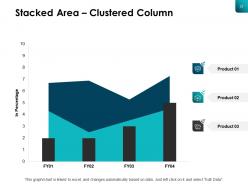
Slide 29: This slide shows Stacked Area – Clustered Column chart with three products comparison.
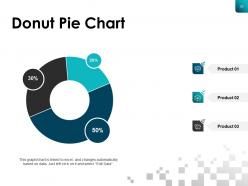
Slide 30: This slide displays Donut Pie Chart with data in percentage.
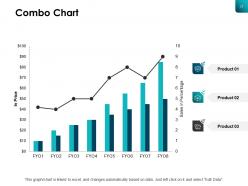
Slide 31: This slide presents Combo Chart with three products comparison.
Slide 32: This is a Thank You slide with address, contact numbers and email address.
Social Media Content Publishing Powerpoint Presentation Slides with all 32 slides:
Use our Social Media Content Publishing Powerpoint Presentation Slides to effectively help you save your valuable time. They are readymade to fit into any presentation structure.

FAQs for Social Media Content Publishing
Here's what's worked for me - solve actual problems for your audience instead of just pushing your products. Visuals are everything since people scroll like maniacs. I always write captions like I'm talking to a friend and throw in questions to get people commenting. Post consistently even if it's not perfect (honestly, authentic beats polished every time). Check your analytics to see when people are actually online - makes a huge difference. Don't go crazy with hashtags, maybe 5-10 relevant ones. Reply to comments fast. Oh and test different post types! Stories, carousels, whatever. See what your followers actually engage with.
Honestly, you gotta look at both sides - engagement stuff like comments and shares, plus how many people you're actually reaching. The built-in analytics on most platforms are pretty solid for this. But here's the thing, don't get caught up in vanity metrics that just make you feel good. Focus on what actually matters for your goals - like if you want website traffic, watch those click-through rates. I usually do a quick monthly check to see which posts killed it and figure out why. Makes way more sense than obsessing over every like, you know?
Honestly, audience segmentation is a total game-changer for social media. You stop posting random stuff and actually connect with people. Think about it - your LinkedIn crowd isn't gonna vibe with the same content as your TikTok followers, you know? I learned this the hard way lol. Different groups want different things, so you can customize your messaging and timing for each. Way better engagement that way. Start small though - pick like 2-3 main segments and experiment with what works. The ROI difference is pretty wild once you get it right.
Honestly, I'd start with 3-5 posts a week - that sweet spot where you're not spamming people but the algorithm doesn't forget you exist. Instagram and TikTok let you get away with daily posts if your content's actually good. Facebook and LinkedIn though? They're pickier about quality over just throwing stuff out there. Twitter's weird - you can basically post whenever since it moves so fast anyway. But here's the thing that actually matters: being consistent beats posting a ton. Pick whatever schedule you can realistically stick to, track how people respond, then tweak from there. Way better than burning out after two weeks.
Video is huge right now, no question. Instagram's all about those polished photos and Reels. TikTok wants authentic, fun stuff - honestly the messier the better sometimes. LinkedIn's weird because professional posts and carousels do great, but only if people actually want to discuss it. Stories are perfect for behind-the-scenes content since they feel more real. YouTube's obviously for longer videos that actually help people. But here's the thing - what works on one platform totally bombs on another. You'll have to test things out with your audience instead of just copying what everyone else does. Each platform has its own vibe.
Mix UGC into your regular posting instead of dumping it all at once. Create branded hashtags but actually engage with people using them - don't just take their content and disappear. Repost customer photos and reviews with credit, though honestly those blurry selfies aren't doing your feed any favors. Quality over quantity always. Build real relationships with your community first. The content part gets way easier after that. Oh, and always ask before reposting someone's stuff - it's just basic courtesy.
Dude, Buffer and Hootsuite are your best bets - both let you schedule everything from one place. Sprout Social's amazing but costs more (worth it if you can swing it). For Instagram stuff, Later is clutch. Honestly? Don't overthink it. Facebook Creator Studio works fine when you're starting out, and it's free. I made the mistake of trying like 5 different tools at once - terrible idea. Pick one and stick with it for at least a month. Buffer's free trial is solid, so maybe start there. The consistency matters way more than having the "perfect" tool anyway.
Start with a brand voice guide - figure out your tone and what you actually want to say. Then stick to it everywhere, but tweak HOW you say it for each platform. Twitter's all punchy one-liners, LinkedIn needs that professional polish, Instagram's obviously visual-heavy. But your core personality? That stays put. Think about it like this - you don't become a totally different person when you're at work vs hanging with friends, right? Same deal here. Someone on your team needs to be the voice police (honestly, drift happens fast if nobody's watching). Oh, and train everyone so they're not just winging it.
Dude, copyright stuff is tricky - I'd always credit the creator and link back to avoid any drama. Fair use gets confusing real quick, especially with photos and videos. Getting permission first is your best move, or just use the platform's share/retweet buttons instead of downloading and reuploading. That way you're not technically reposting it yourself, you know? Watch out for anything with logos or branded stuff too. Honestly, I've seen people get burned by this before. When you're unsure, just make your own content or grab some stock photos with licensing.
Honestly, analytics are a game changer - they'll show you what's actually hitting vs what you *think* is working. I used to post randomly at like 2pm thinking that was peak time, but turns out my people are way more active around 8pm. Go look at your best posts from the past few months and see what patterns jump out. Maybe it's carousel posts that pop off, or maybe your audience loves behind-the-scenes stuff on Tuesdays (weird but whatever works!). Once you spot those trends in timing, format, and topics, just structure your content calendar around that data instead of throwing random posts at the wall.
Oh definitely! Pick one solid blog post and just go wild with it. LinkedIn gets the professional carousel treatment, Instagram stories work great for bite-sized highlights, Twitter loves a good thread breakdown. TikTok's where you can make it snappy and fun. Honestly, I used to think repurposing was lazy until I saw how much reach you actually get. The trick is matching each platform's vibe - so that polished LinkedIn tone becomes way more chill on Insta. Your main message stays the same, but you're just packaging it differently. Start with whatever's already doing well for you and see how creative you can get chopping it up.
Oh man, trends will totally mess with whatever you had planned! You've gotta be ready to drop everything when something blows up that actually fits your brand. I usually keep a few backup posts ready because you never know when you'll need to swap things around. Don't chase every stupid trend though - some aren't worth it. The hard part is figuring out what's actually relevant to your audience versus just internet noise. Sometimes a random meme hits way better than that polished product post you spent hours on. Just build in some wiggle room so you're not scrambling every time something goes viral.
Bright, high-quality visuals are everything - way better than text posts. Ask questions and use polls to get people talking. Oh, and storytelling makes stuff way more relatable. Post when your audience is actually online (I'm terrible at remembering this). Make captions conversational with clear calls-to-action like "tag a friend." Jump on trending hashtags if they fit your brand. Honestly, tracking which posts get shared most is a game-changer - then just do more of that format.
So paid promotions are basically like turning up the volume on stuff that's already working organically. Test your messaging first without spending money, then boost the posts that actually get engagement. Honestly, the timing thing takes practice but it's so worth it when you nail it. The cool part is you can target people who'd never stumble across your content otherwise. I'd start by promoting your best organic posts to lookalike audiences - keep it simple at first. Then just scale whatever converts. Don't waste money on random content though, that never works out.
Ugh, where do I even start? Don't post randomly whenever you feel like it - that kills engagement fast. Also, ignoring comments is such a missed opportunity. Each platform is different too, so you can't just copy-paste the same post everywhere. Spelling mistakes make you look amateur (learned that one the hard way). Being promotional 24/7 is annoying. And please don't chase every viral trend if it doesn't fit your vibe. Honestly though? The biggest killer is not planning ahead. Just pick 2-3 platforms max and actually do them well instead of half-assing everything.
-
Presentation Design is very nice, good work with the content as well.