


Social Media Management Powerpoint Presentation Slides





Try Before you Buy Download Free Sample Product
 Impress Your
 Audience
 100%
100% Editable
 Save Hours
 of Time


Showcase the ways to pitch your product in the market by using our content ready Social Media Management PowerPoint Presentation Slides . With the help of informative and knowledgable social media marketing PPT theme, you can outline the right media social platform to advertise your brand. Use this media management presentation template to illustrate various customer acquisition campaigns with which you can share the message of your product or brand. With the aid of the internet marketing PowerPoint graphic, you can illustrate ways to calculate social media marketing costs. Take the assistance of this professionally designed social media marketing PPT visual and show how to gain customer interest in products and services. Employ social media management tools PowerPoint layout and talk about the elements of social media on the basis of reporting, organic marketing, paid, and mobile marketing. Hence, download our ready-to-use digital marketing & advertising PPT deck and highlight the key points to transmit your product value.
People who downloaded this PowerPoint presentation also viewed the following :
Content of this Powerpoint Presentation
In the present world of technology, social media plays a crucial role in making and breaking a business. Housing a number of influencers and future potential buyers, social media can help you in taking your business to new heights. All you need to do is advertise your brand and manage the social media campaign. Advertising may be easy, but management is not.
To manage your social media campaign, you need a well-structured plan to enlighten you about the technicalities of the campaign. Such a plan answers everything from what to how. SlideTeam’s 100% editable, customizable and fairly inclusive social media management PowerPoint template is just the thing you need to get your hands on to an effective management system.
This template alone will allow you to showcase the matrices of your social media campaign. This collection of documents is useful for the management of your company, its audience, and so many other individuals. How? Let’s check it out.
Are you looking for a way to enlighten your management about your social media management? Take the help of this marketing proposal template to do the needful.
Let’s explore!
Template 1: Marketing Campaigns
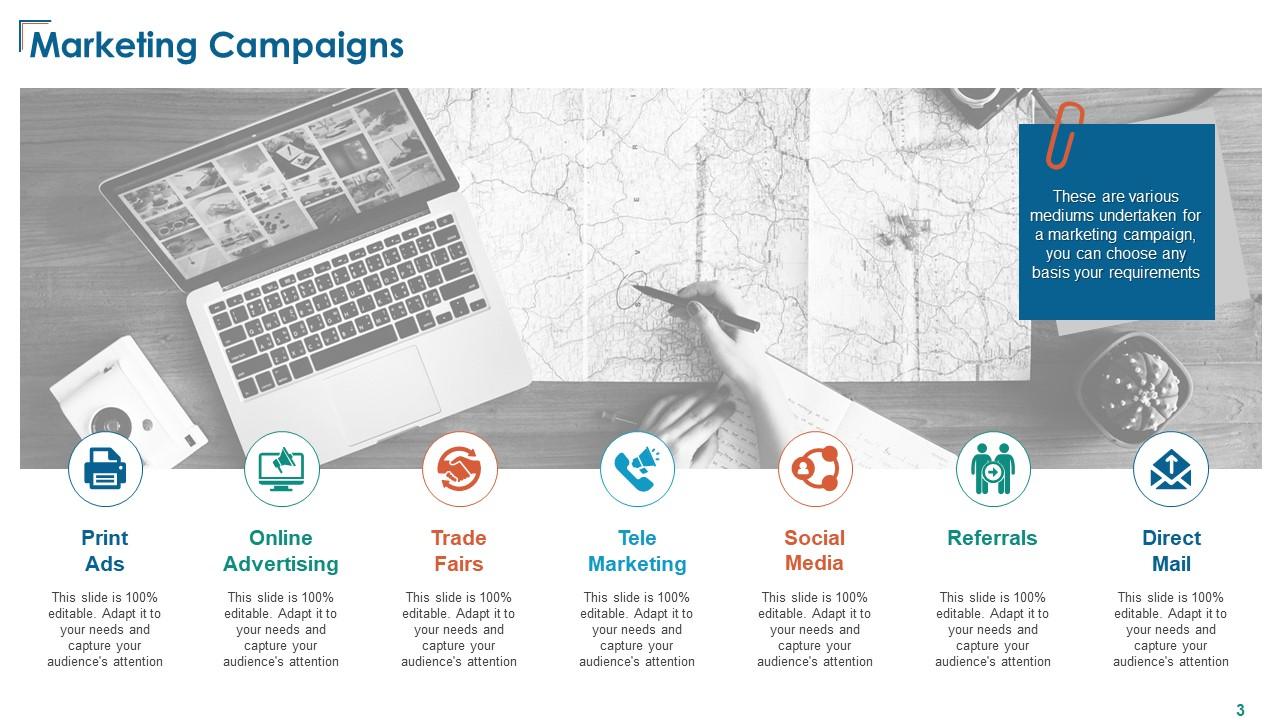
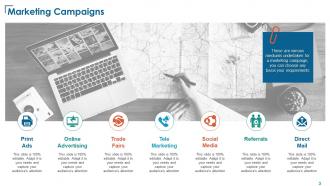
When it comes to social media management, the domain comprises many elements. Out of these, you need to select the most suitable ones for your business that will bring in the required results. This template allows you to showcase some information related to your social media marketing campaign. Here, you can provide details related to your existing print ads, online advertising campaigns, trade fairs, telemarketing responses, referrals, direct mail, and other campaigns.
Template 2: Customer Acquisition Campaigns
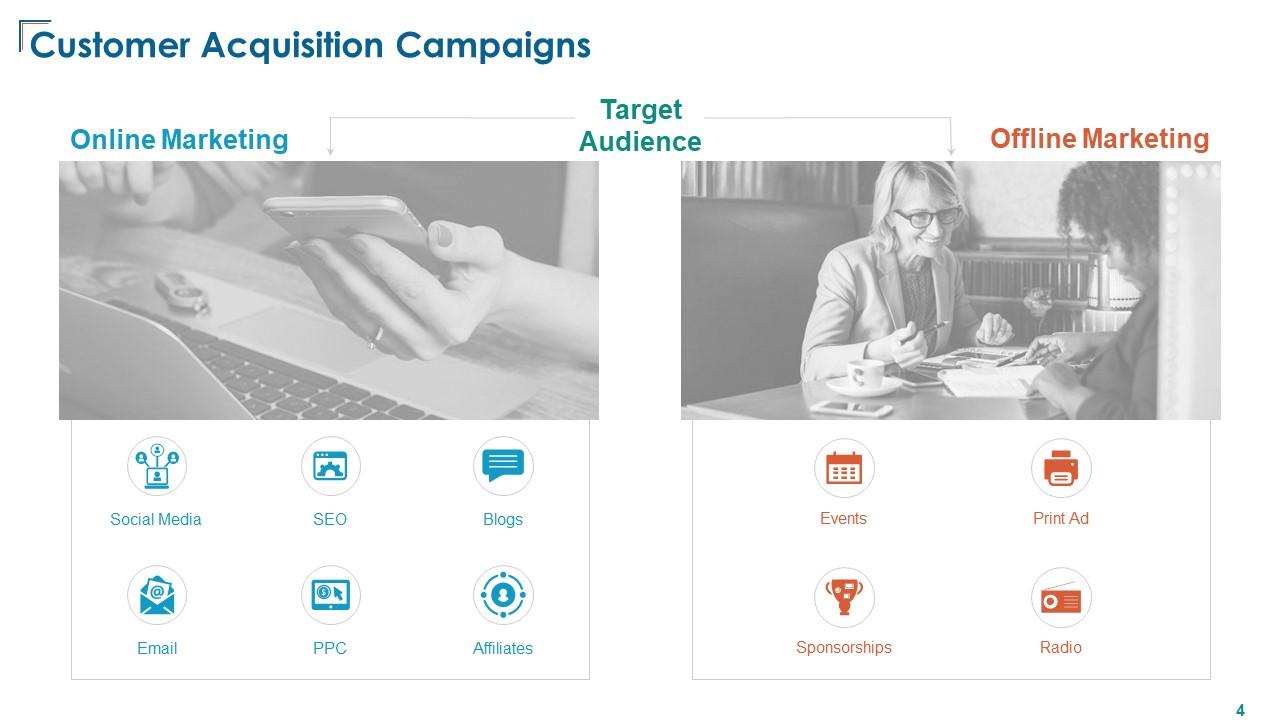
For a successful ad campaign, you need to research your audience of potential buyers. For this, you can take the help of offline and online sources. This template divides these main sources of customers into sub-sources. These sub-sources are the techniques for you to get to your potential clients. Online sources of marketing include Social Media, SEO, Blogs, e-mails, PPC campaigns, and other affiliates. Similarly, offline marketing techniques include Events, Print ads, sponsorships, and radio ads.
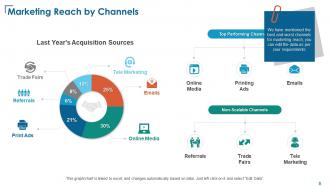
Template 3: Marketing Reach by Channels
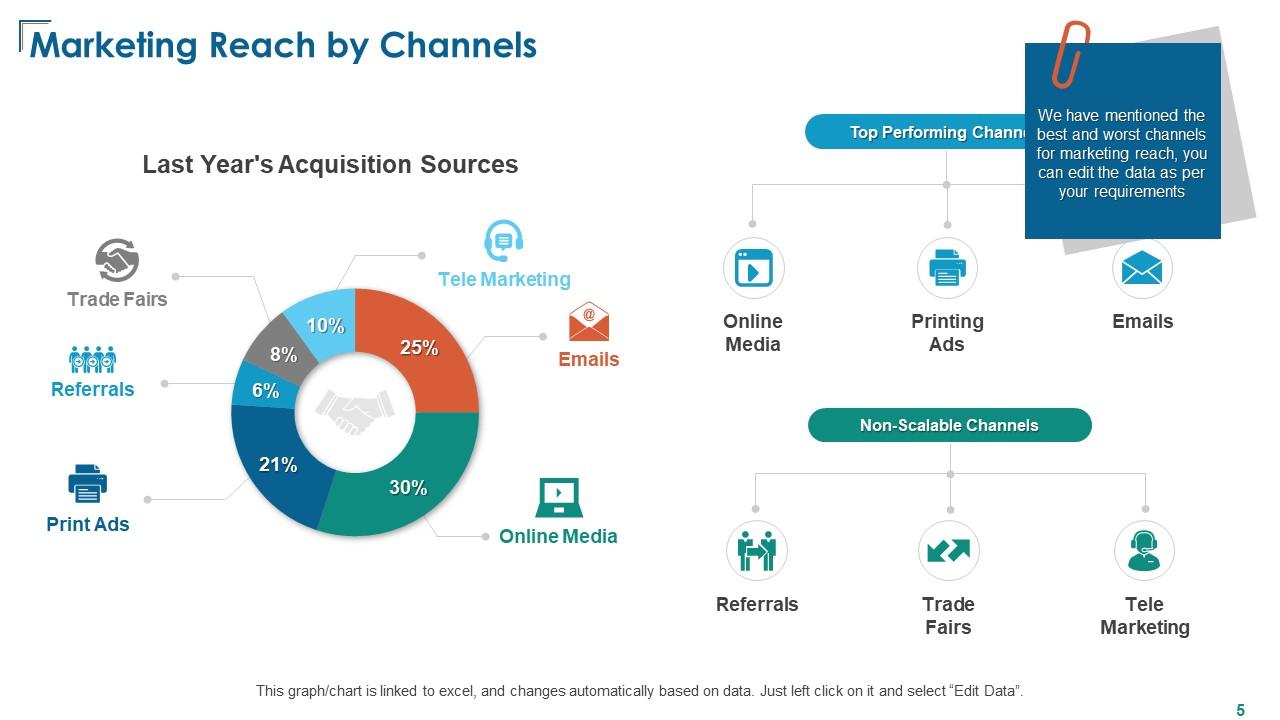
As stated earlier, there are multiple ways or channels that you can use to get to your target audience. However, investing in all of these channels cannot be optimal and a choice needs to be made. You need to ascertain the best and the worst channels of marketing. This slide depicts these channels with their pros and cons. You can enlist the top-performing channels like Online Media, Printing Ads, and Emails as well as the non-scalable channels like Referrals, Trade Fairs, and Telemarketing.
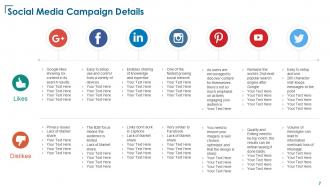
Template 4: Social Media Campaign Details

Within the social media marketing domain, you can find many platforms to run your ads. This slide showcases in detail the likes and dislikes of marketing platforms. This will allow the management to make a better decision about which platform to opt for and which to leave. For example, you can state the best part about Facebook ads is that these are easy to control, whereas the worst part is that there is a limited scope for the audience.
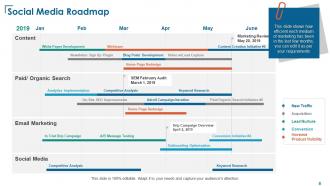
Template 5: Social Media Roadmap
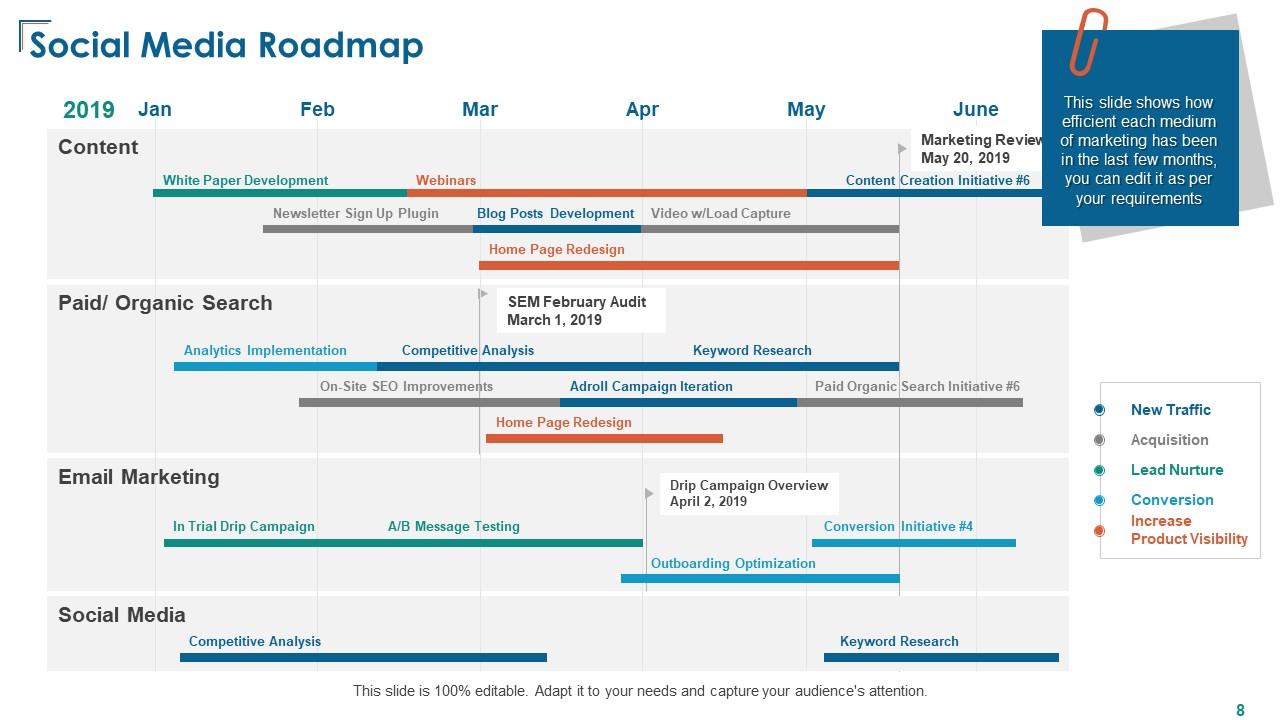
Setting up and running a social media campaign is not enough. You need to create a timeline and follow it. This slide allows you to showcase the roadmap of your existing social media campaign for up to 6 months. You can showcase the roadmap for four campaigns on this slide. These include Content, Paid and Organic Search, Email Marketing, and Social Media campaigns. You can also divide each campaign into overheads as required.
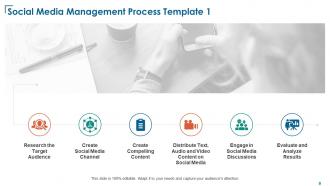
Template 6: Social Media Management Steps

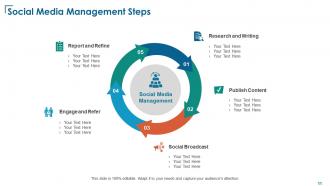
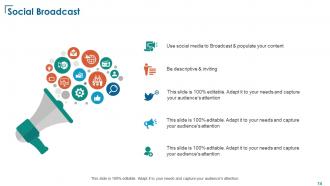
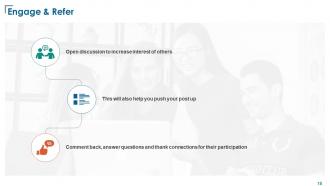
When the process of social media management is laid out, it becomes easy for the management and the employees to follow the procedure as and when scheduled. This is one of the best slides in this social media management template that allows you to define the process of social media management for your ease. The process starts with extensive research and proceeds to content publishing and social broadcasting. Thereon, you can engage with the customers and make the required changes to the campaign, if required.
Template 7: Report and Refine after Studying Engagement
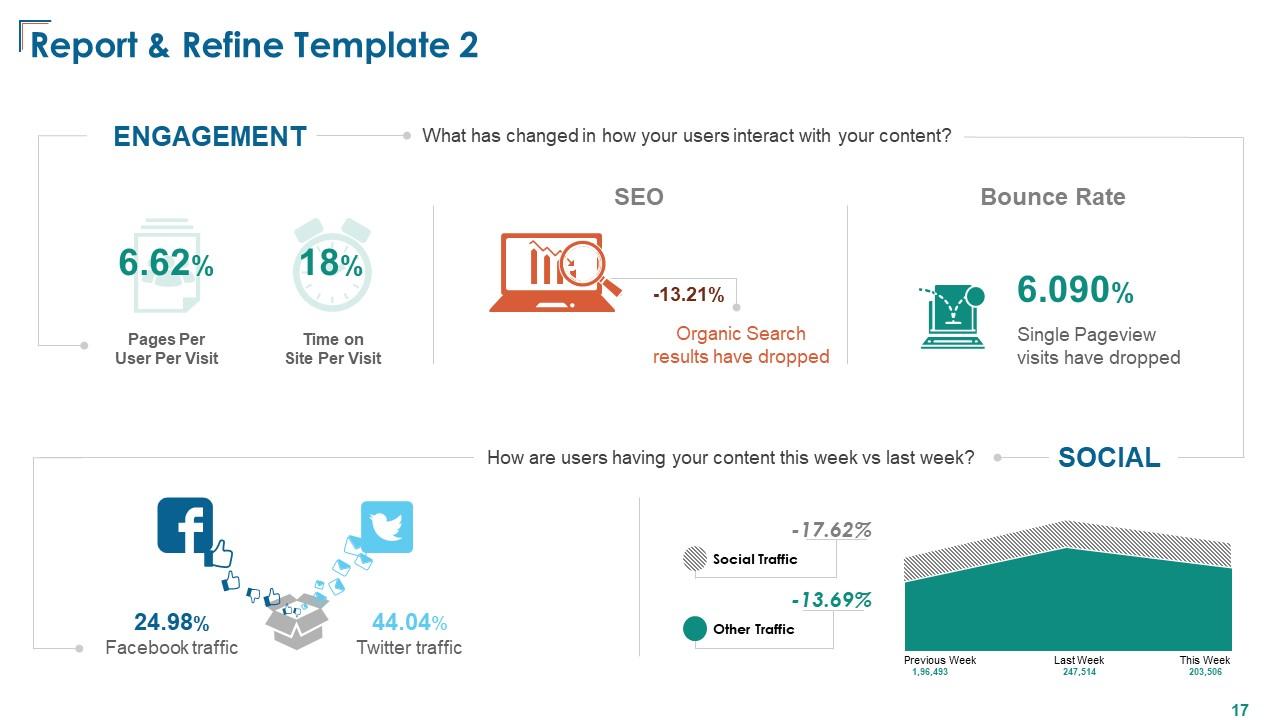
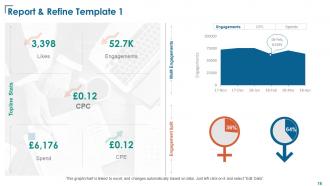
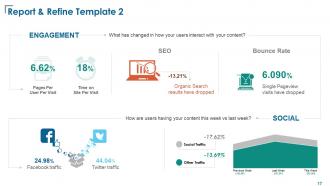
The last stage of the social media marketing campaign, known as Reporting and Refining, is quite crucial. This last stage acts as a base for the first stage of the upcoming year. Here, you can offer a detailed report of the performance of the campaign over the past year. You can add data related to the percentage change in engagement. Here, you can add the percentage change in pages per user per visit, time on site per visit, results derived from SEO operations, and more.
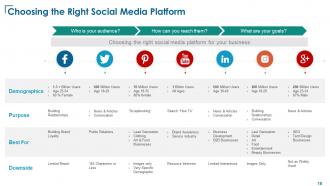
Template 8: Choosing the Right Social Media Platform
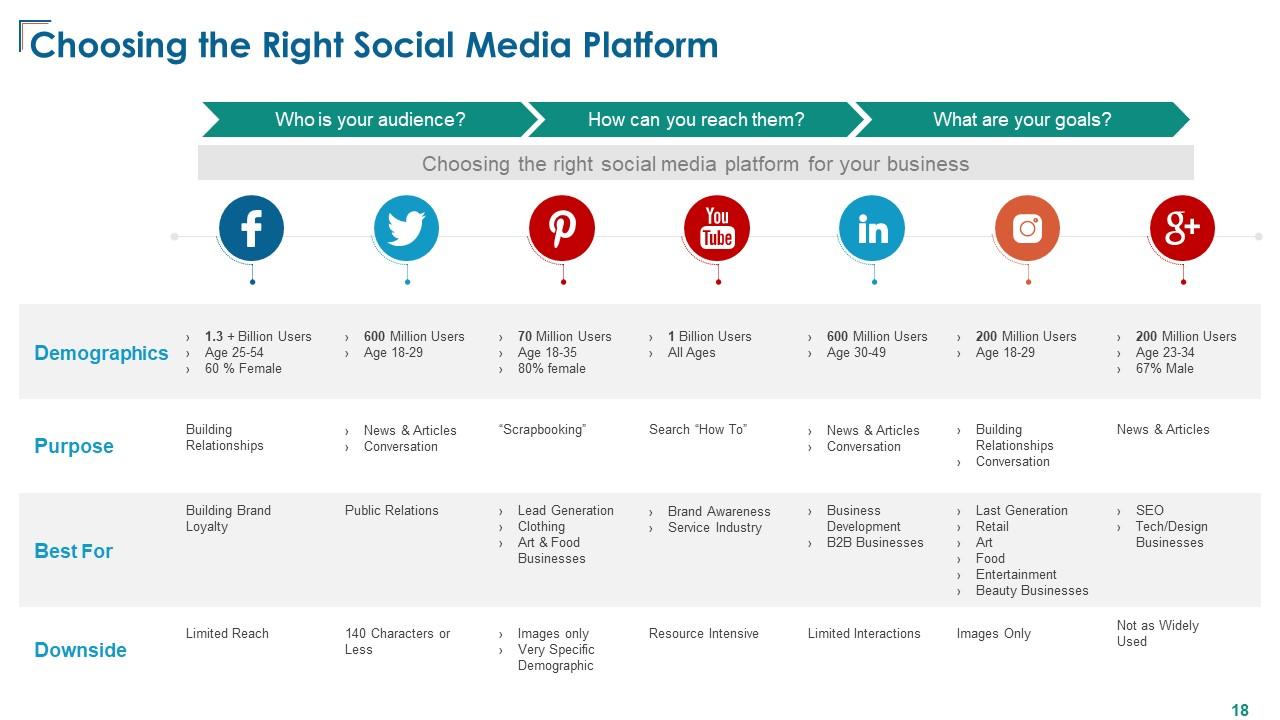
Using this slide, you can target the demographics, purpose, viability, and downsides of each social media platform. Compare the stats of Facebook, Twitter, Pinterest, YouTube, LinkedIn, Instagram, and Google+. For the sake of comparison, you can list the number of users, age groups of users, the purpose behind each platform, and more.
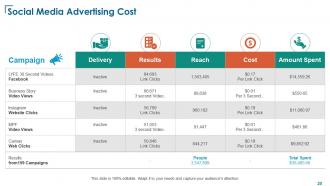
Template 9: Social Media Advertising Cost

The costs of various elements of social media marketing differ. Hence, you need to ascertain the entire and actual costs of all the domains to make an informed decision. This slide allows you to compare campaigns on the cost per click, cost per second, and more. For extensive comparison, you can enlist data related to delivery, results derived, reach grabbed, costs, and amounts spent on platforms. At the end of the document, you can show the number of users visiting your brand and the total amount spent side-by-side.
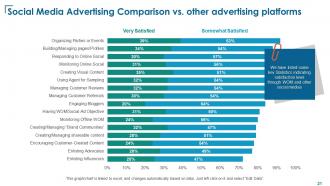
Template 10: Social Media Advertising Comparison vs Other Advertising Platforms

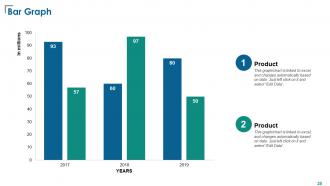
This slide allows you to showcase the satisfaction of the users with elements of the social media marketing domain. In this slide, you can add the reviews generated from the users on many parameters, including those from parties or events, profiles, responses to social media, user-curated content, enlisting influencers, and so much more. The slide uses bar graphs to represent the level of satisfaction. The bottom section of the graph represents percentages of satisfaction.
Your audience may not have an extensive idea about the benefits of a social media marketing campaign. Why don’t you take the help of this engagement awareness campaign template?
*****
Achieve Increased Efficiency from Your Social Media Marketing Campaign
In any level of social media marketing campaign, a lot of funds are spent. If the amount is not spent wisely, then it can affect the performance of the ads and bring in negative results. The above-provided template is quite smart and allows you to make the most out of your marketing campaign with ease by learning from the results generated in the past and using them for greater future benefits.
Here’s an all-inclusive template that will help you showcase the entire social media content management strategy with ease.
Social Media Management Powerpoint Presentation Slides with all 32 slides:
Use our Social Media Management Powerpoint Presentation Slides to effectively help you save your valuable time. They are readymade to fit into any presentation structure.



FAQs for Social Media Management
Honestly, just focus on these four things. First, figure out what you actually want - more sales, brand awareness, whatever. Research your audience too, like where they actually spend time online. Batch creating content will save your sanity (learned this the hard way), so plan that stuff out. But here's the thing - don't just post and ghost. Reply to comments and DMs! That's where the real connections happen. Oh, and pick ONE platform to master first. I see people trying to be everywhere at once and they just burn out. Start small, get good at it, then expand.
Focus on metrics that actually make you money, not just likes and follows - that stuff's basically useless. Most people totally blow this part. Set up conversion tracking in Google Analytics with UTM codes so you can see which posts actually drive sales. Then do the math: add up everything you spend (ads, tools, your time) and divide by the revenue you're getting back. Also track lead gen and email signups. I learned this the hard way after spending months obsessing over engagement rates that didn't translate to anything real.
Honestly, audience analysis is everything in social media. You can't just post random stuff and expect it to work - trust me, I learned that the hard way. Check your analytics weekly to see who's actually following you, when they're scrolling, and what posts they're liking. Demographics matter, but so does timing. If your audience is online at 2pm and you're posting at 9pm, you're missing them completely. Look at your top-performing content too. What made those posts click? Once you figure out these patterns, you'll know exactly what tone to use and which platforms to focus on.
Honestly, trends change so fast it's exhausting sometimes. TikTok went from teen dance videos to serious B2B content in like two years - wild, right? Your content strategy has to stay flexible because what kills it with static posts might flop completely with video. Short-form content is huge now. Algorithms shift constantly too, so you can't just stick with the same engagement tricks forever. I'd block out time monthly to see what's actually working in your space and try something new. Even small tests help you stay ahead instead of scrambling to catch up later.
Buffer's free plan is perfect to start with - just see what you actually need first. Hootsuite and Buffer both handle scheduling across platforms pretty well, plus they've got solid analytics. If you're posting lots of photos and videos, Later's visual calendar is honestly pretty nice to work with. Sprout Social costs more but their reporting is way better if that matters to you. I swear people spend more time picking tools than actually posting content lol. Most of these do the same basic stuff anyway, so don't overthink it.
Honestly, you gotta nail down your brand voice first - write it all out so your whole team knows the vibe. I've watched companies totally confuse people by being all buttoned-up on LinkedIn then switching to super casual TikTok energy. It's weird. Make templates for each platform that keep your core personality but adapt to how people actually use those apps. Like Instagram captions are obviously shorter and more visual, but the voice should still feel like *you*. Oh and definitely audit what you're posting now - you'll probably spot some inconsistencies you didn't notice before.
Okay so first off, reply fast - like within a few hours if you can. People hate when brands just post and disappear (seriously, so annoying). Ask questions in your posts to get conversations going, then actually respond back using people's names. Makes it way more personal. Behind-the-scenes stuff works really well too since everyone wants that insider feel. Don't always be selling something - just be helpful and let your personality show through. Oh, and definitely track what posts get the most comments so you can figure out what's hitting. That data's gold.
Get back to them fast - like within a few hours if you can. Own up to it if you actually screwed something up, and don't get all defensive about it. That never works out well. I'd respond publicly first so everyone sees you're not ignoring complaints, then move the real problem-solving to DMs or email. Delete the obvious troll stuff though, that's just noise. The whole point is showing other customers you'll actually fix things when they go wrong. People respect that way more than companies who just ignore feedback or make excuses.
Okay so first thing - engagement is everything. Likes, comments, shares, saves... that's how you know people actually care about your stuff. Then check your reach and impressions to see how many people you're hitting. Click-through rates matter tons if you want traffic back to your site. Oh and definitely track conversions - are people actually buying or signing up or whatever? Honestly, everyone obsesses over follower count but it's kinda overrated. Quality engagement beats vanity metrics every time. Focus on what actually moves your business forward and set up those UTM thingies so you can track everything properly.
Social media algorithms are basically bouncers deciding who gets into the VIP section. They love engagement - likes, comments, shares, how fast people respond to your posts. Instagram's all about pretty visuals, LinkedIn wants professional chatter, TikTok cares if people watch your whole video (which honestly makes sense). Your relationship with followers matters too, plus when you post and what type of content it is. But here's what's annoying - they change constantly. I swear Instagram tweaks something every other week. Focus on real conversations with your audience instead of chasing numbers, and post when they're actually scrolling.
Honestly, just pick 2-3 platforms and actually get good at those first - spreading yourself too thin is exhausting. Post stuff that's genuinely useful or entertaining, not just promotional garbage. I'd rather see one solid post than five mediocre ones, you know? Behind-the-scenes content kills it because people eat up that authentic vibe. Don't go crazy with hashtags either - use ones that actually relate to your content instead of just chasing the trending ones. Reply to comments like a normal person would. Oh, and if you're already posting somewhere else, share it across platforms. Makes life easier.
Dude, visuals are seriously everything right now. Your posts will get way more engagement with images or videos vs just text. But please don't use those cheesy stock photos - they're so obvious. Even quick phone videos work great. I've been seeing infographics do really well for explaining stuff that's kinda complicated. Oh, and people eat up behind-the-scenes content. Feels more real, you know? Try to keep your colors and fonts the same across everything though. It actually helps people recognize your stuff faster than you'd think.
Ugh, honestly the hardest part is just remembering what you posted where. I'll be scrolling Instagram thinking "wait did I already share this or was that just Twitter?" Each platform wants totally different content too - your LinkedIn audience isn't gonna vibe with TikTok stuff, you know? Then there's all the commenting and DMs... it literally takes forever. Different posting schedules are annoying too. Oh and keeping your brand voice consistent? Way harder than it sounds. You should definitely get Buffer or something though - it'll save your sanity. Makes the whole thing way less chaotic.
Honestly, it's all about actually talking TO people instead of AT them, you know? Respond to their comments, share stuff your customers post - make them feel heard. I spend like 15 minutes every day just engaging, not posting content. People get weirdly attached when brands feel real and accessible. Your retention goes up because they're connecting with your actual story. Plus everyone's obsessed with feeling validated online anyway! The trick is just showing up consistently and being genuine about it. Way better than just broadcasting into the void.
Look, people's feeds are flooded with random stuff, but stories actually stick. Your brain just remembers them better than boring product specs - there's probably some psychology thing behind it, but whatever. Stories make you seem like a real person instead of some faceless brand screaming "buy this!" Plus they get people commenting and sharing because everyone loves a good story, right? I'd start with customer wins or just show what goes on behind the scenes. Honestly, even small moments work. People eat that stuff up way more than another generic "here's our product" post.
-
Best way of representation of the topic.
-
Graphics are very appealing to eyes.