


Asset Lifecycle Management Plan Powerpoint Presentation Slides




Try Before you Buy Download Free Sample Product
 Impress Your
 Audience
 100%
100% Editable
 Save Hours
 of Time


Introducing Asset Lifecycle Management Plan PowerPoint Presentation Slides which will help to analyze and control the actual and expected performance of the asset. Showcase the process of asset lifecycle management by using this PPT slideshow. Showcase the major assets that need to be optimized with these attention-grabbing PPT themes. Utilize our modern-designed asset management plan PPT visuals to depict procurement and acquisition plans. Discuss the key metrics for asset procurement using this PowerPoint visual. It also showcases the process of maintaining the asset. Highlight the steps for the asset requirement plan in a tabular form with the help of this PPT slide design. Highlight the major challenges that organizations face while managing the asset lifecycle with the help of these ready-to-use PPT layouts. Discuss asset management software and its advantages with the help of a strategic asset management PowerPoint slide deck. Hence, measure and analyze asset performance by downloading our asset management PPT slides and optimize the utilization of assets.
People who downloaded this PowerPoint presentation also viewed the following :
Content of this Powerpoint Presentation
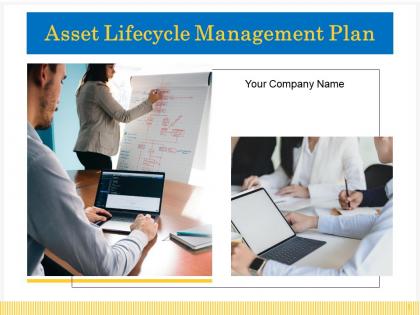
Slide 1: This title slide introduces the Asset Lifecycle Management Plan. Add the name of your company here.
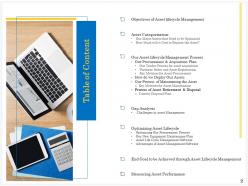
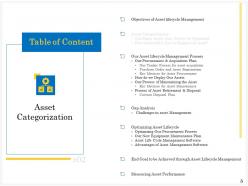
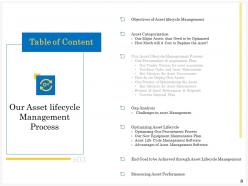
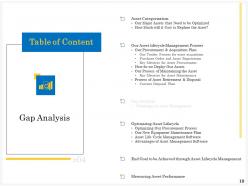
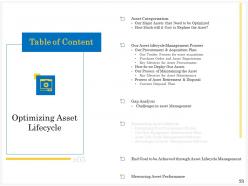
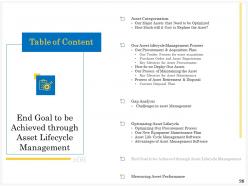
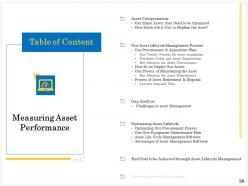
Slide 2: This slide contains the Table of Contents. It includes: Objectives of Asset lifecycle Management Asset Categorization, Our Asset lifecycle Management Process, Gap Analysis, Optimizing Asset Lifecycle, End Goal to be Achieved through Asset Lifecycle Management, and Measuring Asset Performance.
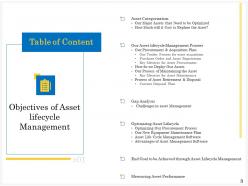
Slide 3: This is a table of content slide showing the Objectives of Asset lifecycle Management. It includes: Objectives of Asset lifecycle Management Asset Categorization, Our Asset lifecycle Management Process, Gap Analysis, Optimizing Asset Lifecycle, End Goal to be Achieved through Asset Lifecycle Management, and Measuring Asset Performance.
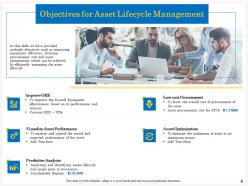
Slide 4: This slide presents the Objectives for Asset Lifecycle Management. It provides multiple objectives such as improving equipment effectiveness, lowering procurement cost, and asset optimization which can be achieved by efficiently managing the asset lifecycle.
Slide 5: This slide presents the Asset Categorization. It includes: Our Major Assets that Need to be Optimized and How Much Will it Cost to Replace the Asset?
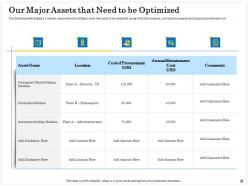
Slide 6: This slide presents the Our Major Assets that Need to be Optimized. It displays a tabular representation of Major assets that need to be optimized along with their location, cost of procurement, and annual maintenance cost
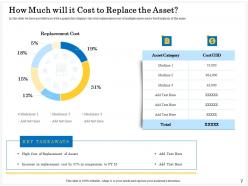
Slide 7: This slide presents How Much will it Cost to Replace the Asset? It provides you with a graph that displays the total replacement cost of multiple assets and brief analysis of the same.
Slide 8: This slide introduces Our Asset lifecycle Management Process. It includes: Our Procurement & Acquisition Plan, How do we Deploy Our Assets, Our Process of Maintaining the Asset, and Process of Asset Retirement & Disposal.
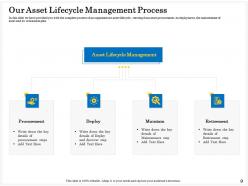
Slide 9: This slide presents the Our Asset Lifecycle Management Process. It provides you with the complete process of an organization's asset lifecycle, starting from asset procurement, its deployment, the maintenance of assets, and its retirement plan.
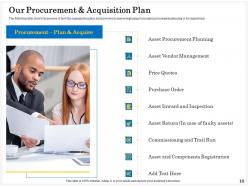
Slide 10: This slide presents the Our Procurement & Acquisition Plan. It shows the process of how the organization plans and procures its assets beginning from asset procurement planning to its registration.
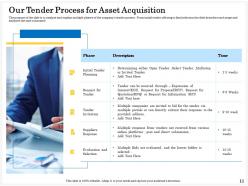
Slide 11: This slide presents the Our Tender Process for Asset Acquisition. It analyzes and explains multiple phases of the company's tender process; From initial tender offering to the final selection, the slide describes each stage and analyses the time consumed.
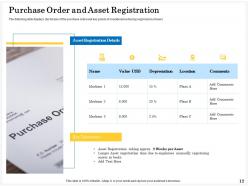
Slide 12: This slide presents the Purchase Order and Asset Registration. It displays the format of the purchase order and key points of consideration during the registration of the asset.
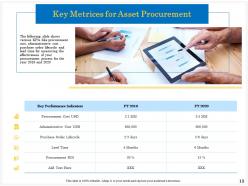
Slide 13: This slide presents the Key Metrics for Asset Procurement. It shows various KPIs like procurement cost, administrative cost, purchase order lifecycle, and lead time for measuring the effectiveness of your procurement process for the years 2019 and 2020.
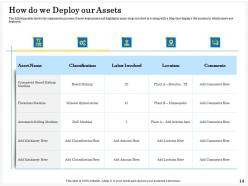
Slide 14: This slide presents How do we Deploy our Assets. It shows the organization process of asset deployment and highlights major steps involved in it along with a Map that displays the location in which assets are deployed.
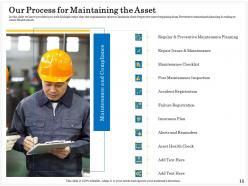
Slide 15: This slide presents Our Process for Maintaining the Asset. It provides you with multiple steps that the organization takes to Maintain their respective asset beginning with Preventive maintenance planning & ending at Asset Health check.
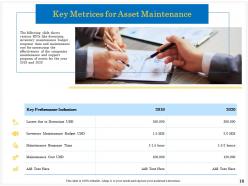
Slide 16: This slide presents the Key Metrics for Asset Maintenance. It shows various KPIs like downtime, inventory maintenance budget, response time, and maintenance cost for measuring the effectiveness of the companies maintenance and support program of assets for the years 2019 and 2020
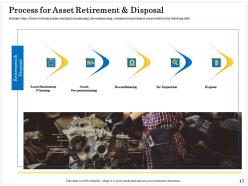
Slide 17: This slide presents the Process for Asset Retirement & Disposal. It shows the process of how the organization plans and procures its assets beginning from asset procurement planning to its registration.
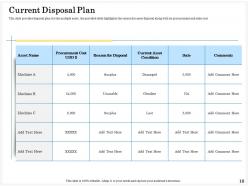
Slide 18: This slide presents the Current Disposal Plan. It provides a disposal plan for multiple assets, the provided table highlights the reason for asset disposal along with its procurement and sales cost.
Slide 19: This slide introduces Gap Analysis which includes Challenges in asset Management.
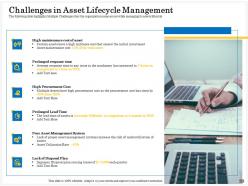
Slide 20: This slide presents the Gap Analysis. It highlights Multiple Challenges that the organization came across while managing the lifecycle of its assets.
Slide 21: This slide introduces Optimizing Asset Lifecycle. This includes: Optimizing Our Procurement Process, Our New Equipment Maintenance Plan, Asset Life Cycle Management Software, and Advantages of Asset Management Software.
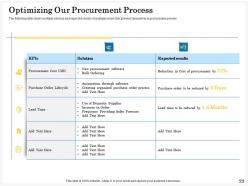
Slide 22: This slide presents the Optimizing Our Procurement Process. It shows multiple solutions and expected results of multiple issues that present themselves in the procurement process
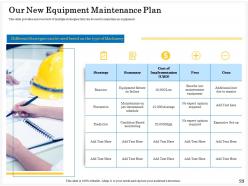
Slide 23: This slide presents the Our New Equipment Maintenance Plan. It provides an overview of multiple strategies that can be used to maintain equipment.
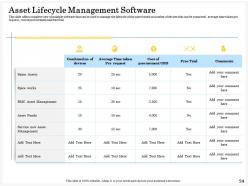
Slide 24: This slide presents the Asset Lifecycle Management Software. It offers a complete view of multiple software that can be used to manage the lifecycle of the asset based on the number of devices that can be connected, the average time is taken per request, cost of procurement, and free trial.
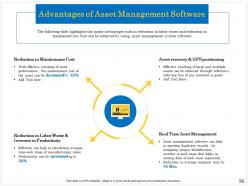
Slide 25: This slide presents the Advantages of Asset Management Software. It highlights the major advantages such as reduction in labor waste and reduction in maintained cost that can be achieved by using Asset management system software.
Slide 26: This is a table of content slide showing the End Goal to be Achieved through Asset Lifecycle Management.
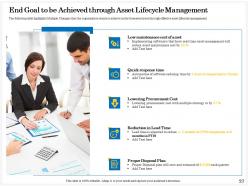
Slide 27: This slide presents the End Goal to be Achieved through Asset Lifecycle Management. It highlights Multiple Changes that the organization wants to achieve in the forecasted year through effective asset lifecycle management.
Slide 28: This slide introduces Measuring Asset Performance.
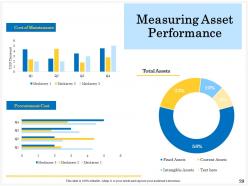
Slide 29: This slide presents Measuring Asset Performance. It involves Total Assets, Cost of Maintenance, and Procurement Cost.
Slide 30: This is the Asset Lifecycle Management Plan Icons Slide.
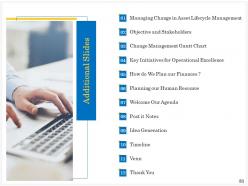
Slide 31: This is a table of content slide showing Additional Slides. It includes: Managing Change in Asset Lifecycle Management, Objectives and Stakeholders, Change Management Gantt Chart, Key Initiatives for Operational Excellence, How do We Plan our Finances? Planning our Human Resource, Welcome Our Agenda, Post-it Notes, Idea Generation, Timeline, Venn, and Thank You.
Slide 32: This slide introduces Managing Change in Asset Lifecycle Management.
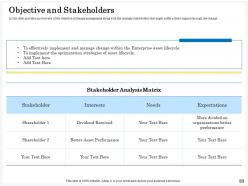
Slide 33: This slide presents the Objectives and Stakeholders. It provides an overview of the objective of change management along with the multiple stakeholders that might suffer a direct impact through the change.
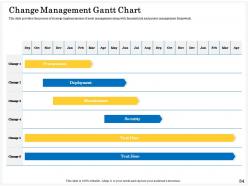
Slide 34: This slide presents the Change Management Gantt Chart. It provides the process of strategy implementation of asset management along with financial risk and project management framework.
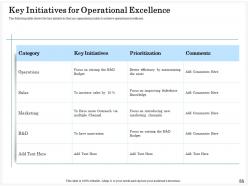
Slide 35: This slide presents the Key Initiatives for Operational Excellence. It shows the key initiatives that an organization takes to achieve operational excellence.
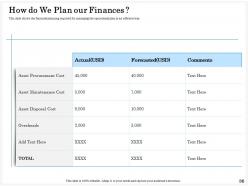
Slide 36: This slide presents How do We Plan our Finances? It shows the financial planning required for managing the operational plan in an efficient way.
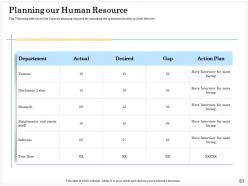
Slide 37: This slide presents Planning our Human Resources. It shows the Capacity planning required for managing the operational activity in the Asset lifecycle.
Slide 38: This slide presents Welcome Our Agenda. List out your agendas here.
Slide 39: This slide contains Post It Notes that can be used to express any brief thoughts or ideas.
Slide 40: This slide is the Idea Generation slide. It is used to brainstorm ideas for a project.
Slide 41: This slide is a Timeline template to showcase the progress of the steps of a project with time.
Slide 42: This slide provides a Venn diagram that can be used to show interconnectedness and overlap between various departments, projects, etc.
Slide 43: This is a Thank You slide where details such as the address, contact number, email address are added.
Asset Lifecycle Management Plan Powerpoint Presentation Slides with all 43 slides:
Use our Asset Lifecycle Management Plan Powerpoint Presentation Slides to effectively help you save your valuable time. They are readymade to fit into any presentation structure.

FAQs for Asset Lifecycle Management Plan
So there's four main stages - planning, buying stuff, running/maintaining it, then getting rid of it. Most companies are terrible at this because they treat each part separately instead of seeing the whole picture. Here's the thing though: what you decide upfront affects your maintenance costs big time later on. Don't just look at purchase price - think total cost from start to finish. How well you maintain everything also impacts what it's worth when you sell or scrap it. Companies that actually coordinate all four stages instead of siloing them? They usually see like 15-30% better returns. I'd start by figuring out where all your current assets are in their lifecycles.
Look beyond just the sticker price - total ownership costs matter way more. Pull your performance data first to see what actually works in your setup. Honestly, going with the cheapest option each time is such a trap. Stick with fewer vendors instead and buy in bulk for better deals and easier maintenance. Time your purchases around budget cycles and when vendors run promotions. Build real relationships with suppliers who get your long-term goals, not just the ones pushing quick sales. Oh, and document everything so you can show leadership the improvements later - they love seeing those numbers.
Dude, technology completely transforms asset tracking. IoT sensors monitor your equipment health while RFID tags show you exactly where everything is. Your team can scan stuff with mobile apps and update status instantly - no more paperwork headaches. All that data feeds into one dashboard so you actually know what's happening. Automated alerts ping you when maintenance is due or something goes missing. Honestly, managing this stuff manually now feels ancient (like seriously, who has time for spreadsheets?). Real-time visibility means problems don't sneak up on you anymore.
Basically, you can catch equipment failures before they wreck your day by watching patterns in all the sensor data - temps, vibrations, how much you're running stuff. Pretty cool actually. The software learns what normal looks like, then flags when things start going sideways. Way better than just fixing stuff when it breaks or doing maintenance every X months regardless. You get actual warning signs with time to order parts or plan downtime properly. Honestly beats the old "wait and see" approach by miles. Start tracking your most critical equipment first and build up that baseline data.
Honestly, the worst parts are data security risks and compliance stuff - plus you'll get crap resale value. Data wiping is critical and I mean *actually* wiped, not just hitting delete like most people think works. Environmental regs are a pain too. The coordination between IT, finance, and facilities? Total nightmare - those teams never sync up on timing. Oh and keep good records because auditors will randomly ask about old disposed equipment like 3 years later (learned that one the hard way). My advice? Plan this stuff way earlier in the lifecycle so you're not freaking out last minute.
Honestly, it totally depends on what kind of stuff you're maintaining. Critical manufacturing equipment? You'll want predictive maintenance with all the sensors and monitoring. Office equipment though - probably just fix it when it breaks. Aviation and healthcare are crazy strict about preventive schedules since people could literally die if something fails. Retail places usually just run cheaper equipment until it dies unless it's mission-critical. Start by sorting your assets into risk categories first. That's like the foundation for everything else. Then you can decide whether each type needs predictive, preventive, or just basic reactive maintenance based on what happens if it craps out.
Honestly, you've got to bake compliance into every single phase - when you're buying stuff, deploying it, maintaining it, even getting rid of it. Map out policies that actually connect to what regulators want. Automate the tracking because manual audits are a nightmare (learned this the hard way). Your team needs to document consistently - I can't stress this enough. Run internal reviews before the real auditors arrive. Don't treat it like some quarterly panic session. Set up alerts for renewals and deadlines, and keep audit trails you can actually navigate later.
Honestly, just start by finding everything you actually have first - including that random server someone shoved in a closet last year. Run some automated network scans, but you'll still need to physically hunt down equipment too. Give everything unique IDs and make intake processes mandatory so new stuff doesn't just appear mysteriously. Don't try cataloging everything at once though, that's a nightmare. Focus on your critical assets first, then expand from there. The trick is building it into daily workflow instead of treating it like some massive one-off project.
Honestly, data integration makes a huge difference because your asset info is scattered everywhere right now. Maintenance stuff lives in one system, financial data in another, operations metrics somewhere completely different. It's like trying to solve a puzzle with half the pieces missing - you can't make good decisions that way. Once everything talks to each other properly, you'll start seeing patterns and can actually predict when things might break down. Plus you'll stop wasting money on unnecessary maintenance. I'd start by just figuring out where all your important asset data currently sits. That alone will open your eyes to how disconnected everything probably is.
You really need everyone's input on this stuff. Operations sees how equipment actually runs daily, while finance has the budget reality check and ROI numbers. Maintenance teams? They know exactly when things break and why. Don't sleep on procurement either - they handle all the vendor drama. Here's the thing though: if these groups aren't talking to each other, you'll make decisions that sound great in meetings but totally flop in real life. I've seen it happen way too many times. Set up regular check-ins so your asset strategies actually work instead of just looking good on spreadsheets.
Track different stuff based on where your asset is in its life. New equipment? Watch time-to-value and how it performs against specs. Once it's running (honestly the most critical phase), monitor uptime, maintenance costs, energy use, output quality. Older assets need tracking for repair frequency and downtime incidents - plus total ownership costs. End-of-life means watching disposal costs and replacement timing. Oh, and set up dashboards that catch problems early. Way cheaper than fixing major breakdowns later.
So basically, lifecycle cost analysis shows you what something *really* costs - not just upfront, but maintenance, energy bills, everything until you toss it. Super helpful when comparing options. That "cheap" equipment? Probably gonna murder your budget with repairs later. I learned this the hard way once, honestly. You'll spot which investments actually pay off versus the ones that look good but drain cash for years. Makes it way easier to justify purchases to your boss too. Don't just look at the sticker price - think about what you'll be paying five years from now.
Honestly, sustainability touches every part of asset management if you think about it. When you're buying stuff, go for energy-efficient equipment and vendors with green certs. Predictive maintenance is huge during operations - extends asset life AND saves cash, so why not? Before replacing things, see if you can refurbish what you have instead. Way cheaper usually. Proper recycling at end-of-life beats just dumping everything in a landfill. The trick is making this part of your regular workflow instead of some separate green initiative that gets ignored when budgets are tight.
So you get this virtual copy of your equipment that mirrors what's happening in real time - sensors feed it data and everything. Pretty neat stuff honestly. You can spot problems before they blow up into expensive disasters. Plus it tracks performance and helps you figure out when to do maintenance instead of just guessing. The whole lifecycle thing is covered too, from when you first design something until you scrap it. I'd probably start with whatever equipment would cost you the most if it broke down. Makes those repair decisions way easier when you've got actual data backing you up.
Ugh, regulatory changes are such a pain - they'll totally mess up your asset plans. That 10-year equipment schedule you mapped out? Forget it. New safety rules or data protection stuff can force you to replace everything in 5 years instead. I've seen this happen so many times. You really need to build some wiggle room into your strategies upfront. Keep tabs on what's coming down the pipeline in your industry too. Otherwise you'll be running around like crazy trying to catch up when new regulations hit. Trust me, staying ahead of this stuff saves major headaches later.
-
Wonderful templates design to use in business meetings.
-
Visually stunning presentation, love the content.
-
Easily Understandable slides.
-
Awesomely designed templates, Easy to understand.
-
Excellent products for quick understanding.
-
Excellent Designs.