





 0 Comment
 Customer Reviews

The meeting's over. Everyone nodded. Nobody wrote anything down.
Three weeks later, someone asks what was decided—and there are four different answers. Not because people weren't paying attention. Because there was no plan. Just a conversation that felt like a decision.
That's the gap. The moment between "we've talked about it" and "here's what happens next." Most teams live there longer than they should. The discussion ends, but the actual decision—who owns it, what criteria drove it, what happens if it's wrong—stays fuzzy.
And it's not a small problem. Fuzzy decisions cost money. They cost time. They create the kind of ambiguity that makes good people leave because they can't tell if anything they do actually matters. When the decision making process isn't documented, it gets relitigated. Again. At the next meeting. And the one after that.
What makes it worse is that most people know what a good decision looks like in hindsight. They just don't have a structure for getting there before the fact. The problem isn't intelligence. It's not even information. It's the absence of a repeatable problem solving framework—something that holds up under pressure, under incomplete data, under a room full of people with different priorities.
That's why decision making plan templates exist. Not because decisions are hard to make—sometimes they're obvious. But because the process of making them visible, traceable, and accountable is genuinely difficult without a starting structure. The same reasons someone builds a project management plan before a launch apply here: not to slow things down, but to make sure what gets decided actually gets done.
SlideTeam's pre-designed templates tackle exactly this gap. They're built for the moment when you know what you need to decide but don't know how to put it on a slide that a room full of stakeholders will trust. Content-ready frameworks for business decision making, action planning, and organizational accountability—ready to be shaped around what you already know.
Here's what's available.
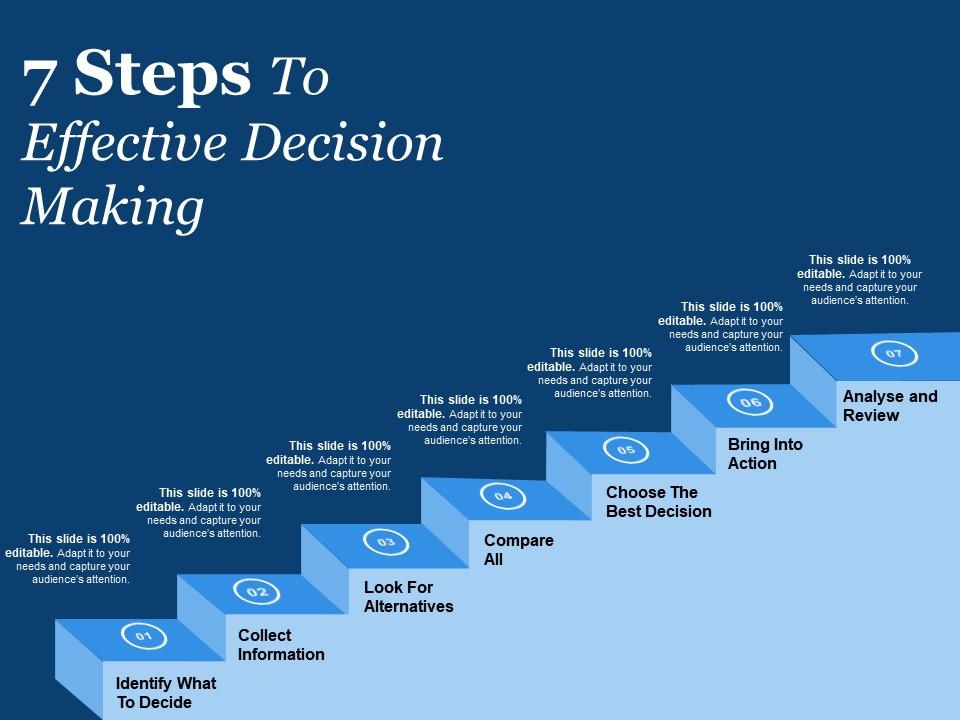
Template 1: 7 Steps to Effective Decision Making
Breaking decisions into clear, sequential steps reduces hesitation and builds team confidence. This PowerPoint slide is built for practitioners who need to walk stakeholders through a structured decision process. Each of the seven stages maps to a real action—defining the problem, gathering data, weighing options, and committing to outcomes. It works well in leadership workshops or team planning sessions where accountability matters. The template is 100% editable and customizable.
Download this PowerPoint Template
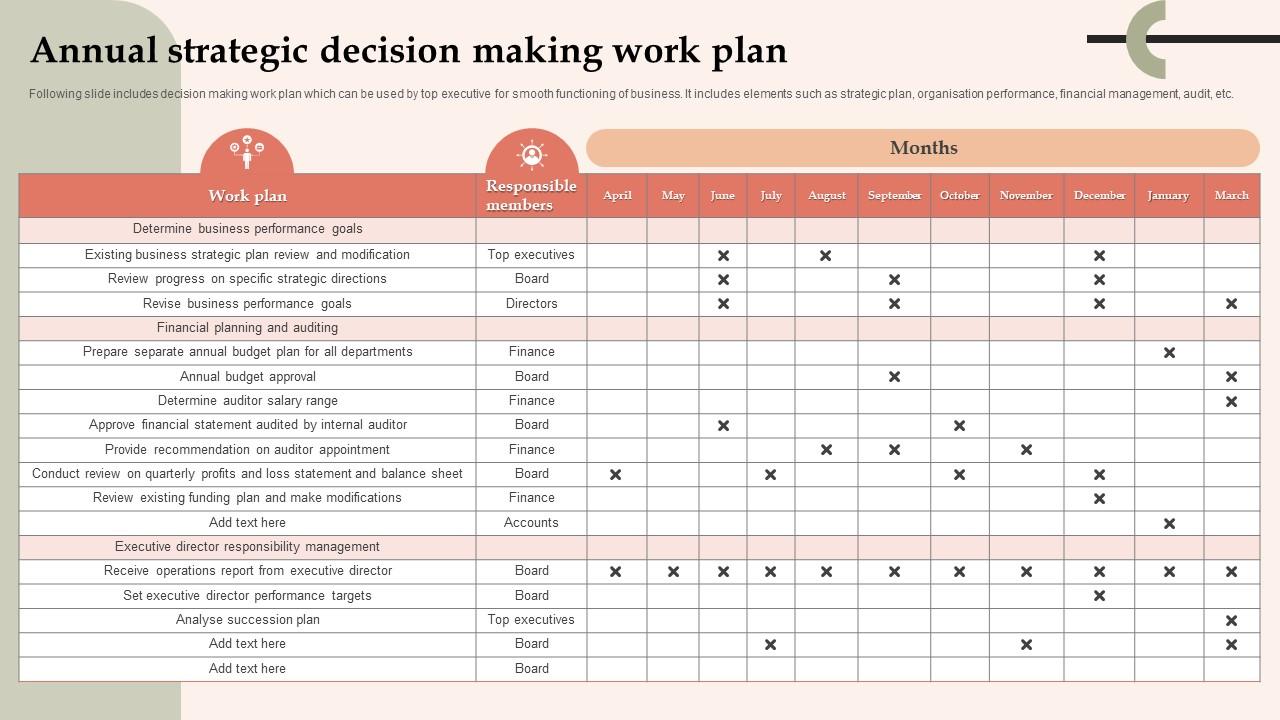
Template 2: Annual Strategic Decision Making Work Plan
Annual planning falls apart when decisions aren't tied to measurable goals and clear owners. This PPT template is built for senior executives who need to align strategic planning, financial management, and organizational performance in one coherent view. It covers the full cycle—from determining business priorities to reviewing progress against targets—making it useful for board-level reviews and quarterly check-ins. For a deeper look at decision making plan templates with examples and samples, this slide fits naturally into that broader toolkit. The template is 100% editable and customizable.
Download this PowerPoint Template
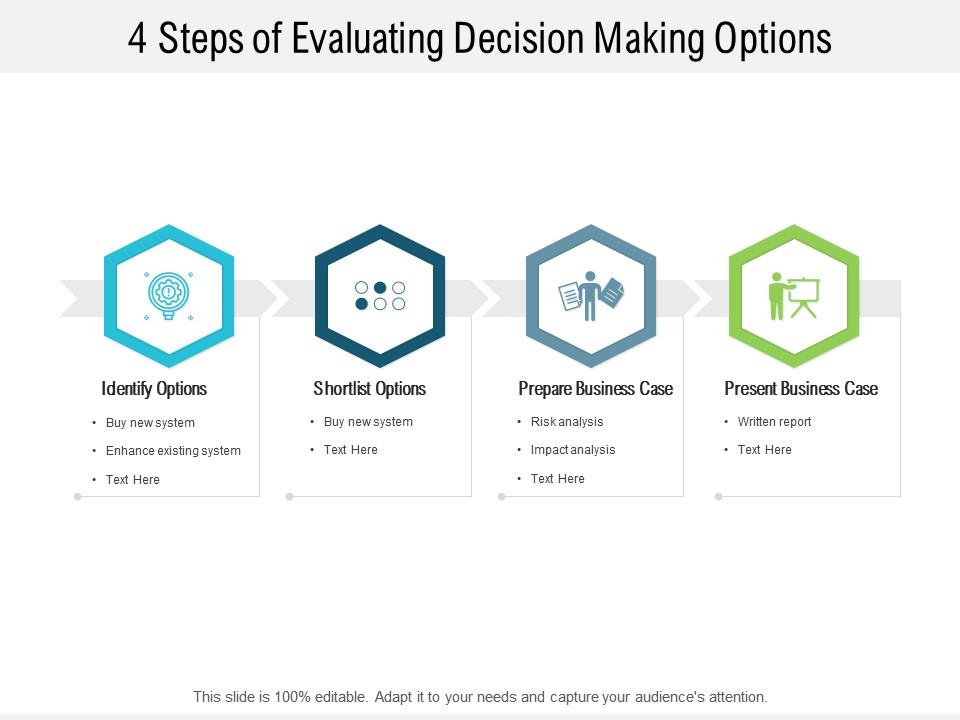
Template 3: 4 Steps of Evaluating Decision Making Options
Evaluating options without a structured lens leads to decisions driven by whoever talks loudest. This four-stage framework captures the full cycle of option assessment, from initial criteria-setting to final selection. Each stage delivers a clear visual anchor that keeps cross-functional teams focused on outcomes rather than preferences. You'll build decision reviews, stakeholder alignment decks, and business case presentations with measurable precision. Transform your evaluation process with a framework built for decisive action. Download this dynamic template now and drive smarter business choices.
Download this PowerPoint Template
Template 4: Decision Making Frameworks Using Pros and Cons PPT Summary
Weighing pros and cons sounds simple—until the list grows and priorities shift mid-conversation. This deck brings a decision making framework to that messy process, giving every trade-off a visual structure that stakeholders can read at a glance. The balanced layout elevates clarity across competing options and ensures no variable gets buried. You'll build credible comparisons for risk assessment, vendor selection, and strategic planning reviews with confidence. Transform your next decision briefing into a clear, persuasive case. Download this dynamic template now and turn trade-off analysis into decisive leadership.
[product_image id=1562029]
Template 5: Decision Making Plan Comparison PPT
Side-by-side comparisons lose their impact when the visual structure doesn't hold up under scrutiny. This deck gives every decision making plan comparison a clean, credible layout that commands the room. The polished design makes competing options immediately legible, reducing back-and-forth and accelerating stakeholder alignment. You'll build business strategy plan reviews, option briefs, and executive summaries with professional authority. Transform your comparison decks into decision-ready presentations today. Download this dynamic template now and deliver clarity where it counts most.
[product_image id=1562030]
Template 6: Engaging Action Plan Deck for Effective Decision Making
Action plans without a clear decision backbone tend to drift—tasks get done, but outcomes stay uncertain. This PPT preset is built for project leads and operations managers who need to connect each action step to a deliberate choice. It structures the full arc from decision trigger to task ownership, making it useful for cross-functional rollouts and performance management reviews. Action plan for decision making templates with samples and examples offer more context on how to use this format effectively. The template is 100% editable and customizable.
[product_image id=1461735]
Template 7: Detailed Strategic Leadership Plan for Better Organizational Decision Making PPT
Leadership decision making breaks down when authority and accountability aren't visually explicit. This deck is built for organizational leaders who need to present a detailed planning structure that covers both direction-setting and operational follow-through. It ties leadership roles to specific decision points, making it practical for board presentations, senior team offsites, and organizational decision making reviews. For teams working on approaches to strategic decision making templates, this slide adds a strong leadership lens. The template is 100% editable and customizable.
[product_image id=1395353]
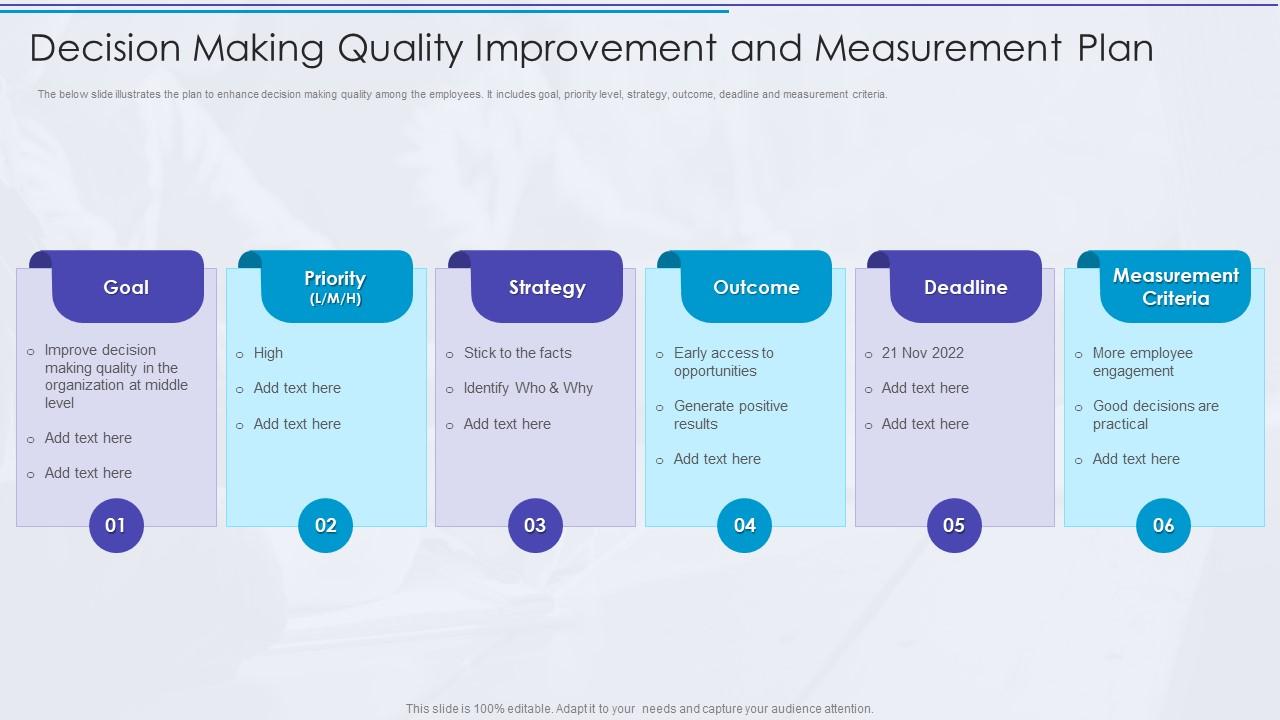
Template 8: Decision Making Quality Improvement and Measurement Plan
Measuring decision quality is harder than measuring output—but it's the only way to improve over time. This slide is built for HR managers and operations leads who need to track how well decisions are being made across teams, not just whether tasks were completed. It captures goal, priority level, outcome, deadline, and measurement criteria in a single structured view. Useful for performance management plans and quarterly improvement reviews. The template is 100% editable and customizable.
Download this PowerPoint Template
Template 9: Step by Step Work Plan PPT Example
Sequential work plans look straightforward until someone has to present them to a skeptical room. This deck structures every project phase into a step-by-step visual that keeps stakeholders oriented and accountable. Each stage connects effort to outcome, eliminating the ambiguity that derails execution reviews. You'll build operational planning decks, project management briefings, and resource allocation plans with clarity and professional authority. Transform your work planning presentations into confident execution roadmaps today. Download this dynamic template now and keep every project on track.
[product_image id=1767678]
Template 10: Decision Making under Uncertainty Strategies for Managers PPT Slides
Managers often have to decide with partial data—and the pressure to look certain makes it worse. This PPT template is built for leaders who need a credible framework for presenting decisions under uncertainty without overpromising outcomes. It covers analytical decision making techniques, risk framing, and contingency thinking in a way that builds stakeholder trust. Works well in fast-moving industries where data driven decision making isn't always possible before a call must be made. The template is 100% editable and customizable.
[product_image id=1682901]
Template 11: Assigning Meeting Roles to Streamline Decision Making Process PPT Designs
Meetings stall when roles aren't clear—everyone waits for someone else to own the call. This PPT preset is built for facilitators and team leads who need to assign decision roles before the room gets together, not after. It maps meeting participants to specific decision functions, cutting ambiguity and reducing the back-and-forth that delays outcomes. Practical for recurring operational planning sessions and cross-functional project reviews. Problem solving decision making process PPT templates pair well with this for end-to-end meeting design. The template is 100% editable and customizable.
[product_image id=1620864]
Template 12: Strategic Action Plan Timeline for Decision Making
Timelines without clear ownership turn action plans into wish lists. This deck structures every project decision into a phased visual timeline—showing stages, assigned owners, and action steps in one clean layout. The clarity it delivers accelerates cross-team alignment and keeps accountability visible throughout execution. You'll build strategic action plans, project governance reviews, and milestone tracking decks that stakeholders trust. Transform your decision-to-delivery gap into a structured, trackable plan today. Download this dynamic template now and keep every decision moving forward.
[product_image id=995224]
Template 13: Decision Making Process Steps for Effective Business Choices PPT Presentation
Business choices made without a repeatable process tend to reflect mood more than method. This deck walks every decision maker through structured steps—from problem framing to outcome selection—using a clean visual flow that reduces ambiguity. The design keeps cross-functional teams aligned on criteria rather than competing instincts. You'll build decision making process reviews, leadership briefings, and business strategy plan presentations with precision. Transform your decision making into a consistent, credible discipline today. Download this dynamic template now and make every business choice count.
[product_image id=1682899]
Template 14: Decision Making at Workplace
Workplace decisions rarely fail because of bad information—they fail because the process wasn't shared. This PPT deck is built for managers and HR leads who need to present decision making norms, authority structures, and escalation paths to their teams. It covers the full spectrum from individual judgment calls to group consensus, making it useful for onboarding, team alignment sessions, and leadership development workshops. Decision making in education PPTs extend this thinking into institutional settings. The template is 100% editable and customizable.
[product_image id=1481131]
Template 15: Organizational Decision Making Improvement Plan
Organizations lose operational returns when decision quality isn't treated as something improvable. This deck maps decision types to their characteristics, identifies decision makers, and outlines improvement approaches—all in one structured layout. It gives operations leaders and change managers a practical tool for organizational decision making reviews and process audits. Useful for any team trying to move from reactive choices to consistent, principled outcomes. Transform your organization's decision quality with a framework built for real improvement. Download this dynamic template now and maximize every operational return.
[product_image id=1201180]
Template 16: Stages of Action Plan for Decision Making in Organizations
Action plans in organizations work best when they're built on structured analysis, not assumptions. This PPT slide is built for strategy and operations leads who need to show how decisions translate into concrete organizational actions. It walks through strategic analysis, scenario formulation, and implementation steps in a two-stage visual that's easy to follow in a boardroom. Practical for organizational decision making workshops and strategic planning offsites. The template is 100% editable and customizable.
[product_image id=995222]
Template 17: Action Plan for Management Decision Making in Universities
University management decisions carry weight—they affect programs, faculty, and students in lasting ways. This PPT template is built for academic administrators and department heads who need to document objectives, goals, action steps, and accountability in one structured view. It covers due dates and success percentages alongside assigned owners, making it useful for faculty meetings, accreditation reviews, and institutional planning cycles. Clear enough for committees, specific enough for follow-through. The template is 100% editable and customizable.
[product_image id=995216]
Template 18: Various Parallel Step Plan of Consumer Decision Making
Consumer decision making doesn't follow a single path—multiple considerations run in parallel before a choice is made. This PPT preset is built for marketers and product strategists who need to map the consumer journey across evaluation stages and target audience segments. It presents a four-stage parallel structure that makes complex buying behavior legible for cross-functional teams and client presentations. Useful for campaign planning and go-to-market alignment. The template is 100% editable and customizable.

Download this PowerPoint Template
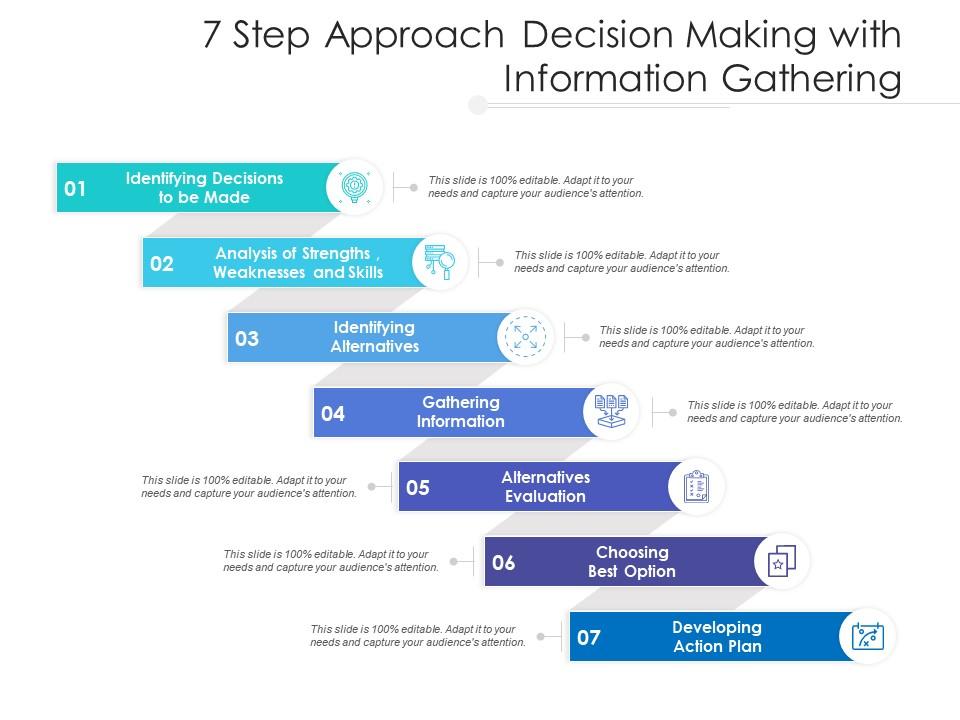
Template 19: 7 Step Approach Decision Making with Information Gathering
Information gathering is the step most decision makers rush—and it's usually where the process breaks down. This seven-step framework captures every phase, from identifying decisions to be made through analysis of strengths, weaknesses, and skills to evaluating alternatives. Each step delivers a concrete visual anchor that keeps presentations grounded in analytical decision making rather than instinct. You'll build leadership decision making decks, critical thinking workshops, and strategic planning reviews with structure and depth. Transform your information-to-decision process into a disciplined, repeatable system today. Download this dynamic template now and elevate every choice you make.
Download this PowerPoint Template
Elevate Every Business Decision with SlideTeam
SlideTeam's PowerPoint templates are the best in the industry for decision making plans. These content-ready slides give you professional structure, clear accountability frameworks, and visual clarity that turns complex choices into actionable outcomes. Use these PowerPoint slides to align stakeholders, reduce ambiguity, and drive consistent, data driven decision making across your organization. Grab these ready-made templates today and make every decision count.
FAQs on Decision Making Plan
What are the core components that differentiate an effective decision-making plan from a reactive one?
An effective decision making plan defines the problem clearly before any options are evaluated. It assigns ownership, sets explicit criteria for success, and records the rationale behind the final choice. Reactive decisions skip these steps—they respond to pressure rather than process. The key differentiators are documented criteria, named accountabilities, and a defined review point after the decision is implemented.
How can organizations structure a decision-making framework to minimize cognitive bias in high-stakes scenarios?
The most practical fix is separating the people who generate options from those who evaluate them. Use a structured scoring rubric with weighted criteria set before options are reviewed—this prevents anchoring on the first solution raised. Assign a designated challenger role to surface blind spots. For high-stakes calls, require written rationale before the final vote. Structure reduces the room cognitive bias has to operate in.
What role does data visualization play in simplifying complex decision-making plans for cross-functional teams?
Visuals turn abstract trade-offs into something a room can react to immediately. Charts, timelines, and comparison matrices let cross-functional teams see where they agree and where they don't—without lengthy explanation. The practical value is speed: a well-designed slide replaces 10 minutes of verbal framing. For decision making plans, visual structure also creates a record that's easier to revisit than meeting notes.
How should a decision-making plan account for uncertainty and incomplete information in fast-moving industries?
Build the plan around reversibility. Categorize decisions as reversible or irreversible—move faster on reversible ones, apply more rigor to irreversible ones. Set a minimum information threshold before action, rather than waiting for certainty that won't come. Scenario planning helps here: define two or three plausible futures and map what the decision looks like under each. The goal is confidence in the process, not certainty in the outcome.
What techniques can leaders use to balance consensus-building with decisive action within a formalized plan?
Set a clear deadline for input before the decision is made—not after. Use structured rounds: gather perspectives first, debate second, decide third. Leaders should state their own position last to avoid anchoring the group. When consensus isn't forming, escalate to a named decision owner rather than extending discussion indefinitely. Consensus-building has diminishing returns past a certain point; the plan should define where that point is.
How does the RACI matrix integrate into a decision-making plan to clarify accountability at each stage?
The RACI matrix maps each decision stage to four roles: Responsible, Accountable, Consulted, and Informed. In a decision making plan, it prevents two common failures—too many approvers slowing execution, and no clear owner when something goes wrong. Assign one Accountable person per decision, never two. Review the RACI before major decisions, not just at project start. It works best as a living document, updated as scope changes.
What are the most common failure points in decision-making plans, and how can they be preemptively addressed?
The most common failure points are unclear ownership, skipped review stages, and decisions made without documented criteria. Plans also fail when the process isn't followed under time pressure—teams default to whoever talks loudest. Address these upfront: name one owner per decision, build a short post-decision review into the plan, and document the 'why' alongside the 'what.' Prevention is faster than fixing a bad call later.
How can scenario planning be embedded into a decision-making plan to prepare for multiple possible outcomes?
Scenario planning works best when it's built into the plan before a decision is needed, not during a crisis. Identify two or three plausible futures that would materially change the right answer. For each scenario, define early indicators—signals that tell you which future is emerging. Then map the decision response to each signal. This keeps the team agile without abandoning structure. It's particularly useful in fast-moving markets where assumptions shift quickly.


