

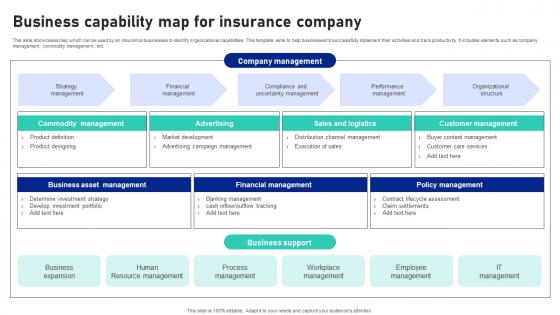
Business Capability Map For Insurance Company




Try Before you Buy Download Free Sample Product
 Impress Your
 Audience
 100%
100% Editable
 Save Hours
 of Time


This slide showcases map which can be used by an insurance businesses to identify organizational capabilities. This template aims to help businesses to successfully implement their activities and track productivity. It includes elements such as company management, commodity management, etc.
People who downloaded this PowerPoint presentation also viewed the following :
Business Capability Map For Insurance Company with all 9 slides:
Use our Business Capability Map For Insurance Company to effectively help you save your valuable time. They are readymade to fit into any presentation structure.








FAQs for Business Capability Map
So there's basically three layers to think about. Your main business stuff sits at the top - like "Customer Management" or whatever your company actually does to make money. Break those down into smaller, more specific pieces underneath. Then you've got all the support functions - IT, HR, finance, the usual suspects that keep the lights on. I'd say start with maybe 8-12 big capabilities first. Don't go crazy with detail right away - that's where people usually mess up. You can always drill down later once you've got the foundation right. The tricky part is honestly just knowing when to stop breaking things down.
Okay so basically a capability map shows you what your company is actually good at vs what you need to be good at. Super useful for finding those annoying gaps where you're like "wait, we can't do this?" You'll see exactly where to throw money and resources. Think of it as your business strengths/weaknesses laid out visually - honestly way better than those endless spreadsheets we usually get stuck with. Plus it stops departments from working in their own little bubbles since everyone can see the bigger picture. Next time you're arguing about budgets in planning meetings, just pull this thing up and let it do the talking.
Think of a capability map like GPS for your business decisions - sounds cheesy but honestly it works. You get a clear picture of what you're actually good at versus what you need to be good at. Market shifts? No problem. You'll spot gaps fast and know where to focus your money and energy. Plus you can dump the redundant stuff you don't need anymore. I'd start by mapping what you've got now, then keep checking it against whatever's happening in your market. Makes prioritizing way less of a guessing game.
Start with mapping out your customer journey - find those spots where people get frustrated or just bail. Figure out which of your business capabilities hit those exact moments. Like if people abandon their carts, maybe your checkout process sucks. Most companies totally skip connecting these dots, then act shocked when their investments don't actually help customers. I'd cross-check your biggest capability gaps against what customers complain about most. Really though, you gotta be brutal about only focusing on capabilities that'll make the biggest difference for customers, not what sounds impressive in a boardroom.
Honestly, you HAVE to get stakeholder feedback or your capability map will be total garbage. I've watched so many teams build these things in a vacuum and they're completely useless. Talk to people in operations, IT, finance - whoever actually works with these capabilities daily. They'll tell you what's really broken, what's missing, and whether your definitions even make sense. Quick interviews work great, or just grab them for workshops. Don't wait until the end either - get their input early before you've already decided everything. Trust me, they'll spot stuff you'd never think of.
So basically, tech integration shows up as those horizontal layers that connect different business functions - like your data platforms, APIs, that kind of stuff. It's honestly like plumbing for your business (sounds unsexy but whatever, it's crucial). Map out what you currently have first. Then you can spot the gaps pretty easily. I'd use color coding or little notes to show which capabilities depend on what tech. The whole point is making it visual so people can actually see where spending money on tech will help multiple departments at once. Short sentences help too.
Honestly, most people go way too granular from day one and just drown themselves. You'll spend forever mapping every tiny detail instead of getting the big picture done. Another classic mistake? Teams just mirror their org chart instead of thinking about what the business actually does. IT loves to take over these projects too, which is fine until you realize you've built a tech diagram that makes zero sense to anyone in operations. Start super high-level first. Get your business people involved early - like, actually involved, not just rubber-stamping. Focus on real outcomes, not whatever department owns what. The details can wait.
Honestly, aim for every 6 months if you're in a crazy fast industry, but annually works for most folks. Big changes like reorganizations or major tech rollouts? Yeah, update it then too. I can't tell you how many companies I've worked with that let theirs get super outdated - such a waste. Set a calendar reminder right now or you'll totally forget. Oh, and definitely pull in people from different departments when you do the updates. Makes it way more accurate. The whole point is keeping it fresh, not just checking a box once and calling it done.
Visio and Lucidchart are probably your best bet - super easy to use and they've got templates ready to go. ARIS or Enterprise Architect work great if you need something more advanced (and don't mind spending more). Honestly though? I've seen teams knock out solid capability maps in PowerPoint or Miro when they're just starting out. My old manager used to swear by Miro for everything, which was kind of annoying but it actually worked well for collaboration. Just pick whatever your whole team can actually use without constant training. The fancy features don't matter if half your people can't figure out how to edit the thing.
Think of it like giving everyone the same map of your company. Right now each department probably speaks their own language and fights over budgets, right? With a capability map, finance sees their stuff, IT sees theirs, but you're all looking at the same big picture outcomes. No more "wait, what do you actually DO over there?" conversations. Honestly, it's one of those things that sounds boring but actually works. Map out capabilities that touch multiple departments first - those make great ice breakers in meetings. You'll be surprised how fast people start connecting dots they couldn't see before.
Honestly, start with the basics - are people actually using this thing? Check if teams bring it up in planning meetings and whether funding conversations use capability terms. Survey people to see if they understand the map (yeah, another survey, but whatever). Look for fewer duplicate investments happening. Strategic initiatives should spread across capabilities instead of piling into the same few buckets. Usage data and feedback beat fancy ROI math at first. The real test? Whether it's actually changing how decisions get made instead of just sitting in some SharePoint folder collecting digital dust.
So basically it's like a visual guide showing you exactly where to put your money. You can see which business capabilities matter most for your strategy vs which ones are totally falling short. Those budget meetings where everyone's fighting for scraps? This makes your case way stronger. Honestly, it's kind of brilliant - shows you the actual gaps between what you need and what you've got right now. Instead of just throwing money everywhere and hoping something works, you'll actually focus on the stuff that makes a real difference for your goals.
So capability maps show *what* your company does - like "customer service" or "product development." Org charts? Those just show who reports to whom. Totally different things. Capability maps help you spot gaps in what you can actually deliver, regardless of how teams are set up. I find them way more useful for strategy stuff than org charts, honestly. Use them when you're planning improvements or figuring out operational issues. Don't use them to understand reporting structure - that's what org charts are for. Short version: one's about functions, one's about people and hierarchy.
So you map out what your company can actually do right now, then compare it to what you'll need for going digital. Pretty straightforward stuff. The gaps become super obvious - like where you desperately need tech upgrades or new processes. I'd start with current capabilities first, then layer your digital goals on top. That way you're not just chasing whatever trendy tech is hot this month (seen too many companies blow their budgets that way). Plus it makes selling transformation projects to the higher-ups way easier when you can show exactly why each piece matters.
Start with strategic alignment - does it actually support your business goals? Then look at what's currently broken vs what's just missing. Honestly, fixing core stuff that's already failing beats shiny new features every time. Customer impact matters way more than internal efficiency projects, so focus there first. Resource requirements are tricky though - some capabilities sound amazing until you realize they need like 6 months and half your team. I'd map out your top capabilities on a simple scoring sheet. Don't overcomplicate it with fancy frameworks.
-
The service is fast, and I could access any presentation after buying the subscription. I don’t think I’ll ever have to worry about a presentation in my life.
-
“Detailed and great to save your time.”