


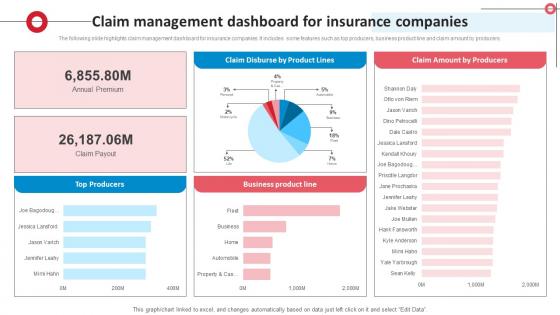
Claim Management Dashboard For Insurance Companies




Try Before you Buy Download Free Sample Product
 Impress Your
 Audience
 100%
100% Editable
 Save Hours
 of Time


The following slide highlights claim management dashboard for insurance companies. It includes some features such as top producers, business product line and claim amount by producers.
People who downloaded this PowerPoint presentation also viewed the following :
Claim Management Dashboard For Insurance Companies with all 10 slides:
Use our Claim Management Dashboard For Insurance Companies to effectively help you save your valuable time. They are readymade to fit into any presentation structure.








FAQs for Claim Management Dashboard
So track your claims volume first - that's the big picture stuff. Processing times and approval rates are obvious ones too. Settlement amounts matter, obviously. Cost per claim is huge though, and those adjuster productivity numbers? They'll shock you honestly, especially at first. Aging reports help catch the stuck claims before they become real problems. Customer satisfaction scores if you're doing surveys. Oh and fraud detection rates - depends on your industry but usually worth watching. Start basic and add the fancy metrics once you see what's actually happening with your data.
Honestly, data viz tools are game-changers for claims data. You'll see patterns pop up immediately instead of hunting through boring spreadsheets forever. Heat maps and trend lines make it super obvious when you've got seasonal spikes or weird bottlenecks happening. I love how you can just click to drill down into specific months or claim types - makes troubleshooting so much faster. Plus your boss will actually understand what you're showing them (trust me on this one). Oh, and definitely start with dashboards for your main KPIs first. Don't try to visualize everything at once or you'll go crazy.
Dude, real-time updates will literally save your sanity on claims. You'll stop getting bombarded with "where's my claim?" calls every five minutes. Instead of constantly refreshing dashboards or chasing down team members for status updates, everything just... appears as it happens. Catch problems early, move stuff around when someone's swamped, and everyone stays in the loop automatically. Honestly, I wish I'd set this up years ago. Start with your messiest claims first - the ones people bug you about most - and build alerts around those.
Honestly, customizable dashboards are a game changer. Different people need different stuff - like, a claims adjuster doesn't care about the same metrics as their manager, you know? When you can move things around to match how you actually work, you'll stop wasting time digging through menus for basic info. Short sentences hit different sometimes. People are way more likely to stick with tools they can make their own. Oh, and here's what I'd do first: figure out your top three features and put those right up front where you can't miss them. Makes such a difference.
Honestly, data inconsistencies are gonna be your biggest nightmare. Each system probably stores claim IDs and dates totally different - legacy stuff uses weird schemas that don't match anything modern. Real-time syncing is brutal too since some sources update instantly while others batch overnight, so your dashboard's always off. API limits make everything slower, plus you're dealing with sensitive claim data so security's tight. Oh and mapping out all your sources first? Do that before anything else - I learned that the hard way. Focus on the common fields you actually need.
So basically, you can use predictive analytics to dig through your old claims data and spot patterns - like when claim volumes spike or where fraud might pop up. Pretty neat, right? Feed in about 2-3 years of historical data and it'll start building models that predict future trends. The system looks at claim types, settlement amounts, processing times, all that stuff. Then you can actually get ahead of problems instead of just reacting to them. Honestly, it's like having a heads up on staffing needs and resource allocation before things get crazy. Way better than flying blind.
Start with role-based access controls - that's your security foundation for claim data. Multi-factor authentication isn't optional either. Encrypt absolutely everything, both stored data and anything moving around. You need to log every user action so you can see who touched what and when. Auditors eat that stuff up, honestly. Set up session timeouts and stay on top of security patches too. Oh, and if you're prioritizing? Access controls and MFA first - they'll give you the most protection right off the bat without breaking the bank.
Honestly, mobile access is a game changer for keeping everyone in the loop. People can check claim status on their phone while grabbing coffee or respond to stuff during their commute. Real-time notifications are huge too - cuts way down on those annoying "hey what's happening with my claim" calls. Everyone can actually see progress as it happens, which builds way more trust than the old "we'll call you back" approach. Claims move faster when people can respond right away instead of waiting to get back to their computer. Oh, and definitely turn on push notifications for the big milestones. Makes people feel like they're part of the process.
Start with basic dashboard training - navigation, key metrics, filtering stuff. The filtering's honestly kind of a mess at first with all those claim categories, but people usually get the hang of it. Advanced features like custom reports and automated workflows need their own separate sessions though. I'd do a follow-up around two weeks later when they've actually used it and have real questions. Oh, and make sure they know where the help docs are and who to bug when things break. Most folks catch on to the basics pretty fast.
Dude, regulatory stuff is such a pain but it completely shapes your dashboard. You've got to track specific data, store it for however long they want, and spit out reports on command. Build in audit trails from day one - every click needs documentation. Role-based permissions are non-negotiable too for privacy compliance. The interface better make those deadlines obvious because explaining missed filings to auditors is literally my nightmare scenario. Oh, and don't even think about adding compliance features later. Trust me on this one - design it in upfront or you'll hate yourself.
Honestly, user feedback is everything for your dashboard. Your adjusters and managers will spot stuff you'd never notice - like navigation that makes zero sense or filters that don't actually exist. The cool part? They'll suggest workflow tweaks you never thought of, like bulk actions or custom reports they're dying for. I've watched dashboards go from total disasters to tools people actually want to use. Set up some feedback sessions (or just send surveys, whatever's easier) and actually fix what they complain about. Trust me, your adoption rates will skyrocket once people feel heard.
Stick to metrics your claims team actually needs - pending claims, resolution times, high-value alerts. Don't throw in random stats just because they look cool. Put the important stuff where people will see it right away. Honestly, half the dashboards I've used are just overwhelming data dumps that nobody wants to dig through. Keep your colors and fonts consistent, group similar info together. Your filtering should be dead simple - adjusters shouldn't need training just to look at specific claim types. Oh, and definitely test it with real users first. You'd be surprised how many obvious issues you'll catch.
Dude, automating the routine stuff is such a lifesaver. Your dashboard can handle claim updates, standard notifications, weekly reports - all that mindless clicking. Start with whatever you do most often, trust me. The time you save is crazy. No more data entry hell means you can actually think about the complicated cases and talk to stakeholders without rushing. I was skeptical at first but honestly? Once you see how much faster everything moves, you'll wonder why you waited. Focus on your most repetitive tasks first and you'll feel the difference right away.
Dude, visual stuff is everything here. Charts and color-coding beat spreadsheets every single time - non-tech people's eyes just glaze over at raw numbers. Break things down into simple KPIs they'll actually get, like "claims we closed this month" or average processing times. Honestly, I've seen too many presentations fail because people overthink the complexity. Add quick explanations for confusing parts. But here's the key thing - frame everything around what they actually care about: saving money, happy customers, working faster. Oh, and next meeting? Ask them upfront what questions they need answered, then build your whole story around that.
Look, think of it as one big shared workspace where everyone can actually see what's happening with claims. Finance, legal, operations - they're all looking at the same real-time info instead of those nightmare email threads we all hate. Teams can drop in updates and docs without the usual chaos. Honestly, the transparency alone is worth it because nobody's guessing who's supposed to do what next. My advice? Pick one big claim and get your main people using it first. Once they see how much easier communication gets (and trust me, they will), rolling it out to other cases basically sells itself.
-
Editable templates with innovative design and color combination.
-
Fantastic and innovative graphics with useful content. The templates are the best and latest in the industry.