


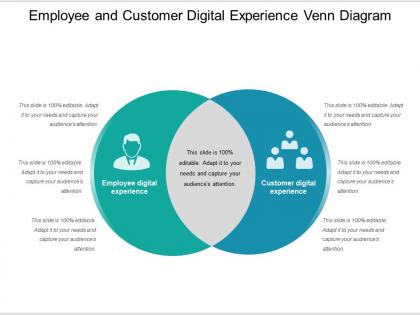
60578705 style cluster venn 2 piece powerpoint presentation diagram infographic slide





Try Before you Buy Download Free Sample Product
 Impress Your
 Audience
 100%
100% Editable
 Save Hours
 of Time


Generate capital with our Employee And Customer Digital Experience Venn Diagram. Folks will be happy to give financial assistance.
60578705 style cluster venn 2 piece powerpoint presentation diagram infographic slide with all 5 slides:
Dish out clinching evidence with our Employee And Customer Digital Experience Venn Diagram. Eradicate any chance for doubt.
FAQs for 60578705 style cluster venn 2 piece powerpoint presentation
Honestly, it comes down to four main things: user experience, speed, personalization, and making sure everyone can actually use your site. Fast loading times are non-negotiable. Your content should feel relevant to whoever's visiting, and everything needs to work perfectly on mobile - that's where most people are browsing anyway. I always do this weird test where I imagine my dad trying to navigate it (he's not exactly tech-savvy). Consistent branding throughout helps too. Oh, and definitely test your stuff regularly yourself. Ask real users what's annoying them - you'll be surprised what they notice that you don't.
Honestly, user psychology is like the secret sauce of design - it's what makes people actually stick around instead of clicking away immediately. People have zero patience these days. They scan first, read later (if at all), and get overwhelmed super easily. Decision fatigue is real too - give someone too many choices and they'll just leave. What really helps is mapping out where users get pissed off or confused in your interface. Those friction points? That's where you focus. Design around how brains actually work, not how you wish they worked. Mental models matter way more than you'd think.
Honestly, accessibility is like the secret sauce of good design. When you build stuff for people with disabilities, everyone else benefits too. Captions? Super helpful when you're watching videos in a loud coffee shop. Clear navigation helps anyone who's multitasking or just having a chaotic day. Good contrast makes everything easier to read - your eyes will thank you. Sure, there's the whole compliance thing, but that's not really the point. Here's what I'd do: bake accessibility into your process from the start. Way less painful than trying to fix everything later. Trust me on this one - your users actually notice when things just work better.
Track conversion rates, bounce rates, and time on site - that's the basic stuff. But honestly, the real goldmine is watching how people actually use your site through heatmaps and session recordings. Customer effort score matters way more than people think since it shows if you're making things unnecessarily complicated. Oh, and definitely send out satisfaction surveys. Here's the thing though - don't go crazy with metrics or you'll get overwhelmed. Just pick 3-5 that actually matter for your goals and stick with those consistently.
Dude, personalization is honestly a game-changer. It makes users feel like your app actually gets them, you know? Netflix nails this - they don't show me random garbage, just stuff I'll probably binge. Same with Spotify's playlists. When everything feels relevant, people stick around way longer and actually convert instead of bouncing. You don't need to go crazy with it either. Just tweaking your homepage based on different user types can bump your engagement numbers pretty well. Oh, and users come back more when they're not sorting through tons of irrelevant content.
Honestly, mobile responsiveness is make-or-break for user experience. When your site doesn't work properly on phones, people have to do that annoying pinch-and-zoom thing just to read anything. It's 2024 - nobody has patience for that anymore. Users will literally bounce within seconds if they can't navigate easily. But when everything loads fast and fits their screen nicely? They'll actually stick around and do what you want them to do. I always tell people to test their own site on their phone first - you'd be surprised how many haven't even tried it. Quick mobile check saves you from losing tons of potential customers.
Honestly, AI personalization is where I'd put my energy first - easiest to test and you'll actually see results. Machine learning is making interfaces crazy smart now, like they predict what you want before you even click. VR finally doesn't suck anymore either (took long enough lol). It's not just gaming now - retail, training, even social stuff is getting the immersive treatment. Voice AI makes everything feel more natural too. Edge computing's handling the technical side so things don't lag. Start small with personalization tools though - you can experiment without breaking the bank.
Think of your user's journey like a story - there's gotta be a beginning, middle, and end that actually makes sense. Your onboarding? That's where you introduce the hero (your user) and what they're trying to accomplish. Then use progressive disclosure like plot twists - reveal info exactly when people need it, not all at once. Even tiny animations can tell mini-stories. Like when you complete something and get that little satisfying bounce? That's storytelling too. Map out how users should *feel* as they move through your product, not just what buttons they'll click. It's way more engaging than most people realize.
Start with image compression and cut down HTTP requests - those two alone will make a huge difference. Browser caching is clutch too. Oh, and definitely turn on gzip compression and minify your CSS/JS files. CDNs are worth it if you've got users all over the place, though they can be pricey depending on your setup. Lazy loading for images works great since people won't scroll down right away anyway. Honestly, just run your site through PageSpeed Insights first. It'll tell you exactly what's broken and which fixes actually matter.
Timing is everything here - grab feedback right after purchases, support calls, or when people bail on tasks. Mix it up with quick surveys, those little feedback widgets, and actual user testing. Skip the generic "how was your experience?" stuff and dig into specifics about what went wrong and what they were actually trying to do. Honestly, most companies suck at this next part: you've got to actually analyze the patterns and share insights with your product team regularly. Otherwise you're just collecting data for no reason. Start small with one or two touchpoints first - don't go crazy trying to capture everything.
So visual hierarchy is just guiding where people look first on your screen. Size, color, and spacing do most of the heavy lifting here - like how that bright "Buy Now" button grabs your attention before you even read anything else. Without hierarchy, everything screams for attention at once and users just... freeze up. Honestly, I see this mistake all the time on websites that try to highlight everything. Start with your main goal for the page. Then make everything else support that one thing instead of competing with it.
Look, pretty designs are cool but they're worthless if users can't actually DO anything. Start with research - figure out what people really need first. Then design around those tasks. Yeah, we all want our stuff to look amazing (designer ego is real lol), but if someone can't find the checkout button or whatever, you've failed. Test with actual humans early on. Nothing humbles you faster than watching someone completely miss your "obvious" navigation. Half the visual stuff we think is brilliant just creates confusion. Focus on what actually helps users accomplish their goals, not what looks good in your portfolio.
Honestly, the biggest thing is getting your customer data synced up everywhere - that's what lets someone browse on their phone and check out later on their laptop without losing their cart. I'd start by mapping the whole customer journey first (trust me on this one, it'll save you hours of backtracking). Keep your branding and messaging the same across all channels too. The data stuff is usually where things get messy, but once you nail that down, everything else falls into place. Just audit what you've got now and tackle the worst gaps first - don't try to fix everything at once.
Honestly, data analytics is a game changer - it shows you what users are actually doing instead of what you think they're doing. Track click patterns, time spent on pages, where people bail out of your funnel. Heat maps are pretty cool too, they show exactly where people look. The sheer volume of data will probably make your head spin initially, but patterns emerge fast. A/B testing different messages? Super revealing. Cohort analysis breaks down which users matter most (spoiler: usually not who you'd expect). My advice is pick one metric that matters and don't try to boil the ocean right away.
Ugh, where do I even start? Legacy systems are the worst - they're like trying to fit a square peg in a round hole. Your employees will probably pushback on changes too, which I get but it's still frustrating. Security becomes this massive headache when you're scaling up digital stuff everywhere. Data gets stuck in silos, user experience goes all over the place between different channels. Oh and good luck finding people with the right digital skills! Budget's always tight since you're basically running two operations at once. I'd honestly just map out your customer journey first and tackle the biggest pain points from there.
-
Helpful product design for delivering presentation.
-
Graphics are very appealing to eyes.