

Claude AI Powerpoint Presentation Slides





Try Before you Buy Download Free Sample Product
 Impress Your
 Audience
 100%
100% Editable
 Save Hours
 of Time


Grab our professionally designed Claude AI PowerPoint presentation. It includes an introduction, benefits and potential applications of Claude AI. It also explains the reasons to prefer Claude AI over other chatbots. This Guide to Anthropics Claude AI PPT contains the overview of anthropic, its pricing model for Claude and internal details of Claude model along with analysis of Claude using different models. Furthermore, our Exploring Anthropics Prompt Engineering in Claude deck includes Claude documentation which explains the primary interfaces used to access Claude. It also includes problematic behavioral traits, constitutional AI approach and configuration of GPT prompts for Claude. Moreover, this How Claude Builds on ChatGPT PPT explains the BBQ evaluation of Claude which include score evaluation and model accuracy comparison based on BBQ questions. It also highlights the HHH evaluation of Claude which contains performance evaluation and metrics for honesty evaluation. Lastly, this Understanding Claude AIs Capabilities PowerPoint Presentation explains role of Claude at workplace which include steps to implement Claude at workplace and also lists the strategies which can be used for automation at workplace. Download our 100 percent editable and customizable template, which is also compatible with Google Slides.
People who downloaded this PowerPoint presentation also viewed the following :
Content of this Powerpoint Presentation
Slide 1: This slide introduces Claude AI. State your company name and begin.
Slide 2: This slide states Agenda of the presentation.
Slide 3: This slide shows Table of Content for the presentation.
Slide 4: This slide highlights title for topics that are to be covered next in the template.
Slide 5: This slide presents Introduction to Claude AI model by Anthropic.
Slide 6: This slide displays Key benefits of Claude AI by Anthropic.
Slide 7: This slide represents Reasons to prefer Claude AI over other chatbots.
Slide 8: This slide showcases Key highlights of Claude 2.1 by Anthropic.
Slide 9: This slide shows Key potential applications for Claude by Anthropic.
Slide 10: This slide presents Real world use cases of Claude.
Slide 11: This slide highlights title for topics that are to be covered next in the template.
Slide 12: This slide gives an overview of Anthropic, the company behind Claude.
Slide 13: This slide displays Anthropic pricing for different Claude models.
Slide 14: This slide represents Claude model internal configuration details.
Slide 15: This slide highlights title for topics that are to be covered next in the template.
Slide 16: This slide showcases Primary interfaces used to access Claude.
Slide 17: This slide shows Problematic behavioural traits discouraged by Claude.
Slide 18: This slide presents Constitutional framework for artificial intelligence traits.
Slide 19: This slide displays Configuration of GPT prompts for Anthropic’s Claude.
Slide 20: This slide highlights title for topics that are to be covered next in the template.
Slide 21: This slide represents Comparison using response generation models of different sizes.
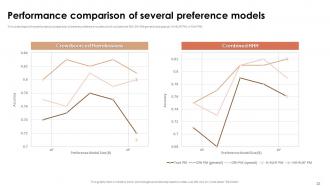
Slide 22: This slide showcases Performance comparison of several preference models.
Slide 23: This slide shows Human feedback evaluations of Claude models.
Slide 24: This slide highlights title for topics that are to be covered next in the template.
Slide 25: This slide presents Introduction to BBQ bias evaluation of Claude.
Slide 26: This slide displays BBQ bias score evaluation of Claude models.
Slide 27: This slide represents Model accuracy comparison on BBQ questions.
Slide 28: This slide highlights title for topics that are to be covered next in the template.
Slide 29: This slide showcases Generalization for training helpful honest and harmless system.
Slide 30: This slide shows Combined HHH performance evaluation of Claude models.
Slide 31: This slide presents Claude 2.1 evaluation using open ended conversation.
Slide 32: This slide highlights title for topics that are to be covered next in the template.
Slide 33: This slide displays Comparison between ChatGPT and Claude 2.1.
Slide 34: This slide represents Differences between three versions of Claude.
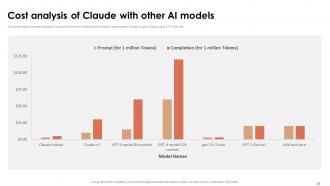
Slide 35: This slide showcases Cost analysis of Claude with other AI models.
Slide 36: This slide highlights title for topics that are to be covered next in the template.
Slide 37: This slide shows Steps to implement Claude AI at workplace.
Slide 38: This slide presents Challenges in implementing workplace automation with Claude AI.
Slide 39: This slide displays Solutions for implementing workplace automation with Claude AI.
Slide 40: This slide highlights title for topics that are to be covered next in the template.
Slide 41: This slide represents Zoom partnership and investment in Anthropic’s Claude.
Slide 42: This slide showcases Use case of Claude on Amazon Bedrock.
Slide 43: This slide shows Use case of Claude adoption at Bridgewater Associates.
Slide 44: This slide highlights title for topics that are to be covered next in the template.
Slide 45: This slide presents 30-60-90 day plan for Claude API integration.
Slide 46: This slide displays Implementation plan for integrating Claude AI's API.
Slide 47: This slide is titled as Additional Slides for moving forward.
Slide 48: This slide represents Major limitations of Claude AI by Anthropic.
Slide 49: This slide contains all the icons used in this presentation.
Slide 50: This slide presents Bar chart with two products comparison.
Slide 51: This is a Timeline slide. Show data related to time intervals here.
Slide 52: This slide depicts Venn diagram with text boxes.
Slide 53: This slide contains Puzzle with related icons and text.
Slide 54: This is Our Goal slide. State your firm's goals here.
Slide 55: This is an Idea Generation slide to state a new idea or highlight information, specifications etc.
Slide 56: This slide presents Roadmap with additional textboxes.
Slide 57: This is a Thank You slide with address, contact numbers and email address.
Claude AI Powerpoint Presentation Slides with all 65 slides:
Use our Claude AI Powerpoint Presentation Slides to effectively help you save your valuable time. They are readymade to fit into any presentation structure.
















FAQs for Claude AI
Honestly, Claude's just more careful about not being an ass. It won't help with sketchy stuff and actually admits when it doesn't know something - which is way better than getting confident BS answers. The whole constitutional AI thing makes it feel less... unhinged? Like it actually thinks through problems instead of just word-vomiting. What I really like is asking it to break down complex stuff step by step. Don't just ask for quick answers - make it walk you through the reasoning. You'll get way more out of it that way.
Dude, Claude's actually clutch for presentations. You can just dump your messy ideas on it and get back a clean outline with everything organized. Takes care of the brainstorming part so you're not staring at empty slides forever. It'll help you write better slide text too, plus figure out good transitions between sections. Oh, and it's weirdly good at helping you think through what questions people might ask afterward. Honestly feels like having a cowriter who doesn't mind doing endless revisions. The best part? You get to focus on actually practicing your delivery instead of wrestling with content structure.
So Claude's actually really solid for data viz stuff. You can throw your dataset at it and it'll suggest which chart types work best - plus it writes the actual Python or R code for you. Honestly saves me tons of time. It's weirdly good at catching when people try to force pie charts where they don't belong (happens way more than it should lol). The cool part is how it helps you write better titles and labels that your audience will actually understand. Oh, and it can walk you through interpreting patterns and turning messy findings into clean presentation stories. Just describe what you're working with and it guides you through everything.
So Claude's trained on tons of different stuff - science, business, arts, whatever. But here's the thing: it doesn't just spit back memorized facts. It actually finds patterns between different fields to give you relevant answers. The cool part is how it switches up its style based on what you're asking. Quantum physics? It'll get technical. Marketing question? Totally different approach. Honestly, the more specific you are about what you need, the better answers you'll get. Oh, and context helps a lot too - like mentioning if it's for work or school or whatever.
Dude, Claude's honestly a lifesaver when I'm stuck staring at empty slides. Just throw your topic at it and ask for like 5-10 different angles - you'll be surprised what comes back. It's weirdly good at suggesting those opening hooks that actually grab people's attention, plus it can help you tailor the same idea for different crowds. Like presenting to your boss vs your coworkers - totally different vibes needed. I use it all the time just to break through that initial "where do I even start" wall. Sometimes the best ideas come from its random suggestions that get your brain moving again.
So Claude's actually pretty solid for presentation prep. I'll have it help me brainstorm audience polls or tricky Q&A scenarios beforehand - saves me from those awkward blank stares later. You can get it to restructure your content so it flows more like a conversation instead of some boring lecture. Oh, and it's good for anticipating weird questions people might throw at you. I also use it for storytelling ideas or creating handouts that people actually want to keep. The trick is using it during prep, not as a crutch during the actual talk.
Oh dude, Claude's actually really good at this! You just tell it what industry you're in and your presentation goals. It automatically switches up everything - colors, layouts, fonts, even transitions. Finance stuff gets clean data-heavy slides, while marketing presentations become way more visual and creative. Honestly it's kind of scary how well it picks up on those industry vibes. The best part though? You can keep asking for changes until it's exactly right. Way faster than doing it yourself from scratch.
Honestly, Claude's been a lifesaver for our presentations. I just dump all my messy meeting notes into it and boom - actual organized talking points that don't suck. What I usually do is have it create the basic outline first, then split up sections between team members. The best part? It keeps everything sounding consistent even when like 4 different people are writing sections. Oh and the speaker notes it generates are actually useful - not just generic fluff. Try starting with rough bullet points and see what happens. Way faster than staring at a blank slide deck forever.
Yeah, Claude's pretty solid security-wise. They encrypt everything during transmission and don't keep your presentation stuff once you're done. Plus your chats aren't used for training their AI, which honestly is a relief. They've got SOC 2 Type II compliance too - that's like the fancy certification companies love to see. Regular security audits, secure cloud setup, all that jazz. I'd feel comfortable sharing most work stuff on there. Just peek at your company's AI policy first though. Some places are weirdly strict about this stuff, even with secure platforms.
Oh yeah, Claude's actually solid for this! Tell it you want your presentation accessible and it'll suggest alt text for images, help pick high-contrast colors, and set up proper headings so screen readers work right. It can also simplify wordy sections and recommend fonts that are easier for people with dyslexia to read. Honestly, the logical reading order thing is clutch - I never thought about that before using it. Just mention you're presenting to a diverse crowd and it'll throw in accessibility reminders as you work. Way easier than trying to remember all those guidelines yourself.
Dude, Claude legitimately saves me hours on presentation prep. Just throw all your random notes and ideas at it - doesn't matter how messy - and it'll spit back a clean outline with actual talking points. The speed is honestly crazy. It's great for brainstorming openings that don't suck, plus it organizes your arguments way better than I ever could. Also catches those logic holes you miss when you're scrambling last minute. My go-to strategy? Brain dump everything first, then have Claude turn that chaos into something that actually flows.
Nah, Claude doesn't plug directly into PowerPoint or Slides - wish it did though. But you can still use it to make your presentations way better. I basically just copy-paste stuff back and forth between Claude and my slides. Ask it to help structure everything, write speaker notes, or create full outlines. Saves me so much time honestly. The back-and-forth gets pretty smooth once you're used to it. Just describe your presentation topic to Claude, then grab whatever's useful and drop it into your slides manually. Works great.
So Claude doesn't learn from our chats - each conversation is basically starting fresh. The training already happened using feedback from tons of people, but not in real-time. Tell it your idea sucks? It won't remember next time. Honestly pretty annoying if you ask me. But here's the thing - you can still get way better results by being super specific upfront. Like, tell it your audience, what vibe you're going for, your goals, all that stuff right away. Makes a huge difference in the suggestions you'll get.
Claude's honestly pretty great for this stuff. Upload your lesson plan and ask for three ways to make it more engaging - it'll suggest creative hooks and activities based on your grade level. The thing that surprised me most? How it can take boring curriculum material and actually make it interesting. Break down complex topics, generate discussion questions, or even have it roleplay as historical figures (my students love that). Just be specific about your audience when you're prompting it. Oh, and it's solid for structuring presentations with clear objectives too. Way better than staring at a blank lesson plan at 10pm.
Honestly, just be smart about fact-checking everything - Claude gets stuff wrong pretty regularly and can be biased. Transparency is huge too. If AI helped you write something, tell people. They deserve to know, you know? There's also this whole murky plagiarism thing since these models train on existing content, but the legal stuff is still being sorted out. Short sentences work. Longer ones can flow naturally when you let them breathe a bit. Bottom line - treat it like a writing buddy, not a replacement for actually thinking through what you're putting out there.
-
Exclusive and extensive collection of templates. Really helped me create a professional presentation in just no time.
-
Wide collection of templates available. SlideTeam has made it easier to create presentations in just a few minutes.