

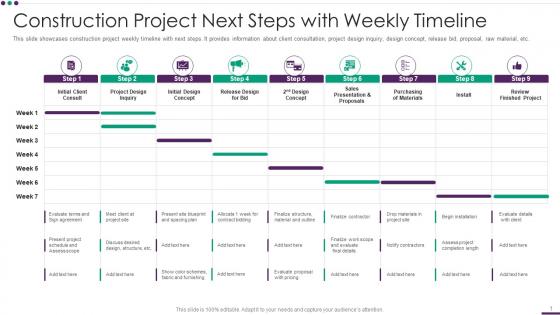
Construction Project Next Steps With Weekly Timeline




Try Before you Buy Download Free Sample Product
 Impress Your
 Audience
 100%
100% Editable
 Save Hours
 of Time


This slide showcases construction project weekly timeline with next steps. It provides information about client consultation, project design inquiry, design concept, release bid, proposal, raw material, etc.
People who downloaded this PowerPoint presentation also viewed the following :
Construction Project Next Steps With Weekly Timeline with all 6 slides:
Use our Construction Project Next Steps With Weekly Timeline to effectively help you save your valuable time. They are readymade to fit into any presentation structure.





FAQs for Construction Project Next Steps
So basically there are five main phases: pre-construction stuff like planning and permits, then site prep where they clear everything and dig, foundation and structural work comes next, followed by all the systems - plumbing, electrical, HVAC. Final phase is finishing touches like flooring and paint. Honestly, timelines always get messed up though. Weather delays, failed inspections, clients changing their minds - it's inevitable. Each phase builds on the last one, so when something gets behind, everything else does too. My advice? Build in extra time for each phase, especially if you're dealing with multiple contractors. Trust me on that one.
Honestly, just pick one document for your timeline and make everyone use it - no exceptions. Gantt charts work great since they update automatically and nobody has to hunt through endless email threads (which is my personal hell). Weekly check-ins are crucial, but actually walk through the milestones together instead of just firing off status updates. Dependencies need to be super obvious so people get how their delays screw over the next person. Oh, and don't wait until things go sideways to communicate changes. Proactive updates save you from those panicked 5pm calls.
Honestly, Microsoft Project or Primavera P6 are your best bets if your team can handle learning them - they're industry standard for a reason. Procore's amazing for construction-specific stuff and integrates with everything else. That said, I've watched smaller crews crush it with just Smartsheet or Asana on simpler jobs. Pick whatever your team will actually stick with instead of the shiniest option. My buddy's crew tried this super fancy software once and literally went back to whiteboards after two weeks. Start simple and upgrade when you outgrow it.
Oh absolutely, complex stuff always drags on way longer. More trades means more scheduling headaches, and don't even get me started on permits - they're such a pain. Honestly, I learned this the hard way when our "quick" kitchen reno turned into a 3-month ordeal because of some weird plumbing issue nobody saw coming. Best thing you can do is pad your timeline with extra weeks upfront. Map out who needs to finish what before the next guy can start. Trust me, something will go sideways and you'll be glad you built in that buffer time.
Start flagging your bottlenecks now before they bite you. Get solid contracts with clear deliverables - trust me, vague agreements always come back to haunt you later. Regular check-ins with everyone involved keeps things moving smoothly. Weather's gonna mess with exterior work no matter what, so have backup plans for your critical stuff. Run parallel workflows instead of doing everything one after another when you can. Honestly, the weekly timeline reviews are what'll save you. Spot the wobbly parts early and you won't be scrambling to fix disasters. Oh, and keep your supply chain people in the loop constantly.
Oh man, yeah external stuff will totally mess you up if you're not ready for it. Weather's the worst - rain, snow, crazy heat can shut you down for weeks. Permit delays are brutal too, plus inspections never line up when you need them. And don't even get me started on regulatory changes that somehow always happen at the worst possible moment. Build in buffer time from the start - like 15-20% extra for weather alone. Also stay on top of your permit office constantly. Trust me, surprises suck when you're already behind schedule.
Honestly, you can't build a realistic timeline without knowing what resources you actually have. Like, if your concrete crew is stuck on another job, your whole schedule falls apart. I learned this the hard way on my first big project - thought I could just wing the timing. Map out when your workers and equipment are free first, then work backwards from there. It's kind of like planning a big meal when you've only got one oven, you know? Start with what you're actually working with, not what you wish you had. Once you audit your current commitments, the timeline basically builds itself around those real constraints.
Dude, always add like 10-15% buffer time because trust me, stuff WILL go wrong. Break everything into smaller chunks so you can adjust fast when things get messy. Weather delays, permit issues, materials showing up late - have backup plans ready. Figure out what can happen at the same time vs what has to wait. Oh and use something easy to update for tracking (I'm obsessed with Notion but whatever works). The key is telling everyone about delays super early. Nobody likes surprises, especially the people writing checks. Learned this lesson the expensive way lol.
Here's what I'd track if I were you: Schedule Performance Index shows if you're behind or ahead of plan. Honestly, that one's pretty clutch. Critical path delays are brutal - they mess up everything downstream. Also watch your milestone hit rate and how long tasks actually take vs what you estimated. Resource utilization matters too since people issues usually cause the timeline headaches. Earned Value Management is solid but kinda dense at first. Maybe set up a simple weekly dashboard? That way you'll catch problems early instead of scrambling later when everything's already off the rails.
Honestly, getting the right people involved upfront is a game changer for timelines. Your contractors and suppliers know way more about potential roadblocks than you do sitting at your computer guessing. They'll catch stuff like permitting delays or supply chain hiccups that would totally blindside you otherwise. The key is picking the *right* stakeholders though - not just the loudest person in every meeting (we all know that guy). When people have actual skin in the game, their estimates get way more realistic too. Less of that "oh yeah, no problem" optimism that always bites you later. Start these conversations early and you'll dodge so many headaches.
Honestly, milestones are game-changers for any project. They're like checkpoints that stop you from wandering off track - I learned this the hard way on a project that went completely sideways last year. You get these mini-deadlines that keep everyone honest about progress. When something starts going wrong, you'll catch it early instead of realizing at the end that you're three weeks behind and over budget. Stakeholders eat this stuff up too because they see actual progress instead of "yeah, we're working on it." Just make sure each milestone has specific deliverables and real dates. Your sanity depends on it.
Check your timeline every few days, seriously. Weekly is the bare minimum but that's honestly not enough if stuff's moving quickly. Big changes like weather delays or scope shifts? Update it right away - don't wait around. Larger projects need even more attention because delays snowball fast. I've watched so many projects crash because teams only checked monthly when they should've been on it constantly. Maybe I'm paranoid, but whatever. Set up quick 15-minute reviews twice weekly with your team. Then update things as problems come up.
Weather delays always screw you over - same with permits taking forever and materials showing up late. Honestly, people are way too optimistic about this stuff. Subcontractors won't magically appear when you need them, and don't get me started on inspection scheduling nightmares. Change orders are brutal too, especially when someone decides they hate the tile halfway through installation. I learned this the hard way on my kitchen reno. Add 20% buffer time to everything and assume permits will drag. Have backup suppliers ready because your first choice will definitely run out of something important.
Honestly, having a solid timeline is a game-changer for your budget. Map out when you'll need materials, labor, and equipment so you can actually plan those costs instead of getting blindsided. The worst is when concrete and steel deliveries hit the same week - your cash flow takes a beating. Give suppliers advance notice and you'll get better rates too. I always start with the big cost phases first, then work backwards to fill in smaller stuff. Think of it as your money roadmap showing when cash goes out and milestone payments roll in. Makes everything way less stressful.
Honestly, skip the spreadsheet nightmare - nobody wants to stare at that mess. Gantt charts are way better for showing timelines visually. Break everything into obvious chunks like permits, site prep, foundation work, all that. Here's the thing though - always pad your timeline because weather's gonna screw you over at least once, plus clients always want changes midway through. I'd show them both scenarios: best case and what'll probably actually happen. Update them constantly so they don't freak out. Walk through each milestone with them so they get why X has to happen before Y can start.
-
“Immediate response, professional support, and effective solutions that were customized and immediately provided. Well done- Thank you!”
-
The service is fast, and I could access any presentation after buying the subscription. I don’t think I’ll ever have to worry about a presentation in my life.