


Construction Project Schedule Management To Track Progress Construction Playbook




Try Before you Buy Download Free Sample Product
 Impress Your
 Audience
 100%
100% Editable
 Save Hours
 of Time


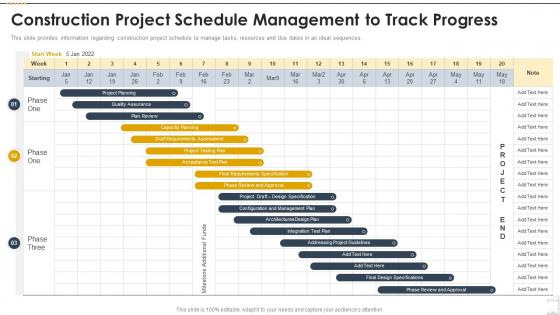
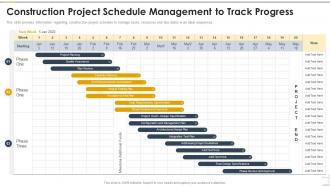
This slide provides information regarding construction project schedule to manage tasks, resources and due dates in an ideal sequences.
People who downloaded this PowerPoint presentation also viewed the following :
Construction Project Schedule Management To Track Progress Construction Playbook with all 6 slides:
Use our Construction Project Schedule Management To Track Progress Construction Playbook to effectively help you save your valuable time. They are readymade to fit into any presentation structure.





FAQs for Construction Project Schedule Management To Track
Honestly, start with stakeholder buy-in on your baseline schedule or you'll be fighting uphill battles later. Break everything down into realistic tasks with clear dependencies - the work breakdown structure is your foundation. Map out that critical path because those delays will kill you (and yeah, it always takes way longer than you'd expect). Resource allocation is where people mess up constantly - don't double-book your crews or equipment. Weather's gonna happen, so build in buffer time. Set up regular check-ins with solid milestones. Oh, and monitor progress religiously because things go sideways fast in construction.
Look, scheduling software will change your life - it auto-syncs everything and catches delays before they wreck your timeline. Your crew can update progress through mobile apps instantly instead of those useless weekly reports nobody reads anyway. I'd honestly start with just one solid platform first, but make sure everyone actually uses it (that's always the tricky part). Real-time data from IoT sensors and drones shows you what's really happening on site. Communication gets way better too since everyone's looking at the same info.
Man, the worst mistake is being way too optimistic with timing. Weather delays, permit BS, unexpected issues - they always happen. I learned this the hard way lol. Also trades stepping on each other is a nightmare - like when electricians show up but plumbing isn't finished yet. Build in 10-15% buffer time, seriously. Weekly meetings with your subs help tons. Update your schedule when things go sideways (and they will). Watch your critical path like a hawk and call out bottlenecks before they screw everything up.
So first thing - figure out how your scope change hits the critical path, that's where you'll really feel the pain. Add your new tasks, update durations, check for resource conflicts. Most PMs totally botch this part by rushing through it, don't be that person. Run some what-if scenarios to see your options. Get stakeholder buy-in on timeline impacts before you lock anything down. Oh and document literally everything - when the client freaks about delays, you'll want that paper trail showing how their "tiny tweak" blew up your whole schedule.
Dude, resource allocation is literally what makes or breaks your schedule. Don't just throw dates on a calendar hoping everything works out. Map out when your crew's actually free, when equipment arrives, if materials are even available yet. I've watched projects completely fall apart because nobody checked if the crane was booked somewhere else that week - rookie mistake honestly. Your timeline needs to factor in all those conflicts between different tasks. Build buffer time into everything and have backups ready. Oh, and always double-check your Gantt chart against what resources you can actually get before promising any deadlines to clients.
Honestly, get everyone involved right from the start - don't wait until things go sideways. Figure out who needs what kind of updates first. Some people are cool with weekly check-ins, others freak out without daily status reports. Those regular review meetings are clutch for catching issues early. Visual timelines beat the hell out of Excel sheets every time, trust me on this one. Talk to people in terms they actually care about - contractors want to know sequencing, clients just want their damn completion date. Pick a communication rhythm that doesn't drive anyone crazy and actually stick to it.
Honestly, I'd check in daily if it's a complex project - weekly bare minimum. Don't just look at percentages either, make sure the actual work quality is there. Your PM software should flag delays right away so you can shift other tasks around. I learned this the hard way, but being proactive beats scrambling to fix stuff later. Set up those automated alerts for critical path issues because things slip by way too easily otherwise. Oh, and tell everyone about changes immediately. Nobody likes project surprises - they're basically death sentences for timelines.
So basically, critical path shows you which tasks can't be delayed without screwing up your whole timeline. Map out your activities and dependencies first - the longest sequence is your critical path. Honestly, this stuff seems confusing at first but it clicks eventually. Any delays on those critical tasks push back everything. Non-critical work has float time though, so there's breathing room. Focus your best crews on the critical path stuff and monitor it closely. That's where you'll make or break your deadline. The rest can wait if needed.
Map out your biggest risks first - weather, permits, material delays, all that fun stuff. Then I'd build in extra time for activities that'll get hit hardest by those issues. Usually 10-20% buffer works for high-risk tasks. Don't just stick to one sequence either. If your electrician gets delayed, you want other work ready to go. Weekly check-ins with your team are huge for staying on top of this stuff. Honestly, the projects that update their risk assessment regularly are the ones that don't completely fall apart when something inevitably goes sideways.
Honestly, most contractors I know use either Primavera P6 or Microsoft Project - they're like the gold standard. Procore's been blowing up lately since it bundles everything together, which is pretty nice. My buddy's crew actually just uses Smartsheet and they're doing fine, but that probably won't cut it for bigger jobs. Monday.com is solid too if you want something that won't make your team hate you. Oh, and I've seen people work miracles with Excel templates, though that gets messy fast. Real talk though - pick whatever your crew will actually update regularly. Doesn't matter how fancy it is if it just sits there collecting digital dust.
Honestly, you've gotta bake in extra time from the start - I do like 10-15% buffer for each big phase. Delays are inevitable, it's just reality. Soon as something goes sideways, figure out how it'll mess with your critical path and tell everyone immediately. Don't sit there hoping it'll somehow work out (learned that the hard way). Update your timeline, maybe try running things in parallel or add some overtime hours. Document everything too - you might need it for claims later. Oh, and start keeping notes on what usually goes wrong. Makes you way better at seeing problems coming next time around.
Dude, start with schedule performance index (SPI) - tells you if you're behind or ahead. Then track your schedule variance for the actual time difference. Critical path delays will absolutely destroy you, so watch those like a hawk. I'd also monitor milestone achievement rates and how well you're using your resources. Labor productivity is key too, plus any weather delays or external stuff that screws up your timeline. Honestly, I think a lot of PMs overthink this and drown in spreadsheets. These five metrics are your bread and butter - build from there once you see what's actually happening with your project.
Look, good teamwork between contractors and subs can totally make or break your timeline. I've watched projects fall apart just because nobody was talking to each other. Weekly meetings from the start are a must - catch problems before they turn into disasters. The contractors who actually ask their subs for input during planning? Those are the smart ones, honestly. Subs know their stuff better than anyone. Bad communication just leads to scheduling nightmares and everyone blaming each other when deadlines get missed. Oh, and make sure everyone can see the updated schedule in real-time - sounds obvious but you'd be surprised how often that gets overlooked.
So milestone tracking is like having checkpoints throughout your project - foundation done, framing finished, electrical rough-in complete, that kind of thing. It's your best shot at catching problems early before they turn into expensive nightmares. I've watched way too many jobs fall apart because people weren't paying attention to these markers. Plus it keeps everyone on the same page about where you actually stand. Weekly check-ins work best in my experience. Flag delays the second you see them coming - waiting just makes everything worse.
So lean construction cuts out schedule waste by keeping work flowing smooth and getting everyone talking. Pull planning sessions are where the magic happens - trades work backwards from deadlines to spot problems before they bite you. Last Planner System sounds boring but it's actually clutch once crews buy in. Daily huddles catch stuff early too. Getting subs to think like actual partners instead of order-takers is probably the hardest part, honestly. Oh, and don't try to do everything at once. Pick one pilot project and nail the planning piece first - you can always expand from there.
-
Great product with highly impressive and engaging designs.
-
Informative design.