


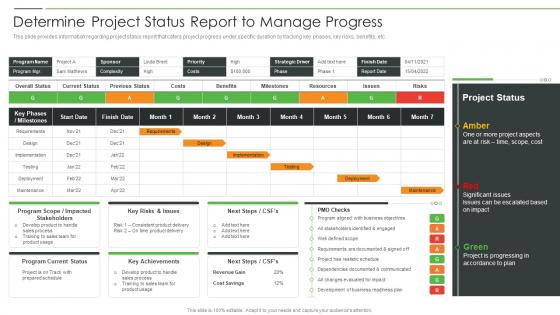
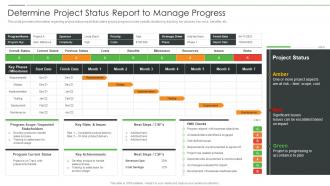
Project Product Management Playbook Determine Project Status Report To Manage Progress




Try Before you Buy Download Free Sample Product
 Impress Your
 Audience
 100%
100% Editable
 Save Hours
 of Time


This slide covers the challenges faced by the digital transformation along with the solutions to overcome such challenges.
People who downloaded this PowerPoint presentation also viewed the following :
Project Product Management Playbook Determine Project Status Report To Manage Progress with all 6 slides:
Use our Project Product Management Playbook Determine Project Status Report To Manage Progress to effectively help you save your valuable time. They are readymade to fit into any presentation structure.





FAQs for Project Product Management Playbook Determine Project Status Report
So for project status reports, definitely hit the basics first - how you're tracking against timeline and budget. Missed milestones are super important to call out. Risk stuff is honestly where most people mess up - you gotta flag potential problems early or you'll get blamed later. Team utilization rates might seem boring but execs eat that up, plus it actually helps you spot when someone's drowning. Quality metrics too if you're measuring that. Charts are your friend here because nobody reads walls of text anymore. The whole point is giving people what they need to make calls without info overload.
Break your risks into high, medium, and low buckets - makes everything cleaner. Here's the thing though: don't just dump a scary list of what might go wrong. That'll send everyone into panic mode. Pair each risk with your actual plan to fix it, plus realistic timelines. Write it so normal humans can understand, not in PM speak. Always assign who's handling what and when you'll check back in. I learned this the hard way - being proactive about updates saves you from those awkward "so what's the plan?" meetings later.
Definitely go with visuals that tell the story instantly - progress bars, red/yellow/green status lights, milestone timelines. I swear, most project reports are just text dumps that people pretend to read. Charts showing budget burn and task completion percentages? Money. Your stakeholders need to get the picture in like 10 seconds, not dig through paragraphs. Oh, and timeline charts for upcoming deadlines work great too. Don't go crazy though - maybe 3-4 key visuals max. More than that and you'll lose them. Pick whatever matters most for your specific project and audience.
Honestly, weekly reports are usually a good starting point for most stuff. But you've gotta read the room - if it's a high-stakes project or things are moving super fast, maybe daily updates make sense. For slower, stable projects? Monthly might be fine. I watched one team kill themselves doing daily reports that literally no one read. What a joke. Look at your timeline, how complex things are, and whether your stakeholders freak out easily. Start weekly, then see what people actually want. The goal is keeping everyone in the loop without making report-writing your full-time job.
Ugh, the worst thing you can do is be super vague - like saying "things are going well" instead of "finished 3 of 5 deliverables on time." Also don't bury the bad stuff at the end or write a freaking novel. I swear some people think longer = better but your stakeholders just want the highlights fast. Use bullet points and clear sections so they can scan quickly. Always start with an executive summary covering status, risks, and what's next. Oh, and never sugarcoat delays - they'll find out anyway and you'll look worse for hiding it.
Dude, you've got to tailor what you're sending to who's reading it. Execs want the high-level stuff - budget, timeline, major risks - formatted so they can skim it fast. Your team needs the actual operational details: task updates, what's blocking them, resources they need. I swear, nothing's worse than watching someone blast the same 3-page report to everyone and then act surprised when leadership tunes out. Like, your CEO doesn't care about that API bug, but your developers absolutely do. Either make two versions or at least put the right info at the top for each group. Trust me on this one.
So waterfall does these big formal reports at major milestones - lots of documentation, scheduled stakeholder meetings, the whole nine yards. Agile is way more casual though. Daily standups, sprint reviews, those burn-down charts everyone loves to hate. Waterfall reports look super official but honestly? They get outdated fast since you're not updating them constantly. Agile gives you real-time updates, which is great, but your stakeholders need to be cool with less formal communication. I'd say pick based on how much your project might change and what your stakeholders actually want to see.
Honestly, the right tools will save you so much headache with status reports. I'd start with something like Asana or Monday - they pull data straight from what your team's already doing, so no more hunting people down for updates. Real-time dashboards are a game changer too. You can set up automated reports that actually look professional and go out on schedule. The collaboration piece keeps everyone looking at the same numbers, which... trust me, that matters more than you'd think. Best part? You'll stop spending hours just gathering info and can focus on what it all means. Pick one tool that plays nice with whatever you're using now.
Yeah, status reports definitely help with accountability - nobody wants to be the person with nothing to show when everyone else is crushing it. People get way more motivated when they can see how their stuff fits into the big picture. Honestly, there's something weirdly satisfying about sharing your wins publicly too. The transparency thing really works because people start caring more about actual results instead of just showing up. Oh, and make sure you highlight both individual stuff and team victories in your updates. That balance between personal ownership and group success is chef's kiss.
Honestly, most status reports are just fancy spreadsheets and nobody reads them. Focus on decisions instead of just dumping data. Structure everything around three questions: what decisions do we need to make this week, who's stuck and needs help, and what risks need attention right now. Always call out who owns what and give them deadlines - then actually follow up next time to see if they did it. That's the difference between real project management and just... documenting stuff that happened. Oh and make sure there's clear ownership for every issue, otherwise things just sit there forever.
Honestly, you've gotta talk to your team more often - like weekly check-ins where people can actually bring up problems early. Don't just rely on those formal status reports because let's be real, everyone sugarcoats those. I'd pull data from your project tools too, comparing what actually got done versus what was planned. Track your burn rates and completion percentages. The big thing is making people feel safe to report bad news without getting blamed for it. Quick pulse surveys help catch stuff before it blows up. Oh and stand-ups are clutch for this kind of thing.
Honestly, just split it into wins and struggles - that's what works best. Lead with your accomplishments first: finished milestones, better metrics, good feedback. Then get real about what's sucking right now. Missed deadlines, not enough resources, whatever roadblocks you're dealing with. People actually respect the honesty way more than when you try to make everything sound perfect (learned that the hard way). The trick is pairing every problem with what you're gonna do about it. Shows you're not just complaining but actually handling shit. Your stakeholders will trust you more when they see you're being straight with them.
Honestly, RAG indicators are a lifesaver - red/amber/green dots help people scan info super quickly. Your exec summary needs to be like 2-3 sentences tops. What's different from last week? What decisions are waiting? Any blockers? That's it. Bullet points work way better than paragraphs for this stuff. I'd structure it as current status, then key risks or wins, then what's next. Oh, and dump all the technical details in an appendix - stakeholders can dig into that later if they want. Trust me, everyone's swamped these days, so making reports actually readable is huge.
After each status report, actually follow up and get feedback - don't just send it into the void. People will tell you straight up what worked and what didn't if you just ask them. Send a quick 3-question survey about the format, timing, what info was helpful, etc. Honestly, I've been shocked at how candid stakeholders get when you show you actually want to improve. Then tweak your template based on what they say. Make it a habit though, not just a one-off thing. The whole point is iterating until you've got something that actually serves everyone.
Honestly, go with the RAGYB thing - red/amber/green/yellow/blue status. Executives eat up that traffic light stuff. Three sections work great too: what you finished, what's next, and what's blocking you. Works for any project size really. I've watched people get way too fancy with dashboards when a basic one-page template gets the job done. Bigger projects might need budget tracking and milestones added in. Here's the thing though - pick one format and don't change it. Your stakeholders will thank you for the consistency instead of wondering what new template you'll surprise them with next month.
-
“I really like the convenient operation and professionalism I saw on the SlideTeam website. I want to express my regards and appreciation to the team.”
-
Extensive range of templates! Highly impressed with the quality of the designs.