

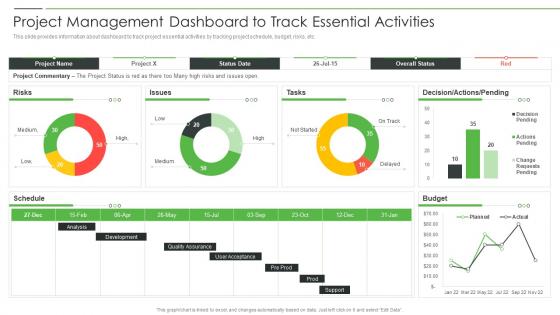
Project Product Management Playbook Project Management Dashboard




Try Before you Buy Download Free Sample Product
 Impress Your
 Audience
 100%
100% Editable
 Save Hours
 of Time


This slide covers the key areas where business can be improved due to introduction of artificial intelligence such as customer experience, employee productivity, cybersecurity, decision making, etc.
People who downloaded this PowerPoint presentation also viewed the following :
Project Product Management Playbook Project Management Dashboard with all 7 slides:
Use our Project Product Management Playbook Project Management Dashboard to effectively help you save your valuable time. They are readymade to fit into any presentation structure.





FAQs for Project Product Management Playbook
So there's five main phases: initiation, planning, execution, monitoring/controlling, and closing. First you define what you're actually trying to accomplish and set your scope. Then comes all the detailed planning - timelines, resources, that stuff. Execution is where things get real (honestly the most satisfying part). But here's what's tricky - you're monitoring constantly while executing, not just at the end. Adjusting plans, tracking progress, dealing with whatever pops up. Closing wraps it all up with handoffs and figuring out what you learned. Oh, and don't think these are strict steps - you'll bounce between planning and execution way more than you'd expect.
Document everything at the start - seriously, this saves your sanity later. Any new requests need formal approval through a change control process. People hate paperwork, so they'll think twice before asking for random additions. When changes do pop up, figure out how they'll mess with your timeline and budget first. Then explain those trade-offs to stakeholders clearly. They need to get what "yes" actually costs. Oh, and start a basic spreadsheet to track requests this week. I was shocked how fast those "tiny" changes pile up into something massive.
Dude, communication literally makes or breaks everything. I've watched so many projects crash because people just assumed everyone knew what was happening - spoiler alert, they didn't. You gotta do regular check-ins and actually make sure stakeholders get it, not just smile and nod. Clear documentation saves your ass too. Honestly? The teams that nail consistent communication rhythms from day one are the ones still standing when everything goes sideways. Don't skip this part - when crisis hits (and it will), you'll be so glad you did the boring stuff upfront.
Honestly, you gotta bake risk management into your planning right from the start. Figure out what could go wrong early - budget issues, resource problems, tech headaches, timeline disasters. Make a list of all these potential threats and rate how likely they are plus their impact. Then brainstorm ways to prevent or handle each one. Oh, and definitely assign someone to keep an eye on each risk area - can't just be a set-it-and-forget-it thing. I screwed this up on my last project and paid for it! Keep reviewing your risk list in team meetings because new stuff always pops up.
Honestly, the flexibility alone makes it worth switching - when clients inevitably change their minds (and trust me, they always do), you won't want to cry. Getting feedback every couple weeks instead of waiting months for some big reveal keeps everyone sane. Your team actually stays motivated because they see real progress happening. Problems get caught early when they're still cheap fixes, not expensive disasters at the end. Yeah, those waterfall timelines are soul-crushing, but with agile you can pivot fast without losing your mind. Maybe try it on just one project first to see how it goes?
Honestly, I always start with impact vs urgency - hit the big, time-sensitive stuff first, then move to important things that aren't on fire. Figure out what your team can actually handle (not their dream capacity, learned that the hard way). Match people based on their strengths and what they've got bandwidth for. Gantt charts or Kanban boards help you see the whole mess visually - makes bottlenecks way more obvious. Things change constantly though, so I review weekly. Oh, and definitely start by just listing everything and ranking by business value. Sounds boring but it works.
Ugh, remote PM is honestly such a pain sometimes. You're dealing with timezone nightmares, people going MIA, and trying to read the room through a screen - which is basically impossible. Communication gets so messy when everything's through Slack or email. Half the time you're wondering if that person's actually working or just online but watching Netflix. Setting clear processes from day one helps a ton, though I learned that the hard way. Also, you'll end up over-explaining everything because what seems obvious to you definitely won't be to your team when they're scattered across different cities.
So I'd focus on the basics first - schedule variance, budget stuff, and quality metrics. Weekly check-ins work great for comparing where you actually are vs where you planned to be. Dashboards showing percentage complete against your timeline are honestly more useful than getting lost in complex formulas (though earned value management is pretty slick if you're into that). Oh, and definitely watch for scope creep - that's what kills most projects. The trick is setting up these tracking methods from day one, not scrambling when everything's already falling apart.
Start with something like Asana or ClickUp for project management - honestly these all do basically the same thing so don't overthink it. Slack beats endless email chains for team chat. If you're billing clients, throw in Toggl for time tracking. Google Workspace handles all your doc sharing needs. The real trick? Stick to like 3-4 tools max. I've seen teams try to use everything and it's a mess. Better to pick a few decent ones and actually get everyone using them than constantly switching between apps. Oh and whatever you choose, make sure it plays nice with your existing setup.
Talk to your stakeholders constantly, but figure out how they actually want to hear from you first. Some love detailed emails, others just want bullet points or a quick call. I made this mistake once - kept sending these massive reports to execs who clearly just wanted the highlights! Set up regular check-ins, but here's the thing: don't just update them. Get them involved when problems pop up. Create ways for them to give feedback that actually matters. Oh, and dashboards work great for people who like checking things themselves. Start by literally asking each person how they prefer staying in the loop.
Honestly, recognition is huge - people need to feel appreciated for what they're doing. I'd start with regular one-on-ones so you can spot problems before they blow up. Clear goals matter too because nobody wants that "working in the dark" vibe that kills motivation. Communication is everything. Keep everyone updated on project status. And here's something I learned the hard way - actually remove the stupid obstacles your team faces instead of making them deal with bureaucracy alone. Maybe try weekly shoutouts? Team retrospectives work well too since people can celebrate wins and voice concerns. Small wins count more than you'd think.
Oh man, cultural stuff can totally mess with your project timelines if you're not careful. Some teams are super direct, others beat around the bush - leads to so much confusion about deadlines. Time zones suck obviously, but honestly the trickier part is how different cultures handle hierarchy and decision-making. Like, what's "urgent" in one place isn't necessarily urgent somewhere else, you know? I got burned on this German-Brazilian project once - learned my lesson there! Buffer time is your friend. Also set up communication rules early that actually work for everyone's style, not just yours.
A project charter is like your project's official permission slip - it gives you the green light and actual authority to start. Without one? You're basically doing work that could get axed tomorrow (trust me on this one). Include the project purpose, main requirements, key stakeholders, success criteria, plus budget and timeline estimates. When scope creep hits - and it will - this becomes your lifeline document that proves what everyone originally agreed to. Oh, and definitely get your sponsor to formally sign off before you do anything else. Saves so much drama later.
Right after each project phase wraps up, grab your team and do a quick debrief while it's all still fresh. Make a simple template - what worked, what sucked, what you'll do differently. Honestly, most teams skip this because they're already stressed about the next deadline, but that's how you end up making the same dumb mistakes over and over. Throw everything in a shared folder that people can actually find later (not buried somewhere random). Then when you start new projects, spend like 20 minutes looking at what went wrong before. Trust me, it's worth it.
Dude, be straight with your stakeholders about risks and timelines - don't sugarcoat it. I've watched way too many PMs crash and burn promising impossible deadlines just to impress people. Protect your team from crazy demands and actually give credit where it's deserved. Fair resource allocation matters too. Think about how your project affects users and communities (or even environmental stuff if relevant). Document your choices so there's real accountability. Never sacrifice quality just to hit some arbitrary date - that's how you end up with a mess later. Build these reality checks into your regular reviews starting now.
-
“Easy to use. I always wanted to have a quick search for products and SlideTeam has helped me have it.”
-
The PPTs are extremely simple to modify. Thank you for providing the slides that are ready to be used. They assist me in saving a lot of time.