

Project task management and time tracking dashboard




Try Before you Buy Download Free Sample Product
 Impress Your
 Audience
 100%
100% Editable
 Save Hours
 of Time


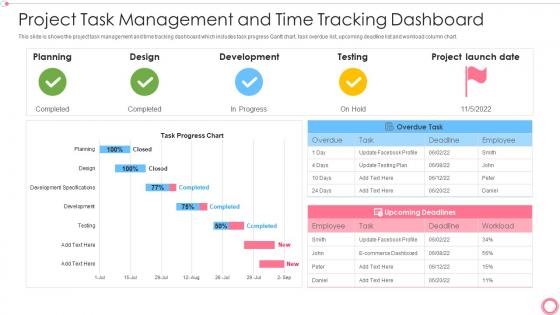
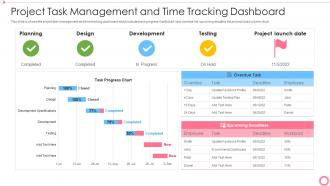
This slide is shows the project task management and time tracking dashboard which includes task progress Gantt chart, task overdue list, upcoming deadline list and workload column chart.
People who downloaded this PowerPoint presentation also viewed the following :
Project task management and time tracking dashboard with all 6 slides:
Use our Project Task Management And Time Tracking Dashboard to effectively help you save your valuable time. They are readymade to fit into any presentation structure.





FAQs for Project task management and
So there's five main phases that build on each other: initiation, planning, execution, monitoring, and closure. First you nail down scope and goals. Then comes planning - mapping timelines and resources (seriously, don't skip this part even if everyone's breathing down your neck for quick results). Execution is just doing the work. You'll monitor throughout to catch stuff before it goes sideways. Oh, and closure wraps everything up with deliverables and lessons learned. Each phase has specific outputs that feed the next one, so you get natural checkpoints. Planning honestly saves your sanity later.
Honestly, just talk to people constantly - that's what saves projects. Figure out who actually matters and what they care about first (usually totally different stuff). I do regular check-ins sharing both good news and problems. Don't wait for things to explode before telling anyone. Even when nothing's happening, I still send updates because silence freaks stakeholders out and they assume everything's falling apart. Schedule reviews at big milestones too. Being ahead of issues instead of always catching up makes such a difference. Trust me on this one.
Think of risk management as your project's safety net - catch problems before they blow up in your face. Start by brainstorming what could go sideways, then rate how likely each thing is to actually happen. Risk matrices are pretty clutch for this (they map probability against impact). SWOT analysis works too, or Monte Carlo sims if you're into that. Honestly though? Sometimes a simple spreadsheet does the trick just fine. The real secret isn't picking the fanciest tool - it's actually sticking with whatever you choose throughout the whole project, not just abandoning it after week one.
Honestly, Agile is a game-changer because you're not stuck following some massive plan that'll probably be wrong anyway. You work in short bursts - like 2-week sprints - then check if you're still on the right track. The constant feedback loop is clutch when your boss inevitably changes their mind halfway through (happens every single time). Short sprints mean you're shipping actual working stuff regularly instead of disappearing for months and hoping you built the right thing. Daily check-ins keep everyone aligned too. Start small with those 2-week cycles and you'll see how much more flexible your team gets.
Honestly, I'd start with weekly check-ins where everyone just says what they finished, what's next, and if they're stuck on anything. Nothing fancy. Then grab a project management tool - Asana's pretty solid, or Monday if your team likes the colorful interface thing. Set up clear deadlines and who owns what task. The automated progress reports are clutch because you'll catch problems early instead of scrambling last minute. Don't overthink it though. Pick one tool, stick to weekly meetings, then tweak based on how your team actually works together.
First thing - set up your communication rules early. Like which apps you're using, how fast people need to respond, meeting basics. Mix up how you connect with people since everyone's different - some live in Slack, others need actual face time. Watch out for the quiet ones who get talked over (happens all the time honestly). Visual stuff like dashboards work great because language barriers become less of a thing. Oh, and do regular check-ins where you straight up ask if communication is working. People won't tell you it sucks unless you ask directly.
Honestly, you've got to figure out who can actually do what before saying yes to anything. Map out everyone's skills and when they're free, then tackle your most critical stuff first. I made this mistake once - put my best dev on three projects simultaneously and it was a disaster lol. Buffer time is your friend because things always go sideways. Resource leveling helps avoid those crazy workload spikes that burn people out. Projects change constantly, so review weekly and adjust. Oh, and definitely keep a shared calendar so people aren't blindsided by each other's commitments.
So scope creep is basically when your project keeps growing with little "oh can we just add this real quick" requests. Super annoying but totally preventable. Document everything upfront - like seriously, write it all down. Then when people ask for extras, you can say "love that idea, let's do it in round two" instead of just saying yes to everything. Weekly check-ins help catch this stuff early. Oh and always show them how their "small" changes affect timeline and budget. Makes people think twice, trust me.
Definitely get a project management thing first - Asana or Trello work great for tracking everything. Slack is a game changer for team chat, seriously wish I'd started using it sooner. You'll need Google Drive or Dropbox for files obviously. Oh and if you're billing clients, Toggl's really good for time tracking (though honestly it's kinda depressing seeing where your hours actually go lol). Don't go crazy with too many tools though. Pick like 3-4 max and make sure everyone actually uses them consistently.
Do it right after each project ends - memories fade fast. Make a simple doc with what worked, what sucked, and what to change next time. I usually do categories like risks and communication problems. Store it somewhere people actually look (seriously, not SharePoint - that's where documents go to die). The trick is making someone review old lessons when starting new projects. Pull up similar past stuff during your kickoff meetings. Oh and make it searchable so you're not digging through random folders later.
Okay so a project charter is basically your roadmap that keeps everyone on the same page about what you're actually doing. Mine saved my butt last month when my stakeholders kept adding random stuff. You'll want to include your main goals, scope boundaries, who's involved, rough timeline and budget estimates. Also throw in success criteria and major risks you can think of upfront. It defines what authority you have as PM too. Honestly, it's like having receipts when people try to change everything later - you just point back to what everyone originally agreed on. Super helpful for avoiding those "wait, I thought we were doing X instead" conversations.
Honestly, you've got to become ruthless about priorities. Map everything against your main goals and deadlines first. When people show up with "urgent" stuff (which happens constantly, ugh), make them explain how it fits those goals. I use a simple matrix - critical, important, or nice-to-have. Works every time. Be super transparent about trade-offs too. New request comes in? Cool, what's getting bumped then? Write this stuff down so you can reference it later when people inevitably forget. Set up regular check-ins because priorities shift constantly anyway.
Honestly, I'd start with just one thing - those daily check-ins where everyone can actually speak up about problems or wins. Sounds boring but it really does keep people connected. Recognition is huge too - call out good work as it happens, not just at the end when everyone's already burned out. Give people real ownership over their chunks of the project so they actually care about the outcome. Oh, and create a space where admitting you screwed up won't get you thrown under the bus. That's probably the hardest part but makes everything else work better. Pick one of these and do it consistently rather than half-assing all of them.
Honestly, remote PM is all about digital tools and async stuff since you can't just walk over to someone's desk. Time zones will mess with you. Also keeping everyone motivated when they're working from their couch is harder than you'd think. What used to be a quick chat now turns into scheduling a whole video call - it's annoying but whatever. You'll end up over-communicating everything because you can't assume people are on the same page. Set up solid processes early and use platforms where you can actually see what everyone's doing. Trust becomes huge when you can't physically check in.
Look at four main things when you wrap up a project. Did you hit your deadlines? That's your schedule performance right there. Budget-wise, see how close you stayed to what you planned - and figure out where the money went if you went over. Quality stuff matters too - defect rates, how happy customers were, whether deliverables got accepted without drama. Oh, and don't skip stakeholder feedback! Seriously, I see people forget this all the time but it tells you way more about actual success than spreadsheets do. Maybe set up some kind of simple scorecard you can use again later?
-
Professional and unique presentations.
-
Perfect template with attractive color combination.