


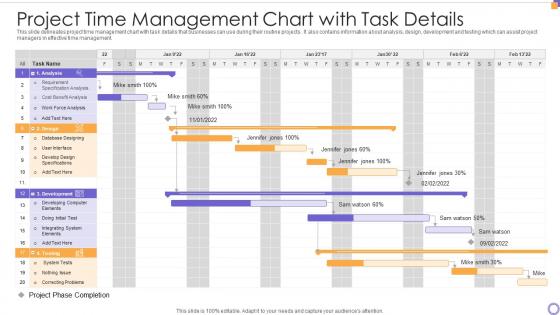
Project Time Management Chart With Task Details




Try Before you Buy Download Free Sample Product
 Impress Your
 Audience
 100%
100% Editable
 Save Hours
 of Time


Our Project Time Management Chart With Task Details are topically designed to provide an attractive backdrop to any subject. Use them to look like a presentation pro.
People who downloaded this PowerPoint presentation also viewed the following :
Project Time Management Chart With Task Details with all 6 slides:
Use our Project Time Management Chart With Task Details to effectively help you save your valuable time. They are readymade to fit into any presentation structure.





FAQs for Project Time Management Chart
Start with a clear scope - know what you're actually building. Break everything down into smaller tasks and estimate realistically (we all suck at this initially). Map out dependencies so you know what can't start until other stuff finishes. Buffer time is crucial because something always goes wrong. I learned this the hard way! Regular check-ins keep things on track since projects have a sneaky way of derailing themselves. Gantt charts work great, but honestly whatever tool your team will actually use is fine. Build in some wiggle room while still holding people to deadlines.
Honestly, start with what you've done before - dig into similar tasks from old projects. That's your goldmine right there. Break big stuff down into smaller pieces because estimating a few hours is so much easier than guessing at weeks. Always pad your estimates though. Trust me on this one - weird stuff always comes up. Talk to whoever's actually doing the work too. They'll catch details you totally missed. Oh, and start keeping track of how long things really take vs what you thought. Makes you way better at this over time. It's kinda like learning to cook - you get the timing down eventually.
Honestly, Asana and Monday.com are your best bet if you want those nice visual Gantt charts. Trello's decent for simple stuff but gets annoying fast when projects get complex. Microsoft Project is like bringing a bazooka to a water fight - way too much unless you're managing something huge. Oh, and Notion's actually pretty sweet if you're into building custom setups (I got a bit obsessed with it last year). But here's the thing - pick whatever your team will actually open every day. I've seen so many fancy tools just collect digital dust because nobody wanted to use them.
Ugh, been there! First thing - figure out what went wrong and how behind you actually are. Check if it's hitting your critical path or just some side task (hopefully the latter). You've got a few moves: throw more people at it, run tasks in parallel instead of sequentially, or honestly just cut some scope if you can swing it. The worst thing you can do is stay quiet and hope it fixes itself - I learned that one the hard way. Get ahead of it with your stakeholders. Show them what happened and your game plan to recover. Way better than scrambling at the deadline.
Look, good stakeholder communication is like having radar for project disasters. Regular updates mean they'll actually tell you about roadblocks or scope changes before everything goes sideways. Nobody wants surprise delays dumped on them last minute - clear communication manages their expectations about what's realistic. When you do need to shift timelines or move resources around, they're way more likely to support you if they've been in the loop. I usually do weekly emails or quick calls, whatever works. Honestly, I'd rather slightly annoy people with too many updates than have to explain later why we're three weeks behind.
Try the MoSCoW method - just sort everything into Must have, Should have, Could have, or Won't have. Seriously helps cut through all the noise. Next, map out dependencies because some tasks will block others no matter what. The Eisenhower Matrix is solid too for separating urgent stuff from what's actually important (we mix those up constantly). Oh, and estimate how long each thing takes. Knock out some quick wins first to get rolling. Honestly, MoSCoW alone will probably solve half your problems. Start there tomorrow.
So basically, critical path shows you which tasks will totally screw your deadline if they get delayed. Map out all your activities and how they connect, then find the longest chain from start to finish - that's your critical path. Once you figure it out (most PM tools do this automatically anyway), you'll know exactly where to put your energy. Any hiccup on those critical tasks pushes everything back. I usually throw extra resources at critical stuff or build in some cushion time. Honestly, it's pretty eye-opening when you first see which tasks actually matter for your timeline versus the ones that don't.
Honestly, timeboxing saved my life when I started doing agile. Break everything into 1-4 week sprints and stick to those lengths religiously. Daily standups catch problems before they explode - which happens more than you'd think. Story points are confusing at first but you'll get the hang of it. Burn-down charts show if you're actually making progress or just spinning wheels. Oh, and retrospectives aren't just busy work - they'll show you what's killing your momentum. Short iterations mean you can pivot fast instead of realizing three weeks later that your estimates were garbage. Start simple and don't overcomplicate it.
Honestly, start by figuring out what your team can actually handle right now. I make a basic spreadsheet - sounds boring but trust me, it's worth it - showing everyone's availability and hours. Work backwards from your deadline to see if the math adds up. Spoiler alert: it probably doesn't. When there's a gap (and there usually is), you've got three moves: push the deadline, get more people, or cut stuff out. Don't wait until you're panicking to have these talks. Get real about your bandwidth this week first though.
Honestly, most people suck at estimating how long stuff takes. Break everything down into tiny pieces - it's way easier to guess "this will take 2 hours" than "this whole project needs 3 weeks." Always pad your timeline by like 20-30% because something will go wrong. Scope creep is brutal too - stakeholders will definitely try sneaking in extra features. Just say no (nicely). Oh, and actually track your time vs what you predicted. I used to be terrible at this but you start seeing patterns in what always takes longer than expected.
Honestly, just start tracking your actual vs planned hours for everything - even small tasks. You'll spot patterns super quickly, like how you always lowball testing time (guilty as charged). Past projects are goldmines for this stuff. I keep notes on what slowed me down, when resources weren't available, clients who took forever to respond. Build your own little database of "oh right, this type of thing always takes longer." Even with just a couple projects tracked, you'll get way better at estimating. It beats wild guessing every time.
So buffer time is like your insurance policy against project disasters. I always add 10-20% extra time to critical tasks because something will go wrong - trust me on this. Maybe it's scope creep, maybe Dave from accounting takes forever to approve things (there's always a Dave). One delay hits and suddenly your whole timeline's screwed. My first couple projects taught me this lesson the hard way when everything domino-effected into chaos. Now I build cushions around major milestones and deliverables. Honestly saves so much stress later.
Ugh, time crunch situations are the worst. You're basically stuck with that whole "pick two" thing - fast, good, or complete. Something's gotta give. Like, you can push the deadline, cut features, or ship something that's kinda rough around the edges. Adding more people sometimes helps but honestly? That gets expensive fast and doesn't always work anyway. My advice is don't wait until you're totally screwed to have this conversation. Hit up your stakeholders now and make them choose what actually matters most to them.
Break it down into smaller chunks first - way easier to estimate pieces than the whole mess. I learned this the hard way on my last project lol. Look at similar stuff you've done before for reference points. Always tack on 20-30% extra time because everything takes longer than you think it will. Dependencies between tasks will bite you if you don't plan for them. Also check when your team's actually available - sounds obvious but I forget this constantly. Track how long things really take so you get better at this over time. Being realistic about complexity beats being optimistic every single time.
Honestly, just get your team to estimate their own stuff from day one - they actually know how long things take way better than we do. I made this mistake with my devs and it was brutal lol. Break everything into smaller pieces and check in regularly, but don't be that manager who freaks out over delays. When someone says "this is gonna take longer," believe them! The whole thing works better when people own their timelines instead of you just throwing deadlines at them. Start small - have everyone estimate what they're working on this sprint and see how it goes.
-
Excellent Designs.
-
Graphics are very appealing to eyes.