

Project Planning Playbook Powerpoint Presentation Slides




Try Before you Buy Download Free Sample Product
 Impress Your
 Audience
 100%
100% Editable
 Save Hours
 of Time


The Project Planning Playbook comprises planning methodology showcasing basic templates to ensure projects progress within assigned cost, scope, and time. Here is an efficiently designed Project Planning Playbook which enables consistent engagement of project management professionals through improved communication across various development stages. Templates for managing the project initiation stage include maturity assessment, project management office charter, project portfolio assessment, and feasibility assessment. Project planning is managed by work breakdown structure, project tasks responsibility assignment matrix, project scheduling, project budget plan. Project execution comprises of change request log management project status report. Project control contains key milestones tracking, risk management plan, quality plan. Project closure covers project acceptance documents, lessons learned for post-project evaluation, and project closure checklist. Moreover, the playbook covers details about the project team with key people involved, the role of the project manager, staff training schedule. The project communication management through stakeholder communication plan, project internal and external communication channels. The project progress is assessed through project essential activities tracking dashboards. Get access now.
People who downloaded this PowerPoint presentation also viewed the following :
Content of this Powerpoint Presentation
Slide 1: This slide introduces Project Planning Playbook. State Your Company Name and begin.
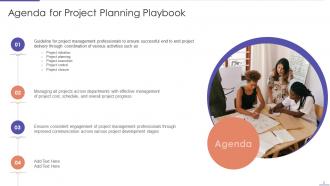
Slide 2: This slide states Agenda of the presentation.
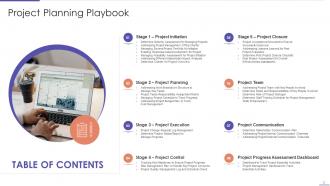
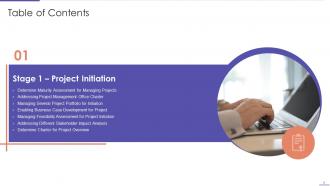
Slide 3: This slide presents Table of Content for the presentation.
Slide 4: This slide shows title for topics that are to be covered next in the template.
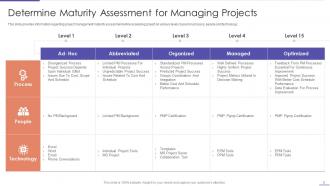
Slide 5: This slide provides information regarding project management maturity assessment.
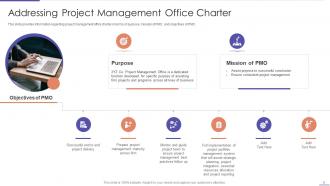
Slide 6: This slide displays information regarding project management office charter.
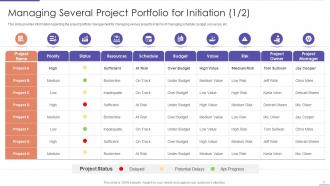
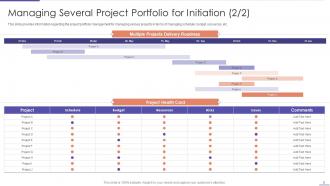
Slide 7: This slide showcases project portfolio management for managing various projects in terms of managing schedule, budget, resources, etc.
Slide 8: This slide represents Managing Several Project Portfolio for Initiation.
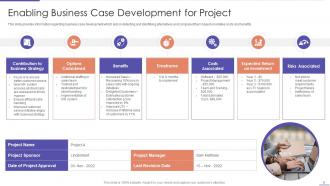
Slide 9: This slide presents information regarding business case development.
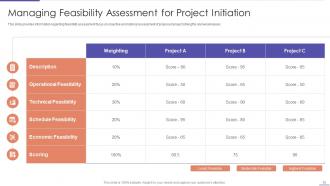
Slide 10: This slide displays feasibility assessment focus on objective and rational assessment of proposed project.
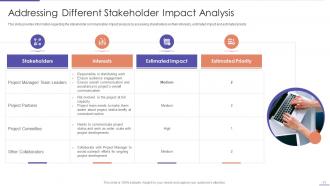
Slide 11: This slide represents Addressing Different Stakeholder Impact Analysis.
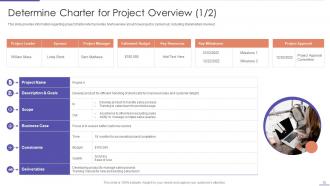
Slide 12: This slide showcases information regarding project charter which provides brief overview about how project is carried out.
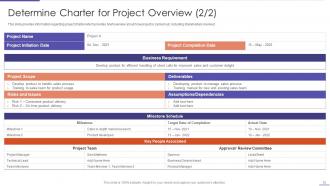
Slide 13: This is another slide continuing Determine Charter for Project Overview.
Slide 14: This slide shows title for topics that are to be covered next in the template.
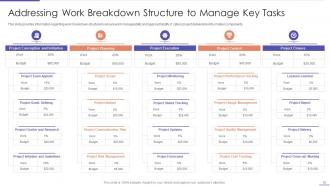
Slide 15: This slide presents Addressing Work Breakdown Structure to Manage Key Tasks.
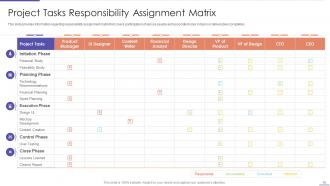
Slide 16: This slide showcases information regarding responsibility assignment matrix.
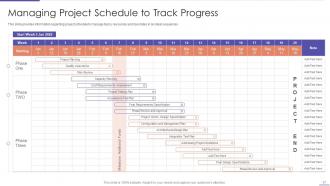
Slide 17: This slide provides information regarding project schedule to manage tasks.
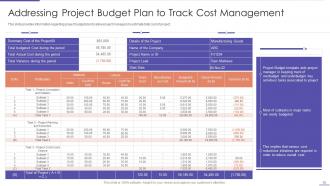
Slide 18: This slide shows Addressing Project Budget Plan to Track Cost Management.
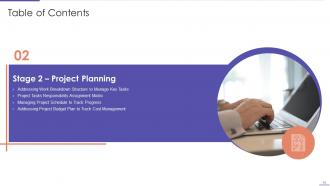
Slide 19: This slide shows title for topics that are to be covered next in the template.
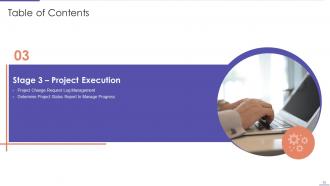
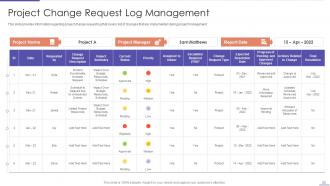
Slide 20: This slide presents information regarding project change request log that covers list of changes.
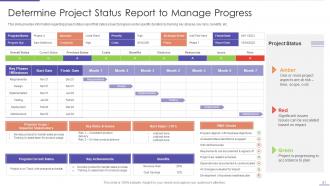
Slide 21: This slide displays Determine Project Status Report to Manage Progress.
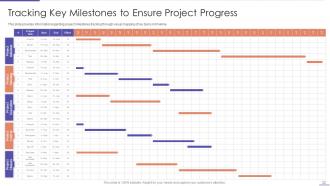
Slide 22: This slide provides information regarding project milestones tracking.
Slide 23: This slide shows title for topics that are to be covered next in the template.
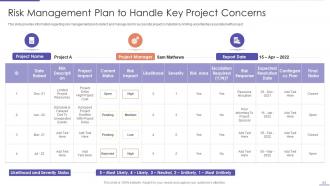
Slide 24: This slide represents Risk Management Plan to Handle Key Project Concerns.
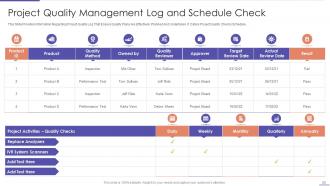
Slide 25: This slide showcases Project Quality Management Log and Schedule Check.
Slide 26: This slide shows title for topics that are to be covered next in the template.
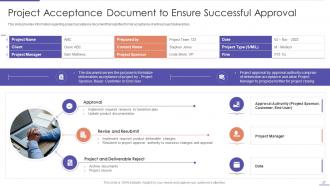
Slide 27: This slide presents Project Acceptance Document to Ensure Successful Approval.
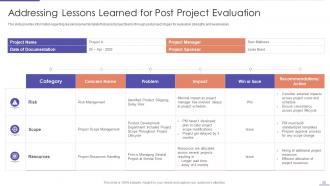
Slide 28: This slide displays Addressing Lessons Learned for Post Project Evaluation.
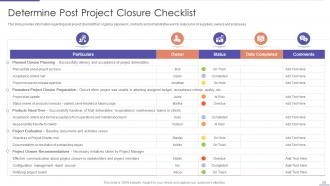
Slide 29: This slide provides information regarding post project checklist.
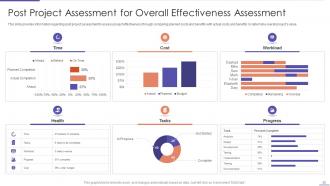
Slide 30: This slide represents Post Project Assessment for Overall Effectiveness Assessment.
Slide 31: This slide shows title for topics that are to be covered next in the template.
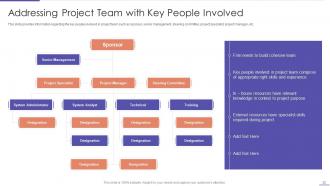
Slide 32: This slide presents Addressing Project Team with Key People Involved.
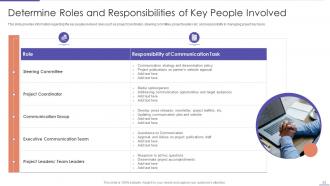
Slide 33: This slide displays Determine Roles and Responsibilities of Key People Involved.
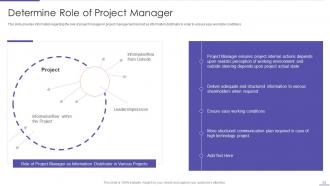
Slide 34: This slide provides information regarding the role of project manager in project management.
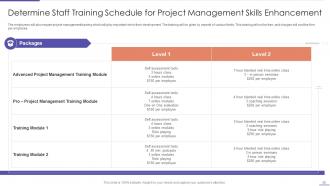
Slide 35: This slide represents Determine Staff Training Schedule for Project Management Skills Enhancement.
Slide 36: This slide shows title for topics that are to be covered next in the template.
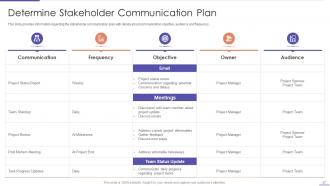
Slide 37: This slide showcases Determine Stakeholder Communication Plan.
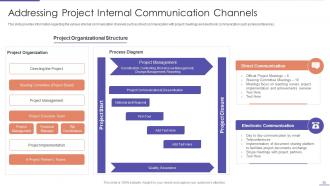
Slide 38: This slide provides information regarding the various internal communication channels.
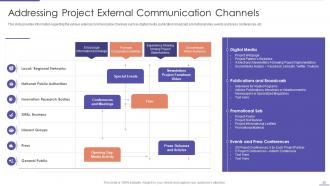
Slide 39: This slide presents regarding the various external communication channels such as digital media, publication broadcast, etc.
Slide 40: This slide shows title for topics that are to be covered next in the template.
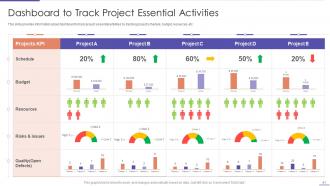
Slide 41: This slide presents Dashboard to Track Project Essential Activities.
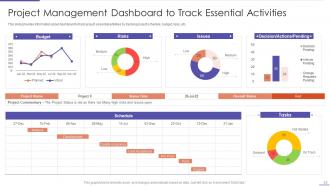
Slide 42: This slide showcases Project Management Dashboard to Track Essential Activities.
Slide 43: This slide displays Icons for Project Planning Playbook.
Slide 44: This slide is titled as Additional Slides for moving forward.
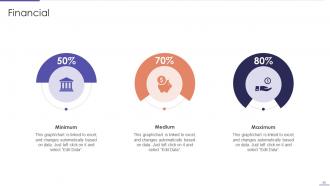
Slide 45: This is a Financial slide. Show your finance related stuff here.
Slide 46: This is an Idea Generation slide to state a new idea or highlight information, specifications etc.
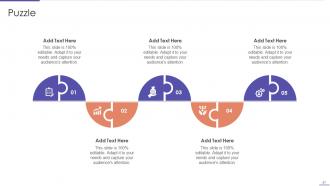
Slide 47: This slide contains Puzzle with related icons and text.
Slide 48: This slide depicts Venn diagram with text boxes.
Slide 49: This slide provides 30 60 90 Days Plan with text boxes.
Slide 50: This slide presents Roadmap with additional textboxes.
Slide 51: This slide shows Post It Notes. Post your important notes here.
Slide 52: This is a Timeline slide. Show data related to time intervals here.
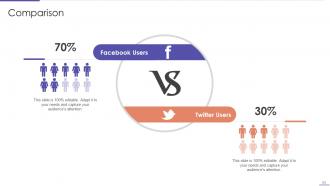
Slide 53: This is a Comparison slide to state comparison between commodities, entities etc.
Slide 54: This is Our Target slide. State your targets here.
Slide 55: This is a Thank You slide with address, contact numbers and email address.
Project Planning Playbook Powerpoint Presentation Slides with all 60 slides:
Use our Project Planning Playbook Powerpoint Presentation Slides to effectively help you save your valuable time. They are readymade to fit into any presentation structure.





FAQs for Project Planning Playbook
So for your playbook, start with project scope definition and stakeholder mapping - seriously, don't skip that second one or you'll hate yourself later. Timeline templates are clutch, plus you need risk assessment stuff and communication protocols. Oh and definitely include resource allocation guidelines and milestone tracking. Scope creep will happen no matter what, so build in a change management process from day one. The really good playbooks I've seen throw in lessons learned templates too. Post-project reviews help but honestly half the team usually bails on those. Just customize whatever you pick based on how your team actually works.
Start with your basic playbook framework, then swap out the industry stuff. Healthcare projects need FDA approval stages, software focuses on sprints and user testing - that kind of thing. Replace generic milestones with whatever matches your sector's regulations and project phases. Honestly, the templates should sound like your industry too. Nobody wants to see "manufacturing quality gates" in their marketing plan (been there, it's awkward). Keep the core project management principles but customize workflows and stakeholder roles. Oh, and definitely pilot it on something smaller first. Trust me on that one.
Dude, you absolutely have to get stakeholders involved from day one - I can't stress this enough. Map out everyone who'll be impacted or has any say in your project. Then actually talk to them during planning, not after. Trust me, I've watched so many solid projects completely implode because someone didn't bother including the right people early on. Regular check-ins with your key players will save you from nasty surprises later. Plus you'll get way better requirements and timelines that actually make sense. It's honestly the difference between smooth sailing and total chaos.
Okay so SMART goals are actually clutch here - specific, measurable, achievable, relevant, time-bound. Don't just say "improve user experience." That's useless. Say something like "boost user satisfaction from 3.2 to 4.0 by Q3." Numbers make everything clearer. Break the big stuff into smaller chunks you can track monthly. Oh and pick metrics your stakeholders actually care about, not just whatever makes pretty charts. I've seen way too many teams obsess over vanity metrics that don't move the needle. The whole thing falls apart if you're measuring the wrong stuff anyway.
Honestly, just write the damn things down instead of trying to remember everything. Get your team together and brainstorm what could blow up, then figure out which ones are likely vs just theoretical nightmares. I keep a basic risk tracker that we peek at weekly - sounds super corporate but trust me, it's worth it when stuff hits the fan. High-impact risks need actual plans, not just wishful thinking. Oh, and throw in a quick risk check during regular meetings. New problems always pop up mid-project, so you'll want to catch them before they steamroll you.
Dude, Gantt charts are seriously a lifesaver for this stuff. They show everything - tasks, dependencies, progress - in one visual that people actually get. Timeline roadmaps work too if you want the big picture view. I've honestly watched people overcomplicate these things until nobody understands what's happening anymore. Colors help a ton - red for delays, green for done, whatever makes sense. Always throw in today's date so everyone knows where you're at right now. Oh, and build in buffer time visually because otherwise you'll spend forever explaining why dates keep moving around. Kanban boards are cool too if workflow's your focus.
Miro's been a game-changer for our brainstorming sessions - way better than trying to sketch ideas over Zoom calls. For project stuff, Asana keeps everyone on track without being annoying about it. Google Docs works fine for planning, though my team's obsessed with Notion lately. Pick your communication channels early and stick to them. I've watched projects completely fall apart because half the team was in Slack while others were emailing. Also, don't go overboard with tools - start with maybe two that people will actually use. Regular check-ins help but keep them short. Trust me, you don't want people working in silos on this stuff.
Honestly, don't wait until the end to think about budget - that's a recipe for disaster. Set your spending limits right at the start and break everything down by phase or whatever makes sense. Track your actual costs weekly (not monthly, trust me on this). Most projects die because people forget to check their spending regularly. I usually just throw together a simple spreadsheet - nothing fancy needed. Build in time for budget check-ins when you're planning your timeline. Catch problems early before they become real headaches. Oh, and always flag variances the second you spot them.
Honestly, the worst thing you can do is make it too rigid. I've seen so many teams create these massive, complicated playbooks that nobody ever touches - total waste of time. Don't build it alone either, you need input from people who'll actually use the thing daily. Otherwise you'll just have another dusty document sitting in some shared folder. Start simple and test it on a smaller project first. See what works, what doesn't. Make sure it's flexible enough for different types of work too, because let's be real - no two projects are exactly the same. Get feedback early so you're not stuck rebuilding everything later.
Build your playbook like building blocks instead of a rigid manual. Teams should be able to grab what they need and skip what doesn't fit. Honestly, I've watched so many of these things just collect dust because they're way too strict. Set up quarterly check-ins where people can actually tell you what sucks and what works. Oh, and definitely put someone in charge of keeping it fresh—otherwise it'll get outdated fast. Include backup plans for weird situations too. The whole thing should feel more like a wiki that grows with you, not some corporate bible nobody wants to read.
Honestly, you'll want to watch four main things. Schedule variance is huge - are you actually hitting deadlines or just moving them around constantly? Budget variance shows if your cost guesses were even close to reality. Then there's scope creep percentage, which... let's be real, happens to literally every project I've ever seen. Team velocity tells you if you planned resources right. Oh, and stakeholder satisfaction scores matter way more than people think - grumpy stakeholders = planning problems. Start tracking this stuff from the beginning, not when everything's already falling apart.
Build those feedback checkpoints right into your timeline from day one. Don't wait until the end when everything's already set in stone - trust me, learned that lesson the hard way! I'd do quick check-ins weekly with your team so people can raise red flags early. Maybe set up a casual Slack channel too, not just formal meetings. Actually, some of my best feedback comes from random hallway conversations anyway. Start with one simple feedback loop and add more as you go. The trick is making it feel normal, not like extra work nobody wants to do.
Honestly, set up roles and communication rules from day one - saves you so much headache down the road. Do regular check-ins so people can actually speak up instead of silently seething for weeks (I've watched entire projects crash because of this). Don't wait for conflicts to magically disappear - they won't. Jump on issues fast. Make it safe for people to disagree and share weird ideas. Celebrate wins AND failures equally. Oh, and whatever vibe you bring, your team will mirror it back. So if you want collaboration, be collaborative yourself. Maybe bring this up in your next retro?
Ok so first thing - map every project outcome to what the executives actually give a damn about. Don't let your playbook become one of those things that sits on a shelf collecting dust when priorities change (which they always do). Set up checkpoint reviews during quarterly planning to double-check you're still aligned. Also throw in some templates that make PMs spell out how their work connects to big-picture goals. Oh and make these connections visible somehow - not just a box-checking thing at kickoff. The whole point is keeping it trackable so leadership can see the value.
Honestly, start with whatever's bugging you most - if it's tracking tasks, grab Asana or Monday. Slack keeps everyone talking without endless email chains. For visual stuff, Miro's clutch for wireframing and planning sessions. I've been using Notion obsessively lately (probably too much tbh) but it's sick having your playbook and project tracker together. Oh, and get Toggl or something similar - you'll be shocked where your time actually goes vs where you think it goes. Don't try implementing everything at once though, you'll just overwhelm yourself.
-
SlideTeam’s pool of 2Million+ PPTs has really benefited my team, everyone from the IT department to HR. We are lucky to have crossed ways with them.
-
Topic best represented with attractive design.