

Cyber Phishing Powerpoint Ppt Template Bundles




Try Before you Buy Download Free Sample Product
 Impress Your
 Audience
 100%
100% Editable
 Save Hours
 of Time


Our Cyber Phishing Powerpoint Ppt Template Bundles are topically designed to provide an attractive backdrop to any subject. Use them to look like a presentation pro.
People who downloaded this PowerPoint presentation also viewed the following :
Cyber Phishing Powerpoint Ppt Template Bundles with all 19 slides:
Use our Cyber Phishing Powerpoint Ppt Template Bundles to effectively help you save your valuable time. They are readymade to fit into any presentation structure.
-
Cyber Phishing
-
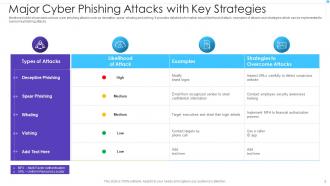
Major Cyber Phishing Attacks with Key Strategies
-
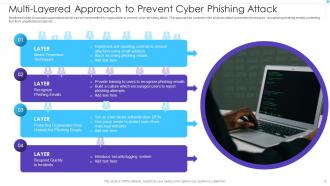
Multi Layered Approach to Prevent Cyber Phishing Attack
-
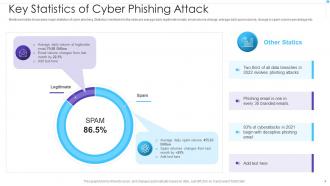
Key Statistics of Cyber Phishing Attack
-
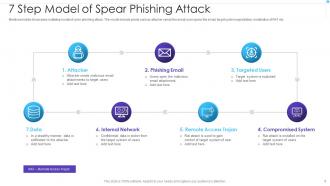
7 Step Model of Spear Phishing Attack
-
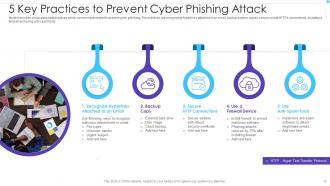
5 Key Practices to Prevent Cyber Phishing Attack
-
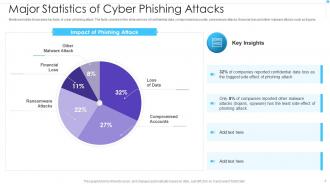
Major Statistics of Cyber Phishing Attacks
-
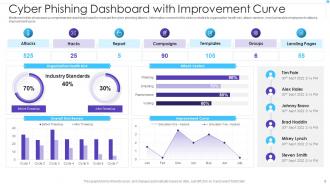
Cyber Phishing Dashboard with Improvement Curve
-
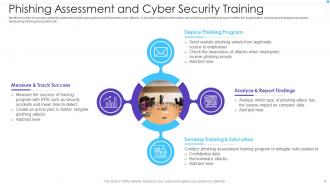
Phishing Assessment and Cyber Security Training
-
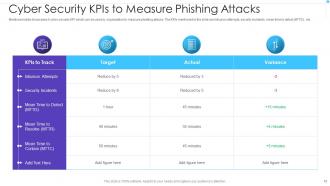
Cyber Security KPIs to Measure Phishing Attacks
-
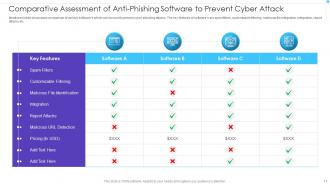
Comparative Assessment of Anti Phishing Software to Prevent Cyber Attack
-
Icon of Hacker Launching Cyber Phishing Attack
-
Cyber Phishing Attack Icon to Steal Confidential Data
-
Cyber Phishing
-

-

-

-

-

FAQs for Cyber Phishing Powerpoint
The big ones are email phishing - you know, fake "bank" emails and stuff. Spear phishing is worse though, they actually research you first. Smishing comes through texts now too. Phone calls (vishing) still work surprisingly well because people trust voices more than emails, which is kinda weird when you think about it. They're also cloning legit websites to steal login info. Honestly the sophistication is pretty crazy these days. Just double-check email addresses before clicking anything, or better yet go straight to the actual website yourself.
Okay so first thing - if they're being super pushy about "act NOW!" that's sketchy. Also check the sender's email address, like if it says it's from Apple but comes from some random Gmail account lol. Generic greetings are another giveaway instead of using your actual name. Grammar errors used to be a dead giveaway but honestly scammers are getting way better at that now which is annoying. Don't give out passwords or SSN over email - legit companies won't ask for that stuff. Before clicking anything, hover over links to see where they actually go. When you're unsure, just call the company directly.
Phishing works because attackers mess with your head, not just your computer. They'll pretend to be your boss or bank, then craft messages designed to make you panic or get curious. Like they know exactly which buttons to push, you know? The whole thing exploits how we naturally want to help people or avoid trouble. They create fake urgency so you don't stop to think. My rule is always double-check before clicking anything - especially if it feels rushed or sounds too good to be true. Trust me, that extra 30 seconds can save you major headaches.
Ugh, phishing has gotten so much scarier lately. They're using AI now to write emails that actually sound like your boss - it's creepy how good they are. And it's not just email anymore either. I've seen fake texts, sketchy social media messages, even those QR codes you scan can be traps. People get way too comfortable on their phones too, which doesn't help. The fake websites are insane - they'll clone your bank's login page perfectly. Honestly, my rule is just be paranoid about anything urgent, especially if they want passwords or money. Better safe than sorry.
Dude, phishing is no joke legally speaking. These people get hit with wire fraud, identity theft, computer fraud - we're talking 20+ years and huge fines. The FBI goes hard on this stuff now, especially when it crosses state lines. Even smaller operations usually end up as felonies since victim losses pile up fast. International cases get messy with extradition but domestic ones? They prosecute aggressively. If this happened at your work, document everything and report to local cops plus the FBI's IC3 thing. The paper trail actually matters for getting convictions later.
Honestly, phishing simulations are your best bet here. Send fake phishing emails to see who bites, then train whoever clicks immediately after. Sounds kinda mean but it actually works really well! Monthly training sessions help too - cover new tactics people are using. Oh, and teach simple stuff like hovering over links before clicking to check URLs. Don't make it a one-and-done thing though, it needs to be ongoing. I'd start with a test simulation next week just to see where everyone's at right now.
Dude, start with whatever email protection your provider already has - Gmail and Outlook's built-in filters are actually pretty decent. Then grab uBlock Origin for your browser, it's free and blocks tons of sketchy stuff. If you're dealing with work stuff, maybe look into something beefier like Proofpoint or Mimecast, but honestly? Most people don't need enterprise-level protection. The key is using multiple layers together. I'd say just enabling spam filtering plus a browser extension catches like 90% of the crap that comes your way. Way better than relying on one thing.
Oh no! First thing - change your passwords right away, especially for any accounts you might've given info for. Call your bank if you shared financial stuff. Run an antivirus scan too since some phishing emails have malware hiding in them. Don't feel terrible about it, seriously happens to everyone these days. Keep an eye on your accounts for weird activity. If it's work-related, definitely tell your IT people - they've probably seen worse. You could also put a fraud alert on your credit reports just to be safe. Moving fast is what matters most here.
So basically, scammers go after regular people for quick wins - your password, credit card, whatever. But companies? That's where the real money is. You'll get those obvious fake Amazon emails or bogus bank alerts. Companies face way more sophisticated stuff though. Hackers actually research employees on LinkedIn, pose as vendors, create whole elaborate schemes to trick accounting into wiring cash. Makes sense when you think about it - why steal hundreds when you could steal millions? My advice: always double-check weird requests through a different channel. Especially anything involving money. Trust me on this one.
Oh man, there've been some crazy ones. That 2020 Twitter hack was wild - they phished employees and suddenly Elon Musk was tweeting Bitcoin scams. SolarWinds started with phishing too, and don't get me started on how Podesta's Gmail hack basically influenced a whole election. Honestly, the pandemic made things worse with all those COVID relief scams targeting remote workers. These attacks keep getting scarier because they're so personalized now. Your team really needs to just slow down and double-check before clicking anything sketchy.
Ugh, phishing is such a nightmare for trust. People get burned once by a fake email and suddenly they're suspicious of everything - even your legit stuff. I've seen customers abandon their carts just because they're second-guessing whether a site is real. They won't click promotional emails anymore, get weird about password resets. It's honestly infuriating how scammers mess it up for everyone else. Your best bet? Pour money into security education and make your real communications super obvious to spot. Visual indicators help people tell the difference, but man, the damage is already done for a lot of folks.
So the main stuff you want to hit is training your people and locking down email. Phishing simulations are clutch - honestly, some of these fake emails are getting scary good, so your team needs practice. Get email filtering set up to catch the obvious junk before it even reaches people. Multi-factor authentication is a must everywhere. Oh, and make reporting super simple - like, stupidly easy - so employees aren't worried about looking dumb when they flag something suspicious. Half the battle is just getting people comfortable speaking up about weird emails.
Yeah so basically MFA is a game-changer for phishing attacks. Even if you accidentally type your password into some sketchy fake site, the scammers still can't actually get in without that second step. They'd need your phone for the text code or whatever app you're using. Sure, it's not perfect - nothing really is - but it blocks most basic phishing attempts. I'd definitely turn it on for your email and bank accounts first. Oh and work stuff too if you haven't already. It's honestly one of those things that's way more effective than people realize.
Dude, these scams mess with your head on purpose. They'll hit you with fake urgency like "account expires tomorrow!" or pretend to be your bank/IT team. Really gets people panicking. The whole point is making you scared or greedy enough to click without thinking - plus they love throwing in fake reviews like "thousands already updated!" Honestly the best thing? Just stop when you feel rushed to do something immediately. I know it sounds obvious but that pressure feeling is your red flag. Double-check through a different way, and if your gut says something's weird, it probably is.
So basically, encryption scrambles your data so badly that even if hackers steal it, they can't read it without the right keys. Think of it like - they can grab your locked safe but good luck opening it, you know? Your passwords, bank stuff, documents on your phone are all protected this way. Won't stop you from getting tricked by phishing emails (honestly, we've all been there), but at least the damage gets contained. Make sure your phone has full-disk encryption turned on, and always check for that little lock icon when browsing. HTTPS is your friend.
-
Easy to edit slides with easy to understand instructions.
-
Awesomely designed templates, Easy to understand.