


Cyber Security Threats Powerpoint Ppt Template Bundles




Try Before you Buy Download Free Sample Product
 Impress Your
 Audience
 100%
100% Editable
 Save Hours
 of Time


Our Cyber Security Threats Powerpoint Ppt Template Bundles are topically designed to provide an attractive backdrop to any subject. Use them to look like a presentation pro.
People who downloaded this PowerPoint presentation also viewed the following :
Cyber Security Threats Powerpoint Ppt Template Bundles with all 22 slides:
Use our Cyber Security Threats Powerpoint Ppt Template Bundles to effectively help you save your valuable time. They are readymade to fit into any presentation structure.





FAQs for Cyber Security Threats Powerpoint
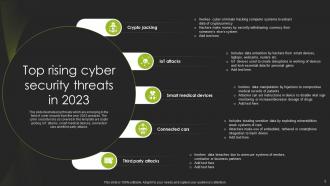
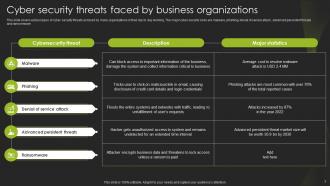
Honestly, the usual suspects are still wreaking havoc - ransomware, phishing, and supply chain hits. But ransomware crews stepped up their game big time. They steal your data first, then encrypt everything so you're screwed twice over. Phishing isn't just those obvious spam emails anymore either. Now it's targeted spear-phishing with AI deepfakes that'll fool anyone. Supply chain attacks are blowing up too because why hack 100 companies when you can compromise their shared vendor instead? Smart move, terrible for us. Keep your systems patched, train people to catch sketchy stuff, and have backups that actually work.
Look, start by teaching your team to catch the obvious stuff - weird sender addresses, "URGENT!!!" messages, sketchy links. Set up email filters and SPF/DMARC authentication to block the garbage before it even reaches people. But honestly? Your employees will always be the biggest risk factor. Run fake phishing tests regularly - better they mess up during practice than click something that actually wrecks your system. Oh, and make it super easy for them to report suspicious emails without feeling like idiots about it.
Dude, you've gotta train your people - it's honestly the only thing that works against social engineering. These scammers don't hack systems, they hack brains. So your team needs to spot sketchy emails and those "urgent" CEO requests that try to skip normal approval stuff. I swear, half the companies I know got hit because someone fell for a fake executive email asking for gift cards or whatever. Make the training actually interesting though - role-play scenarios, not death-by-PowerPoint. Your employees need practice telling pushy callers to buzz off. Short answer? Turn your biggest weakness into your best defense.
Dude, ransomware groups are getting scary good at this stuff. They're not just hitting random computers anymore - now they go straight for hospitals, power grids, anything that'll make people panic and pay up fast. The really messed up part? They steal all your files first, then encrypt everything AND threaten to post your data online if you don't pay. It's like getting mugged twice. Oh, and apparently targeting backup systems is their new favorite thing since that's usually your only way out. Definitely test your backups more often - maybe keep some completely offline too, just in case.
Dude, IoT stuff is a nightmare for security. Most smart devices ship with garbage passwords and zero encryption. Your doorbell camera? Probably still using "admin123" or whatever. These things turn into backdoors that hackers love - they'll use your smart thermostat to launch attacks or sneak into your actual important systems. I learned this the hard way when my neighbor's baby monitor got hacked (super creepy). Change those default passwords immediately. Better yet, put all your smart devices on their own network so they can't touch your work computers if something goes wrong.
So insider threats are way scarier honestly - these are people who already work for you, contractors, partners, whoever has legit access. External hackers have to break down your door first. Insiders? They've got the keys already. You'll want to monitor what users are actually doing and only give people access to stuff they need for their job. Regular check-ins on who can see what helps too. Oh, and set up alerts for weird activity patterns - like if someone's suddenly downloading everything at 3am. That's usually your first red flag something's off.
Honestly, just get everyone a password manager - it's a game changer. Make passwords at least 12-15 characters with mixed case, numbers, and symbols. Change them every 90 days and turn on two-factor auth everywhere you can. Block obvious ones like "password123" because people will absolutely try that. Train your team on phishing too since even the best password doesn't matter if someone gets tricked into handing it over. I know it sounds like a pain, but once you set up the password manager company-wide, it actually makes life easier.
Dude, AI is actually clutch for cybersecurity. It catches sketchy patterns way faster than any human could - like, we're talking milliseconds vs hours. The machine learning stuff gets smarter over time too, so it'll spot new malware and phishing attempts that would've slipped through before. Plus it can automatically respond to threats instead of waiting for someone to notice. Honestly, the predictive side is wild - it can flag vulnerabilities before hackers even find them. I'd start with AI-powered endpoint detection tools since they're pretty straightforward to set up and you'll immediately see what's happening across your network.
So basically, nation-states are playing a completely different game than regular hackers. They've got unlimited budgets and will sit in your systems for literally years without you knowing. Instead of just grabbing credit cards, they're after your infrastructure, trade secrets, political stuff - the really damaging targets. Honestly, it's kinda scary how patient they are. This forces companies to completely rebuild their security around zero-trust models. Governments are throwing billions at this now, both offense and defense. Bottom line? You can't just worry about some kid in his basement anymore - assume you're dealing with actual spy agencies.
Dude, you gotta move FAST. First thing - isolate those compromised systems and revoke any sketchy access credentials. Encrypt whatever data you can still protect. The "during" phase is honestly terrifying because you're already bleeding. Focus on stopping more damage, preserve evidence for later investigation, and be upfront with customers about what went down. Get legal involved early too - trust me on this one. Having a response plan ready beforehand is clutch because when shit hits the fan, you don't want to be figuring it out on the fly.
Don't panic and resist the urge to start clicking around trying to fix stuff. Disconnect those systems from the network immediately - you don't want this spreading everywhere. I know it sounds weird, but grab screenshots or even phone pics of what you're seeing right now. Call your IT security team or whoever handles incidents - like, right now. Don't restart anything unless they specifically tell you to. Keep all the logs intact too. Honestly, the speed of your response here makes all the difference. The sooner you contain it and get the right people involved, the less of a nightmare this becomes.
Updates are honestly your best defense against getting hacked. I know they're super annoying - mine always seem to pop up right when I'm busy with something important. But here's the thing: hackers specifically look for people running old software with known security holes. It's like they have a roadmap of what to attack. Your OS, browser, all that stuff needs regular updates. Just turn on auto-updates wherever you can and maybe check weekly for anything you missed. Way better than dealing with malware later.
Ugh, third-party vendors are such a pain - they're basically backdoors waiting to happen. Most of them don't have security standards anywhere close to yours, but they still need system access to do their job. When hackers hit them first, they just hop right over to your network. Remember that whole SolarWinds mess? Perfect example of how one vendor's problem becomes everyone's headache. You really can't control their internal security, which is honestly terrifying. Set up regular audits of who can access what, force them to use MFA, and don't give them more system permissions than absolutely necessary.
Start with a full security audit - map out your assets, vulnerabilities, and what controls you've got in place. Don't just do pen testing once yearly for compliance stuff. Run those scans regularly. Your employees need security training too (honestly, we're all guilty of clicking sketchy links sometimes). Third-party auditors can spot things you miss when you're too close to your own setup. Make this ongoing, not some one-and-done thing. I'd say quarterly reviews work well. Just don't let those findings sit in a report gathering dust - actually fix what they find.
So basically encryption scrambles your data into complete nonsense that only you can decode. Even if someone steals your stuff, they can't actually read it without your key. Your passwords, bank info, personal files - all just gibberish to hackers. It's like having a secret code for everything important. Honestly, I don't get why more people don't use it by default. You should definitely have it on for file storage and messaging. Oh, and data transfers too - that's where a lot of breaches happen.
-
A fantastic collection of templates. I'll likely use this as my go-to resource for future templates and support.
-
SlideTeam never fails to surprise me with its amazing PPT designs. Thanks team for providing me with your constant support!