

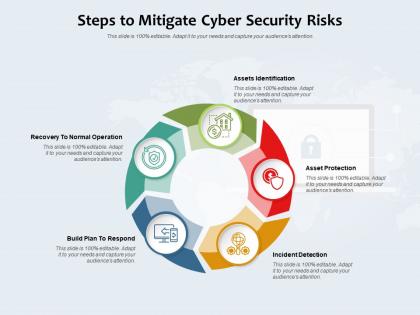
Steps to mitigate cyber security risks




Try Before you Buy Download Free Sample Product
 Impress Your
 Audience
 100%
100% Editable
 Save Hours
 of Time


Our Steps To Mitigate Cyber Security Risks are topically designed to provide an attractive backdrop to any subject. Use them to look like a presentation pro.
People who downloaded this PowerPoint presentation also viewed the following :
Steps to mitigate cyber security risks with all 2 slides:
Use our Steps To Mitigate Cyber Security Risks to effectively help you save your valuable time. They are readymade to fit into any presentation structure.

FAQs for Steps to mitigate
Honestly, ransomware's the worst - it'll literally kill your whole business overnight. Phishing's still everywhere too, people keep clicking sketchy links. Your biggest risks are probably those plus data breaches from stolen passwords. Supply chain attacks are getting crazy popular now, where they hack your vendors first. Also insider threats, whether someone's being malicious or just screwing up accidentally. Don't forget about software that hasn't been updated - hackers love those gaps. You should probably run a risk assessment to figure out what's most dangerous for your specific situation.
First thing - map out what digital stuff you actually have and where the weak spots are. Run some vulnerability scans and check who has access to what. Your team can either be your best asset or your biggest headache, so factor that in too. Honestly, I'd bring in outside pen testers because we all miss obvious things in our own systems. Document what you find (boring but necessary) and rank everything by how badly it could mess up your business. Then build a realistic timeline to fix the worst stuff first.
Dude, training your employees is seriously the best thing you can do for cybersecurity. Most attacks aren't even that sophisticated - they just trick people with phishing emails or social engineering crap. Your team can be your biggest weakness or your strongest protection. I'd start with monthly security sessions where you teach them to spot sketchy emails and use better passwords. Also, definitely run those fake phishing tests on them - sounds mean but it works. Oh and make it ongoing, not just some boring one-time presentation. People forget this stuff fast.
Hey! So password stuff - make them long and random with letters, numbers, symbols. At least 12 characters but honestly longer is better. Don't even try memorizing them though, you'll go crazy. Just grab a password manager like Bitwarden or 1Password to handle everything. Two-factor auth is clutch wherever you can set it up. Oh and never reuse passwords - I learned that the hard way when my old gaming account got hacked and suddenly they had access to way too much. Start with your email and banking first since those are the big ones.
Look, you need full audits at least once a year - that's non-negotiable. But quarterly check-ins are where it's at since hackers don't exactly wait around. Finance or healthcare? Bump it to every 2-3 months because you're basically wearing a target. Also do them after any major changes or breaches (obviously). Honestly, most companies treat cybersecurity like getting a dentist cleaning - something they'll "get around to eventually." Don't be those guys. Set quarterly mini-reviews in your calendar today and stick to them like you would any other business-critical meeting.
So MFA is like having two locks on your door instead of one. Your password gets stolen? Doesn't matter - they still need your phone or fingerprint to actually get in. I was skeptical at first but honestly it's a game changer. Banks and email should be your first priority if you haven't set it up yet. The data shows it stops like 99% of those automated hack attempts. Takes two seconds to enable and saves you from potentially massive headaches later. Way easier than dealing with a compromised account, trust me.
So basically it's your game plan for when hackers mess with your stuff. You map out who handles what, how to contain the damage, and recovery steps - all before anything bad happens. Trust me, you don't want to figure this out mid-crisis when everyone's freaking out. Start by figuring out what systems you absolutely can't lose, then build your response team around those. Having clear communication chains makes a huge difference too. It's like having a fire drill but for cyber attacks. Gets you back online faster and stops the bleeding quicker.
So you've got three main areas to cover - data at rest, in transit, and in use. AES-256 is your go-to algorithm. Key management is honestly where everyone screws up, so don't skip proper rotation schedules. Encrypt your databases, backups, communications, the works. Oh and endpoints too - laptops get stolen way more than people think. Here's what kills me though: companies spend tons on firewalls then leave their internal data sitting there naked. Start by figuring out what actually needs protecting first, then build around that. Makes the whole process way less overwhelming.
Okay so first thing - you gotta do a full data audit to see what personal info you're collecting and where it all lives. Set up proper consent stuff and figure out how long you're keeping data (and actually stick to it). Train your people because honestly, they'll be your biggest security risk. Access controls are boring but necessary. Document your incident response plan and actually practice it - don't just let it collect dust. Oh, and tackle your scariest data flows first since you can't fix everything at once. This isn't a one-and-done thing either, it's more like... ongoing maintenance for your business.
Start with a good SIEM like Splunk or Elastic Security for centralizing logs and threat detection. For endpoints, CrowdStrike or SentinelOne will catch malware and sketchy behavior on devices. Network monitoring is where Wireshark or SolarWinds come in handy - you'll be amazed at the random traffic floating around your network. Oh, and grab a vulnerability scanner like Nessus or Qualys to find holes before the bad guys do. My advice? Pick one tool per category first. Don't go crazy trying to deploy everything at once - that's a recipe for headaches.
Dude, you've gotta stay on top of updates - they literally patch security holes before hackers can mess with your stuff. Most big data breaches? They happen because people ignore patches for vulnerabilities that were fixable for months. Your OS, apps, all that firmware stuff needs regular updating since new threats show up constantly. Honestly, I'm terrible at remembering this myself, but auto-updates are a lifesaver. For anything critical though, I'd still do monthly check-ins manually just to be safe.
Honestly, train your people to recognize sketchy emails - that's where like 90% of breaches actually start. Run those fake phishing tests regularly so they get practice spotting the real thing. Multi-factor authentication is a lifesaver too because even if someone's password gets stolen, hackers still can't get in. Oh, and make sure people can report weird stuff without getting blamed for it - you'd be surprised how many folks stay quiet because they're scared of looking dumb. Skip the annual snooze-fest training and do shorter, more frequent sessions instead. People actually retain that stuff better.
Okay so first thing - disconnect everything that got hit and change those passwords ASAP. Document what data they actually grabbed (lawyers love paperwork, what can I say). Call your legal team and notify customers per whatever laws apply - being upfront about it usually works better than hiding it. Patch whatever hole they used to get in. Run a full security check after. The real kicker though? Having a response plan ready beforehand saves you from totally freaking out when this happens. Trust me, scrambling around during an active breach just makes everything ten times worse.
Three things you gotta nail down: identity stuff, securing devices, and who can access what. Multi-factor authentication is absolutely critical - don't skip this one. Get endpoint detection running on everyone's laptops and make people use VPNs for sensitive cloud stuff. Role-based permissions are your friend here, btw - only give access to what someone actually needs. The thing that kills companies? They get lazy about checking who has access to what when everyone's working remote. Do quarterly reviews of permissions and cut off access the second someone switches roles or leaves.
So network segmentation is basically building walls inside your network. Think of it like having different rooms in a house instead of one giant open space. You split things up - servers here, user computers there, IoT devices over in that corner. Each zone has its own access controls between them. The cool thing is if hackers break into one area, they can't just wander around your whole network freely. They're trapped in that one segment while you figure out what's going on. I'd start with whatever your most critical stuff is and wall that off first.
-
I discovered this website through a google search, the services matched my needs perfectly and the pricing was very reasonable. I was thrilled with the product and the customer service. I will definitely use their slides again for my presentations and recommend them to other colleagues.
-
Awesome use of colors and designs in product templates.
-
Out of the box and creative design.
-
Appreciate the research and its presentable format.