

Cyber security risk management powerpoint presentation slides




Try Before you Buy Download Free Sample Product
 Impress Your
 Audience
 100%
100% Editable
 Save Hours
 of Time


Critical assets security requires planning and due importance in businesses today to keep the vital information confidential with integrity, availability and assurance. Here is an efficiently designed template on Cyber Security Risk Management at Workplace that will reduce the risk of crisis in your company and the effects of that crisis occurring outside. This template aims to identify high safety risks, enable cyber threat security to protect the company from fears, and set up safety plans to reduce such risks. One can display their current security plans critical success factors and significant reasons for poor security to know the companys challenges. Security tasks require organizations to show the elements that affect the operations and overcome them by setting an advanced safety plan for IT. Businesses evaluate information processing assets for analyzing the risk and clearly define the threat management system through adopting high-tech assessment controls for themselves. Book a free demo with our research or design team and customize this 100 percent editable template based on your needs. Get access now.
People who downloaded this PowerPoint presentation also viewed the following :
Content of this Powerpoint Presentation
Slide 1: This slide introduces Cyber Security Risk Management. State Your Company Name and begin.
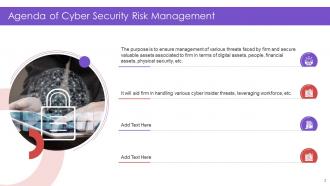
Slide 2: This slide shows Agenda of Cyber Security Risk Management.
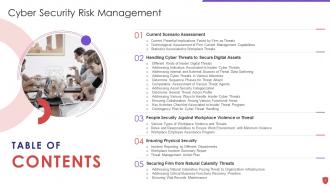
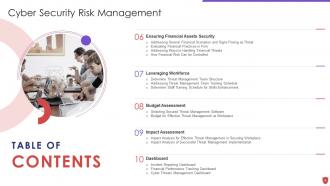
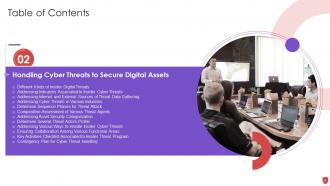
Slide 3: This slide presents Table of Content for the presentation.
Slide 4: This is another slide continuing Table of Content for the presentation.
Slide 5: This slide depicts title for 'Current scenraio assessment'.
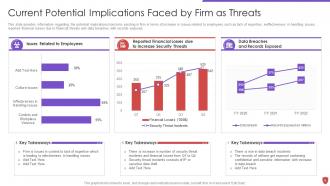
Slide 6: This slide provides information regarding the potential implications/concerns existing in firm.
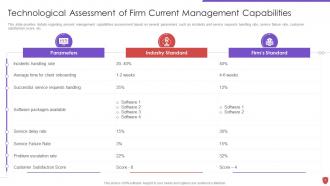
Slide 7: This slide provides details regarding present management capabilities assessment.
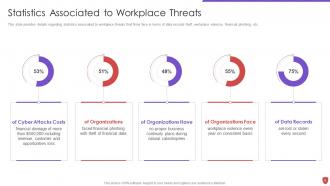
Slide 8: This slide provides details regarding statistics associated to workplace threats.
Slide 9: This slide displays title for 'Handling cyber threats to secure digital assets'.
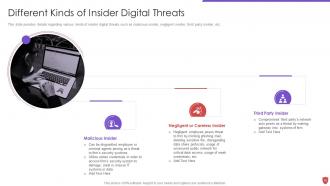
Slide 10: This slide provides details regarding various kinds of insider digital threats.
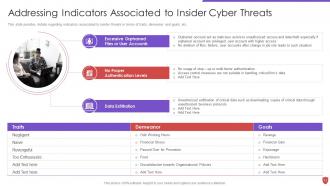
Slide 11: This slide provides details regarding indicators associated to insider threats.
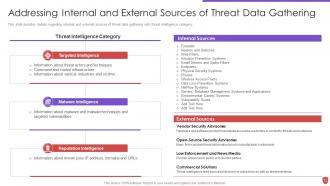
Slide 12: This slide provides details regarding internal and external sources of threat data.
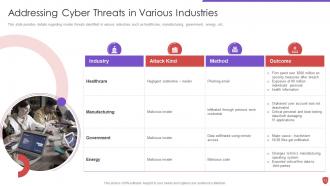
Slide 13: This slide provides details regarding insider threats identified in various industries.
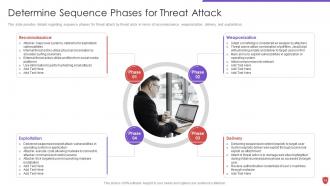
Slide 14: This slide provides details regarding sequence phases for threat attack by threat actor.
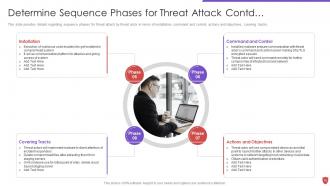
Slide 15: This slide presents continued content.
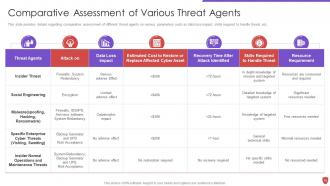
Slide 16: This slide provides details regarding comparative assessment of different threat agents on various parameters.
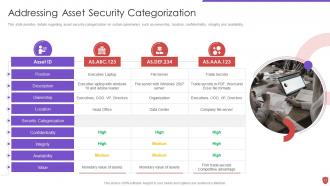
Slide 17: This slide provides details regarding asset security categorization on certain parameters.
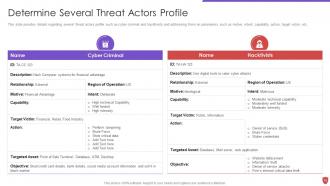
Slide 18: This slide provides details regarding several threat actors profile.
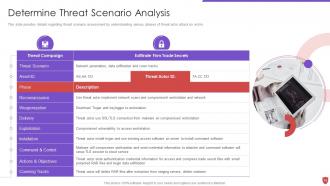
Slide 19: This slide provides details regarding threat scenario assessment by understanding various phases of threat actor attack on victim.
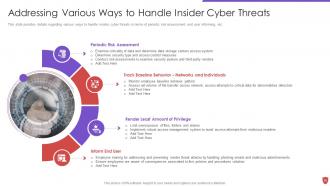
Slide 20: This slide provides details regarding various ways to handle insider cyber threats.
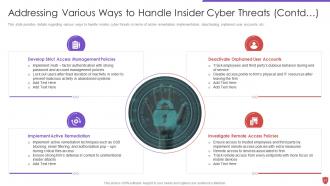
Slide 21: This slide exhibits continued content.
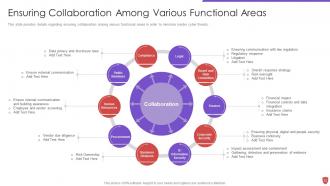
Slide 22: This slide provides details regarding ensuring collaboration among various functional areas.
Slide 23: This slide provides details regarding checklist associated to insider threat program.
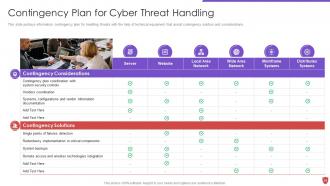
Slide 24: This slide portrays information contingency plan for handling threats with the help of technical equipment.
Slide 25: This slide shows title for 'People security against workplace violence or threat'.
Slide 26: This slide provides details regarding various types of workplace violence threats created by people.
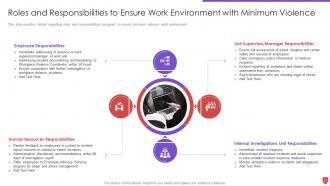
Slide 27: This slide provides details regarding roles and responsibilities assigned to ensure minimum violence work environment.
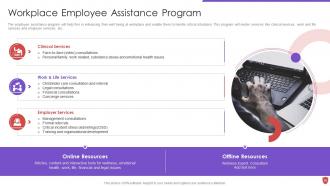
Slide 28: This slide depicts Workplace Employee Assistance Program.
Slide 29: This slide displays title for 'Ensuring physical security'.
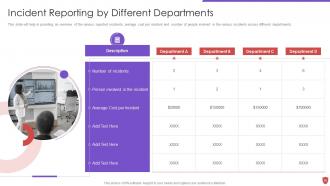
Slide 30: This slide provides overview of the various reported incidents.
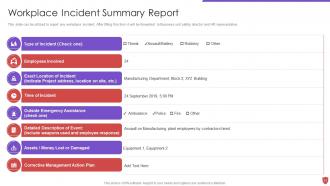
Slide 31: This slide can be utilized to report any workplace incident.
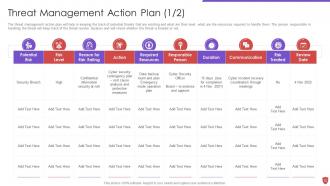
Slide 32: This slide presents Threat Management Action Plan.
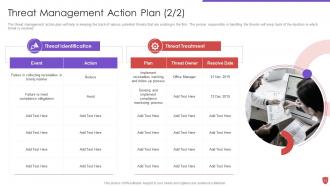
Slide 33: This slide exhibits continued content.
Slide 34: This slide shows title for 'Securing firm from natural calamity threats'.
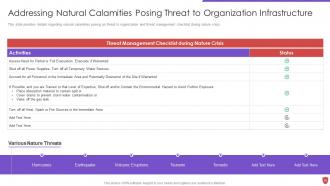
Slide 35: This slide provides details regarding natural calamities posing as threat.
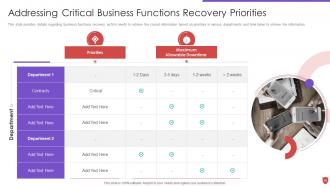
Slide 36: This slide provides details regarding business functions recovery as firm needs to retrieve the crucial information.
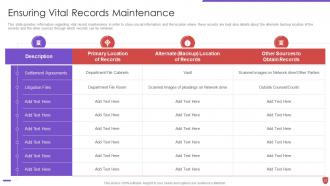
Slide 37: This slide provides information regarding vital record maintenance in order to store crucial information.
Slide 38: This slide displays title for 'Ensuring financial assets security'.
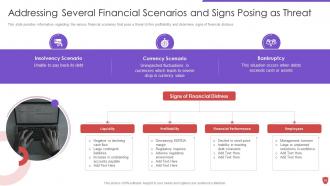
Slide 39: This slide provides information regarding the various financial scenarios that pose a threat to firm.
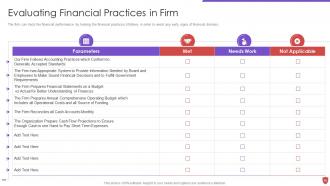
Slide 40: This slide presents Evaluating Financial Practices in Firm.
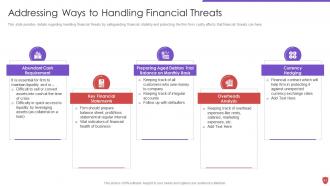
Slide 41: This slide provides details regarding handling financial threats by safeguarding financial stability.
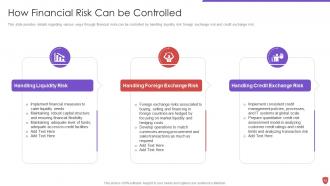
Slide 42: This slide provides details regarding various ways through financial risks can be controlled.
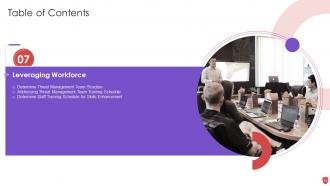
Slide 43: This slide presents title for 'Leveraging workforce'.
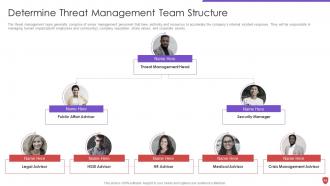
Slide 44: This slide exhibits 'Determine Threat Management Team Structure'.
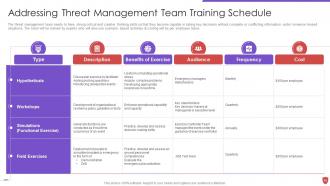
Slide 45: This slide addresses Threat Management Team Training Schedule.
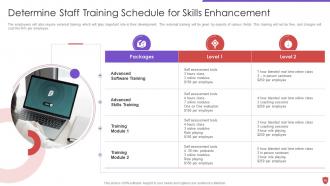
Slide 46: This slide shows 'Determine Staff Training Schedule for Skills Enhancement'.
Slide 47: This slide depicts title for 'Budget assessment'.
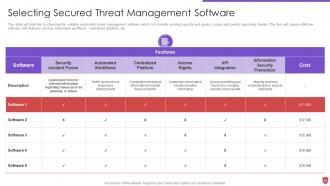
Slide 48: This slide highlights 'Selecting Secured Threat Management Software'.
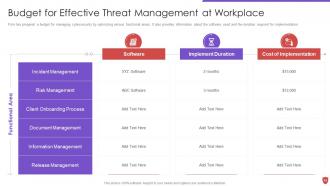
Slide 49: This slide illustrates Budget for Effective Threat Management at Workplace.
Slide 50: This slide presents title for 'Impact assessment'.
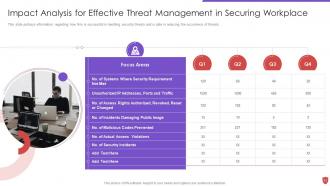
Slide 51: This slide portrays information regarding how firm is successful in handling security threats.
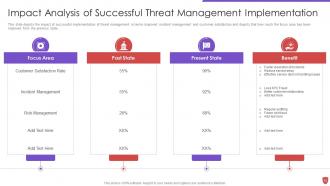
Slide 52: This slide depicts the impact of successful implementation of threat management.
Slide 53: This slide exhibits title for 'Dashboard'.
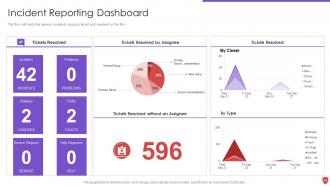
Slide 54: This slide shows Incident Reporting Dashboard.
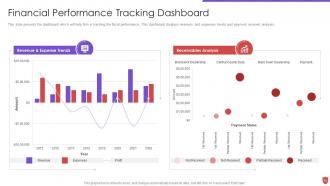
Slide 55: This slide presents the dashboard which will help firm in tracking the fiscal performance.
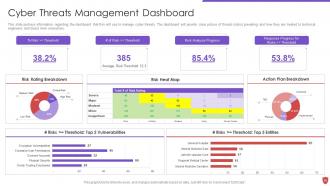
Slide 56: This slide portrays information regarding the dashboard that firm will use to manage cyber threats.
Slide 57: This slide displays Icons for Cyber Security Risk Management.
Slide 58: This slide is titled as Additional Slides for moving forward.
Slide 59: This slide provides 30 60 90 Days Plan with text boxes.
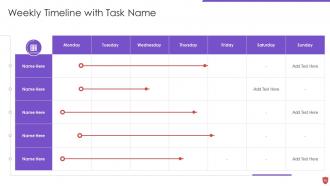
Slide 60: This slide shows Weekly Timeline with Task Name.
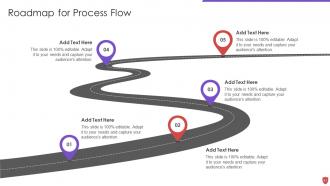
Slide 61: This slide displays Roadmap for Process Flow.
Slide 62: This slide shows Post It Notes. Post your important notes here.
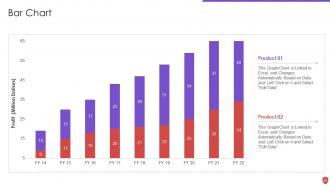
Slide 63: This slide presents Bar chart with two products comparison.
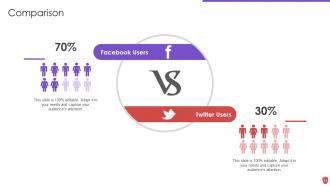
Slide 64: This is a Comparison slide to state comparison between commodities, entities etc.
Slide 65: This slide showcases Magnifying Glass to highlight information, specifications etc
Slide 66: This is Our Target slide. State your targets here.
Slide 67: This is a Thank You slide with address, contact numbers and email address.
Cyber security risk management powerpoint presentation slides with all 72 slides:
Use our Cyber Security Risk Management Powerpoint Presentation Slides to effectively help you save your valuable time. They are readymade to fit into any presentation structure.







FAQs for Cyber security risk management
Okay so first you gotta map out what you're actually protecting - can't defend stuff you don't even know you have. Then figure out what threats you're facing and how vulnerable you are to each one. Honestly, the hardest part is usually getting leadership to agree on risk appetite levels... like, good luck with that meeting lol. You'll need solid incident response plans too. Continuous monitoring is huge since everything changes so fast. Oh and definitely assign clear roles - nobody wants to be scrambling during an actual incident wondering who's supposed to do what. Track some metrics so you know if it's working.
Start by mapping out what you actually have - assets, weak spots, potential threats. Run some vulnerability scans and be brutally honest about where your security sucks right now. I'd also throw in phishing tests because people always click stuff they shouldn't. Document it all in a risk register with likelihood and impact ratings. The whole point is not sugar-coating your problems - if something's broken, admit it. Oh, and don't skip the human factor stuff, that's where most breaches happen anyway. Once you've got that ugly truth documented, you can figure out what needs fixing first versus what can wait.
Dude, most cyber attacks happen because someone clicks a sketchy email or uses "password123" - not some hacker genius breaking through systems. Training your people is honestly huge, maybe bigger than whatever security software you're running. Turn your team into human shields by teaching them to spot phishing attempts and create decent passwords. You can't just do it once though - threats change all the time. I know it sounds boring, but regular training with real-world scenarios actually works. When people know what to look for, they become your best defense. Way better than crossing your fingers and hoping nothing bad happens.
So AI and IoT are completely changing the game for cybersecurity risks. IoT dumps thousands of connected devices on your network - most with garbage default passwords like "admin/admin" (honestly, what were they thinking?). AI's interesting because it cuts both ways. You get better threat detection, but hackers also use it to launch more sophisticated attacks. Don't expect either one to solve everything magically though. Start small - figure out what devices you actually have connected first. Then slowly roll out AI monitoring tools instead of trying to do everything at once. Both are more like power-ups than cure-alls.
Honestly, the worst myth is thinking cybersecurity is just an IT thing when it's really about business risk for everyone. Small companies always say "we're too small to be targets" - totally wrong. Compliance doesn't equal security either, that's huge. People blow tons of money on fancy tools but skip training their staff, which is kinda backwards if you think about it. The one that kills me though? "We've never been hacked so we're good." That's like not buying car insurance because you haven't crashed yet. Treat it like any other business risk, not some tech checklist.
Look, start by figuring out what would actually screw you over if it got hit. Customer data? Your main systems? Money stuff? Map that out first - honestly, most people skip this step and waste time protecting random things. Then think realistically about what's gonna happen. Nation-state hackers? Probably not. Some idiot clicking a sketchy email? Way more likely. Make a quick chart - bad outcome vs. how often it happens. Go after the stuff that's both likely AND would mess you up badly. Oh, and update it every few months because this crap changes constantly.
Compliance sets your baseline security requirements - it's like the minimum you gotta do to stay legal. GDPR, SOC 2, all those frameworks end up driving which controls you prioritize first. Sometimes it feels backwards though, like you're building security around paperwork instead of actual threats. The upside? Way easier to get budget approved when you can point to regulatory requirements. Don't just check boxes and call it done - that's how you end up "compliant but compromised." Build on top of those requirements based on what actually threatens your business. You'll cover your legal bases while being genuinely secure.
Your risk plan can't just sit there gathering dust - it needs constant updates. New threats pop up all the time, so check it quarterly at minimum. I'd set calendar reminders now or you'll totally forget. Look at recent breaches in your field, update security controls, tweak incident response stuff. Honestly, most people treat this like updating their LinkedIn profile - once a year if they're lucky. Don't be that person. When you add new tech or spot fresh vulnerabilities, adjust your risk register right away. Think phone updates but actually important.
Honestly, you've gotta treat every vendor like they could be your weak point. Figure out what data they're touching and which systems they'll access first. Then dig into their security setup, certifications, incident track record - the whole deal. I've watched companies get burned by vendors they thought were "harmless" but had way too much access. Rate them by how sensitive the data is and how critical they are to your business. Set up monitoring and get solid contracts in place. Oh, and don't just do this once - keep checking on them regularly or you're asking for trouble.
Honestly, start with what your exec team actually cares about - usually that's cost per incident since they love seeing dollar impacts. Response time and mean time to recovery are obvious ones. Then track vulnerability remediation rates and how many people finish security training (though half will complain about it anyway). What really matters is watching your risk register trends - are high/critical risks actually going down? Compliance audit scores help too, plus third-party assessments if you're dealing with vendors. Don't go crazy though. Pick maybe 5-7 metrics that tell the real story without drowning everyone in spreadsheets.
So incident response plans are basically your backup when everything else fails. Picture it like this - you've got smoke detectors, but you still need that fire escape route mapped out, right? Your plan should focus on your biggest risks first. Set up clear escalation steps and communication paths before anything hits the fan. Testing is huge here because trust me, you don't want to be scrambling during an actual emergency figuring out who calls who. It's really the "when things go sideways" piece of risk management. Most companies skip the testing part and regret it later.
Look, cybersecurity isn't something you set up once and forget about. Do risk assessments every quarter - trust me on this one. When stuff goes wrong (and it will), actually learn from it instead of just fixing and moving on. Your threat models need updating whenever new attacks pop up or your business changes. Get input from different teams too. IT sees totally different risks than finance or ops. Check what industry standards say and peek at what competitors are doing. Oh, and document your changes - otherwise you'll have no clue if you're actually improving things or just shuffling deck chairs.
Look, cybersecurity isn't just some money pit - think of it as helping your business actually work better. Figure out what processes would absolutely wreck you if they went down, then protect those first. You can't guard everything equally (learned that one the hard way). Go for stuff that kills two birds with one stone - like automated backups or better identity management that makes life easier for everyone. Honestly, the best security fixes are ones that make daily operations smoother while keeping the bad guys out. Don't overthink it.
Threat intel gives you actual context for making smart security decisions instead of just winging it. You'll know what attackers are doing right now - which vulnerabilities they're hitting, what industries they're going after. It's like having a weather forecast for cyber threats, which honestly beats just knowing "bad stuff happens sometimes." This lets you prioritize defenses based on real campaign data rather than theoretical maybes. Oh, and definitely grab a threat intel feed that matches your industry. Use that to guide where you spend your security budget.
Honestly, you've got to speak their language. Executives don't want to hear about packet analysis - they want to know how much money they could lose and whether they'll get in trouble with regulators. Board members just need those simple red/green dashboards they can actually understand. Your IT team can handle the technical details, but even they need to know why it matters to the business. Oh, and skip the abstract threat stuff. Use real examples instead - way more effective. Send updates regularly too, because those yearly reports? They just collect dust. Each group cares about totally different things, so don't waste their time.
-
Enough space for editing and adding your own content.
-
Best Representation of topics, really appreciable.