

Cybersecurity awareness training powerpoint presentation slides




Try Before you Buy Download Free Sample Product
 Impress Your
 Audience
 100%
100% Editable
 Save Hours
 of Time


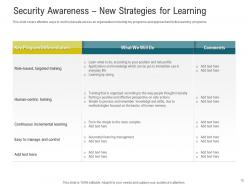
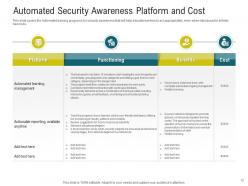
Introducing our cybersecurity awareness training PowerPoint presentation slides. Spread awareness about the matters of cyber security in your team with the help of this IT security awareness PPT layout. Explain malware attacks and hacking to the employees of your company with the help of our internet safety PowerPoint design. This well built network protection PPT theme contains a slide that lets you talk about the new strategies of learning about cyber security. Associate with this cyber protection recognition PowerPoint set to provide justification for the need of having an automated cyber security awareness program. This security reliability PPT bundle contains a slide that elaborates on the budget allocation for the cyber security awareness program. The network security apprehension PPT deck lets you make required variations to the icons and colors making our PPT more practical. Choose our computer security awareness PowerPoint design to showcase organization and assurance. Download our cybersecurity ppt slide to explore true perfection.
People who downloaded this PowerPoint presentation also viewed the following :
Content of this Powerpoint Presentation
The Mailchimp incident that happened in 2023 reminds us how important it is to watch out for online dangers. This cyber-incident itself was the reinforcement of, Nobody can mess with your security unless you give them a chance. It showed that even the most password-secure tools that our employees use daily can pose a threat to the company’s integrity.
Since, employees represent the face of the company, and in such instances, they are usually the first ones to face cyber threats. Therefore, organizations need to train their staff to combat these threats or avoid falling for their tricks altogether.
Such Cyber Security awareness training should focus on educating employees on potential risks they may face, allowing them to safeguard the firm and themselves from any cyber threat.
Companies may initiate cybersecurity awareness training for a number of reasons. These could be for improving existing security, creating cyber threat visibility, or for regulatory compliance.
SlideTeam’s 100% customizable Cybersecurity Templates are designed to help you educate your team on cybersecurity in a way that's tailored to your organization's needs.
Let’s uncover a powerful complete deck of Security Awareness Training Templates and examine its features, customization options and interactive assessments.
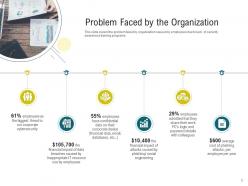
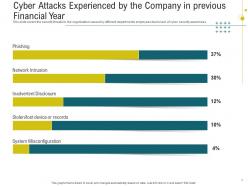
Slide 1: Cyber Attacks Experienced By the Company in Previous Financial Year
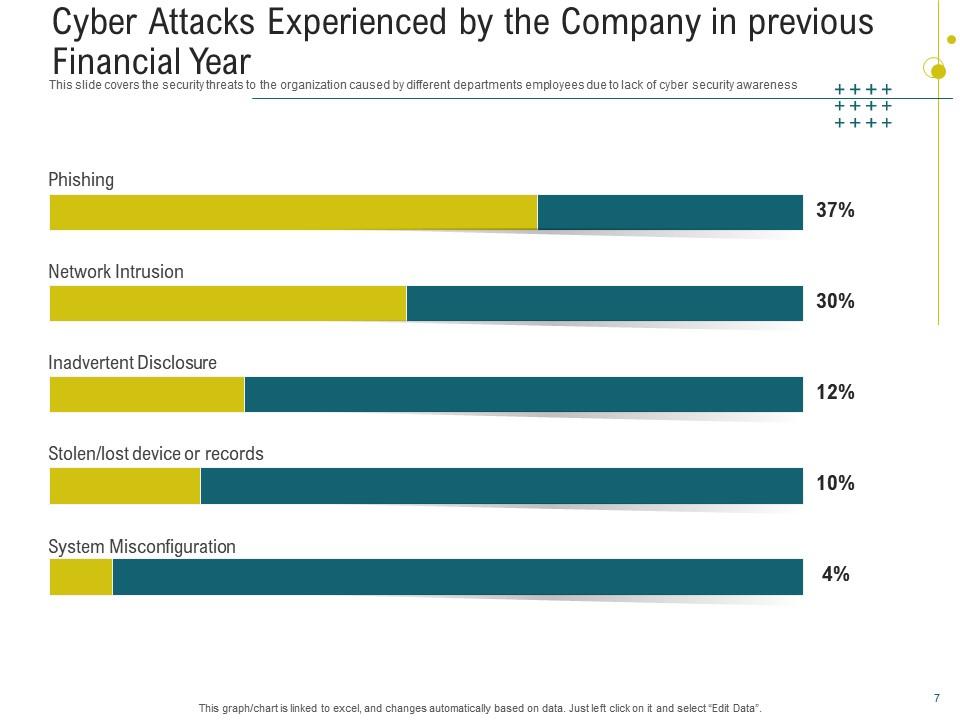
A precise risk assessment is crucial for identifying the company's vulnerabilities and allocating security solutions appropriately. This PPT Slide allows you to develop future preventions by learning from previous cyber assaults. It also allows you to examine your present security posture and identify opportunities for improvement. This presentation template also serves as a reporting tool for stakeholders to make strategic decisions on cybersecurity investments.
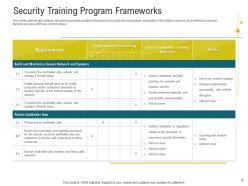
Slide 2: Security Training Program Frameworks
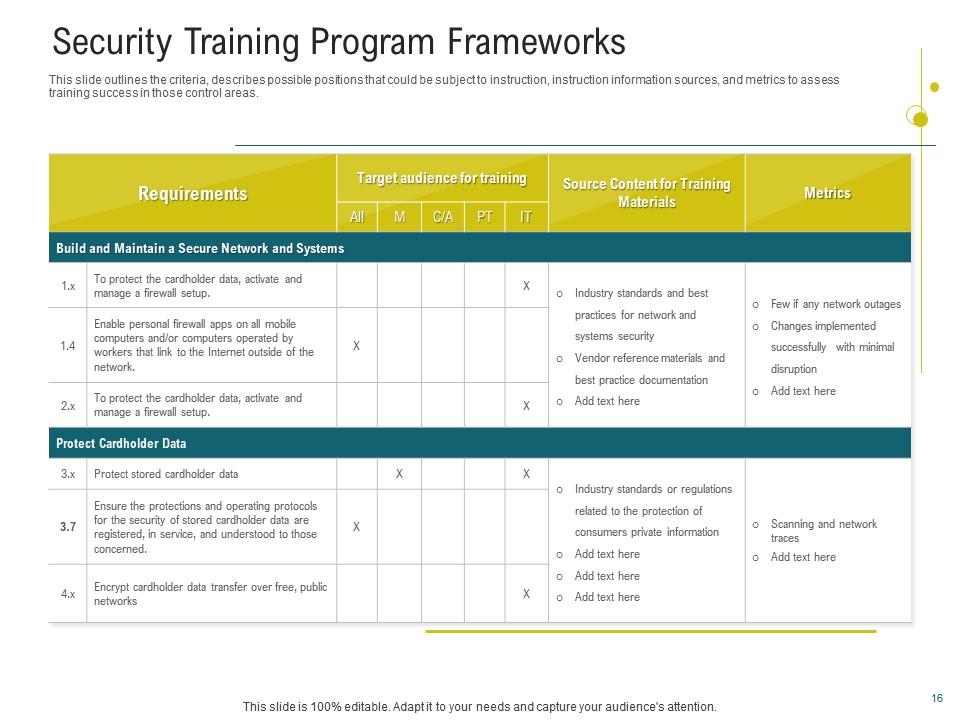
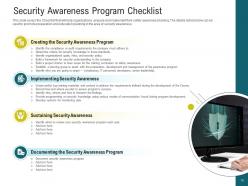
This comprehensive cybersecurity training slide covers different sections to provide a clear roadmap for enhancing organizational cybersecurity resilience. Using the requirements section, you can outline the objectives of your cybersecurity training program. Next, under the Target Audience for Training section, specify who will be receiving cybersecurity instruction. You may also provide case studies and real-world examples of cyber mishaps. The presentation also lists the leading performance indicators for evaluating your training efficacy. The use of yellow and green tones effectively conveys a sense of professionalism and dependability. A clean and straightforward presentation layout ensures that each part of the training framework is clearly defined.
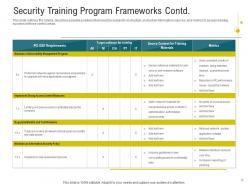
Slide 3: Security Training Program Contd.
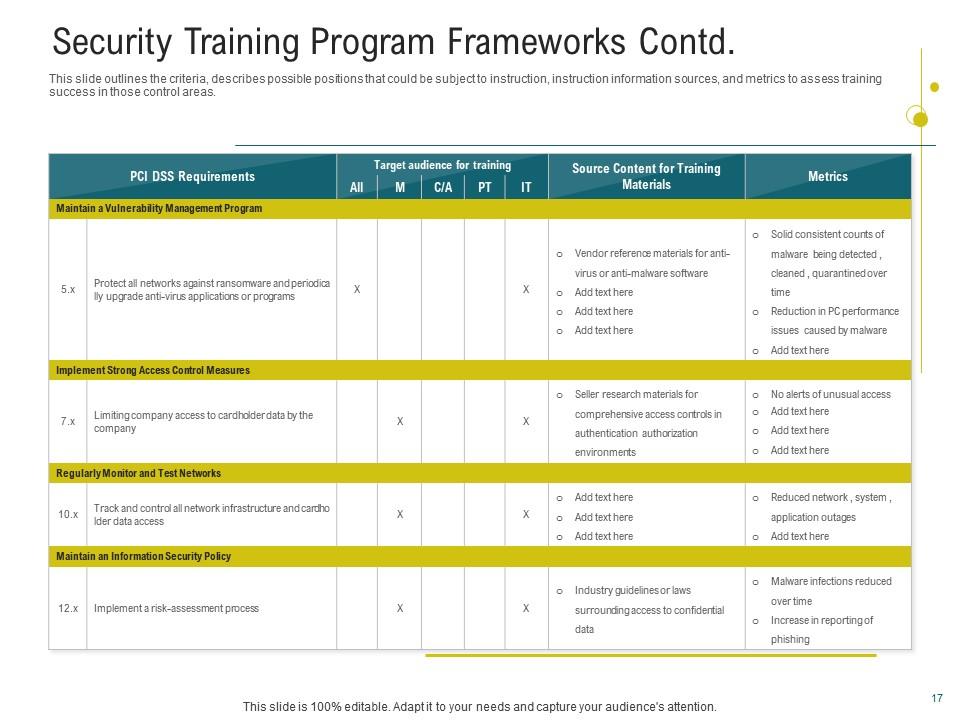
Use this PPT Layout to outline the scope, clear criteria, and objectives of your training program. Customizing training materials to match employees' needs defines training success. A separate Target Audience section in the slide proves how clearly it guides you. It emphasizes the significance of tailoring information to specific demographics' learning goals and preferences. Every moment matters when it comes to system security, so make the most of it by setting up and executing effective cybersecurity training campaigns within your company before hackers gain access to your systems and data.
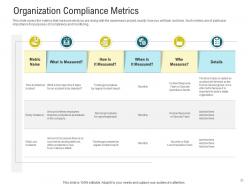
Slide 4: Organization Compliance Metrics
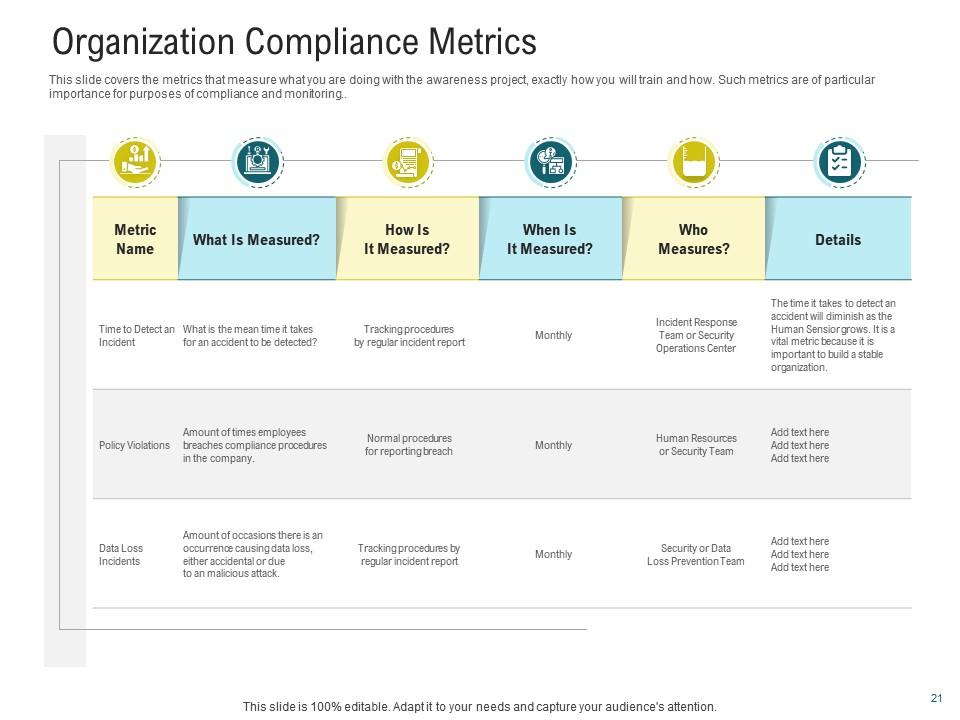
This PPT Template provides segments on What is Measured to describe the achievement of your set objectives. There is a section on How it is Measured as well. This provides ongoing tracking of how events unfold. It also specifies who will be in charge of administering the project and ensuring that everything works well. Deploy this PPT Slide's refreshing combination of spring daffodils and cyan shades to draws attention and promote audience involvement in exploring the importance of compliance.
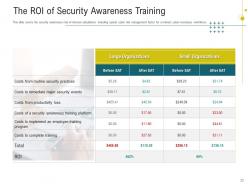
Slide 5: The ROI of Security Awareness Training
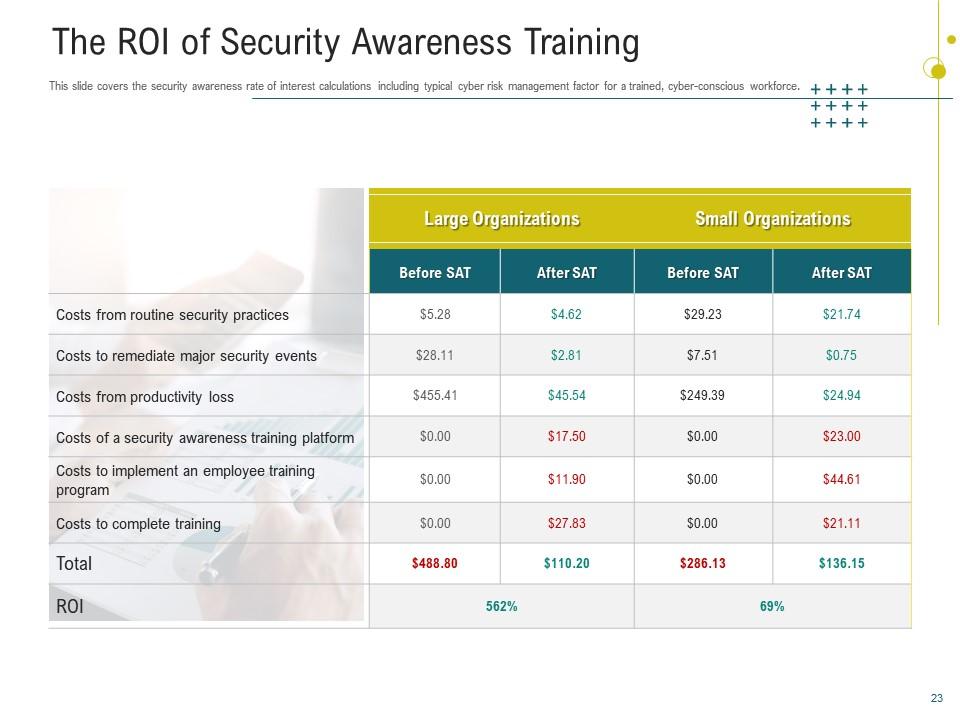
Use this PPT Slide to show how a skilled, cyber-conscious workforce may help your organization manage those risks. This presentation layout helps determine the return on investment for security awareness training. It allows you to determine whether security awareness training is worthwhile by examining how much better your security becomes as a result of the training.
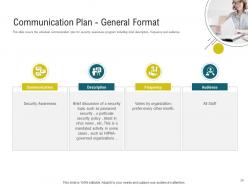
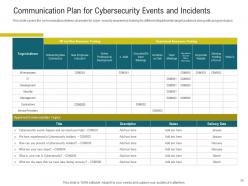
Slide 6: Communication Plan for CyberSecurity Events and Incidents
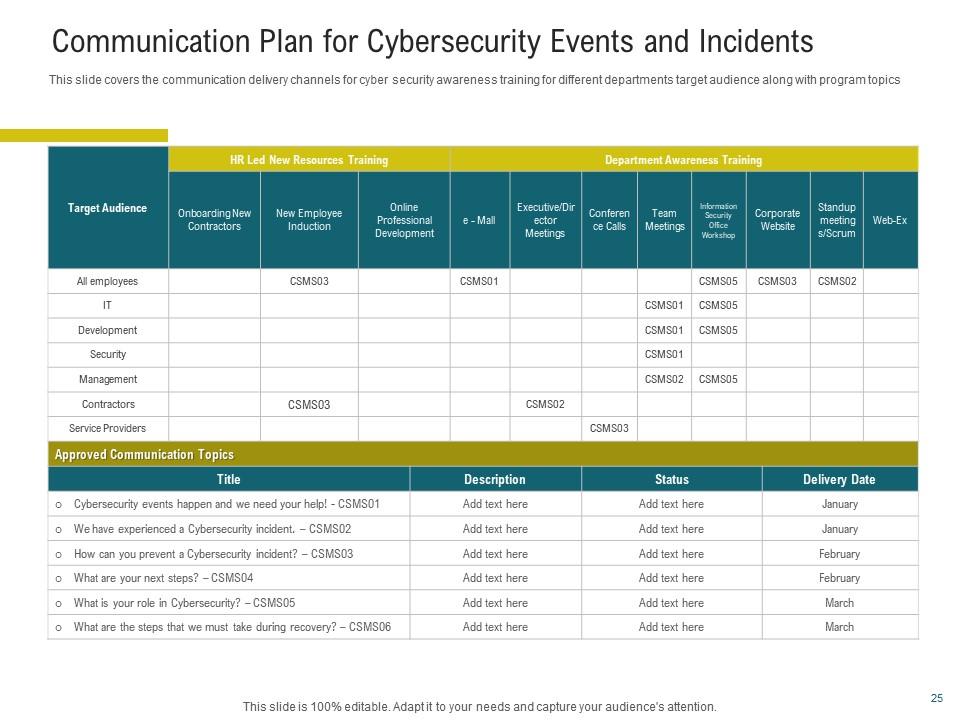
This PowerPoint Design goes beyond just identifying communication channels. It precisely defines a complete framework to ensure that information flows efficiently and participants are notified correctly in the case of a cybersecurity incident. Employ it to outline the roles of various team members clearly. Establish dates and procedures for alerting relevant stakeholders. It makes it easier for teams dealing with a cyber challenge to collaborate and solve problems more effectively.
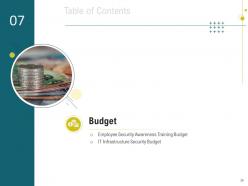
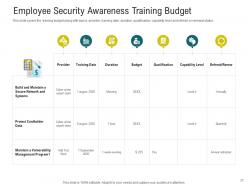
Slide 7: Employee Security Awareness Training Budget
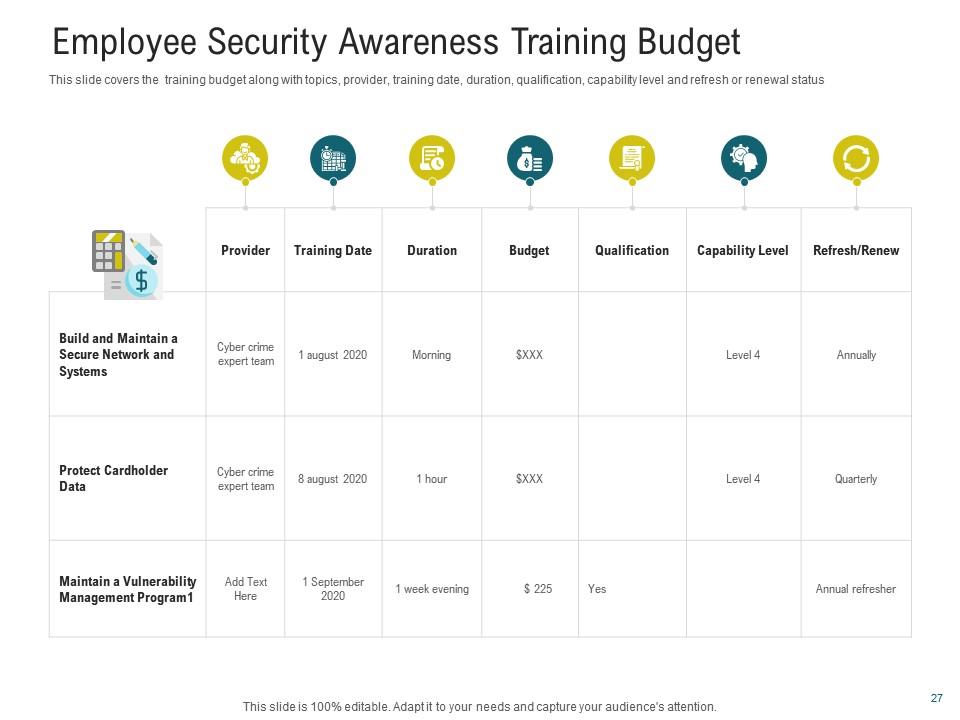
Well-trained staff can quickly identify and respond to security issues, reducing the potential for hacking and assaults. By implementing security awareness training, businesses can avoid costly data breaches and legal fees, resulting in long-term cost savings. This PPT Layout includes critical elements such as the date, money allocation, targeted capability levels, and renewal considerations for planning training sessions.
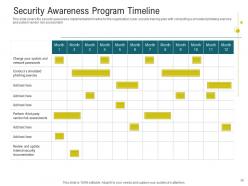
Slide 8: Security Awareness Program Timeline
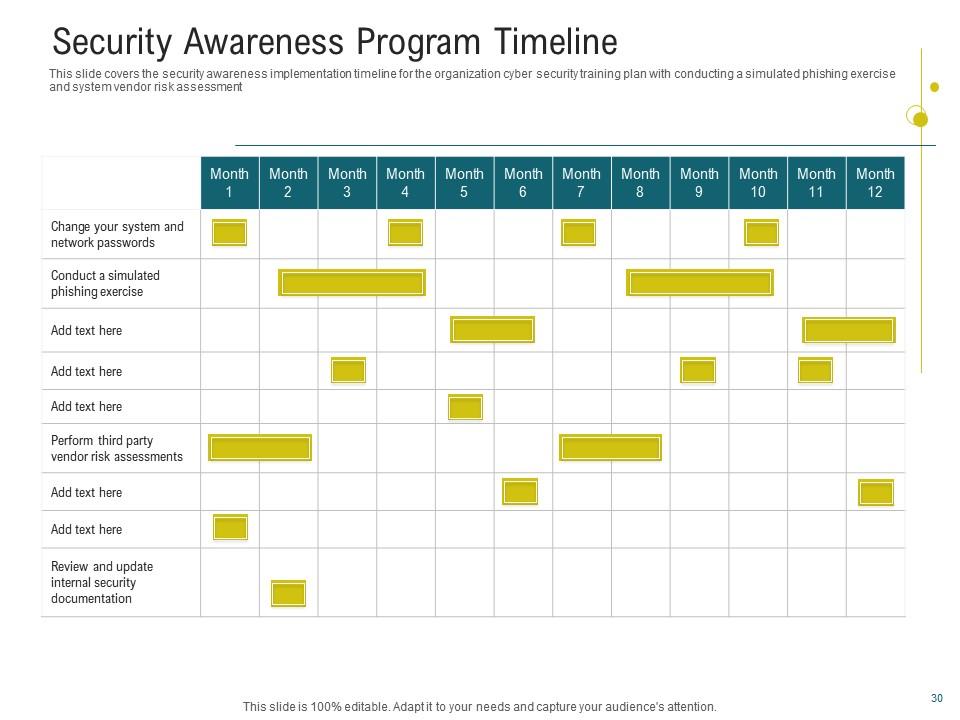
Employ this PPT Template to establish a comprehensive cybersecurity training strategy in your firm. The presentation template includes two essential exercises. The first is a simulated phishing exercise in which staff are given bogus emails to see if they prey on phishing scams. It functions as a wake-up call and promotes a culture of vigilance among employees. Another function is a critical examination of system vendor risks, which includes monitoring external threats posed by outside vendors. This proactive strategy not only strengthens the organization's resilience to developing cybersecurity threats but also develops a culture of collective responsibility in which everyone plays an integral part in protecting sensitive data and maintaining organizational integrity.
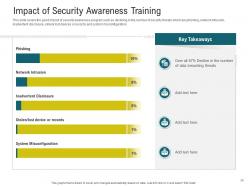
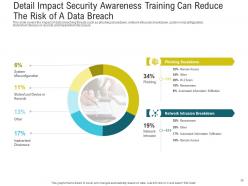
Template 9: Impact of Security Awareness Training
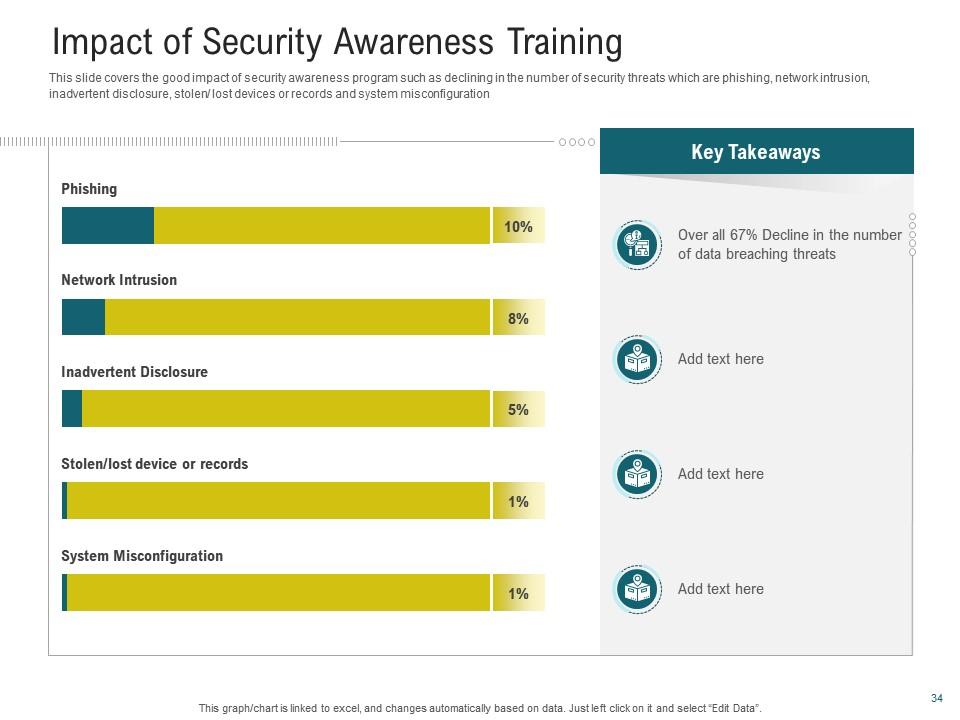
This PowerPoint Design provides the complete framework to ensure that information flows efficiently and participants are notified correctly in the case of a cybersecurity incident. Employ it to outline team members' duties and roles clearly. Establish dates and procedures for alerting relevant stakeholders. It makes it easier for teams dealing with a cyber challenge to collaborate and solve problems more effectively. This PPT Layout includes the date, money allocation, targeted capability levels, and renewal considerations for planning training sessions.
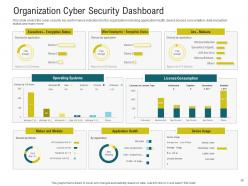
Slide 10: Organization Cyber Security Dashboard
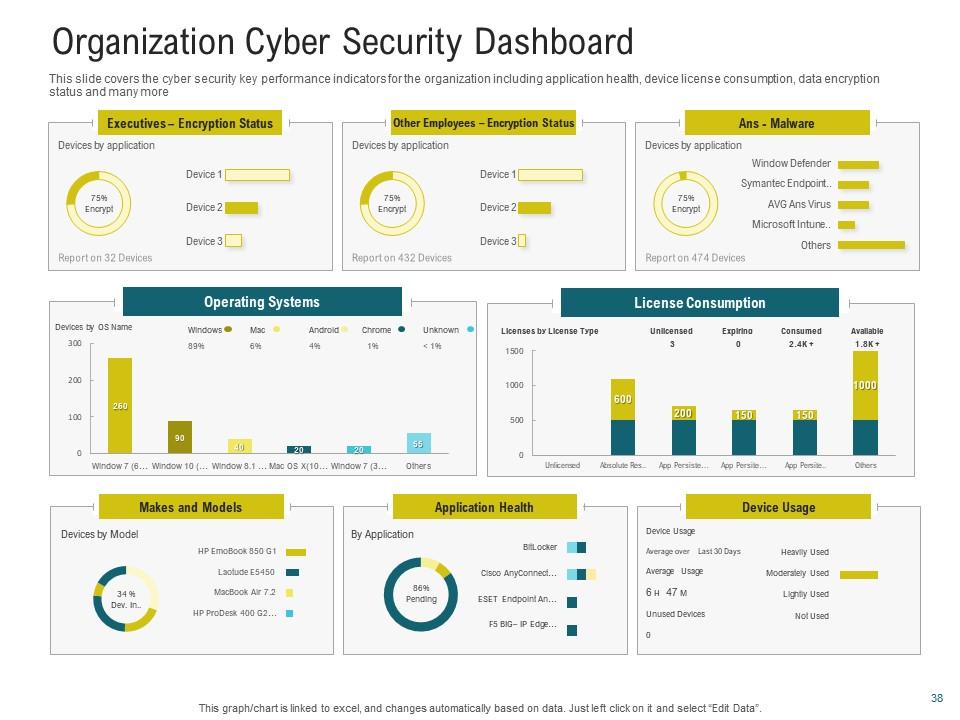
Detect security incidents as they happen using this PPT Dashboard. The slide also depicts real-time monitoring of cybersecurity indicators. It provides centralized visibility into the business's cybersecurity environment. That enables you to integrate data into a single, intuitive interface. The slide's alerting features notify cybersecurity teams of questionable behaviors as soon as they occur. The critical indicators on the slide are: application health, device license consumption, data encryption state, etc.
Supercharge your Anti Phishing Defense with our PPT Templates
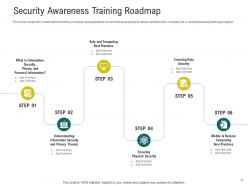
Most safety breaches happen due to human error. SlideTeam's comprehensive and 100% customizable cybersecurity awareness training templates will assist you in turning each employee into a cyber defender. These security awareness training templates will train your workforce to think critically about their data and data hygiene, what they get in their inbox, how to respond, and how to keep information safe in their physical offices.
Cybersecurity awareness training powerpoint presentation slides with all 51 slides:
Use our Cybersecurity Awareness Training Powerpoint Presentation Slides to effectively help you save your valuable time. They are readymade to fit into any presentation structure.

FAQs for Cybersecurity awareness training
Focus on four big things: phishing training with fake attacks, password managers plus MFA, social engineering awareness, and how to report sketchy stuff. Phishing simulations are clutch - people fall for that crap all the time. Skip the boring PowerPoints and do interactive scenarios instead. Honestly, the data protection basics matter too but don't overwhelm them. Password stuff should be pretty straightforward. Make it ongoing though, like quarterly check-ins. One-and-done training doesn't stick. Keep it real with actual examples they'd see at work.
Honestly? Every 6 months at minimum, but I'd go with quarterly if you can swing it. Cyber threats move crazy fast these days - like, new phishing scams literally pop up weekly. My old IT manager used to say "if you're not updating, you're already behind" and he wasn't wrong. Set a calendar reminder for every 6 months to do a full review of your training stuff. Between those big updates, just keep an eye on security news and patch in new threats as they come up. Oh, and if you ever have a close call or actual incident, drop everything and update immediately. That's usually when the best learning happens anyway.
So phishing simulations are like fake phishing emails you send to your team to see who takes the bait. It's basically a fire drill for email threats - helps you figure out who needs more training. The best part? People actually start developing better instincts for spotting sketchy emails. You'll want to run these pretty regularly and use the results to fix whatever specific mistakes people keep making. Honestly, it's way better than just lecturing everyone about email security and hoping they remember it when it counts.
So you want to know if your security training actually works? Start with before/after tests to see knowledge gains. Then hit them with fake phishing emails - the click rates don't lie. Course completion stats are whatever, people just rush through those anyway. What really matters is tracking actual incident reports over time. Are employees reporting more suspicious stuff after training? That's your sweet spot right there. Oh, and watch for overall security incidents dropping. Set up some kind of tracker and check it every few months. You'll start seeing patterns pretty quick.
Oh man, the worst myth? People think cybersecurity is just IT's job. Wrong. Also, tons of folks believe antivirus catches everything - it really doesn't. Small companies especially think they're not worth targeting, which is nuts because hackers love easy targets. Phishing emails aren't always obvious anymore either. I see people relying only on passwords too, completely skipping two-factor authentication. Here's the thing - everyone's basically the human firewall now. Most breaches happen because someone got tricked, not because of some crazy movie hacker scenario. Your training should use real examples from similar companies.
Look, generic training is totally useless - nobody pays attention to it. Map out what data each team actually handles first. Your IT people need the heavy technical stuff about vulnerabilities. HR should focus on phishing and social engineering since they're swimming in employee info all day. Executives? Business email compromise for sure, plus governance stuff. They're honestly painted with the biggest targets on their backs. Sales teams are constantly on sketchy public wifi, so mobile security is huge for them. Build scenarios that actually match what they deal with daily - way more effective than boring generic modules everyone clicks through mindlessly.
Honestly, gamification works way better than those boring slide presentations everyone hates. Break your training into small chunks - people actually finish those. VR is getting pretty cool for phishing practice, though it might be overkill depending on your budget. Interactive simulations are solid too. Learning management systems help you track who's struggling with what. Some AI platforms will adjust difficulty automatically, which is nice because not everyone learns the same way. I'd start by figuring out where you're most vulnerable first - like, are people clicking sketchy links or using terrible passwords? Then pick maybe two tools max that fit your budget and culture.
Dude, your training needs to work online and actually match how people work now - from home, cafes, wherever. Most companies are stuck teaching office stuff that's totally irrelevant. Hit the real problems: securing home WiFi, spotting sketchy emails (especially when personal/work blur together), video call safety. Make it hands-on with scenarios they'll recognize, not boring corporate nonsense. Here's what works better - ditch the annual marathon session. Break it into monthly 15-minute chunks people can do anywhere. Track who's done what so nobody disappears. Honestly, consistency beats everything else here. Short and regular wins every time.
Hey! So for security training that actually works - use real examples your people see daily. You know, fake CEO emails asking for wire transfers, sketchy USB drives in the parking lot. Skip the boring PowerPoint marathons and do interactive stuff instead. Quizzes, simulations, whatever keeps them awake. Keep sessions super short, like 15-20 minutes tops. Share actual breach stories so they get why this matters. Honestly, most people tune out if it feels too "corporate training-y." Pop quizzes help too - just quick ones to make sure stuff's sticking. The goal is making cybersecurity feel relevant to what they're doing every day, not some random IT checkbox.
Honestly, you've gotta get everyone involved, not just dump it all on IT. Skip the boring training videos - nobody actually watches those anyway. Try interactive stuff like phishing simulations that relate to their actual jobs. Your executives need to walk the walk too; people notice when leadership actually cares about security. Set up simple ways for folks to report weird stuff, and don't forget to give props when they do. The whole trick is framing it as "we're protecting our team" instead of just more corporate rules to follow.
So it really depends on what kind of business you're running. GDPR, HIPAA, SOX, PCI-DSS - they all have their own training requirements for handling data and responding to breaches. Keep records of who completed what because you'll need proof later. Healthcare and financial companies get hit the hardest with regulations, but even smaller businesses have to deal with state breach notification laws (which are honestly a pain). Your legal team should know which ones apply to you specifically. Just focus your training on whatever compliance stuff you actually have to follow. When auditors show up, you'll be glad you documented everything.
Honestly, your employees make or break your whole security setup. They're clicking links, opening emails, handling data - basically deciding if that suspicious message is real or fake. Just takes one person falling for a phishing scam to mess up everything. But here's the thing - when your team actually knows what to look for, they become pretty solid at catching threats early. Training helps, though you gotta make it interesting or people just tune out (learned that the hard way). Short bursts work better than those marathon sessions nobody remembers.
Honestly, gamification works because people love competition and rewards - it's just human nature. Add some leaderboards, badges, maybe point systems to your cybersecurity training. Way better than boring presentations, trust me. Remember those mobile games you couldn't put down? Same concept here. You could do phishing contests where teams compete, or trivia games about security stuff. Progressive modules that unlock new content work great too. The whole point is making it feel less like work training and more like... well, actually fun. I'd start simple - just basic points for completing modules. You can always add more bells and whistles later once people get into it.
Honestly? People just hate being forced into training during crunch time. I've definitely half-listened while answering emails - we all do it. Companies cheap out with boring one-size-fits-all programs that either put you to sleep or completely overwhelm you. Plus there's always someone struggling with the tech or language barriers making it awkward for everyone. Best bet is timing it when folks aren't swamped and actually tailoring it to what people do day-to-day. Interactive stuff works way better than those mind-numbing click-through modules. Oh, and maybe don't schedule mandatory sessions right before big deadlines?
Make it regular, not just some annual training thing everyone sleeps through. I do 5-minute monthly videos on whatever threats are hot right now - people actually remember the real horror stories (that ransomware company still makes me cringe). Quarterly phishing tests keep everyone sharp. Set up automated reminders for updates and maybe an internal newsletter about recent scams. Oh, and start with 15-minute team check-ins where people can share sketchy emails they've gotten. Honestly, the surprise factor works way better than scheduled stuff. Keep it relevant to what's actually happening out there.
-
It saves your time and decrease your efforts in half.
-
Good research work and creative work done on every template.
-
Excellent template with unique design.
-
Professional and unique presentations.
-
Very unique, user-friendly presentation interface.
-
Wonderful templates design to use in business meetings.
-
Appreciate the research and its presentable format.
-
Editable templates with innovative design and color combination.
-
Perfect template with attractive color combination.
-
Unique design & color.
-
Page:
- You're currently reading page 1
- Page 2
-
