

Implementing a security awareness program powerpoint presentation slides




Try Before you Buy Download Free Sample Product
 Impress Your
 Audience
 100%
100% Editable
 Save Hours
 of Time


Introducing our implementing a security awareness program PowerPoint presentation slides. Spread awareness about the matters of cyber security in your team with the help of this IT security awareness PPT layout. Explain the problems faced by your organization because of security lapses with the help of our internet safety PowerPoint design. This well built network protection PPT theme contains a slide that talks about the new strategies of learning about cyber security. Associate with this cyber protection recognition PowerPoint set to provide justification for the need of having an automated cyber security awareness program. This security reliability PPT bundle contains a slide that gives an overview of the budget allocation for the cyber security awareness program. This network security apprehension PPT deck lets you make required variations to the icons and colors making this PPT more practical. Choose this computer security awareness PowerPoint design to showcase organization and assurance. Download this PPT slide to explore true perfection.
People who downloaded this PowerPoint presentation also viewed the following :
Content of this Powerpoint Presentation
Slide 1: This slide introduces Implementing a Security Awareness Program. State Your Company Name and begin.
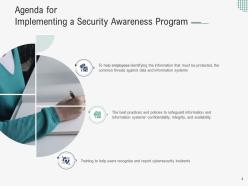
Slide 2: This is an Agenda slide. State your agendas here.
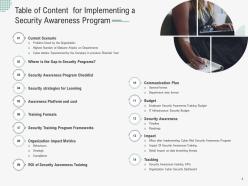
Slide 3: This slide shows Table of Content for the presentation.
Slide 4: This slide presents Table of Content for the presentation.
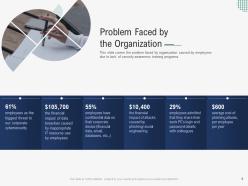
Slide 5: This slide covers the problem faced by organization caused by employees due to lack of security awareness training programs.
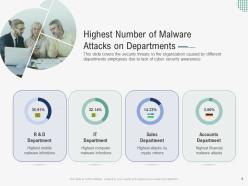
Slide 6: This slide displays security threats to the organization caused by different departments employees due to lack of cyber security awareness
Slide 7: This slide represents the security threats to the organization caused by different departments employees due to lack of cyber security awareness.
Slide 8: This slide shows Table of Content for the presentation.
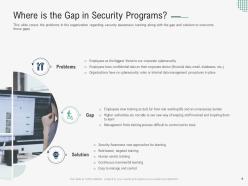
Slide 9: This slide covers the problems in the organization regarding security awareness training along with the gap and solution to overcome those gaps.
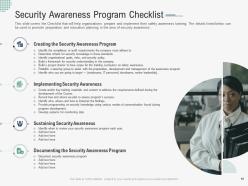
Slide 10: This slide covers the Checklist that will help organizations prepare and implement their safety awareness training.
Slide 11: This slide displays Table of Content for the presentation.
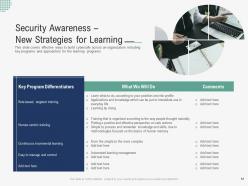
Slide 12: This slide represents effective ways to build cybersafe across an organization including key programs and approaches for the learning programs.
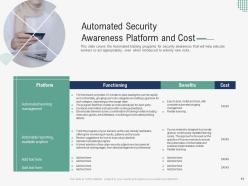
Slide 13: This slide covers the Automated training programs for security awareness that will help educate workers to act appropriately, even when introduced to entirely new risks.
Slide 14: This slide presents Table of Content for the presentation.
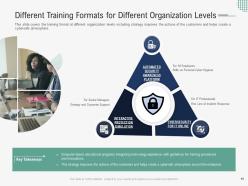
Slide 15: This slide covers the training format at different organization levels including strategy improves the actions of the customers and helps create a cybersafe atmosphere.
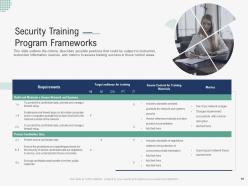
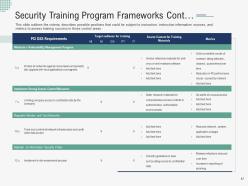
Slide 16: This slide displays possible positions that could be subject to instruction, instruction information sources, and metrics to assess training success.
Slide 17: This slide represents Security Training Program Frameworks.
Slide 18: This slide shows Table of Content for the presentation.
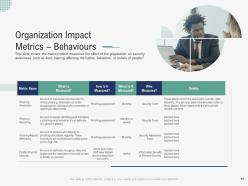
Slide 19: This slide presents the metrics which measures the effect of the preparation on security awareness such as does training affecting the habits, behaviors, etc.
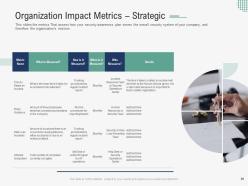
Slide 20: This slide shows assess how your security awareness plan serves the overall security system of your company.
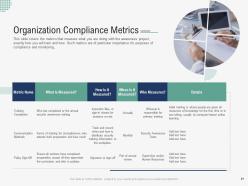
Slide 21: This slide displays metrics that measure what you are doing with the awareness project.
Slide 22: This slide represents Table of Content for the presentation.
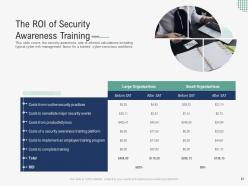
Slide 23: This slide shows security awareness rate of interest calculations including typical cyber risk management factor for a trained.
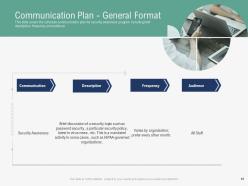
Slide 24: This slide presents schedule communication plan for security awareness program including brief description, frequency and audience.
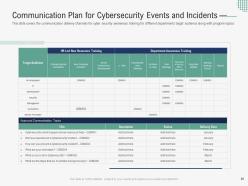
Slide 25: This slide shows Communication Plan for Cybersecurity Events & Incidents.
Slide 26: This slide displays Table of Content for the presentation.
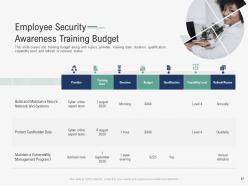
Slide 27: This slide represents Employee Security Awareness Training Budget.
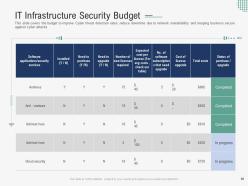
Slide 28: This slide shows budget to improve Cyber threat detection rates, reduce downtime due to network unavailability and keeping business secure against cyber attacks.
Slide 29: This slide presents Table of Content for the presentation.
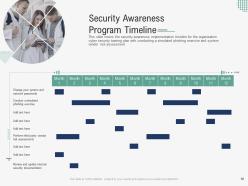
Slide 30: This slide covers the security awareness implementation timeline for the organization cyber security training plan.
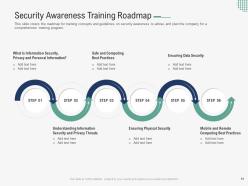
Slide 31: This slide displays Security Awareness Training Roadmap.
Slide 32: This slide represents Table of Content for the presentation.
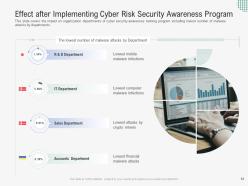
Slide 33: This slide shows the impact on organization departments of cyber security awareness training program.
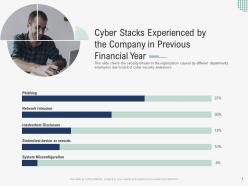
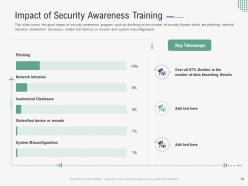
Slide 34: This slide presents the good impact of security awareness program such as declining in the number of security threats which are phishing, network intrusion, inadvertent disclosure, etc.
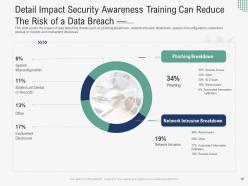
Slide 35: This slide shows Detail Impact Security Awareness Training can Reduce the Risk of a Data Breach.
Slide 36: This slide displays Table of Content for the presentation.
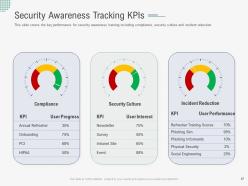
Slide 37: This slide represents Security Awareness Tracking KPIs.
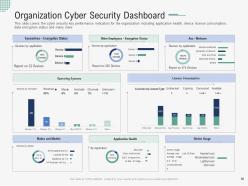
Slide 38: This slide covers the cyber security key performance indicators for the organization including application health, device license consumption, data encryption status, etc.
Slide 39: This slide shows Implementing a Security Awareness Program Icons.
Slide 40: This slide is titled as Additional Slides for moving forward.
Slide 41: This is Our Mission slide with related imagery and text.
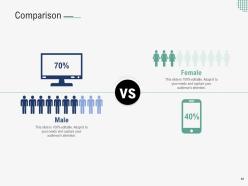
Slide 42: This is a Comparison slide to state comparison between commodities, entities etc.
Slide 43: This is Our Team slide with names and designation.
Slide 44: This is About Us slide to show company specifications etc.
Slide 45: This is an Idea Generation slide to state a new idea or highlight information, specifications etc.
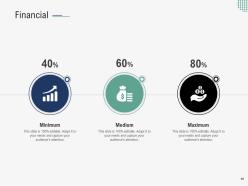
Slide 46: This is a Financial slide. Show your finance related stuff here.
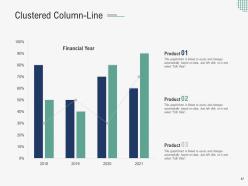
Slide 47: This slide shows Clustered Column-Line three products comparison.
Slide 48: This slide shows Post It Notes. Post your important notes here.
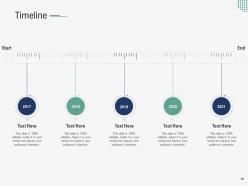
Slide 49: This is a Timeline slide. Show data related to time intervals here.
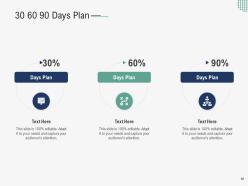
Slide 50: This slide shows 30 60 90 Days Plan with text boxes.
Slide 51: This is a Thank You slide with address, contact numbers and email address.
Implementing a security awareness program powerpoint presentation slides with all 51 slides:
Use our Implementing A Security Awareness Program Powerpoint Presentation Slides to effectively help you save your valuable time. They are readymade to fit into any presentation structure.

FAQs for Implementing a security awareness program
Honestly, you'll need four things to make this actually stick. Training that doesn't suck - cover phishing, passwords, social engineering, but skip the boring compliance videos everyone ignores. Run fake phishing tests to see who bites. Make sure people know how to report weird stuff when it happens (and it will). Leadership has to care too, or nobody else will. Start basic, then do monthly check-ins. The tricky part is keeping it fresh - security fatigue is real and people tune out fast.
So you definitely want to look at both the behavior stuff and whether people actually remember what you taught them. I'd start with baseline numbers - like how many people click on those fake phishing emails, then see if it gets better over time. Quiz scores and completion rates show you the learning side. Real incidents and help desk calls tell you what's actually happening out there. Honestly, those phishing simulation results are probably your best indicator - they show if people really got it or just zoned out during training. Track attendance and feedback too, obviously. Monthly reports help you catch trends early instead of scrambling before quarterly reviews.
Honestly, if your employees aren't engaged with security training, you're just wasting everyone's time. They'll sit through those mandatory sessions but retain basically nothing. Engaged employees actually start thinking "hmm, this email seems sketchy" instead of clicking whatever lands in their inbox. The difference is huge - they'll report weird stuff more often and actually care about protecting the company. Make your training interactive and relevant to what they do daily. Maybe throw in some humor too? I know it sounds cheesy, but boring training equals terrible results. Your security incidents will drop noticeably.
Honestly? Every 3 months minimum. The threat landscape is nuts right now - like, attackers are constantly switching up their game. Do a quick content review quarterly, then a bigger refresh once a year. The phishing stuff needs constant updates since those tactics change weekly (I swear these scammers have too much time). Recent industry incidents, new scam methods - that's your bread and butter for frequent updates. The dry compliance training can sit longer without changes. Nobody's reinventing those rules every month. But watch what's actually happening in the wild - that's what'll keep people paying attention instead of zoning out.
Focus on phishing emails first - that's honestly where most breaches start. Your team needs to spot sketchy emails and verify any requests for sensitive stuff before acting on them. Ransomware attacks are everywhere right now too. Also cover social engineering (people manipulating you over the phone), password security, and sketchy Wi-Fi networks. I'd say use real examples they'll actually encounter at work. The generic training modules are pretty useless tbh. Make sure they know how to double-check things when something feels off, even if it seems to come from their boss.
Honestly, you gotta tailor this stuff to what people actually do at work. HR needs social engineering training since they're handling employee data all day. IT teams? Hit them with advanced threat detection and incident response. Sales people are basically sitting ducks - they're always clicking links and oversharing, so phishing sims are perfect for them. Finance folks need fraud training because, duh, they move money around. The trick is matching real threats to job roles. Nobody wants another boring "don't click suspicious links" presentation. Make it bite-sized and relevant to their day-to-day chaos.
Honestly, I'd start with baseline testing to see where everyone's at. Run simulations monthly or quarterly - just don't overdo it and piss people off. Your fake phishing emails should look like actual threats your industry sees. When someone clicks, give immediate feedback through a quick learning module instead of making them feel like idiots. Click rates and reporting rates are your main metrics to watch. Oh, and celebrate when things improve! The real goal though? Create a culture where people actually report suspicious emails instead of staying quiet. Follow up with targeted training for repeat clickers - some folks just need extra help.
Honestly, gamification is a game-changer for security training. Instead of boring compliance stuff, you're creating actual challenges with points and badges that people actually want to do. I've watched entire teams get weirdly competitive over phishing scores - it's kind of hilarious but it works. Short sentences help. Active engagement beats passive slide-clicking every time for retention. You can set up department competitions and track who's improving. Oh, and leaderboards are surprisingly motivating even for people who claim they don't care about that stuff. Just start simple with basic points and see what clicks.
Track quiz scores right after training, then test again at 30/60/90 days to see what people actually remember. Phishing simulations are your best friend here - way better than regular tests since they show real behavior. Monthly mini-quizzes work better than those huge quarterly exams nobody likes. Keep an eye on incident reports and help desk security tickets too. Honestly, the retention part is brutal because everyone forgets so fast. Set up some kind of dashboard so you can actually see patterns and tweak things. Oh, and compliance rates are clutch for showing if people are following policies day-to-day.
Honestly, the biggest thing is making security part of daily life instead of just that boring annual training everyone sleeps through. Drop security tips in your team Slack. When someone catches a phishing email, actually celebrate them - people love recognition. We started doing these "security spotlights" in meetings where we'd share real threats or wild stories from other departments. Keeps everyone engaged, you know? Your managers have to walk the walk too because employees notice everything leadership does. Make it ongoing and visible so it doesn't just fade into the background noise.
Honestly, the hardest part is just getting people to care - everyone thinks security training is super boring. Budget's always tight too, and good materials aren't cheap. Leadership says they want results but then won't actually invest properly, which is so frustrating. Start small though! Pick specific roles and make it relevant to what they actually do. Skip the generic stuff that puts everyone to sleep. Track something concrete like how many people still click phishing emails - executives love numbers they can understand. Once you show that's working, getting more funding becomes way easier.
Honestly, the trick is making it feel relevant instead of just another compliance thing to check off. Ask your team what security stuff actually worries them first - then build from there. Mix up how you deliver it too: videos, quick demos, team chats. Real scenarios work way better than abstract threats nobody relates to. Plain language is everything - I swear half these programs fail because they sound like legal docs. Also maybe I'm biased, but the interactive stuff always gets better results than boring slides. Bottom line: if it doesn't connect to their actual daily work, people tune out immediately.
Don't use real employee data without asking first - that's sketchy. Skip the fear tactics too, they backfire. When people mess up on tests, help them learn instead of shaming them (seriously, public call-outs are the worst). Your training needs to work for everyone - different tech skills, disabilities, cultural backgrounds. Be upfront about what you're tracking and why. I mean, transparency builds trust. Short tests work better than marathon ones. The whole point is creating a team that thinks about security naturally, not setting traps. Focus on teaching, not gotcha moments.
Honestly, generic training is useless. Pull actual incidents from companies like yours - show them the real phishing email that wrecked some competitor last month. That hits way harder than theoretical BS. Check local news for data breaches, talk to your IT folks about close calls you've had. We actually shared a sanitized version of our own incident once and people finally got it. The whole point is making it feel like something that could actually happen to them at work, not some made-up scenario they'll tune out.
Honestly, there's a bunch of good options out there. KnowBe4 and Proofpoint are solid choices - they do everything from phishing sims to tracking who's actually completing the training. SANS is another big one. Some companies just use what they already have, like SharePoint or Slack for quick reminders. The phishing simulation stuff is pretty cool though, you can literally watch people click on fake malicious links in real time (kind of terrifying but useful). Most platforms give you decent dashboards showing completion rates and quiz scores. I'd pick something that plays nice with whatever systems you're already using - makes reporting way less of a headache later.
-
Thanks for all your great templates they have saved me lots of time and accelerate my presentations. Great product, keep them up!
-
Content of slide is easy to understand and edit.
-
Use of different colors is good. It's simple and attractive.
-
Illustrative design with editable content. Exceptional value for money. Highly pleased with the product.
-
Great designs, really helpful.
-
Great quality slides in rapid time.
-
Nice and innovative design.
-
Content of slide is easy to understand and edit.
-
Use of icon with content is very relateable, informative and appealing.
-
Use of icon with content is very relateable, informative and appealing.
-
Page:
- You're currently reading page 1
- Page 2
-
