


Building Awareness Powerpoint Presentation Slides




Try Before you Buy Download Free Sample Product
 Impress Your
 Audience
 100%
100% Editable
 Save Hours
 of Time


Make your thoughts more effective with our Building Awareness Powerpoint Presentation Slides.
People who downloaded this PowerPoint presentation also viewed the following :
Content of this Powerpoint Presentation
Slide 1: This is an introductory slide for Building Awareness. State your company name to get started.
Slide 2: This is Our Agenda slide. State company agendas etc. here.
Slide 3: This is Customer Solution Model PowerPoint Templates slide showing Demand Creation Process in a circular image form.
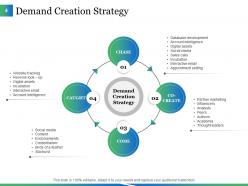
Slide 4: This slide states Demand Creation Strategy in a circular image form which includes- CHASE, CAUGHT, COME, CO-CREATE.
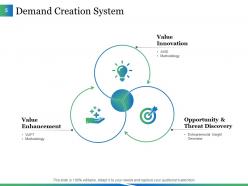
Slide 5: This slide showcases Demand Creation System in a circular flow diagram. Its components are- Value Innovation, Opportunity & Threat Discovery, Value Enhancement.
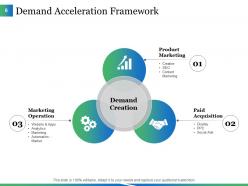
Slide 6: This slide presents Demand Acceleration Framework in a circular diagram with DEMAND CREATION as its central criteria. Its 3 components are- Product Marketing, Paid Acquisition, Marketing Operation.
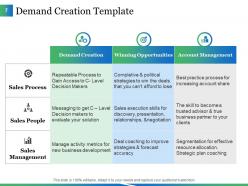
Slide 7: This slide showcases Demand Creation Template in a tabular form.
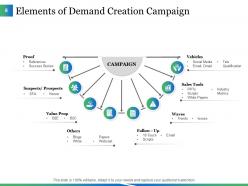
Slide 8: This slide states Elements of Demand Creation Campaign. These elements include- Waves, Sales Tools, Vehicles, Follow - Up, Value Prop, Suspects/ Prospects, Proof, Others.
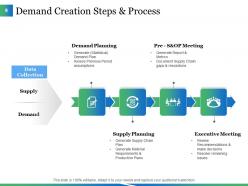
Slide 9: This slide shows Demand Creation Steps & Process which are- Demand Planning, Supply Meeting, Pre - S&OP Meeting, Executive Meeting.
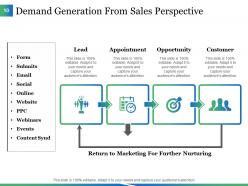
Slide 10: This slide shows Demand Generation From Sales Perspective with arrow and icon imagery.
Slide 11: This is Building Awareness Icons Slide. Move or edit icons as per your requirement.
Slide 12: This is a Coffee Break slide with imagery which can be altered as per need.
Slide 13: This slide is titiled Additional slides. You may change the content as per need.
Slide 14: This slide showcases Our Team with name and designation to fill.
Slide 15: This is a Quotes slide. State business message, beliefs etc. here.
Slide 16: This is a Timeline slide to show growth, evolution etc.
Slide 17: This slide showcases a Puzzle image to show information, specifications etc.
Slide 18: This is a Target image slide. State targets etc. here.
Slide 19: This is a Bulb & Idea image slide to show ideas, innovative information etc.
Slide 20: This slide forwards to Our Charts & Graphs. Alter/ modify content as per your requirement.
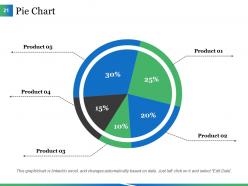
Slide 21: This is a Pie Chart slide to show product/entity comparison, specifications etc.
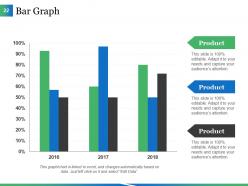
Slide 22: This is a Bar Graph image slide to show product comparison, growth etc.
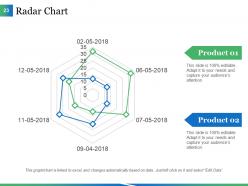
Slide 23: This is a Radar Chart slide to show product/entity comparison, specifications etc.
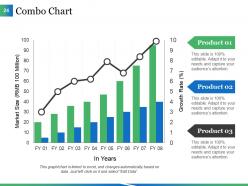
Slide 24: This is a Combo Chart slide to show information, comparison, specifications etc.
Slide 25: This is a Thank You slide with Email, Address# street number, city, state, Contact Numbers.
Building Awareness Powerpoint Presentation Slides with all 25 slides:
Be able to elaborate in depth on every aspect with our Building Awareness Powerpoint Presentation Slides. You will discover infinite capacity.

FAQs for Building Awareness
Dude, being aware of your audience is honestly a game-changer. You can tell when people are zoning out just by watching their faces and body language. I've sat through way too many presentations where the speaker just bulldozed through their slides while everyone looked dead inside. But if you're paying attention, you can switch things up - ask questions, change your pace, throw in different examples. You'll spot tech problems quicker too. My advice? Scan the room every couple minutes and actually make eye contact. It sounds obvious but most people forget to do it.
Dude, you've gotta match your content to whoever's sitting there. Executives? Hit them with strategy and ROI stuff. Front-line workers need the nitty-gritty how-to details instead. Age can matter too - younger crowds might dig interactive stuff while older folks usually want those printed handouts (though my dad's way more tech-savvy than me, so who knows). Your whole vibe should change - the language, examples, even how it looks. I learned this the hard way after bombing a presentation once. Just tailor everything from your opener to what you want them to do afterward.
Honestly, being self-aware is huge for presentations. You catch your own weird habits - I used to say "um" every five seconds until I realized how bad it was. Now I notice when I'm fidgeting or talking too fast and can actually fix it in the moment. Plus you read your audience way better when you're not totally in your own head. People look confused? Slow down. They're clearly bored? Time to switch gears or bring more energy. Recording yourself practicing is brutal but SO worth it - you'll be shocked at the gap between what you think you're doing versus reality.
Look, cultural awareness can totally make or break your presentation. You don't want to accidentally offend people, right? Research your audience's background first - like, red means luck in China but screams danger here in the West. Wild how different that is. Some cultures want you to be super direct with feedback, others hate confrontation and prefer hints. Also pay attention to their communication style and views on hierarchy. I learned this the hard way once, but now I always adjust my approach based on who I'm presenting to. Trust me, it makes a huge difference in actually connecting with people.
Start with visuals that actually hit people in the gut - powerful photos, stark numbers, anything that makes them *feel* something. People tune out bullet points instantly, but they'll remember a good story. So structure your slides like narratives instead of fact dumps. Before/after shots work great, or real testimonials from people who've been affected. Your design choices matter too - colors and fonts should back up your message, not fight it. Oh, and this is crucial: give them something concrete to do at the end. A QR code, website, whatever. Don't just leave them feeling bad about the world with no way to actually help.
Dude, emotional awareness is a game-changer for storytelling. You can literally watch your audience and see when they're zoning out or actually hooked - then switch gears on the spot. I've bombed presentations before by missing those cues completely lol. But it's not just reading them - you gotta know your own emotional state too. Nothing kills a good story like letting your nerves make you rush through the best parts. The trick is picking stories that match where people's heads are at right now, not just what you want to tell.
Honestly, less is more with slides. One concept per slide or you'll lose people fast. Big fonts and bold colors are your friend - nobody wants to squint at tiny text from the back. Charts work amazing for data stuff, and simple diagrams break down processes without confusing anyone. Your visuals should back up what you're saying, not fight for attention. Oh, and definitely test them on a coworker first. If they don't get it immediately without explanation, you've got some tweaking to do. Always end with what you want people to actually DO with the info.
Stop listing features and start solving actual problems. Figure out what's really bugging your customers, then show them how you fix it differently than everyone else. Real stories work way better than generic benefits - honestly, people tune out the moment you sound like a brochure. Drop the corporate speak too. Nobody cares about "solutions" or whatever jargon you're using internally. Structure it simple: here's what sucks for you, here's why that matters, here's how we actually fix it. Focus on outcomes they give a damn about.
Just be upfront about it - "I know you're looking at X, Y, and Z too, so here's how we compare." Make a simple chart showing where competitors are strong and where you win. Honestly? People appreciate the honesty way more than pretending other options don't exist. Focus on 2-3 things that actually matter for their situation specifically. Then ask what else they're considering. Shows you're confident enough to talk about alternatives openly, plus it gets them talking. Way better than dancing around the obvious.
Dude, timing awareness is everything! Your audience can totally tell when you're scrambling or dragging things out. I've watched so many good presentations crash because someone spent forever on setup then had like 30 seconds left for their main point - honestly painful to watch. When you know your pacing, you hit the important stuff without rushing. Practice with a timer for sure. Oh, and leave little gaps between sections so you can slow down or speed up if needed. Sounds boring but it actually makes you look way more polished and confident up there.
Honestly, Mentimeter and Slido are lifesavers for this - people can respond to your questions instantly so you'll know if they're tracking or totally confused. But don't sleep on just watching faces! Nodding, scribbling notes, that deer-in-headlights look we've all given before. For virtual stuff, chat and those little reaction buttons work pretty well. Quick pulse checks help too - "raise your hand if this clicks" gets people moving. Oh, and breakout rooms if you're feeling fancy. Just pick one method first though. Trust me, trying to juggle everything makes you look scattered.
Dude, once you start spotting these feedback loops during presentations, everything changes. You know how you rush through slides when you're nervous? That makes people zone out, which freaks you out more, so you speed up even worse. But if you catch yourself doing it, you can actually slow down mid-presentation. The reverse works too - like when you make good eye contact and see people nodding, suddenly you feel way more confident and keep that energy going. Honestly it's weird how much this helps once you get it. Just pay attention to what's happening while you're up there and tweak things as you go.
Honestly? Tableau or Power BI are game-changers for making environmental data actually look interesting in presentations. AR apps are pretty sweet too - you can overlay pollution stats right onto real photos of locations. VR's cool but probably overkill unless you're presenting to tech bros who love that stuff. Tools like Prezi or basic infographic makers work great for turning boring sustainability numbers into stories people won't forget. Don't go crazy with too many tools though. Pick one, get good at it first. The tech should help tell your story, not become the story itself.
Honestly, you've gotta make it personal if you want people to actually care. Skip the boring stats and tell real stories they can relate to. I always throw in interactive stuff - ask questions, get them talking about their own experiences. Small group discussions are a game changer instead of just talking at everyone for an hour straight. Give them scenarios from their actual job, not some made-up corporate example. They need tools they can use tomorrow, not theory. The whole point is those lightbulb moments where someone's like "oh shit, I never thought of it that way." That's when you know it worked.
Okay so digital awareness basically means being super aware of how tech affects your whole presentation vibe. Bad audio will absolutely tank you - I've seen great speakers become unwatchable because of crackling mics. Your camera angle matters way more than you'd think too. The tricky part? You can't read people the same way through screens. Body language gets weird and flat. So you've got to amp up your energy and check in with people way more often than usual. Also - and this is non-negotiable - test everything at least 30 minutes early. Your internet will pick the worst possible moment to act up otherwise.
-
Commendable slides with attractive designs. Extremely pleased with the fact that they are easy to modify. Great work!
-
Excellent design and quick turnaround.