


Product Awareness Powerpoint Presentation Slides




Try Before you Buy Download Free Sample Product
 Impress Your
 Audience
 100%
100% Editable
 Save Hours
 of Time


Promote your product using our Product Awareness PowerPoint Presentation Slides. Product awareness is very important for products market’s success. The product promotion PowerPoint complete deck helps to showcase brand strategy and product awareness plans to win customers from competitors. The marketing team can properly explain the details of the plan using this brand awareness presentation which includes slides like brand awareness campaign, steps to build brand awareness online, brand awareness metrics, effectiveness measurement, brand execution roadmap, and brand awareness pyramid, etc. The brand awareness PPT template can present the purpose of branding along with a marketing plan summary. Marketing professionals can use content ready product strategy PPT templates for concepts such as product plan, product promotion, brand awareness, brand recognition, brand strategy, product marketing, product promotion, brand visibility and many more. Download this product marketing PowerPoint slide design to showcase the purchase decision process and marketing communication. Create the foundation for agreement with our Product Awareness Powerpoint Presentation Slides. It helps build grounds for consensus.
People who downloaded this PowerPoint presentation also viewed the following :
Content of this Powerpoint Presentation
Slide 1: This slide introduces Product Awareness state your company name and get started.
Slide 2: This slide showcases Content. Also this slide showing this as content points listed are- Brand Awareness - Introduction, Brand Awareness Steps, Brand Awareness Roadmap, Brand Awareness Campaign, Brand Awareness Metrics, Measuring Effectiveness of the Brand.
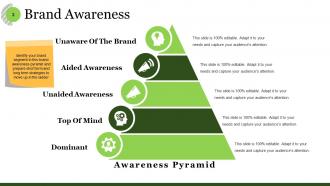
Slide 3: This slide showcases Brand Awareness. Identify your brand segment in this brand awareness pyramid and prepare short term. we have listed some and those are- Awareness Pyramid, Unaware Of The Brand, Aided Awareness, Unaided Awareness, Top Of Mind, Dominant,.
Slide 4: This slide include Brand Awareness - Steps. Monitor these steps, you can alter them as per your requirements- Create Interest, Maintain Interest, Reward Interest.
Slide 5: This slide presents Steps To Build Brand Awareness Online. You can alter the content as per your requirement. Repeat Visibility & Engagement, Awareness, Sales.
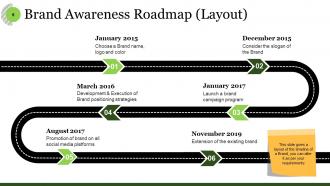
Slide 6: This slide introduces Brand Awareness Roadmap (Layout). we have mentioned some parameters such as- Promotion of brand on all social media platforms, Choose a Brand name, logo and color, Consider the slogan of the Brand, Development & Execution of Brand positioning strategies, Launch a brand campaign program, Extension of the existing brand, This slide gives a layout of the timeline of a Brand, you can alter it as per your requirements.
Slide 7: This slide presents Brand Awareness Campaign. We have categorized somecommon categories just to give a basic idea on classification which can be altered by you as per your requirement.
Slide 8: This slide displays Brand Awareness Metrics. slide aslso includes table about awareness with some of the social sites. You can add and edit data.
Slide 9: This slide presents Effectiveness Measurement with Awareness parameters and their bar charts.
Slide 10: This slide showcases Product Awareness Icon.
Slide 11: This slide is a Coffee Break image for a halt.
Slide 12: This slide forwards to Charts & Graphs.
Slide 13: This is a Bar Graph image slide to show product comparison, growth etc.
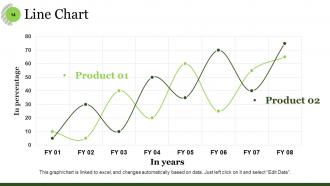
Slide 14: This slide shows a Line Chart for two product comparison.
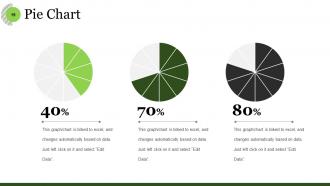
Slide 15: This slide gives You to compare your product or business through Pie Chart.
Slide 16: This slide is titled Additional slides to proceed forward.
Slide 17: This is Our mission slide with imagery and text boxes to go with.
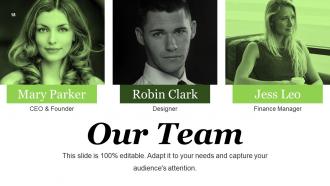
Slide 18: This is Our team slide with names and designation.
Slide 19: This is an About Us slide showing Our Company, Value Client, and Premium services as examples.
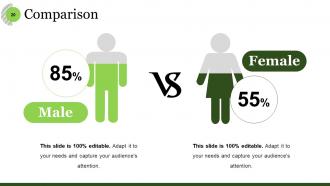
Slide 20: This is a Comparison slide to show comparison of two entities.
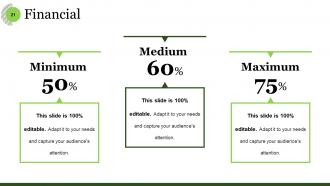
Slide 21: This is a Financial Score slide to show financial aspects here.
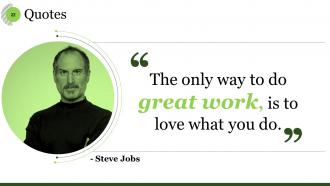
Slide 22: This is a Quotes slide to convey message, beliefs etc.
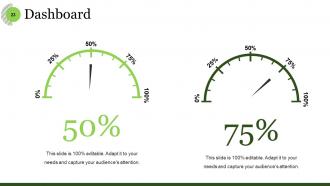
Slide 23: This is Dashboard slide to show information in percentages etc.
Slide 24: This slide showcases Global Project Locations with a World map and text boxes to make it explicit.
Slide 25: This is a Target slide. State your targets here.
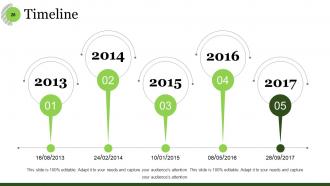
Slide 26: This is a Timeline slide to show milestones, growth or highlighting factors.
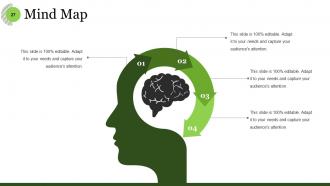
Slide 27: This slide shows a Mind map for representing entities.
Slide 28: This is a Bulb or Idea slide to state a new idea or highlight specifications/information etc.
Slide 29: This slide shows a Magnifying glass with text boxes.
Slide 30: This is a Thank You slide with image.
Product Awareness Powerpoint Presentation Slides with all 30 slides:
Choose the right frequency for your thoughts. Our Product Awareness Powerpoint Presentation Slides will ensure delighted listeners.










FAQs for Product Awareness
Honestly, most people screw up the storytelling part - they dive into technical stuff way too early. Start with the problem your audience actually faces, then show how your thing solves it specifically. Three things you can't skip: understanding their pain points, having a crystal clear value prop, and backing it up with real examples or case studies. Visuals and demos work way better than just talking at people. Oh, and always give them a clear next step at the end - otherwise they'll just sit there wondering what you want them to do.
Dude, visuals are game-changers for product demos. People actually *see* what you're selling instead of trying to picture it from your description. Screenshots work great for software, or try those before/after comparisons if you're doing services. Just don't throw in random stock photos - that's annoying and pointless. Most folks tune out after like three bullet-point slides anyway. Screen recordings are solid too. The trick is making sure each visual actually shows off what makes your product useful, not just filling space. Trust me, it beats talking at people for 20 minutes straight.
Honestly, stories just stick better than boring feature lists. Like, nobody's gonna remember "30% efficiency boost" - but they'll definitely remember hearing about that one customer who went from working weekends to actually having free time again. People need to see themselves in your product, you know? A good before-and-after story does that instantly. Plus it makes your whole brand feel less corporate and more... human, I guess? Which builds trust way faster than throwing stats at people. Start with one solid customer story - that's usually your best bet for getting attention.
Honestly, market research is a game-changer because it shows you what people *actually* want instead of what you assume they want. Surveys and focus groups are your best friends here. Competitor analysis too - see what's working for them. Figure out their real pain points and how they like getting info. Trust me, nobody wants to sit through another boring feature list! Focus on benefits that actually matter to your specific audience instead. Oh, and definitely check any recent customer feedback before you start building your presentation. Makes such a difference.
Honestly, less is more with these things. White space is your friend, and stick to maybe 2-3 colors tops. Your headline needs to be crystal clear about what the product actually does - I can't tell you how many templates I've seen where I'm like "what even is this?" Use good visuals and make the product the star. Bullet points work great for benefits since people just scan anyway. Oh, and definitely test it with real people first! What makes perfect sense to you might totally confuse someone else. Keep your fonts consistent and add a clear call-to-action at the bottom.
Dude, audience segmentation is everything when you're pitching product awareness. Tech people want specs and how it integrates with their existing stuff. Executives? They only care about ROI and beating competitors. Same product, but you're basically speaking different languages to each group. You'll need different case studies too - honestly, I learned this the hard way once. Research who's gonna be in that room beforehand. What keeps them up at night? Then adjust your examples and how deep you go into details. Don't treat a CFO like a developer, you know?
Dude, you need actual proof for whatever you're claiming about your product. Customer testimonials work great. So do usage stats, performance data, case studies - anything concrete that backs you up. Nothing's worse than those "we're the best!" slides with literally zero evidence (seriously, so cringey). Get specific with numbers too - like "boosted efficiency 23%" instead of just "makes things better." Oh and make sure your sources aren't from 2019 or something sketchy. Honestly? If you can't prove it, don't say it.
Honestly, most people overthink this. Start with simple surveys asking if customers recognize your brand - super basic stuff. Google Analytics shows your branded search traffic, which is huge. Social media mentions tell you a lot too, though tracking sentiment gets messy fast. Those fancy brand tracking studies? Yeah, they're supposedly the best but cost a fortune. Skip 'em unless you're rolling in cash. Quick email polls work great - just ask your list what brands they know in your space. The real trick is measuring before and after campaigns. Otherwise you're just guessing what worked. Direct website traffic spikes usually mean awareness is growing.
Don't jump straight into features - start with the actual problem you're solving or people will tune out immediately. Also, resist the urge to cram everything into one presentation. Most stakeholders honestly don't care about technical specs, they want to know how this affects them personally. Keep demos focused on key use cases instead of showing off every single feature you built. Oh and definitely test your screen share beforehand! I've seen so many presentations derailed by tech issues. Wrap up with specific next steps so everyone knows what they're supposed to do after.
Okay so don't just dump testimonials everywhere - that looks desperate. Instead, work in real numbers like "50K+ users" and drop in actual customer quotes where they make sense. Company logos work great if you've got good ones. Screenshots of people actually using your stuff? Even better. Place this credibility where people naturally get skeptical - right near your main pitch or those CTA buttons. Honestly, the whole thing needs to feel authentic, not like you're trying too hard to convince them. I'd start by looking at your current templates and finding maybe 2-3 spots where adding some social proof would actually feel natural, not forced.
Dude, interactive storytelling is totally changing how companies do product demos. Instead of boring everyone to death, they're using polls, breakout rooms, and live Q&A stuff. Personalized demo paths are pretty cool too - viewers pick their own journey based on their job or whatever. Thank god the "death by PowerPoint" era is finally over, right? Companies are also throwing short video clips into longer presentations, which works great for complicated products. Honestly, I'd just try adding one interactive thing to your next pitch and see what happens. The engagement difference is usually pretty obvious.
Honestly, you've gotta get people doing stuff instead of just staring at your slides. Polls work great - ask what they already know about your product. Let them click through a demo themselves, or just pause for questions every few minutes. People remember way more when they're actually participating. I learned this the hard way after boring audiences to death with feature lists. Mix things up every 5-7 minutes or you'll lose them. The whole point is making them feel like they're discovering your product's benefits, not getting lectured at.
Dude, you NEED a clear call-to-action or people will just awkwardly shuffle out after your presentation wondering what they're supposed to do. Like, you just spent 20 minutes getting them interested in your product, right? But if they don't know whether to hit up your website, book a demo, or whatever - that whole effort was pointless. It's literally the difference between "oh cool" and them actually doing something about it. Even basic stuff like "scan this QR code" beats ending with boring "thanks for your time." Make it super specific and dead simple to follow.
Create a simple brand guidelines doc with your colors, fonts, logo rules, and messaging - like a cheat sheet people can actually use. Make slide templates with everything already built in so nobody has to guess what looks right. Seriously, I've sat through way too many presentations where the logo looked terrible because someone just threw it wherever. Set up a shared folder with all the approved stuff. Quick tip: do fast reviews before big presentations to catch problems early. The whole point is making it super easy to stay consistent - if it's harder to follow the brand than ignore it, people will totally go off-script.
Dude, testimonials are gold! Real customers saying good things about your stuff works way better than any fancy ad copy. People actually trust other buyers more than whatever you write - I know I do. They help potential customers picture themselves using your product and getting the same results. Plus they'll highlight benefits you probably didn't even think to mention. The specific, detailed ones are the best - those are what you want front and center. Seriously though, if you're not collecting these already, start now. It's like having your customers do half the selling for you.
-
Editable templates with innovative design and color combination.
-
I discovered this website through a google search, the services matched my needs perfectly and the pricing was very reasonable. I was thrilled with the product and the customer service. I will definitely use their slides again for my presentations and recommend them to other colleagues.