

Product Knowledge Powerpoint Presentation Slides




Try Before you Buy Download Free Sample Product
 Impress Your
 Audience
 100%
100% Editable
 Save Hours
 of Time


Product knowledge is the most important tool for closing sales. Keeping this view point in mind our team of designers have crafted this product knowledge PowerPoint template. Product knowledge is an essential sales skill. This product knowledge presentation slideshow has been created keeping in mind the importance of product list and features, product rating, training process, training timeline, product roadmap, product comparison, product pricing and sales by region, etc. Customers respond to enthusiastic sales staff who are passionate about their products and eager to share the benefits with them. Having a thorough understanding of your products and services can allow a presenter to use different techniques and methods of presenting these to customers. Overall, this product knowledge Presentation allows businesses to create a way for understanding your products' features and allows you to present their benefits accurately and persuasively. So, download now and incorporate our amazing product knowledge PPT slide visuals into your business presentations. Dispel all causes of friction with our Product Knowledge Powerpoint Presentation Slides. They help battle feelings of hatred.
People who downloaded this PowerPoint presentation also viewed the following :
Content of this Powerpoint Presentation
Slide 1: This slide introduces Product Knowledge. State Your Company Name.
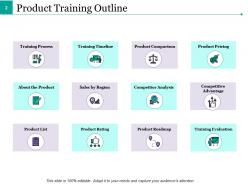
Slide 2: This slide showcase Product Training Outline with these of the following of the points- Training Evaluation, Product Pricing, Competitive Advantage Product List, Training Process, About the Product, Product Roadmap, Product Comparison, Competitor Analysis, Product Rating, Training Timeline, Sales by Region.
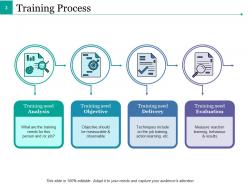
Slide 3: This slide presents Training Process with these four points- Training need Analysis, Training need Delivery, Training need Evaluation, Training need Objective.
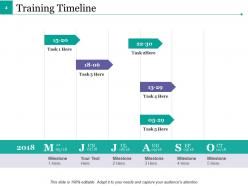
Slide 4: This slide showcases Training Timeline.
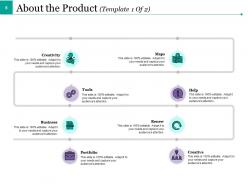
Slide 5: This slide shows About the Product (Template 1 Of 2) with these of the following factors- Maps, Creativity, Help, Tools, Portfolio, Creative, Business, Renew.
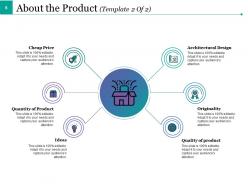
Slide 6: This slide shows About the Product (Template 2 Of 2) with these six of the parameters- Architectural Design, Originality, Quality of product, Cheap Price, Ideas, Quantity of Product.
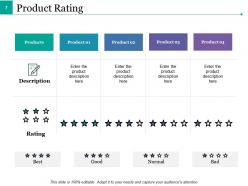
Slide 7: This slide shows Product Rating with these of the following parameters- Description, Rating, Best, Good, Normal, Bad.
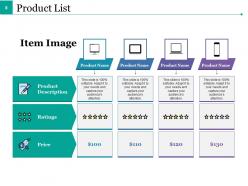
Slide 8: This slide showcases Product List these of the following- Item Image, Product Description, Ratings, Price.
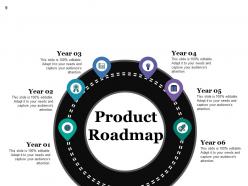
Slide 9: This slide shows Product Roadmap which showcases the different years.
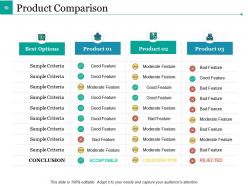
Slide 10: This slide showcases Product Comparison with these of the following parameters.
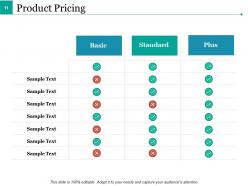
Slide 11: This slide showcases Product Pricing with these of the three factors- Basic Standard Plus
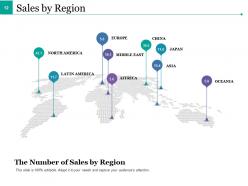
Slide 12: This slide presents Sales by Region.
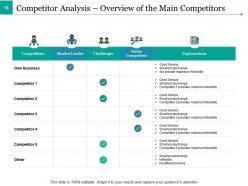
Slide 13: This slide showcases Competitor Analysis – Overview of the Main Competitors.
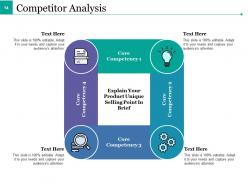
Slide 14: This slide presents Competitor Analysis.Explain Your Product Unique Selling Point in Brief.
Slide 15: This slide presents Training Evaluation with these of the following Results, Behaviour, Learning, Reaction.
Slide 16: This is a Coffee Break slide to halt. You may change it as per requirement.
Slide 17: This slide presents Product Knowledge Icons Slide.
Slide 18: This slide is titled Additional Slides to move forward.
Slide 19: This is a Vision, Mission and Goals slide. State them here.
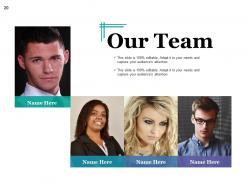
Slide 20: This is an Our Team slide with name, image &text boxes to put the required information.
Slide 21: This is an About Us slide showing Our Company, Value Client, and Premium services as examples.
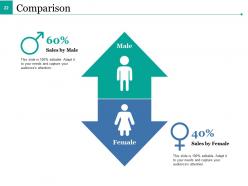
Slide 22: This slide shows Comparison of Positive Factors v/s Negative Factors with thumbs up and thumb down imagery.
Slide 23: This is a Dashboard slide to show- Strategic System, Success, Goal Process, Sales Review, Communication Study.
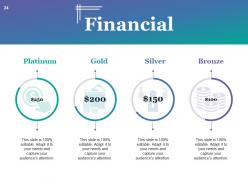
Slide 24: This slide is titled as Financials. Show finance related stuff here.
Slide 25: This is a Quotes slide to highlight, or state anything specific.
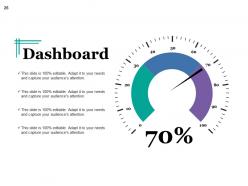
Slide 26: This is a Dashboard slide displaying- Revenue, Purchase Value, Units Sold.
Slide 27: This slide shows Project Events Timeline with icons and text boxes.
Slide 28: This is a Location slide of World map to show global presence, growth etc
Slide 29: This is a Venn diagram image slide to show information, specifications etc.
Slide 30: This slide showcases a Puzzle with imagery
Slide 31: This slide displays a Magnifying Glass with icon imagery.
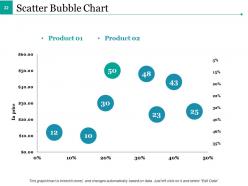
Slide 32: This slide showcases Scatter Bubble Chart.
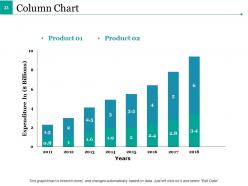
Slide 33: This slide presents Column Chart.
Slide 34: This is a Thank You slide with Address# street number, city, state, Contact Numbers, Email Address.
Product Knowledge Powerpoint Presentation Slides with all 34 slides:
Crown your thoughts with our Product Knowledge Powerpoint Presentation Slides. They will make you the king of the boardroom.





FAQs for Product Knowledge
Okay so first thing - you gotta figure out who you're actually talking to. Are they the ones writing checks or just using the product? Technical people care about specs while budget folks want ROI numbers. Industry matters a ton too - healthcare has compliance nightmares that retail doesn't deal with. Find out what's broken in their current setup and when they need to decide. Company size tells you their budget reality. Honestly, most people skip this step and wonder why their pitch falls flat. Just do a quick call beforehand or send them a survey. Way better than winging it.
You gotta know your product inside and out if you want your stories to actually land. Generic "this helps customers" BS doesn't work anymore. I've watched reps crash and burn when they couldn't answer basic follow-up questions - so painful to watch. But when you really get what your product does (and what it can't do), your stories feel real instead of rehearsed. Pick three specific problems your product fixes, then build your narratives around those situations. Trust me, authentic details make all the difference. People can smell fake stories from a mile away.
Honestly, just pick the stuff that fixes their biggest headaches first. Your core feature that makes you different? Lead with that - it's what sticks anyway. Time and money savers are always winners, plus anything that makes their life less complicated. Oh, and if they need integrations with tools they already use, definitely mention that upfront. Scalability matters too if they're growing. The trick is figuring out what YOUR specific audience actually cares about though. Keep it to like 3-5 features max or you'll just confuse them.
Honestly, competitive comparisons are a game-changer for product presentations. Your prospects are gonna research alternatives anyway, so you might as well control that story. It builds trust too - nobody believes you're the only solution out there. When you acknowledge competitors exist, you look way more credible. Plus you get to spotlight what makes you different while handling objections before they even come up. I learned this the hard way after watching too many prospects disappear to do their own research. Just keep it fair and stick to actual features and results - don't be that person who trashes the competition.
Dude, visual design makes or breaks product training. I've watched amazing experts bomb because their slides were a hot mess - seriously painful to look at. Clean layouts and smart color choices help people actually absorb what you're teaching instead of getting overwhelmed. Your design basically translates all that technical stuff in your head into something everyone can follow. Map out your main points visually first, then worry about the text. Good visuals guide people's eyes to the important bits and show how different concepts connect. It's like having a really good interpreter between you and your audience.
Okay so here's what works: match your customer stories to whatever feature you're showing off. When you're in the analytics dashboard, casually mention how Sarah from Company X used those same metrics to bump her team's performance 40%. Don't just read quotes though - that sounds robotic as hell. Tell it like you're sharing gossip while clicking through the actual product. Drop these stories right after demonstrating each feature. That's when people really get it. Keep maybe 3-4 solid examples in your back pocket so you're not scrambling.
Break your complex stuff into bite-sized pieces - bullet points, short paragraphs, clear headings. Use analogies people actually get (like comparing data encryption to a locked mailbox). Visuals are clutch because honestly, nobody reads walls of text anymore. Ditch the jargon for plain English. Always lead with what's in it for them before getting into technical details - people care about benefits first. Test it on someone outside your team. If they're lost, you need to simplify more. The whole point is making people feel smart, not like idiots.
Oh definitely do a demo - it's like the best part of any pitch. People need to SEE the thing working, not just hear you talk about it. I've sat through way too many presentations where they just described features and honestly? My brain checks out. But when someone actually shows me the product doing its thing, that's when it clicks. You don't need long either - even 2-3 minutes of core functionality beats 10 minutes of feature lists. Trust me, demos create those moments where people go "oh wait, I get it now."
Dude, the worst thing you can do is just list off a bunch of features without showing how they actually help people. Nobody cares about specs - they want to know what's in it for them. Don't oversell either, because that'll bite you later when you can't deliver. I've seen way too many presentations where people use super technical language that just confuses everyone. Talk like a normal person instead. Oh, and honestly? Skip the industry buzzwords - they make you sound fake. Write down maybe 2-3 main benefits beforehand and practice explaining them like you're just chatting with someone at a coffee shop.
Honestly, you can't just wing it and hope you'll catch stuff. Google Alerts are clutch for your product categories. I do a quick 10-minute scan every morning with coffee - way better than scrambling later. LinkedIn groups help too, but skip the ones where everyone's just posting corporate garbage. Your customers actually see market shifts before your internal teams half the time, so ask them what's happening. Oh and definitely sync with your product team monthly so you're not the last to know about roadmap changes. Industry newsletters work too if you actually read them.
Dude, you've gotta add interactive stuff to your presentations. People remember way more when they can actually click around or try things themselves - it's night and day compared to just talking at them. Polls work great, or let them mess around with a demo version. Honestly, I think hands-on trials are the best because prospects "get it" so much faster when they're actually using your product. Plus you'll see right away what they care about based on their reactions. Even something small like a Q&A makes a huge difference. Trust me, try it once and you'll never go back to boring slide decks.
Honestly, watch how people react during the technical stuff - are they asking good follow-up questions or just nodding along? I'd track your conversion rates too. The big one though? Count how many product questions you can actually answer vs. the dreaded "let me get back to you" moments. Five of those in one meeting and you're toast. Good objections are actually a win - means they get what you're saying enough to push back intelligently. Oh, and keep a running tally of questions that stump you. Makes it obvious where you need work.
Honestly, just figure out who you're talking to first and match their vibe. Start with what's in it for them - the good stuff they'll get. Then sprinkle in some technical bits so you don't sound like a total fluff merchant, but don't go overboard. I've watched so many engineers completely lose their audience by geeking out too hard. It's painful to watch. Use comparisons people actually get and keep connecting back to problems they deal with every day. Watch faces - if they're glazing over, dial it back. Oh, and have somewhere to dump the super detailed questions so you don't get sidetracked.
Honestly, I'd hit up the product docs first - they're way better organized now than they used to be. The product team is pretty cool about doing quick walkthroughs too if you just ask. Sales enablement portal has all the competitive stuff and messaging frameworks (boring but useful). Customer success is where the gold is though - they deal with actual users complaining and loving our stuff daily, so they've got real stories. Block out like 2-3 hours total to dig through everything properly. You've got this!
So feedback loops are just tracking what works when you present stuff. After each session, ask people specific questions - not the generic "any questions?" thing that gets you nowhere. Find out which features they actually cared about, what examples made sense, where you totally lost them. I keep a running doc of this feedback because honestly, you'll forget otherwise. Short sessions work better than long ones IMO. Look for patterns across presentations so you can tweak your approach. Way better than just hoping your content lands well.
No Reviews