

It security powerpoint presentation slides





Try Before you Buy Download Free Sample Product
 Impress Your
 Audience
 100%
100% Editable
 Save Hours
 of Time


Use IT security PowerPoint Presentation Slides to educate your audience about the cyber security. Incorporate professionally designed content-ready IT security PPT templates to showcase the techniques of protecting computers, networks, programs, and data from attacks that are aimed for exploitation. Demonstrate the preventive measures to protect information from being stolen, compromised or attacked with the help of IT security PowerPoint slideshow. Talk about various cybersecurity strategies which include identify management, risk management and incident management. This deck comprises of templates to create awareness regarding cyber security are cyber security seven preventive methods, cyber security framework, cyber security initiatives, cyber security tips, and more. Add relevant ready-to-use cyber security PPT templates to illustrate various tools such as software patches, firewalls, encryption, etc. These templates are completely editable. You can customize the template as per your convenience. Edit the color, text, icon, and font size as per your requirement. Download ready-made IT security PPT presentation to make your audience aware about the potential cyber threats. End the jitters with our It Security Powerpoint Presentation Slides. Don't give in to baseless apprehensions.
People who downloaded this PowerPoint presentation also viewed the following :
Content of this Powerpoint Presentation
The world is more connected than ever, and newer technologies offer many quality-of-life benefits based on Internet-of-Things (IoT) being introduced every day. However, the more technology is connected, the more it is susceptible to cyber-attacks. Thus, these technologies often serve as a double-edged sword.
Cyberattacks and security incidents can exact a huge toll, resulting in lost business, damaged reputations, regulatory fines, and, in some cases, extortion and stolen assets. IBM’s Cost of a Data Breach 2023 report studied over 550 companies that suffered a data breach between March 2022 and March 2023. The average cost of a data breach to those companies was USD 4.45 million—up 2.3 percent from findings of a similar study a year earlier and up 15.3 percent over a 2020 study. Factors contributing to the cost include everything from notifying customers, executives, and regulators to regulatory fines, revenues lost during downtime, and customers lost permanently.
Some security incidents are more costly than others. Ransomware attacks encrypt an organization’s data, rendering systems unusable, and demand an expensive ransom payment for a decryption key to unlock the data. Increasingly, cybercriminals demand a second ransom to prevent sharing sensitive data with the public or other cybercriminals. Any organization in today’s era needs to have a proactive approach in identifying and defending any data breach. Businesses with sensitive databases need to be on their toes and adapt to all the software changes and solutions rapidly. Hackers are always on the lookout for advanced tools and technology to get their hands on sensitive databases.
With SlideTeam’s content-ready PPT Templates on information security, you can take a step toward ensuring companies prioritize IT security risk management and IT policy framework. Our Information Security slides cover programs for effective cybersecurity risk, the key components of risk-based methodology for cyber information security programs, and the process of an information security plan.
Our PowerPoint templates are 100% customizable and editable. The content of the slides provides the user with the structure of the presentation, and the edit feature helps the user make the presentation suitable to their preferences.
Let's explore the top PPT Slides of this complete deck
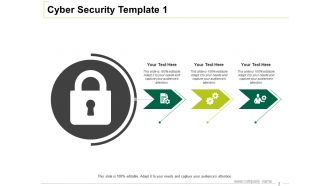
Template 1: Cyber Security Seven Step PPT Template
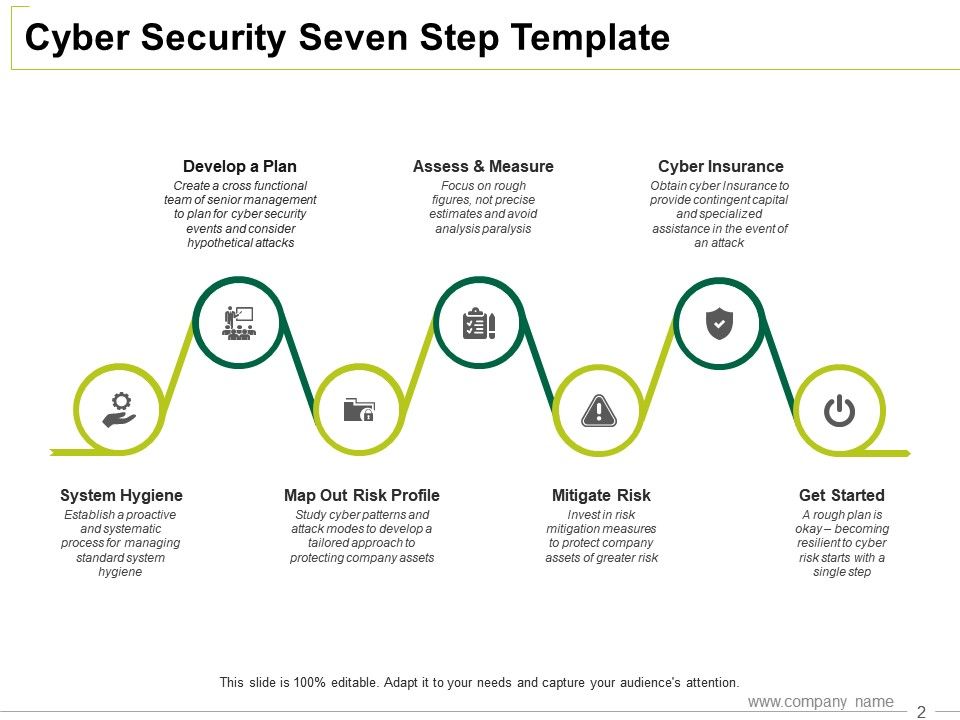
Use this PPT Template to implement a Seven Step Plan against cyber hackers. It highlights and presents the key stages that include establishing system hygiene, initiating action, mapping out risk profiles, mitigating risks, forming cross-functional teams, assessing progress, and considering cyber insurance. The PPT Layout with the given framework provides a clear roadmap for your company, aiming to strengthen your plan in case of a cyber attack. With these steps, you can better prepare yourselves against evolving cyber threats while also ensuring financial protection through cyber insurance. Get started with creating a cyber shield, Download Now
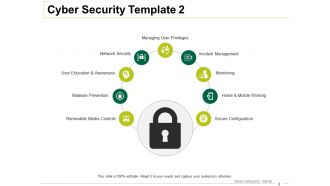
Template 2: Cyber Security PPT Template
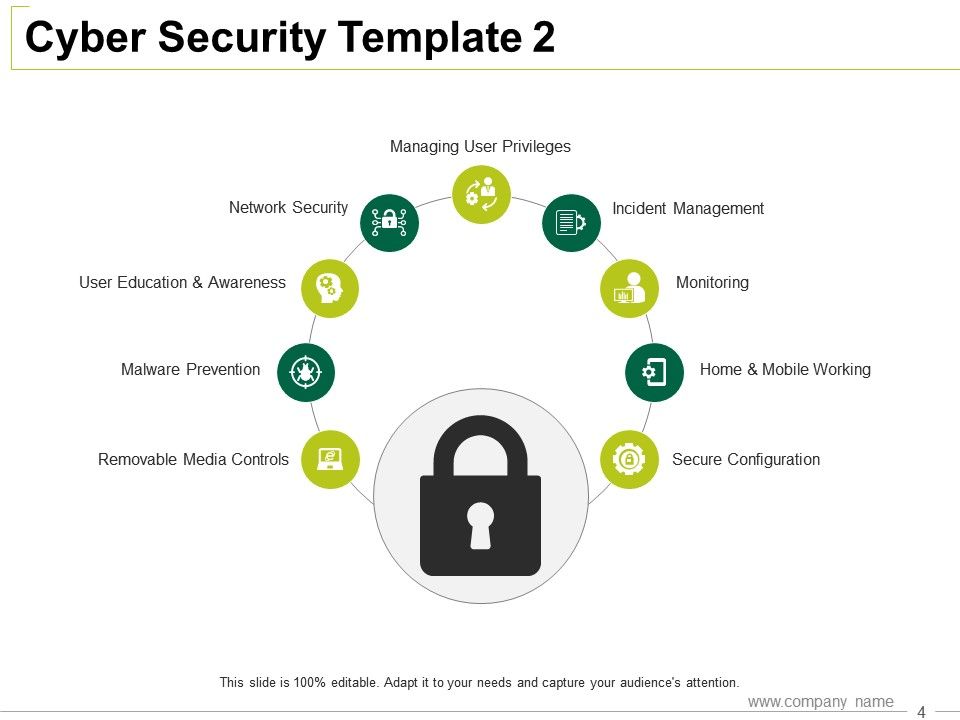
Understand and present the components of Cyber Security. This PPT Template provides you with a number of aspects to consider while developing a security strategy. The Layout includes features like removable media controls, malware prevention, user education and awareness, network security, user privileges, incident management, monitoring, and a secure configuration. This slide will help you develop a solid security system for your information and sensitive databases. Download Now!
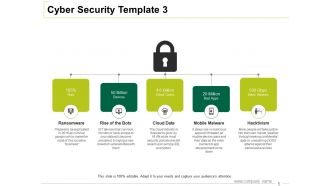
Template 3: Cyber Security PPT Template
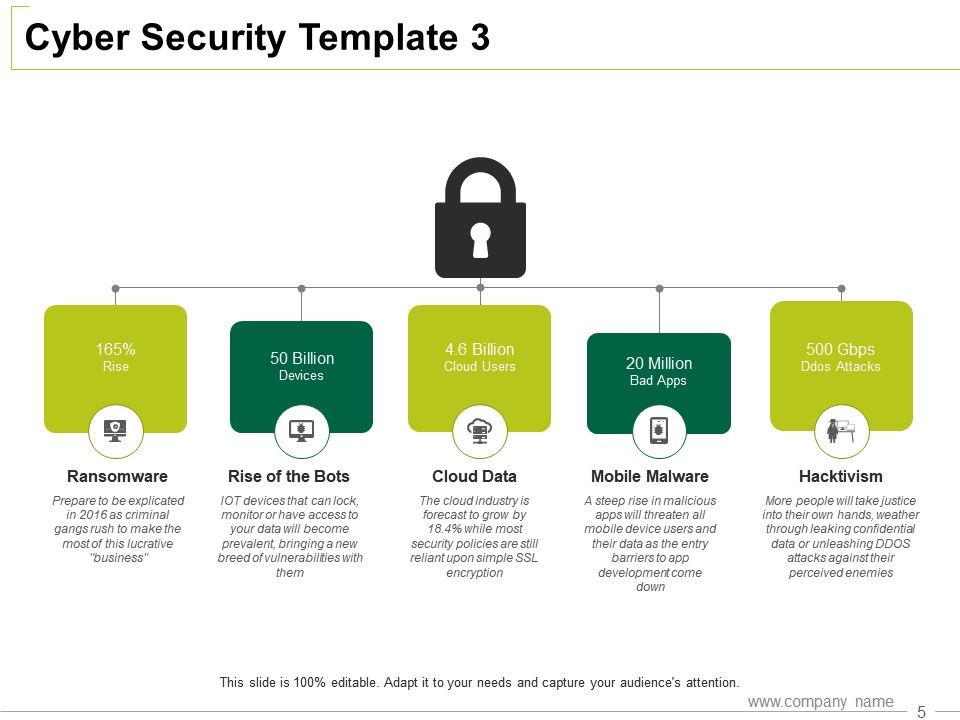
To combat cyber attacks, it is crucial to understand the common mediums of attack. This PPT Template displays five primary ways: ransomware, rise of bots, cloud data, mobile malware, and hacktivism. The columns display the frequency and the volume of these attacks highlighting how prone are devices, software, and data to these attacks. Use this PPT Layout to make mitigation plans for each type of cyber attack and ensure a strong IT Security system. Download Now!
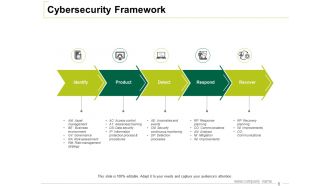
Template 4: Cybersecurity Framework PPT Template
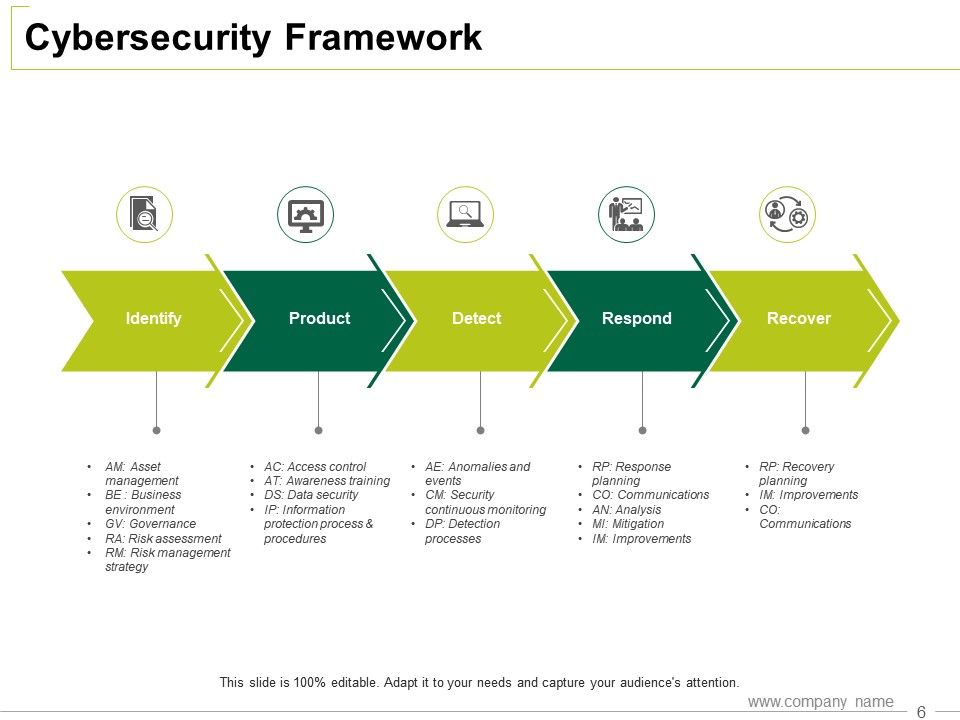
This Cybersecurity framework allows you to create a strong IT Security shield. The steps included in the framework are, identify, product, detect, respond, and recover. Each of these five individual functions represents a set of objectives and activities that need to be achieved in order to build a comprehensive cybersecurity strategy that can be listed in the column provided below. Download Now!
Template 5: Cybersecurity Initiatives PPT Framework
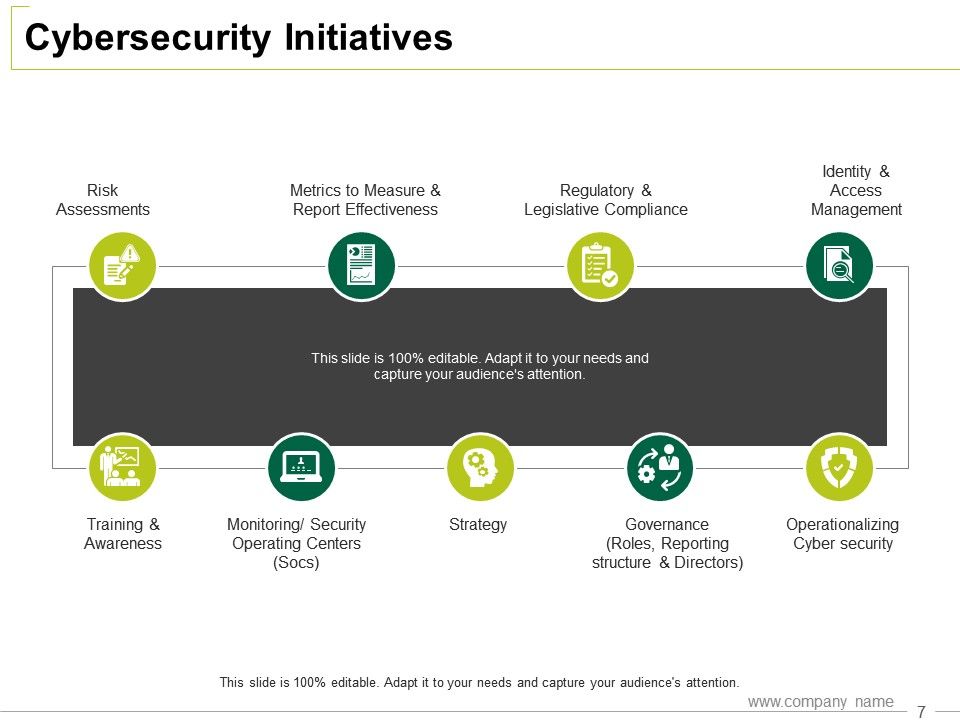
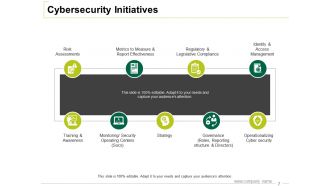
With companies going digital globally, it is important to secure all your digital operations and build an environment that can prevent data leaks, theft, and attacks. This PPT template lists initiatives that can be deployed in your organization to maximize cybersecurity. It includes risk assessments for your active projects, metrics to measure and report effectiveness of operations, regulatory and legislative compliance, identity and access management data, training programs, and awareness workshops, monitoring in-house security operating centers, brainstorming strategy, aligning governance, and operationalizing cyber security. Get started today!
Template 6: Cybersecurity Tips PPT Template
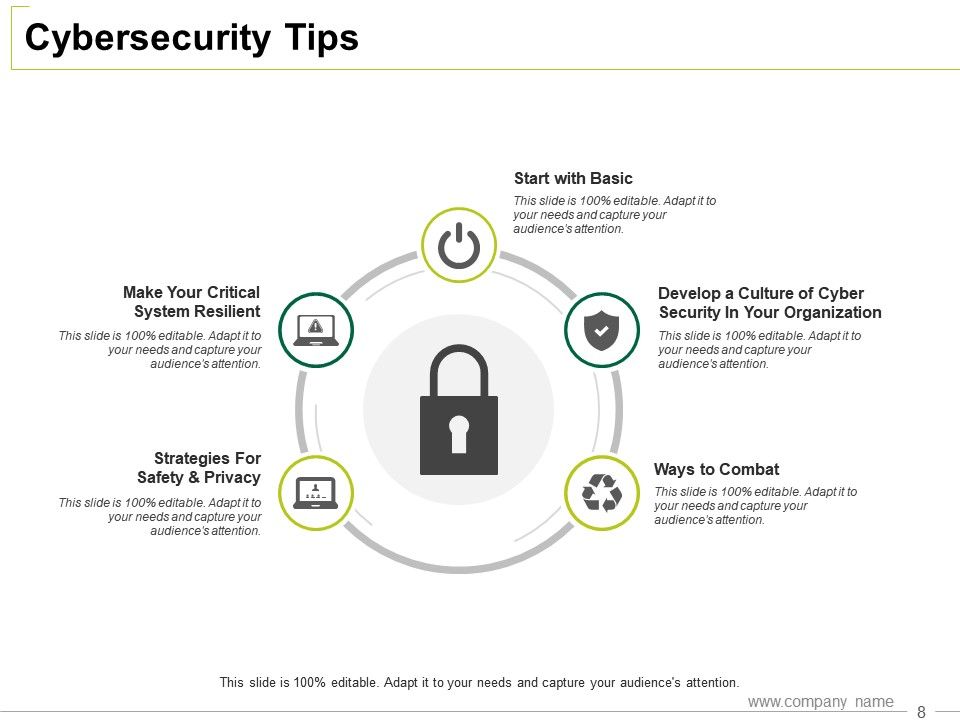
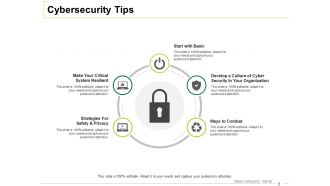
This PPT Template is a guide for cybersecurity that offers you tips to keep your data safe. While the slide focuses on making critical systems resilient, developing a culture of cybersecurity within your organization, and implementing strategies for safety and privacy, you can add details of a basic action plan and brainstorm ways to combat cyber attacks. Keep in mind these tips to optimize your cybersecurity. Download now!
Beware of Data Theft!
As data breaches and cyberattacks make daily headlines, don't leave your IT security to chance. Be prepared for company cyber attacks, data leaks and be prepared with a response plan incase of one. Train your employees with our plan of action PPT Templates.
It's scary to think that someone might be able to access your company database without any consent, putting your organization at high risk. Not so scary now! With SlideTeam's pack of informative and customizable templates, you can transform your team from vulnerable targets into cybersecurity champions.
It security powerpoint presentation slides with all 19 slides:
Display dynamism as an executive with our It Security Powerpoint Presentation Slides. Demonstrate that you are completely in control.








FAQs for It security
So for your IT security policy, you'll want access controls first - basically who can get into what. Incident response plans are huge because stuff WILL break (learned that the hard way). Password policies, obviously. Data handling rules so people know what they can share and what they can't. Regular training helps too, though honestly half the team will zone out anyway. Network security guidelines and any compliance stuff if that applies to you. Oh, and keep it short! Nobody's reading a novel-length policy document.
Honestly, you've gotta treat this like taking your car in for regular tune-ups. Start with automated scanning tools - they'll catch the obvious stuff in your network and apps. Then get some ethical hackers to actually try breaking in (you'll be shocked at what they find, trust me). Social engineering tests are huge too since people click on literally anything. I'd say quarterly assessments, plus anytime you make big system changes. Oh, and actually fix what they discover - can't tell you how many companies just collect dusty reports.
Dude, most breaches happen because someone clicks a sketchy link or falls for phishing. Your firewalls can be bulletproof, but if Dave from accounting downloads "definitely-not-a-virus.exe," you're screwed. I've watched companies get completely wrecked by one bad email attachment - it's wild how fast things spiral. Train your people quarterly on spotting scams and password basics. Honestly, teaching them to recognize threats is way more effective than any fancy security software. Strong passwords, safe browsing, that kind of stuff. It's boring but it works.
Phishing's still the biggest pain - fake emails tricking people into clicking sketchy links or handing over passwords. Ransomware locks up all your files until you pay (which honestly feels like digital extortion). Various malware can sneak in and either steal data or create backdoors for hackers. Social engineering attacks are getting worse too since, let's face it, humans make mistakes. Oh and keep everything updated - I know it's annoying but those patches actually matter. Employee training helps a ton since people are usually how these attacks get in.
Okay so first thing - tackle your most important stuff like email and admin accounts. Cloud services too. Most platforms have MFA built right in now which is nice. Skip SMS though, it's kinda sketchy. Go with Google Authenticator or Microsoft's version instead. The real pain? Getting everyone to actually stick with it once you roll it out. I'd start small - maybe IT folks and the higher-ups first, then spread it around. Give people decent instructions and do a little training session. Oh, and expect some pushback initially - people hate change but they'll get used to it.
Okay so password stuff - get yourself a password manager like Bitwarden or 1Password. Game changer honestly. They'll create crazy strong passwords for everything and you just remember one master password. Don't use your dog's name or birthday, that's way too easy to guess. Each account needs its own unique password - I know it sounds annoying but the manager handles all that. Two-factor authentication is clutch too, turn it on everywhere you can. Start with your important stuff first - email, bank, work accounts. I put off getting a manager for ages but wish I'd done it sooner.
Start with a data audit - figure out what personal info you're collecting and where it's all stored. Access controls and encryption are your best friends here. Staff training is critical because honestly, Karen from accounting will click on anything. Document your processes since regulators are obsessed with paper trails. You'll also want monitoring systems to catch problems before they blow up. Have an incident response plan ready to go. Oh, and make sure your retention policies actually follow GDPR or CCPA rules. This isn't a one-and-done thing - it's ongoing maintenance that'll save your butt later.
Honestly, most teams totally wing it when stuff hits the fan. Don't be those guys. First thing - figure out what actually counts as an "incident" for your company, then write up some basic playbooks for different scenarios. Assign clear roles so people aren't just standing around going "wait, who's handling this?" Been there, it sucks. Get your communication channels sorted beforehand too. Run tabletop exercises every quarter or so - keeps everyone sharp. Oh and update your plan after real incidents happen. There's always something you didn't think of the first time around.
So encryption takes your data and scrambles it with these crazy complex algorithms - makes it look like total nonsense to anyone who doesn't have the decryption key. It's like having a really fancy lock system. Hackers might steal your files, but they can't actually read anything without that key. Just looks like random garbage to them. The stronger your encryption (AES-256 is solid), the tougher it gets to crack. Definitely use it for sensitive stuff - customer info, financial data, you know the drill. Honestly can't believe some companies still skip this step.
Dude, remote work basically turns your nice secure office into Swiss cheese. Everyone's working from Starbucks WiFi and their kids' old laptops now. Your biggest headaches? Endpoints you can't control, data floating around god-knows-where, and honestly - people just click on stupid stuff more when they're in pajamas. VPNs are your friend, but go zero-trust if you can swing it. Multi-factor auth on literally everything. And seriously, audit what remote tools people are actually using because I guarantee it's not what you think. Oh, and beef up endpoint detection yesterday.
Honestly, AI can be a game changer for security stuff. It catches threats in real-time way better than we can - like spotting weird patterns or malware before things get messy. The machine learning gets really good at flagging phishing emails and sketchy network activity too. Your team won't be stuck doing the same boring tasks over and over since it automates responses. Oh, and it's pretty solid at predicting where vulnerabilities might pop up. I'd say start with something specific though - maybe email security or just network monitoring. Let it prove itself in one area first, then expand from there.
First thing - turn on multi-factor auth everywhere you can. Seriously, everywhere. Also get your identity management sorted and encrypt your data (both when it's moving around and just sitting there). Don't let all your systems chat with each other freely - segment that network. I made that mistake once, not fun. Keep everything patched and updated, watch for weird activity, and back stuff up with a decent recovery plan. Oh and those cloud configs? Check them constantly because honestly, most breaches happen from dumb misconfigurations. Start by seeing what's currently exposed.
Honestly, skip those awful annual training videos that everyone just clicks through without watching. Instead, do short sessions focused on stuff they'll actually encounter - like sketchy emails or weird links. Make security everyone's responsibility, not just something IT handles. When someone reports something suspicious, celebrate it! Don't make them feel dumb for asking. The whole point is building a culture where people aren't scared to speak up about potential threats. Oh, and keep the training interactive - nobody learns anything from sitting there passively. You want them comfortable raising concerns without worrying they'll get blamed.
AI-powered attacks are getting wild - they're using machine learning for super realistic phishing and deepfakes that honestly freak me out. Supply chain compromises are huge right now too. Ransomware's hitting cloud infrastructure hard, which makes sense since everyone's moved there. IoT devices are basically sitting ducks as more stuff gets connected. Oh, and quantum computing's starting to threaten our current encryption, though that's still a few years out. Your team should definitely stay on top of these trends and think about how they'd hit your specific setup. Can't afford to be caught off guard anymore.
Security audits are like taking your car in for maintenance - you want to catch problems before they leave you stranded. They'll spot outdated software, crappy passwords, weird permission settings, all that stuff that piles up over time. Hackers look for the same vulnerabilities, so you need to find them first. The audits check your systems from inside and outside perspectives, which is honestly pretty smart. I'd say run them every three months minimum. When you get the results, fix the scary stuff first - some vulnerabilities are way worse than others.
No Reviews