


Cyber security and phishing awareness training powerpoint presentation slides




Try Before you Buy Download Free Sample Product
 Impress Your
 Audience
 100%
100% Editable
 Save Hours
 of Time


Introducing our cyber security and phishing awareness training PowerPoint presentation slides. Generate awareness about the matters of cyber security with the help of this IT security awareness PPT layout. Explain malware attacks and hacking to the employees of your company with the help of our internet safety PowerPoint design. Assimilate this well built network protection PPT theme into your presentation if you want to apply new strategies of learning about cyber security. Associate with this cyber protection recognition PowerPoint set to provide justification for the need of having an automated cyber security awareness program. Deploy this security reliability PPT bundle to decide the budget allocation for the cyber security awareness program. This network security apprehension PPT deck lets you make required variations to the icons and colors making this PPT more practical. Choose this computer security cracking awareness PowerPoint design to showcase organization and assurance. Download this PPT slide to explore true perfection.
People who downloaded this PowerPoint presentation also viewed the following :
Content of this Powerpoint Presentation
In the ideal world, you have built an impregnable fortress of an organization with all information secured behind high-end firewalls and secured connections. But what happens if your workforce is not aware of it? You are left unprotected, and one of your team members taps on a phishing link or shares his work password in a message. This is why generating awareness for cybersecurity within the organization should not be called essential — it is a vital mission.
However, how can you make sure that every team member is aware of their role in this mission and knowledgeable about how to protect sensitive information? The answer is simple: Cybersecurity and Phishing Awareness Training PowerPoint Presentation Slides.
With our slides, you are given a unique opportunity to provide your organization with the most comprehensive set of PowerPoint slides, which give concise information about one of the most pressing issues today. The slides create knowledgeable armor protecting your organization against digital threats. Every slide is packed with critical information concerning our understanding of cybersecurity and how every employee can maintain protective means and recognize threats. Prepare for the end of yawn-inducing presentations! Keep the audience engaged and active with a captivating slide design prepared by SlideTeam.
Look out for our blog on Analysis of Nist Cyber Security Framework to understand its scope in detail.
Template 1 - Problem Faced By the Government
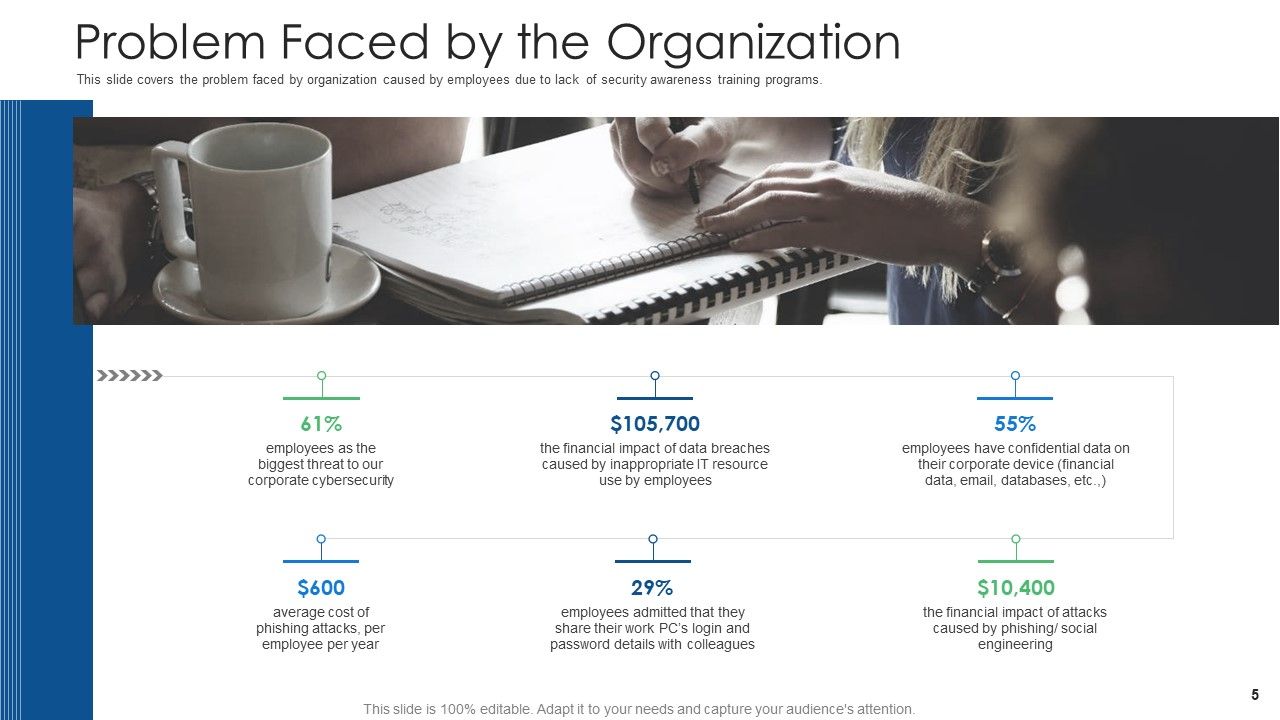
The slide pertains to the main issues that organizations experience as a result of their employees’ lack of consciousness. More specifically, the slide includes the percentage of employees under the most significant threat, the average annual cost of the phishing attack per employee, corresponding financial cost, the average number of people in work serving in positions requiring regular access to another dress data, as well as the cost associated with data disruption as caused by an employee and employee’s financial cost. This part of training is one of the most important due to its emphasis on the risks associated with internal security issues.
Template 2 - Highest Number of Malware Attacks On Departments
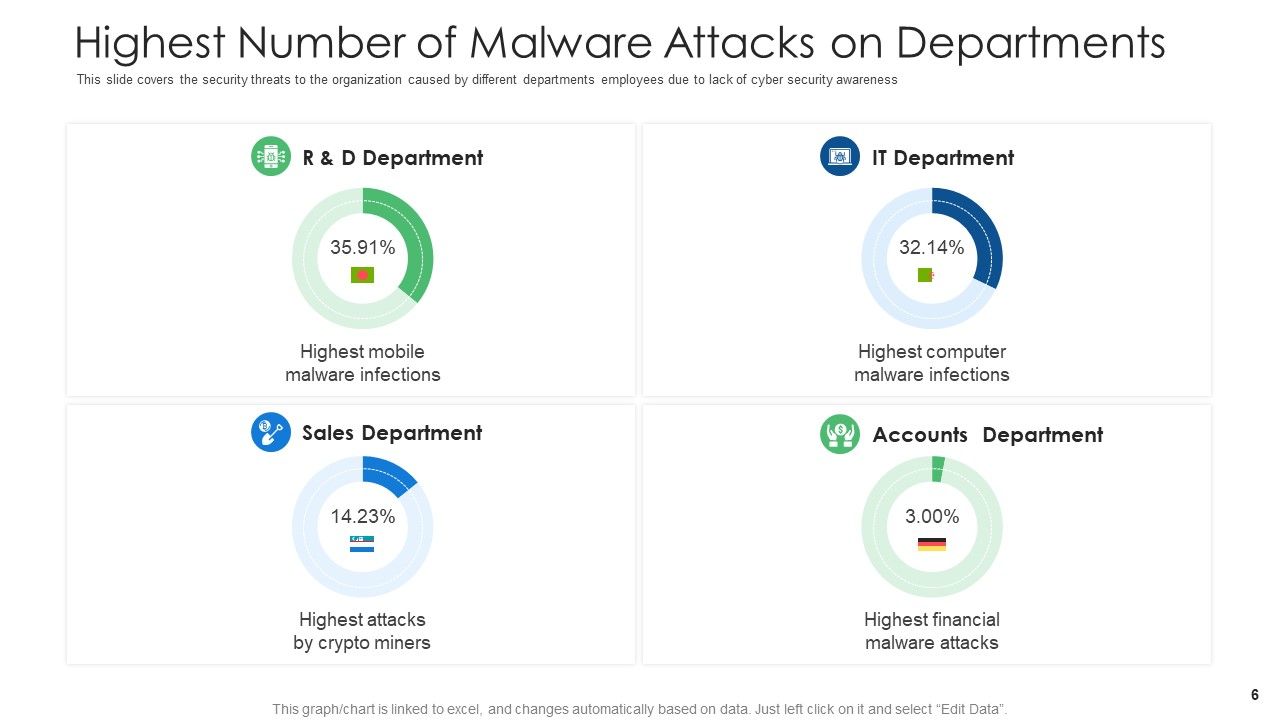
The slide focuses on representing departments in an organization that is the most susceptible to malware attacks. It shows which of the departments, including Sales, IT, Research, and more, are targeted by the highest number of threats. The content of the slide reveals the most dangerous points of hacking attacks and, at the same time, the areas that require reliability measures. It shows where the employees should pay even more attention and where the protection may require additional effort. From this perspective, the slide wins in importance. It can be used during discussions in the boardrooms or teams, and presented to the employees as a part of the training session.
Template 3 - Cyber Stacks Experienced By the Company in Previous Financial Year
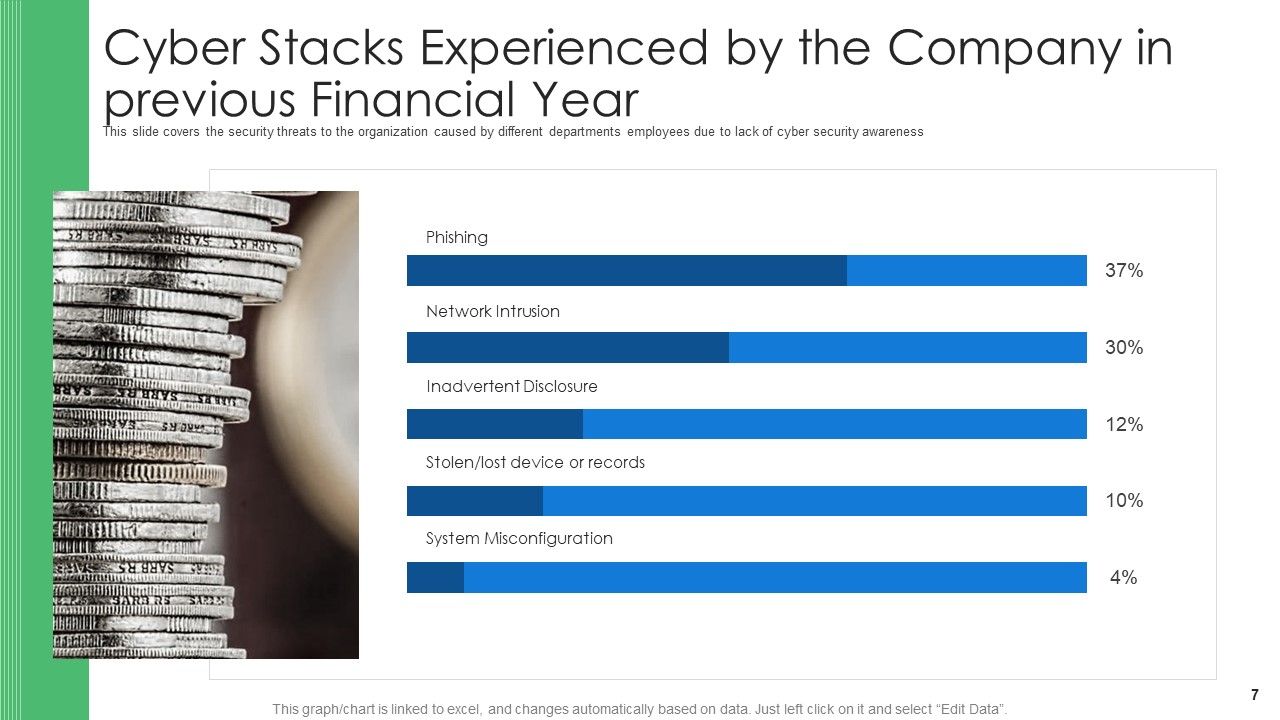
The slide is about the security threats that occurred in the organization during the last fiscal year. It shows various cyber incidents caused by people from almost all departments due to their lack of cybersecurity-related knowledge. The threats are associated with the loss of records, network intrusion, accidental exposure of sensitive information, phishing attacks, and system misconfiguration. The slide is a tool for analyzing the past, which allows the audience to see the results of insufficient cybersecurity and phishing awareness training.
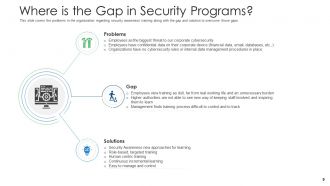
Template 4 - Where is the Gap in Security Programs?
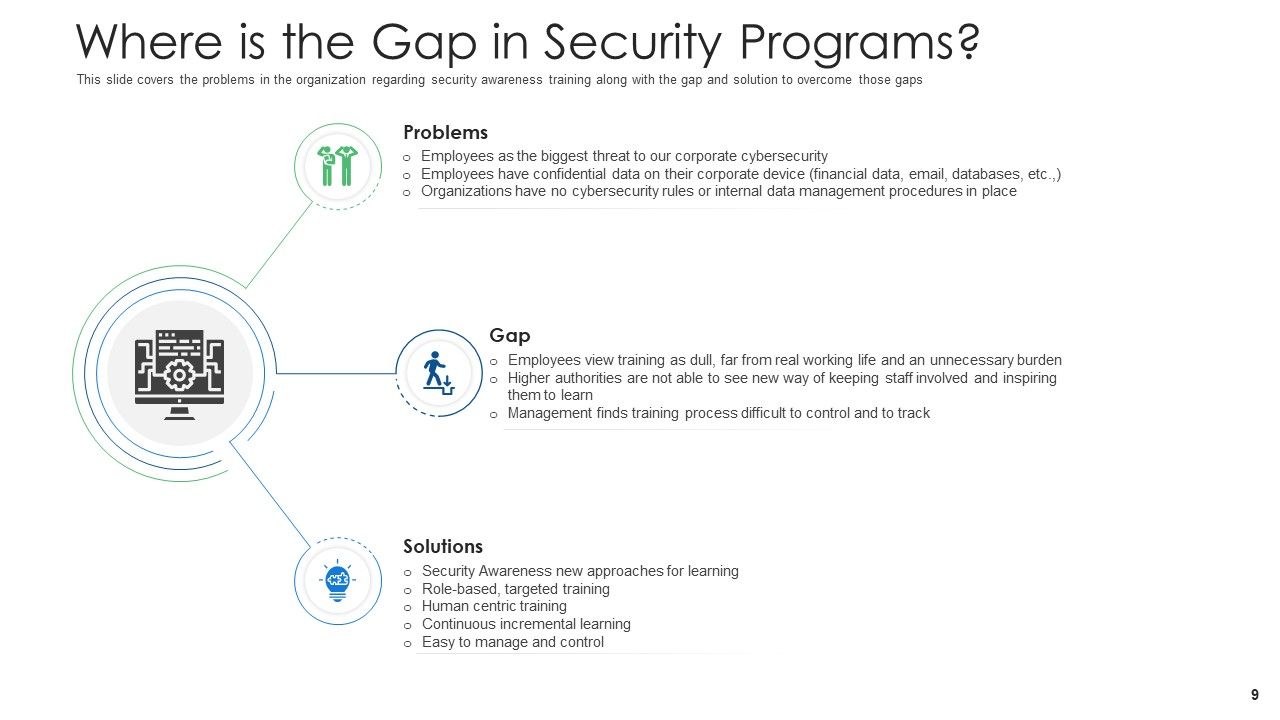
The slide deals with the problems that the majority of organizations have: data breaches, cyber threats, and compliance with regulations. More precisely, it identifies the particular gaps of the security programs within the Venn diagram where the issues appear, meaning that the slide points to the main reasons for the problems. Finally, the slide is helpful for the audience, in general, as it tells the people how they can solve the issues on their own, showing that security awareness solutions and required training should be used to fix the problem. In this way, the slide is somewhat like a diagnostic tool to identify and heal the weaknesses of organizations' security programs.
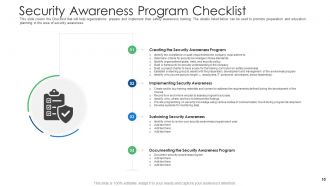
Template 5 - Cyber Security Awareness Program Checklist
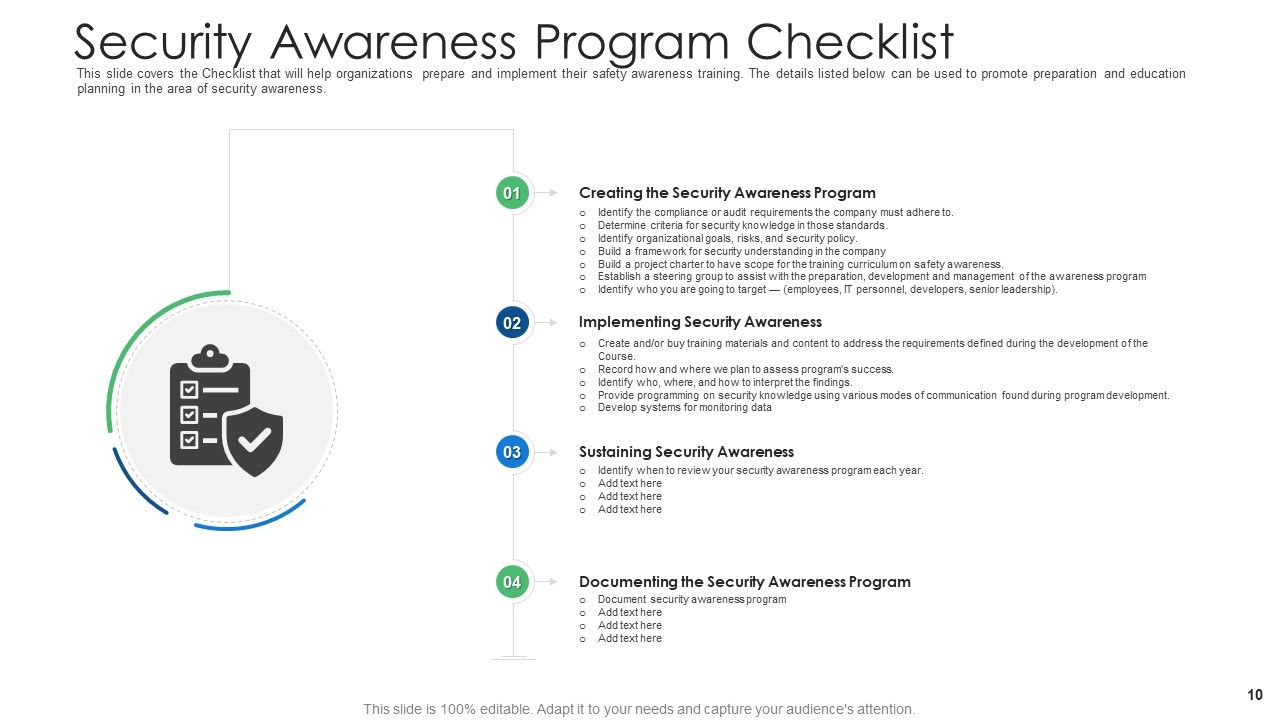
This slide is a detailed checklist for organization. This slide provides the essential steps, such as creating a security awareness program, implementing security awareness measures, sustaining security awareness, and documenting of the security awareness program. When looking at this slide, the organizations can verify that they take into consideration all the necessary elements of their cybersecurity awareness initiatives. In other words, this slide is an efficient tool that outlines the significant steps through which organizations can develop a plan and assess its implementation.
Get an insight into our blog on cybersecurity PowerPoint templates to learn more about it.
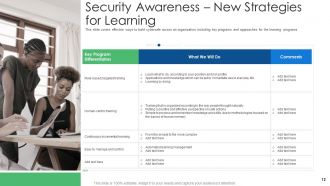
Template 6 - Security Awareness - New Strategies For Learning
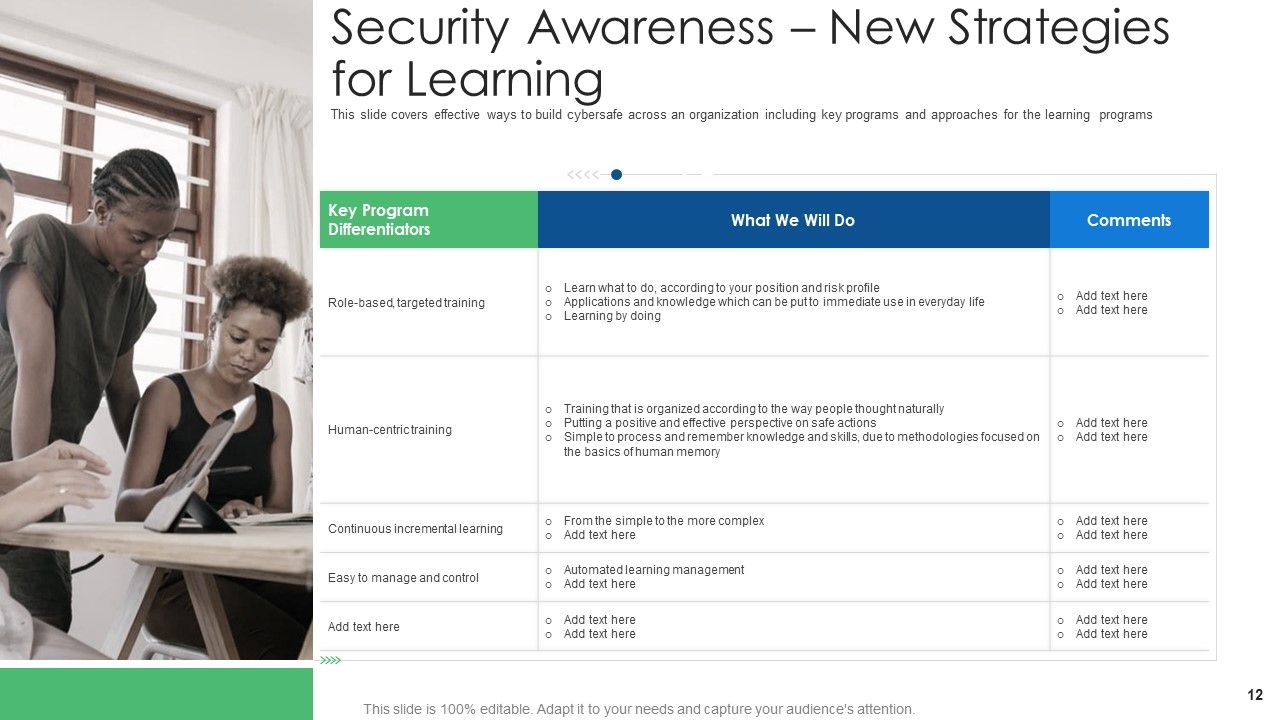
The slide presents new and creative methods for promoting cyber-safe behaviors throughout the organizations. It discusses the programs, methodologies, and initiatives that promote learning in cybersecurity and phishing awareness. In addition, the slide shares innovative strategies intended to motivate employees and create a cyber-aware culture. The specifics of the activities and initiatives informing these learning programs could also be included. The comments and feedback about the efficacy and necessity of the strategies are helpful in providing some insight into their potential.
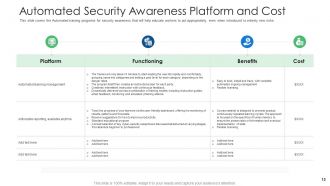
Template 7 - Automated Security Awareness Platform and Cost

The slide illustrates the relevance of automatic solutions implemented in cyberspace and phishing awareness efforts. It reflects the specifics of some platforms intended for educating employees regarding best practices, even in the conditions of unknown threats. The slide features different platforms, highlighting the peculiarities and the effects, as well as the cost. It provides viewers with a profound understanding of available automatic solutions and the scale of beneficial outcomes. The slide is helpful for decision-making on the uses of automatic security awareness platforms, considering both effectiveness and expenses.
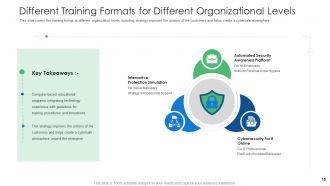
Template 8 - Different Training Formats For Organizational Levels
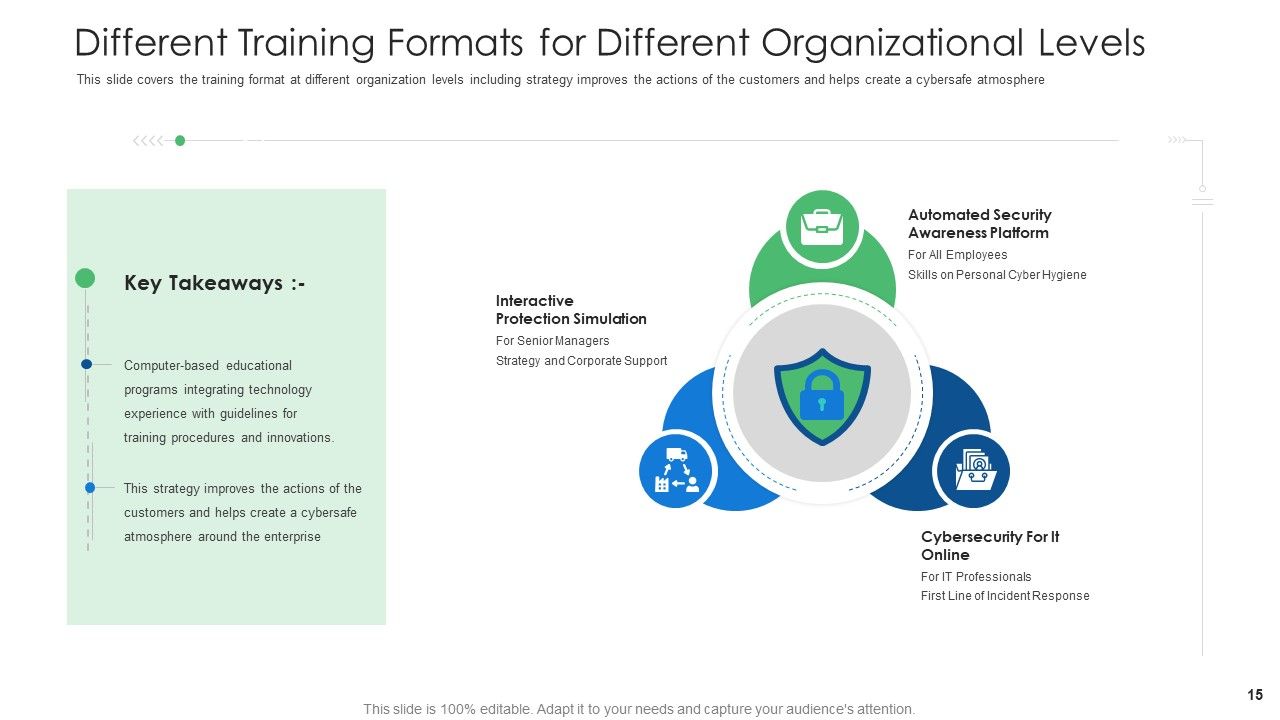
The slide includes adjusted cyber security and phishing awareness training strategies. First, the slide lists various approaches feasible at different organizational tiers, such as interactive problem stimulation sessions, Cybersecurity for IT online modules, and automated security awareness platforms. By focusing on different organizational levels, such strategies symbolize the importance of ensuring advanced and educationally focused teaching. Secondly, the slide also indicates that training formats should meet the specific competencies and needs across departments and hierarchies.
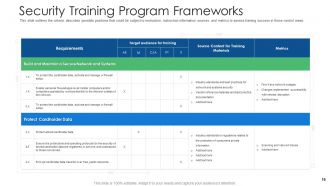
Template 9- Security Training Program Frameworks

The slide describes a systematic approach to creating and sustaining a secure network and data. The material focuses on the requirement of protecting cardholder data, as it must comply with various regulatory standards. Moreover, the slide gives a detailed depiction of the target audience. As the content suggests, all employees, both entry-level and senior management, should undergo training. The sources of learning material are listed and include internal resources, industry practices, and expert talks. Besides, the slide lists metrics that indicate the effectiveness of the program and show aspects that need improvement. The described slide is a helpful guide for organizations that would like to create a security training framework.
Template 10 - Security Training Program Frameworks Continued
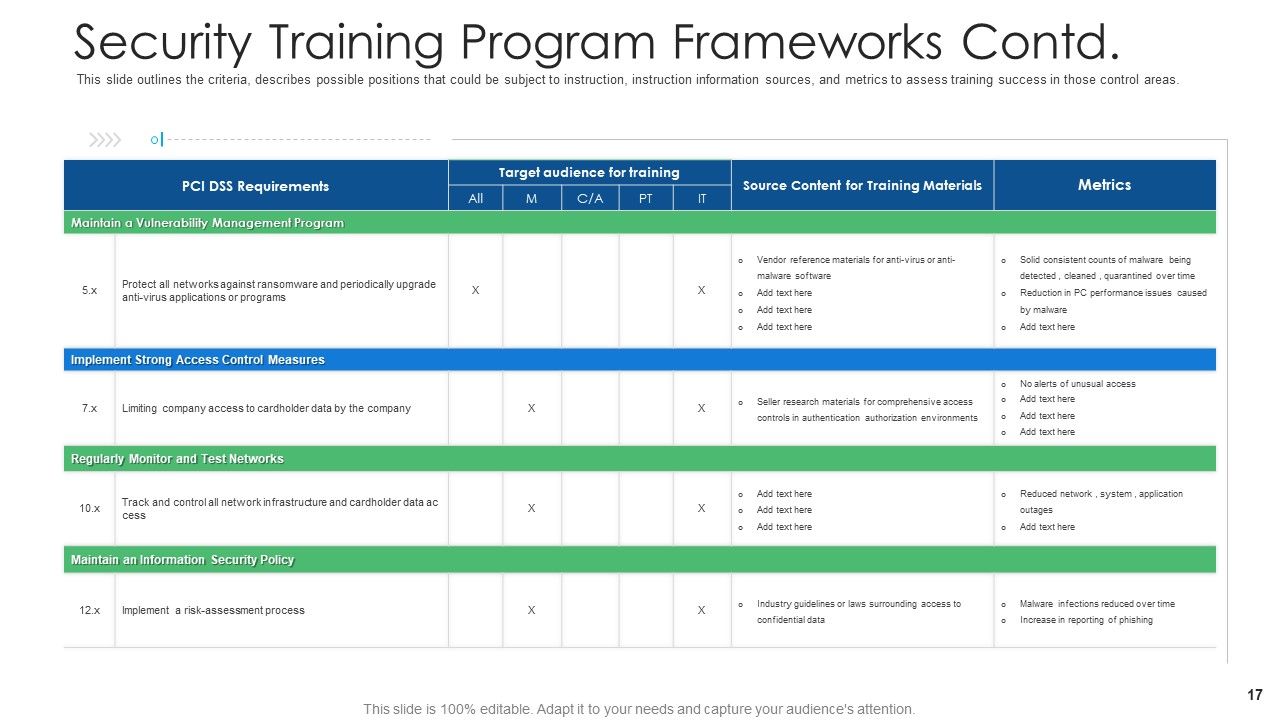
The slide focuses on organizational requirements that are useful in a cybersecurity training program. These requirements vary, based on organizational characteristics and must be obeyed. This list identifies requirements for determining the areas in the organization requiring training, positional candidates for training, information sources, target areas, and success measurements in them. This guidance also identifies the audience to which specialized security training should be directed.
Empower Your Organization Security
In the digital age, where one click or tap might be the entrance to the world of cyber threats, protecting the data of your organization was never more critical. Empower your organization with SlideTeam’s Cybersecurity and Phishing Awareness Training PowerPoint Presentation Slides to be prepared for whatever happens.
PS Don’t forget to check our blog on cyber security strategy powerpoint to strategize things.
Cyber security and phishing awareness training powerpoint presentation slides with all 50 slides:
Use our Cyber Security And Phishing Awareness Training Powerpoint Presentation Slides to effectively help you save your valuable time. They are readymade to fit into any presentation structure.
-
Cyber Security Phishing Awareness Training
-

Agenda for Cyber Security Phishing Awareness Training
-
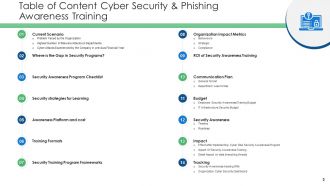
Table of Content Cyber Security Phishing Awareness Training
-
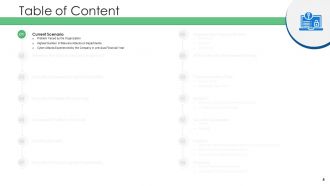
Table of Content
-
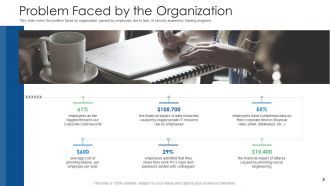
Problem Faced by the Organization
-
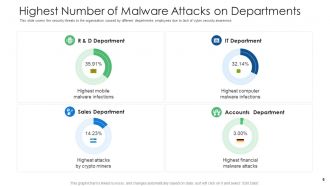
Highest Number of Malware Attacks on Departments
-
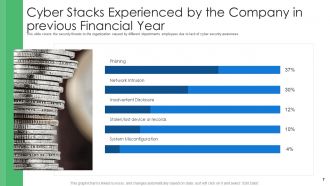
Cyber Stacks Experienced by the Company in previous Financial Year
-
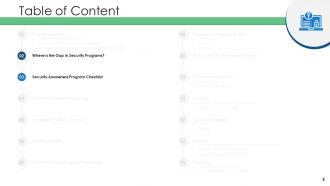
Table of Content
-
Where is the Gap in Security Programs
-
Security Awareness Program Checklist
-
Table of Content
-
Security Awareness New Strategies for Learning
-
Automated Security Awareness Platform and Cost
-
Table of Content
-
Different Training Formats for Different Organizational Levels
-
Security Training Program Frameworks
-
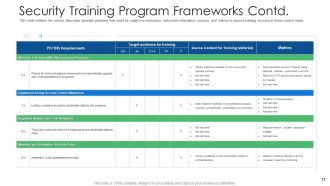
Security Training Program Frameworks Contd
-
Table of Content
-
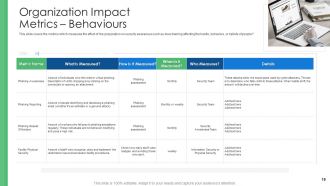
Organization Impact Metrics Behaviours
-
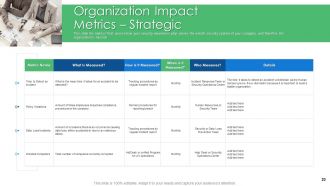
Organization Impact Metrics Strategic
-
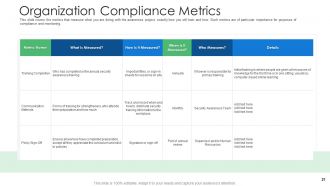
Organization Compliance Metrics
-
Table of Content
-
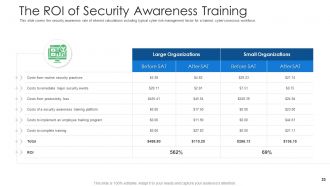
The ROI of Security Awareness Training
-
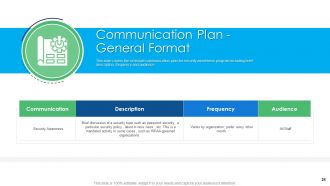
Communication Plan General Format
-

Communication Plan for Cybersecurity Events and Incidents
-
Table of Content
-
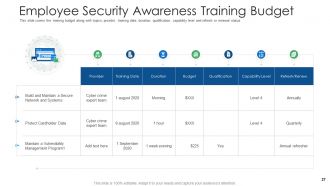
Employee Security Awareness Training Budget
-
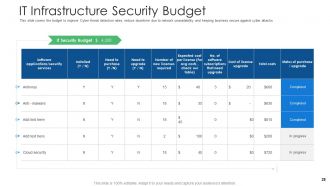
IT Infrastructure Security Budget
-
Table of Content
-
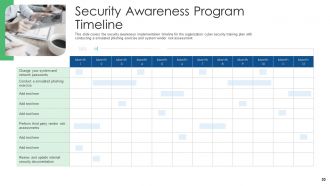
Security Awareness Program Timeline
-
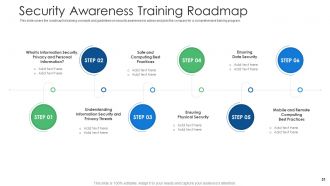
Security Awareness Training Roadmap
-
Table of Content
-
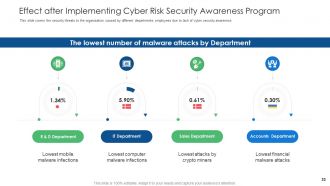
Effect after Implementing Cyber Risk Security Awareness Program
-
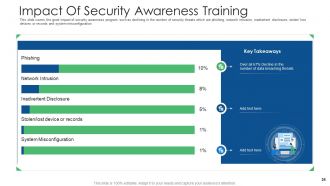
Impact Of Security Awareness Training
-
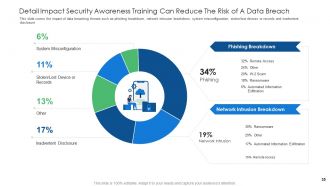
Detail Impact Security Awareness Training Can Reduce The Risk of A Data Breach
-
Table of Content
-
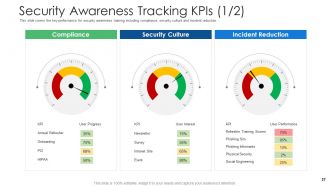
Security Awareness Tracking KPIs 1 2
-
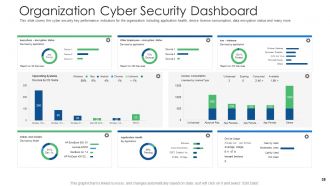
Organization Cyber Security Dashboard
-
Cyber Security Phishing Awareness Training Icons Slide
-
Additional Slides
-
About Us
-
Our MISSION
-
30 60 90 Days Plan
-
Timeline
-
Weekly Timeline with Task Name
-
Roadmap
-
Puzzle
-
Post It Notes
-
Magnifying Glass
-
Thank You
FAQs for Cyber security and phishing awareness training
Honestly, phishing emails are still the biggest pain - those sketchy messages trying to trick your employees into clicking bad links or handing over login info. Ransomware's another nightmare that can lock down everything until you pay (which obviously sucks). You've also got credential stuffing where hackers try stolen passwords from other data breaches on your accounts. Social engineering is getting worse too - like when scammers just call and sweet-talk people into giving up info instead of going through all the technical stuff. Make sure everyone knows what suspicious emails look like and uses different passwords for each account.
Honestly, monthly phishing simulations work way better than just talking about it. Show your team real examples - especially the sneaky ones that almost got you fooled. Quick reference guides are clutch too, something they can actually bookmark and use. The reporting system thing is huge though. People won't flag suspicious emails if they think they're being annoying. Make it dead simple. Mix up your training with hands-on stuff instead of death-by-PowerPoint. Watch for the usual red flags: urgent language, weird links, random requests for passwords. It's kinda like building muscle memory, you know?
Okay so password managers are honestly a game changer. You know how we all reuse the same 3 passwords for everything? Yeah, that's basically handing hackers your entire digital life on a silver platter. I learned this the hard way when I got completely locked out of my email last year - what a nightmare. These apps generate crazy complex passwords for each account and remember them all for you. You just need one master password. The best part? If someone breaks into your Instagram or whatever, your bank account is still safe because every password is different. Seriously worth setting up.
Dude, you really need to keep your stuff updated. Those notifications are annoying as hell, but skipping updates leaves security holes wide open. Hackers literally target old systems because they know exactly what's broken. Your phone, computer, browser - all of it needs those patches. Think of it like this: companies find problems and fix them constantly, but only if you actually install the updates. I learned this the hard way when my laptop got infected last year. Just turn on automatic updates and save yourself the headache.
Start with vulnerability scans and pen testing - that's your foundation. Honestly, I'd bring in outside auditors because internal teams miss stuff all the time (we're too close to our own work). Test your people with fake phishing emails too - you'd be surprised how many click random links. Make sure your incident response plan isn't just gathering dust on a shelf somewhere. NIST or ISO 27001 give you solid benchmarks to measure against. The big thing is doing this regularly, maybe quarterly? One-time assessments are pretty much useless since threats change constantly.
Okay so first thing - get WPA3 on your home wifi and ditch that default router password. You'll want a VPN for work stuff, plus two-factor auth on literally everything. Keep your devices updated too. I get that coffee shops are nice for working, but their wifi is sketchy for anything important. Try setting up a proper workspace at home if you can. Always lock your screen when you get up (learned this the hard way), and stick to your company's cloud storage instead of random file sites. Oh and back up regularly - trust me on this one.
Social engineering hits your emotions, not your brain - that's why it works so well. Scammers fake being IT support screaming about "urgent" password resets, or they'll send phishing emails pretending to be your bank. Even smart people get fooled because when you're panicked or rushed, you just react. Fear and wanting to help others? That's their sweet spot. I've honestly seen brilliant engineers hand over login info to fake "emergencies." Your best bet is hitting pause before you do anything. Verify through a different way - call the company directly, don't use their provided links.
Oh man, notification laws are your biggest headache - most states give you like 72 hours to tell customers, which is insane when you're dealing with chaos. Industry stuff matters too: HIPAA if you're healthcare, PCI DSS for payments, whatever. Honestly the fines will wreck you - I'm talking millions if it's bad. Customers will probably sue, especially over SSNs or bank info. SEC reporting kicks in if you're public. I'd get a lawyer to look over your incident plan now rather than scrambling later when everything's on fire.
Ok so MFA is basically extra security steps on top of your password. Hackers can't just waltz into your accounts even if they somehow get your login info - they'd also need your phone or fingerprint or whatever. I use the authenticator app thing instead of text codes because it's supposedly safer (though honestly the text thing works fine too). Your email and bank accounts should definitely have it turned on first. It's kinda like having a deadbolt plus a chain lock. Takes two seconds to set up but saves you from getting totally screwed over later.
So October is Cybersecurity Awareness Month - it's this big push to get everyone (not just tech people) thinking about their online security. Most data breaches still happen because someone clicked a sketchy link or used terrible passwords. You'll probably get bombarded with security training emails at work, which is honestly annoying but whatever. The main thing is using it as your yearly reminder to actually do that stuff you keep avoiding - like setting up a password manager or updating your software. Basic cyber hygiene really does matter, even though it feels boring.
Look, AI's basically turned cybersecurity into this weird arms race. Hackers are using it to build smarter attacks that actually learn from your defenses - kinda terrifying if you think about it. But you can fight fire with fire. AI security tools spot weird patterns way faster than any human could, and they'll predict what's coming next. The catch? Those same tools help bad guys create better phishing emails and malware. Honestly, you should probably start adding AI-based defenses to whatever you're already running. Just make sure your team knows how to spot AI-generated attacks too.
People make dumb cybersecurity choices mostly because our brains take shortcuts. Like when you're curious about a sketchy link and click it anyway, or use "password123" because it's easier to remember. We get numb to all those security warnings too - honestly, who actually reads them anymore? Your coworkers probably think "hackers won't target us" which is classic optimism bias. Plus we copy what others do, even if it's risky behavior. I'm totally guilty of rushing through those annoying security prompts when I'm busy. The trick is making the secure option the obvious, easy choice instead of fighting human nature.
Okay so first thing - turn on encryption for everything. Data at rest, data in transit, all of it. Most cloud providers have it but it's not always enabled by default which is kinda annoying. Set up multi-factor auth too, obviously. You'll want to check user permissions pretty regularly because honestly people get way too click-happy with sharing access. Oh and don't forget backups - sounds basic but you'd be surprised. Have some kind of incident plan ready just in case. The big thing is you can't just rely on your provider's security. You've gotta actually configure your own stuff properly.
Okay so first things first - isolate any compromised systems and change those passwords ASAP. Document everything you can remember while it's still fresh in your head. This stuff gets fuzzy fast, trust me. Alert your IT team and management right away. Depending how bad it is, you might need to loop in law enforcement too. If customer data got hit, you'll have to notify them - that conversation's gonna suck but it's unavoidable. Once the dust settles, do a full review of what went sideways and patch those gaps for next time.
Honestly, the biggest thing is getting everyone to actually care about it, not just dump it on IT. Those marathon training sessions? Waste of time. Break it into quick, relevant bits that connect to what people actually do. When someone spots a sketchy email, celebrate them! And for the love of god, don't punish people for honest mistakes - they'll just start hiding stuff. Keep your policies simple enough that normal humans can follow them. Oh, and if the leadership team acts like security is optional, good luck getting anyone else to care. Lead from the top or you're basically screwed.
-
Great quality slides in rapid time.
-
Excellent design and quick turnaround.
-
The content is very helpful from business point of view.
-
Great experience, I would definitely use your services further.
-
Unique research projects to present in meeting.
-
Unique research projects to present in meeting.
-
Easily Editable.
-
Perfect template with attractive color combination.
-
Editable templates with innovative design and color combination.
-
Unique and attractive product design.
-
Page:
- You're currently reading page 1
- Page 2
-
