

Employee Security Awareness Training Program Powerpoint Presentation Slides




Try Before you Buy Download Free Sample Product
 Impress Your
 Audience
 100%
100% Editable
 Save Hours
 of Time


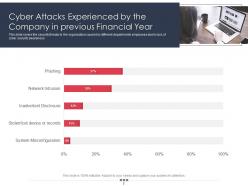
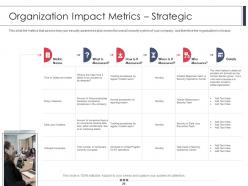
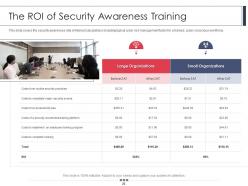
Introducing our employee security awareness training program PowerPoint presentation on slides. Make your employees aware of cyber threats with the help of this network security PowerPoint deck. This IT data security PPT theme consists of a slide that discusses the cyber attacks experienced by the company in the previous financial year. Assimilating this security recognition assignment PPT layout will help you in discussing the different training formats at different organizational levels. This ready-to-use web security PowerPoint design contains a slide that showcases the automated security awareness platform and cost. Incorporating this particular organization network security PPT theme allows you to have a discussion on the security training programs. This data safety coaching PowerPoint creative set contains a slide that discusses the organization impact metrics. Selection of this internet security awareness PowerPoint template lets you represent the ROI (Return on Investment) of security awareness training. Choose this company information safety guide PowerPoint design to display organization. Download this PPT slide to explore true perfection.
People who downloaded this PowerPoint presentation also viewed the following :
Content of this Powerpoint Presentation
Slide 1: This slide introduces Employee Security Awareness Training Program. State Your Company Name and begin.
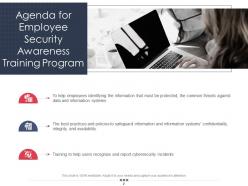
Slide 2: This is an Agenda slide. State your agendas here.
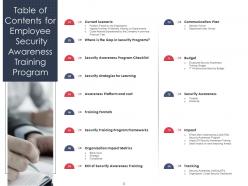
Slide 3: This slide shows Table of Content for the presentation.
Slide 4: This slide presents Table of Content for the presentation.
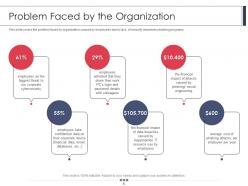
Slide 5: This slide covers the problem faced by organization caused by employees due to lack of security awareness training programs.
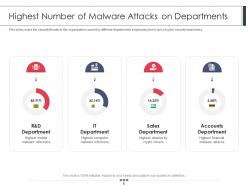
Slide 6: This slide displays security threats to the organization caused by different departments employees due to lack of cyber security awareness
Slide 7: This slide represents the security threats to the organization caused by different departments employees due to lack of cyber security awareness.
Slide 8: This slide shows Table of Content for the presentation.
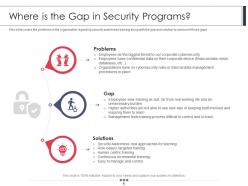
Slide 9: This slide covers the problems in the organization regarding security awareness training along with the gap and solution to overcome those gaps.
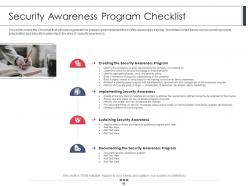
Slide 10: This slide covers the Checklist that will help organizations prepare and implement their safety awareness training.
Slide 11: This slide displays Table of Content for the presentation.
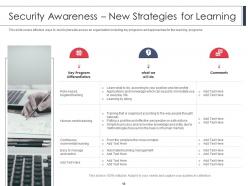
Slide 12: This slide represents effective ways to build cybersafe across an organization including key programs and approaches for the learning programs.
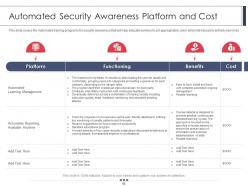
Slide 13: This slide covers the Automated training programs for security awareness that will help educate workers to act appropriately, even when introduced to entirely new risks.
Slide 14: This slide presents Table of Content for the presentation.
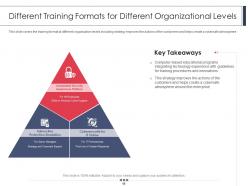
Slide 15: This slide covers the training format at different organization levels including strategy improves the actions of the customers and helps create a cybersafe atmosphere.
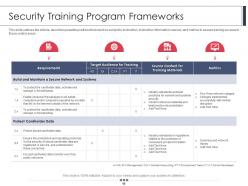
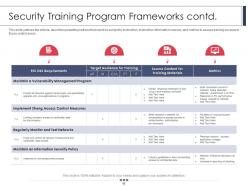
Slide 16: This slide displays possible positions that could be subject to instruction, instruction information sources, and metrics to assess training success.
Slide 17: This slide represents Security Training Program Frameworks.
Slide 18: This slide shows Table of Content for the presentation.
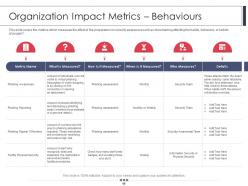
Slide 19: This slide presents the metrics which measures the effect of the preparation on security awareness such as does training affecting the habits, behaviors, etc.
Slide 20: This slide shows assess how your security awareness plan serves the overall security system of your company.
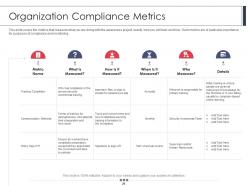
Slide 21: This slide displays metrics that measure what you are doing with the awareness project.
Slide 22: This slide represents Table of Content for the presentation.
Slide 23: This slide shows security awareness rate of interest calculations including typical cyber risk management factor for a trained.
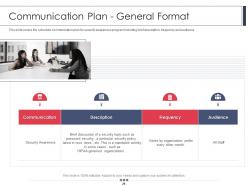
Slide 24: This slide presents schedule communication plan for security awareness program including brief description, frequency and audience.
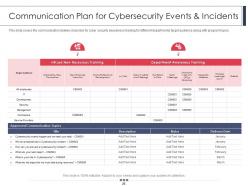
Slide 25: This slide shows Communication Plan for Cybersecurity Events & Incidents.
Slide 26: This slide displays Table of Content for the presentation.
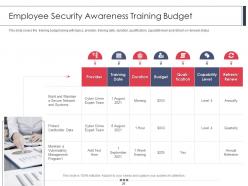
Slide 27: This slide represents Employee Security Awareness Training Budget.
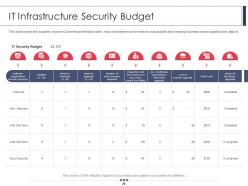
Slide 28: This slide shows budget to improve Cyber threat detection rates, reduce downtime due to network unavailability and keeping business secure against cyber attacks.
Slide 29: This slide presents Table of Content for the presentation.
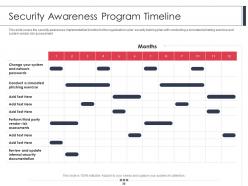
Slide 30: This slide covers the security awareness implementation timeline for the organization cyber security training plan.
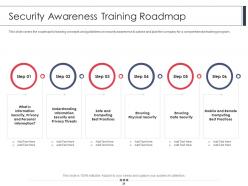
Slide 31: This slide displays Security Awareness Training Roadmap.
Slide 32: This slide represents Table of Content for the presentation.
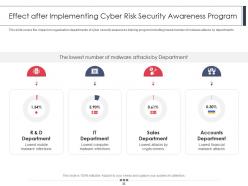
Slide 33: This slide shows the impact on organization departments of cyber security awareness training program.
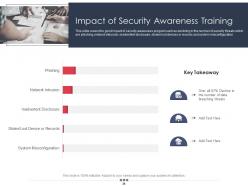
Slide 34: This slide presents the good impact of security awareness program such as declining in the number of security threats which are phishing, network intrusion, inadvertent disclosure, etc.
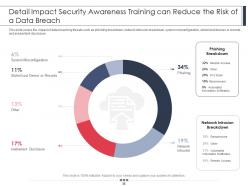
Slide 35: This slide shows Detail Impact Security Awareness Training can Reduce the Risk of a Data Breach.
Slide 36: This slide displays Table of Content for the presentation.
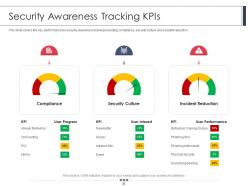
Slide 37: This slide represents Security Awareness Tracking KPIs.
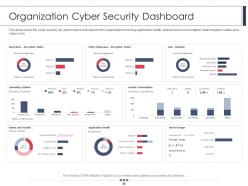
Slide 38: This slide covers the cyber security key performance indicators for the organization including application health, device license consumption, data encryption status, etc.
Slide 39: This slide presents Employee Security Awareness Training Program Icons.
Slide 40: This slide is titled as Additional Slides for moving forward.
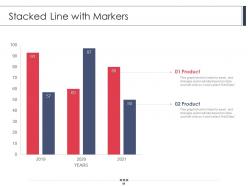
Slide 41: This slide displays Stacked Line with Markers.
Slide 42: This is Our Mission slide with related imagery and text.
Slide 43: This is Our Team slide with names and designation.
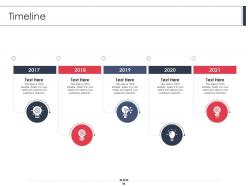
Slide 44: This is a Timeline slide. Show data related to time intervals here.
Slide 45: This is a Comparison slide to state comparison between commodities, entities etc.
Slide 46: This slide displays Post It Notes. Post your important notes here.
Slide 47: This is Our Target slide. State your targets here.
Slide 48: This is a Location slide with maps to show data related with different locations.
Slide 49: This slide presents Puzzle with related icons and text.
Slide 50: This slide shows Venn diagram with text boxes.
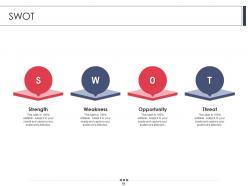
Slide 51: This slide displays SWOT describing- Strength, Weakness, Opportunity, and Threat.
Slide 52: This is an Idea Generation slide to state a new idea or highlight information, specifications etc.
Slide 53: This is a Thank You slide with address, contact numbers and email address.
Employee Security Awareness Training Program Powerpoint Presentation Slides with all 53 slides:
Use our Employee Security Awareness Training Program Powerpoint Presentation Slides to effectively help you save your valuable time. They are readymade to fit into any presentation structure.

FAQs for Employee Security Awareness Training Program
Start with phishing simulations - they're honestly game-changers because people don't realize how easily they fall for stuff. Password training and social engineering awareness are must-haves too. Oh, and make sure everyone knows how to report sketchy incidents without feeling stupid about it. Interactive sessions work way better than death-by-PowerPoint. I'd do quarterly training with monthly phish tests - seems to hit that sweet spot. Use real examples your team might actually encounter, not some generic corporate scenario about "Bob from accounting." Also assess what they already know first. Threats change constantly so you can't just set it and forget it.
Track the obvious stuff first - completion rates, quiz scores, follow-up tests to see if they remember anything weeks later. But honestly? Fake phishing campaigns are where you'll really see what's working. People might ace a quiz then immediately click a sketchy link the next day. Also keep an eye on your actual incidents - if training works, you should see fewer people falling for real attacks. Monthly phish tests work well, maybe quarterly knowledge checks too. The whole point is seeing if they actually change behavior, not just memorize answers.
So phishing simulations are basically fake attacks you send to test if your team would bite on the real thing. Way more effective than boring training videos, honestly. When someone clicks a sketchy link and gets that "oh shit" moment, they'll remember it forever. You can see who's struggling and give them extra help. Plus your employees stay sharp knowing they might get tested randomly. Just don't be a dick about it - make it educational, not a punishment thing. Follow up right away with learning stuff so people don't feel stupid.
Quarterly is your best bet, though 6-12 months works if you're stretched thin. Cyber stuff changes so fast it's honestly wild - half the threats from last year are already old news. Your employees will totally check out if they see the same tired phishing examples over and over. What I'd do is plan big content refreshes once a year, then smaller tweaks every quarter when new attack methods pop up. You don't want to be teaching people about yesterday's threats while hackers are already three steps ahead. Set it in your calendar now or you'll forget.
Honestly, the worst thing people think is that cybersecurity is just the IT team's job. Most folks assume they can spot phishing emails easily - you really can't though. Antivirus doesn't catch everything either. Public WiFi seems harmless but it's sketchy as hell. Small companies think they're too boring to target (nope). USB drives from random places? Also risky. Here's the thing - hackers don't just go after tech stuff anymore, they mess with your head instead. They'll make fake emails that look super legit. My rule now is questioning anything asking for passwords or personal details, even if it looks totally normal. Threats change constantly so you've gotta stay paranoid.
Honestly, just break it down by what each team actually does day-to-day. Your IT folks need the hardcore technical stuff about network vulnerabilities and system breaches. HR should focus on employee data protection and spotting social engineering - they're always getting tricked by fake LinkedIn messages, I swear. Sales teams handle customer info constantly, so their scenarios need to be totally different from accounting. And finance people? They get hit with phishing attempts nonstop. Map out what sensitive data each department touches, then build training around those real threats. Makes it way more relevant than generic "don't click suspicious links" nonsense.
Honestly, just make it way more hands-on. Grab actual phishing emails your company's gotten and let people practice spotting the red flags. Real breach stories work great too - nothing gets attention like "this happened to a company just like ours." Keep sessions super short, like 15-20 minutes tops. Hour-long slide marathons kill brain cells. Mix things up with videos, quick quizzes, maybe group discussions where people share their own sketchy email stories. You want them feeling like they're part of the security team, not just suffering through mandatory training. Oh, and definitely start with a phishing test to see where everyone's at right now.
Honestly, gamification works because it hooks into that competitive side we all have. Instead of clicking through boring slides, people actually pay attention when there's points or leaderboards involved. I've watched teams jump from like 30% quiz scores to over 80% just by switching up the format. The thing is, games make you feel something - you'll totally remember that phishing test you almost bombed way more than some random slide about email safety. People connect emotionally with the content, which is huge. Try starting with simple monthly challenges or quick quizzes first. Way less intimidating than overhauling everything at once.
Mix up your approach - phishing sims with instant feedback work great when people click stuff they shouldn't. I'd do monthly security tips through email or Slack, keeps it fresh without overdoing it. Lunch-and-learns are solid but honestly, getting attendance is rough sometimes. Try sneaking security reminders into regular meetings or those rotating desktop screensaver tips. Don't overwhelm people though. Start with monthly phishing tests plus quarterly refreshers - way better than those brutal annual training marathons everyone hates.
Your executives need to actually do the training themselves - I've watched way too many CEOs skip their modules then wonder why nobody takes security seriously. Put security stuff in performance reviews. Celebrate people who catch phishing attempts. Have leadership mention it during company meetings, not just leave it to IT. Honestly, if your C-suite doesn't visibly care about it, you're fighting an uphill battle. Make it everyone's problem, not just the security team's. When leaders model good behavior, people actually follow.
Dude, check out NIST first - their frameworks give you a solid foundation to work from. SANS has really good templates and content you can use right away. CISA's free toolkits are actually way better than you'd think (I was pleasantly surprised). For phishing stuff, KnowBe4 and Proofpoint have decent training modules built in. I'd start mapping everything out with NIST's guidelines first. Then fill in whatever gaps you have with CISA's materials - saves you tons of time versus building from scratch.
Honestly, the biggest thing is focusing on what's actually different when people work from home. Home Wi-Fi security is a nightmare - everyone's on sketchy networks or competing with kids streaming YouTube all day. Your training needs to cover the remote-specific stuff: proper VPN use, securing personal devices, and those phishing emails that specifically target WFH people. Don't forget video call security and file sharing protocols. Also throw in scenarios about working from coffee shops and taking sensitive calls when family's around. Way better to adapt your current security training for these remote risks than just recycling the same office materials.
Check out KnowBe4, Proofpoint, or SANS - they're built specifically for security training and tracking is super straightforward. The phishing simulations are honestly where these platforms shine because you can see who actually needs help vs. who's just going through the motions. Most integrate with your HR systems too, so new hires get enrolled automatically. I'd start by figuring out if you need basic awareness stuff or more advanced role-based training. Then just match a platform to your budget and team size. The compliance reports basically write themselves, which is nice when audit season rolls around.
You gotta make it crystal clear that reporting stuff won't get anyone fired. Most screw-ups are honest mistakes anyway - people aren't trying to mess things up on purpose. Set up anonymous reporting if you can, since some folks will always stress about backlash. Train your managers to actually thank people instead of going straight into "what did you do wrong" mode. Here's the thing though - your leadership has to walk the walk, not just talk about it. Celebrate the people who speak up! Make them look like heroes instead of troublemakers. Do that consistently and people will start trusting the process.
Dude, skip security training and you're basically asking for a breach. Your employees will click sketchy links, pick terrible passwords, maybe accidentally share stuff they shouldn't. The money hit is brutal - we're talking millions, plus fines if you're dealing with regulations. But honestly? The reputation damage stings worse than the cash. Trust me, customers bail and it takes forever to win them back. Just start simple - run some fake phishing tests and teach people about passwords. Even like 30 minutes every few months helps tons.
-
Great quality slides in rapid time.
-
Editable templates with innovative design and color combination.
-
Thanks for all your great templates they have saved me lots of time and accelerate my presentations. Great product, keep them up!
-
Illustrative design with editable content. Exceptional value for money. Highly pleased with the product.
-
Easily Editable.
-
Very unique and reliable designs.
-
Topic best represented with attractive design.
-
Enough space for editing and adding your own content.