


Application Security Powerpoint Presentation Slides




Try Before you Buy Download Free Sample Product
 Impress Your
 Audience
 100%
100% Editable
 Save Hours
 of Time


This Application Security PowerPoint presentation briefly overviews application security, its features, common threats, and benefits. It also includes the comparative analysis of vulnerability scanning and penetration testing and the difference between authentication and authorization. Additionally, this Application Security Testing PPT contains application security types, including authentication, authorization, access control, logging, encryption, cloud-native application security, etc. Furthermore, Unlocking the Authentication for Application Security Template consists of various types of security testing, including penetration testing, code review, and vulnerability scanning. Moreover, The Application Security Testing Presentation consists of the application security trends and the Compound Annual Growth RateCAGR of application security. Lastly, this Cloud Native Application Security Deck outlines best practices, a checklist, a training budget, a timeline, a roadmap, and the impact of application security. Download our 100 percent editable and customizable template, also compatible with Google Slides.
People who downloaded this PowerPoint presentation also viewed the following :
Content of this Powerpoint Presentation
Slide 1: This slide introduces Application Security. State Your Company Name and begin.
Slide 2: This slide is an Agenda slide. State your agendas here.
Slide 3: This slide shows a Table of Contents for the presentation.
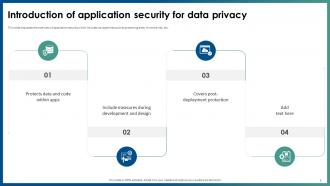
Slide 4: This slide is an introductory slide.
Slide 5: This slide discusses the overview of application security which includes its objectives such as protecting data, minimize risk, etc.
Slide 6: This slide outlines the key characteristics of application security which include authentication, authorization, encryption, logging, etc.
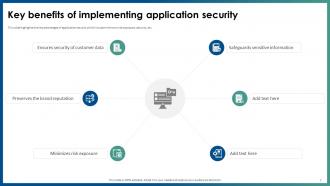
Slide 7: This slide highlights the key advantages of application security which include minimum risk exposure, security, etc.
Slide 8: This slide discusses the vulnerabilities and security threats in web application such as SQL injection, cross-site scripting, etc.
Slide 9: This slide is an introductory slide.
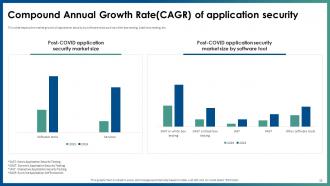
Slide 10: This slide depicts the market growth of application security by software tools such as white-box testing, black-box testing, etc.
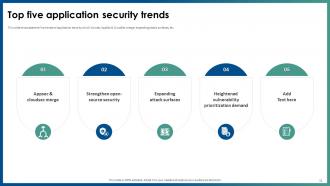
Slide 11: This slide showcases the five trends of application security which include, AppSec & CloudSec merge, expanding attack surfaces, etc.
Slide 12: This slide is an introductory slide.
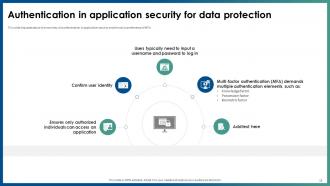
Slide 13: This slide discusses about the overview of authentication in application security and the various elements of MFA.
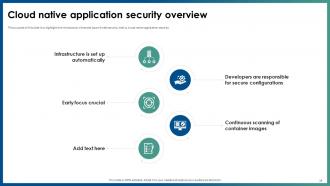
Slide 14: This slide highlights the introduction of second type of web security, that is, cloud native application security.
Slide 15: This slide is an introductory slide.
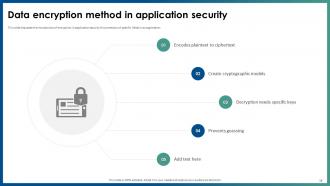
Slide 16: This slide discusses the introduction of encryption in application security for protection of specific fields in an application.
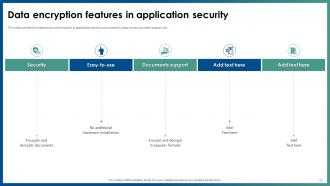
Slide 17: This slide outlines the characteristics of encryption in application security such as security, easy-to-use, document support, etc.
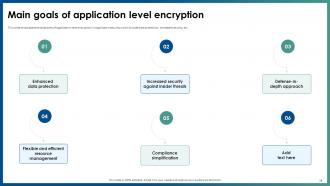
Slide 18: This slide portrays the objectives of application-level encryption in application security which include data protection, increased security, etc.
Slide 19: This slide is an introductory slide.
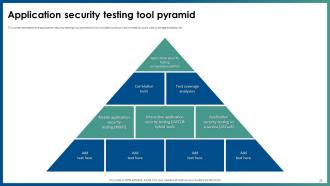
Slide 20: This slide ertains to the application security testing tool pyramid which includes tools such as correlation tools, test coverage analysis, etc.
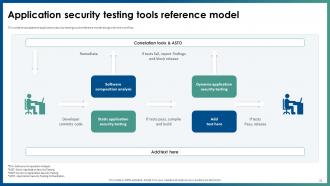
Slide 21: This slide embarks the application security testing tools reference model along with the workflow.
Slide 22: This slide is an introductory slide.
Slide 23: This slide mentions the overview of authorization in application security for authorized access of resource.
Slide 24: This slide is an introductory slide.
Slide 25: This slide highlights the introduction of access control safeguards in application security for preventing malicious attacks in applications.
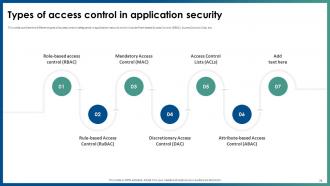
Slide 26: This slide outlines the different types of access control safeguards in application security.
Slide 27: This slide represents the installation process of access control system for application security in an organization.
Slide 28: This slide is an introductory slide.
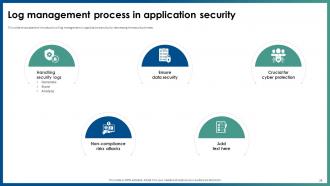
Slide 29: This slide entails the introduction of log management in application security for decreasing the security threats.
Slide 30: This slide discusses the selection of security events that need to be logged for application security to ensure user accountability.
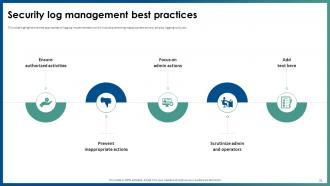
Slide 31: This slide highlights the best approaches of logging implementation which include preventing inappropriate actions, employ logging tools, etc.
Slide 32: This slide is an introductory slide.
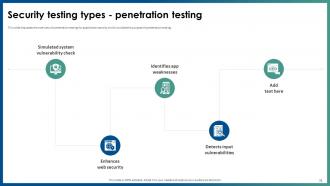
Slide 33: This slide depicts the overview of penetration testing for application security which includes the purpose of penetration testing.
Slide 34: This slide highlights the steps for implementing penetration testing which include planning and reconnaissance, gaining access, etc.
Slide 35: This slide is an introductory slide.
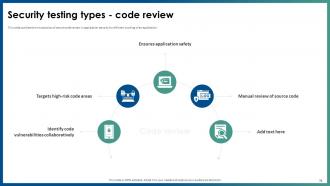
Slide 36: This slide outlines the introduction of secure code review in application security for efficient working of an application.
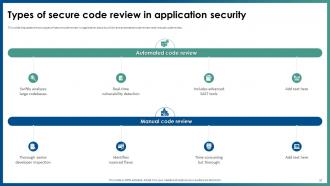
Slide 37: This slide puts the two types of secure code review in application security which are automated code review and manual code review.
Slide 38: This slide is an introductory slide.
Slide 39: This slide outlines the overview of vulnerability scanning in security testing for application security.
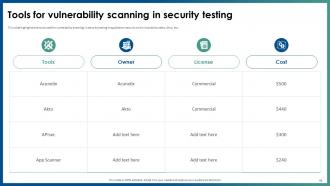
Slide 40: This slide highlights the tools used for vulnerability scanning in security testing in application security which include Acunetix, Akto, etc.
Slide 41: This slide is an introductory slide.
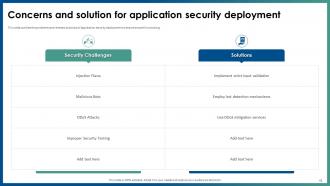
Slide 42: This slide outlines the problems and relevant solutions of application security deployment to ensure smooth functioning.
Slide 43: This slide is an introductory slide.
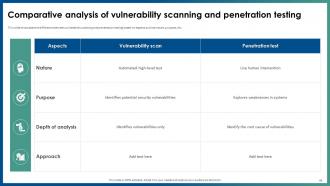
Slide 44: This slide puts the difference between vulnerability scanning and penetration testing based on aspects such as nature, purpose, etc.
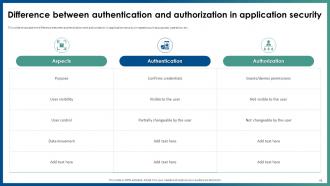
Slide 45: This slide caters to the difference between authentication and authorization in application security on aspects such as purpose, operation, etc.
Slide 46: This slide is an introductory slide.
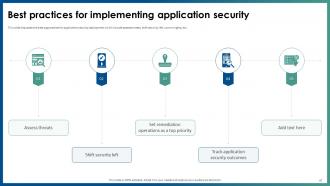
Slide 47: This slide discusses the best approaches for application security deployment which include assess threats, shift security left, control rights, etc.
Slide 48: This slide entails the actions performed while deploying application security, person responsible, status and comments for the same.
Slide 49: This slide is an introductory slide.
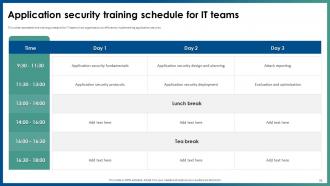
Slide 50: This slide represents the training schedule for IT teams in an organization to efficiently implementing application security.
Slide 51: This slide showcases the technology cost breakdown for different components such as internet, software, IT staff, etc.
Slide 52: This slide provides a 30-60-90-day plan with text boxes.
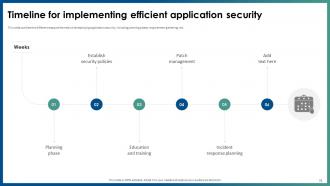
Slide 53: This slide outlines the different steps performed while deploying application security, including planning phase, requirement gathering, etc.
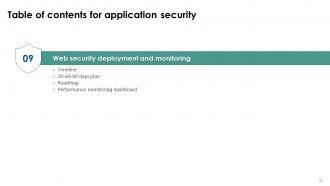
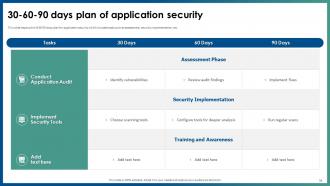
Slide 54: This slide depicts the 30 60 90 days plan for application security which includes tasks such as assessment, security implementation, etc.
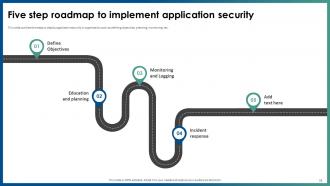
Slide 55: This slide puts the steps to deploy application security in organization such as defining objectives, planning, monitoring, etc.
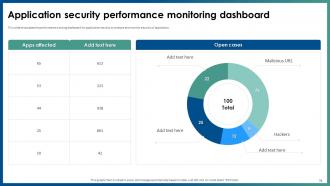
Slide 56: This slide showcases the performance tracking dashboard for application security to analyze and monitor security of application.
Slide 57: This slide is an introductory slide.
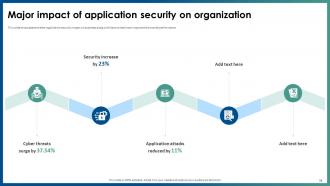
Slide 58: This slide showcases the after application security impact on business along with factors that have improved the overall performance.
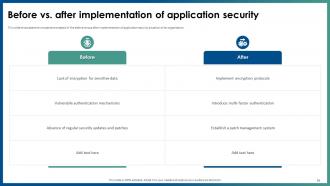
Slide 59: This slide shows the comparative analysis of the before versus after implementation of application security situation of an organization.
Slide 60: This slide is an introductory slide.
Slide 61: This slide highlights the overview of the company, problems faced, and their related solutions in the case study.
Slide 62: This slide shows all the icons included in the presentation.
Slide 63: This slide is titled Additional Slides for moving forward.
Slide 64: This slide showcases the suitable graph/chart.
Slide 65: This slide is a Timeline slide. Show data related to time intervals here.
Slide 66: This slide depicts a Venn diagram with text boxes.
Slide 67: This slide is a financial slide. Show your finance-related stuff here.
Slide 68: This slide contains a Puzzle with related icons and text.
Slide 69: This slide is Our Goal slide. State your firm's goals here.
Slide 70: This slide is an Idea Generation slide to state a new idea or highlight information, specifications, etc.
Slide 71: This slide provides a 30-60-90-day plan with text boxes.
Slide 72: This slide shows Post-It Notes. Post your important notes here.
Slide 73: This slide is a thank-you slide with address, contact numbers, and email address.
Application Security Powerpoint Presentation Slides with all 81 slides:
Use our Application Security Powerpoint Presentation Slides to effectively help you save your valuable time. They are readymade to fit into any presentation structure.


























FAQs for Application Security
Dude, SQL injection is still *everywhere* - wild that people haven't figured this out yet. XSS and broken authentication are the other big ones you'll run into constantly. Oh, and insecure direct object references where apps just don't bother checking if you should actually see that data. Default passwords and misconfigurations kill me too. Honestly though? Most of this stuff boils down to crappy input validation. Get that right along with proper auth checks and you're already way ahead of like 70% of sites out there. It's not rocket science but somehow everyone still messes it up.
First thing - get your devs trained on the basics like SQL injection and XSS. Seriously, even senior people mess this up all the time. Code reviews are huge too, but make sure you're actually using security checklists instead of just hoping people catch stuff. Oh, and throw SAST tools right into your CI/CD pipeline so you're not finding vulnerabilities after everything's already deployed (been there, not fun). OWASP's secure coding guidelines are pretty solid if you need a starting point. The trick is building clear standards around input validation and auth stuff, but making it feel like part of the normal workflow rather than some separate security thing nobody wants to deal with.
So threat modeling is like playing hacker with your own app to find weak spots first. Map out how your app works, where data goes, what could break. Do it early though - way easier than fixing a disaster later (learned that the hard way). STRIDE and PASTA are decent frameworks if you need structure. Honestly, it's just organized paranoia. You're basically asking "what would I attack here?" then building defenses around those spots. Saves you from wasting time on security stuff that doesn't actually matter for your specific setup.
Build security straight into your CI/CD instead of slapping it on later. SAST tools can check your code on every commit. Add dependency scans too - honestly, half the vulns I see are from outdated packages anyway. DAST should hit your staging environment automatically. Make your pipeline fail hard when it finds critical stuff - no exceptions. The whole point is making security checks run like unit tests. No waiting around for someone to manually review everything. It's way cheaper fixing bugs early than dealing with them in prod later.
SAST basically reads through your code without running it - like having someone super anal review every line for vulnerabilities. DAST is different though. It actually fires up your app and tries to hack it from the outside, simulating real attacks. Here's the trade-off: SAST catches stuff early when it's cheap to fix, but it'll miss problems that only show up when the app's actually running. DAST finds the real nasty exploits but only after you've already built everything (which honestly sucks timing-wise). You definitely need both. Run SAST while you're coding, then hit it with DAST before shipping.
Don't wait until the end to think about compliance - bake it right into your dev process. Figure out what regs actually hit you first (GDPR, SOX, whatever applies). Then get automated security testing running in your CI/CD so you catch stuff early. The documentation part honestly sucks but you can't skip it. Regular audits, vulnerability checks, documenting all your security controls - it's tedious but auditors will grill you without it. Treat this as ongoing work, not something you scramble to do once a year. I'd set up quarterly check-ins to stay on top of new requirements. Trust me, regulations change constantly and falling behind is painful.
Definitely keep those dependencies updated - tools like Snyk or OWASP Dependency Check will save your ass. Only add libraries you actually need (though I'm guilty of this too lol). Pin your versions in production so random updates don't break everything. Set up alerts for security stuff and have a quick process for critical patches. Oh, and audit what you're using regularly. Remove dead weight. Honestly, run a vulnerability scan on your current project today. You'll probably find some scary stuff hiding in there that you forgot about.
Start with automated tools like SAST and DAST - they'll catch the obvious stuff. Manual testing comes next for business logic flaws. Architecture review is huge too, honestly that's where I find the worst vulnerabilities hiding. Do threat modeling early so you know what you're dealing with. Code review is a must, especially auth and input validation areas. Oh and data flow analysis - can't skip that. Layer everything since each method misses different things. Just make sure your documentation has actual fix steps, not vague "secure this better" nonsense.
APIs are like your app's front door, so if they're not secure you're basically asking for trouble. Bad actors can slip through weak endpoints and grab sensitive data or mess with your functions. I've watched companies get wrecked from one sloppy API - it's wild how fast things can go sideways. You need solid authentication and input validation right from the start. Rate limiting helps too. Oh, and don't put off API security until later because that never works out well. Trust me on this one.
Honestly, security works best when it doesn't feel like this separate thing developers have to deal with. Train your team on actual threats they'll face - skip the boring compliance workshops that nobody pays attention to anyway. Build security tools right into your pipeline so devs get instant feedback while coding. Oh, and create an environment where people can report issues without getting blamed for them. The biggest thing though? Actually give your team time to fix problems when they pop up. If you don't, they'll just start tuning out all those alerts.
So for security tools, you'll need a few different types. SAST stuff like SonarQube or Checkmarx scans your actual code. Then grab OWASP ZAP for runtime testing - that's your DAST scanner. For dependencies, Snyk's pretty solid, or WhiteSource works too. The tooling changes constantly though, kinda annoying tbh. Get these hooked into your CI/CD so they run automatically. Oh, and don't skip runtime protection - Contrast Security catches live attacks which is clutch. Start with one from each category first, then expand based on what you're actually building.
ML is honestly a game-changer for app security. You can catch weird user behavior patterns that would fly right past human reviewers. Real-time threat detection is where it really shines - automatically blocking sketchy stuff before it becomes a problem. The algorithms will scan your code for vulnerabilities during development too, which is clutch. Plus they learn from past attacks to predict new ones. It's basically like having a security guy who never takes a coffee break (and doesn't complain about working weekends). Just make sure you start with decent training data and keep feeding it more intel as you go.
Isolate everything first - disconnect affected systems and kill any compromised login credentials right away. Check your logs to see what data got accessed and how they broke in. Honestly, this part is a nightmare because everyone's breathing down your neck, but you've got to dig deep. Patch whatever vulnerability let them in and beef up your security after that. Document the whole mess for compliance stuff and so it doesn't happen again. Oh, and don't forget to actually tell people what happened - users and stakeholders deserve to know. Seriously though, get an incident response plan ready now before you need it.
Dude, you absolutely need encryption - it's like your safety net when hackers get through everything else. Encrypt stuff sitting in your database AND when it's moving around (like API calls). I always think of it as putting valuables in a safe even though your door's already locked, you know? If someone breaks in or intercepts your data, they'll just see gibberish without the keys. Use AES-256 - it's solid. Oh and seriously, don't try building your own encryption system. That's a nightmare waiting to happen. Stick with established libraries that already figured out the tricky parts.
Honestly, AI attacks are getting scary good at finding vulnerabilities way faster than before. Supply chain stuff is blowing up too - all these sketchy third-party libraries causing headaches. Zero-trust isn't just fancy talk anymore, it's actually becoming standard practice. Container security matters more now that everyone's going cloud-native. But the biggest thing? You've gotta shift security left into your dev process. Start doing threat modeling during sprint planning if you're not already. Trust me, catching issues early beats scrambling later when something breaks in production.
-
These stunning templates can help you create a presentation like a pro.
-
Great product with effective design. Helped a lot in our corporate presentations. Easy to edit and stunning visuals.