

Security Testing Powerpoint Presentation Slides





Try Before you Buy Download Free Sample Product
 Impress Your
 Audience
 100%
100% Editable
 Save Hours
 of Time


Explore our security testing PPT, which includes an introduction, goals, features, evolution, principles, advantages, etc. The Power of Security Penetration Testing also demonstrates market analysis, including the global market size of security testing, region-wise market analysis, emerging trends, etc. Furthermore, our Harnessing the World of Ethical Hacking Guide discusses the implementation of security testing, the architecture of security testing, etc. This Power of IoT Security Testing Presentation also represents tools and types of security testing, checklists for implementing security testing, best practices, etc. Moreover, the Mobile Application Security Testing Deck contains sections about challenges and solutions of the program budget for security testing, etc. Lastly, our Fuzz Testing Module contains tracking and monitoring dashboards of security testing, the roadmap for implementing security testing, etc. Download our 100 percent editable and customizable template, also compatible with Google Slides.
People who downloaded this PowerPoint presentation also viewed the following :
Content of this Powerpoint Presentation
Slide 1: This slide introduces Security Testing. State Your Company Name and begin.
Slide 2: This slide is an Agenda slide. State your agendas here.
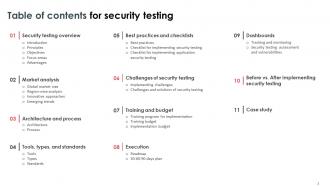
Slide 3: This slide shows a Table of Contents for the presentation.
Slide 4: This slide is an introductory slide.
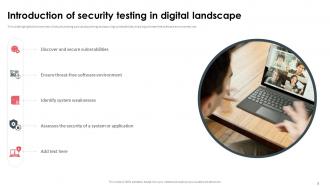
Slide 5: This slide highlights the overview of security testing such as discovering and securing vulnerabilities, ensuring a threat-free software environment, etc.
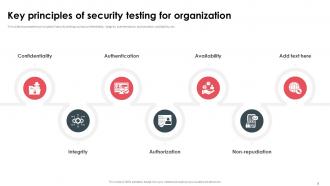
Slide 6: This slide showcases the principles of security testing such as confidentiality, integrity, authentication, authorization, availability, etc.
Slide 7: This slide represents the goals of security testing such as coding security issue resolutions, uncovering system security risks, etc.
Slide 8: This slide presents the focus area in security testing such as network security, system software security, client-side application security, etc.
Slide 9: This slide shows the advantages of software security testing such as identifying weaknesses, enhancing security, ensuring compliance, etc.
Slide 10: This slide is an introductory slide.
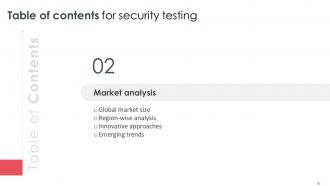
Slide 11: This slide caters to the global market size of security testing based on different storage such as on-premises and cloud, etc.
Slide 12: This slide contains the global security testing market analysis regions vise such as north America, Europe, Asia pacific, south America, etc.
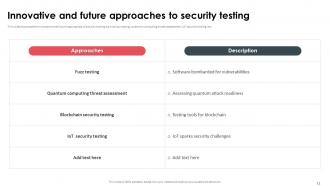
Slide 13: This slide mentions the innovative and future approaches of security testing such as fuzz testing, quantum computing threat assessment, IoT security testing, etc.
Slide 14: This slide showcases the emerging trends in security testing such as shift-left security testing, DevSecOps, cloud security testing, IoT security testing, etc.
Slide 15: This slide is an introductory slide.
Slide 16: This slide highlights the architecture of security testing components such as user interface, controller, tester, test report, test case, etc.
Slide 17: This slide shows the steps to follow for security testing such as creating a functional test case, adding a security test, running the test, creating the reports, etc.
Slide 18: This slide entails the steps to follow for security testing such as creating a functional test case, adding a security test, running the test, creating the reports, etc.
Slide 19: This slide is an introductory slide.
Slide 20: This slide highlights the top open-source tools of security testing such as netsparker, immuniweb, Vega, wapiti, etc.
Slide 21: This slide illustrates the types of security testing such as penetration testing, application security testing, web application security testing, etc.
Slide 22: This slide puts the elements of ISO standards for security testing such as confidentiality, integrity, availability, etc.
Slide 23: This slide is an introductory slide.
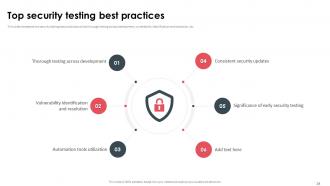
Slide 24: This slide represents the security testing best practices such as thorough testing across development, vulnerability identification and resolution, etc.
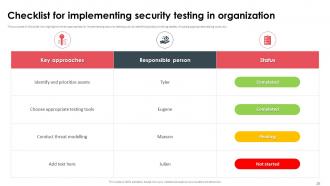
Slide 25: This slide presents the key approaches for implementing security testing such as identifying and prioritizing assets, choosing appropriate testing tools, etc.
Slide 26: This slide includes the checklist for implementing application security testing components such as coverage, low false positive, exploitability, code visibility, etc.
Slide 27: This slide is an introductory slide.
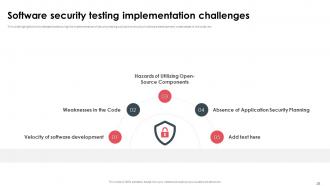
Slide 28: This slide highlights the challenges faced during the implementation of security testing such as the velocity of software development, weaknesses in the code, etc.
Slide 29: This slide represents the major challenges of security testing with solutions.
Slide 30: This slide is an introductory slide.
Slide 31: This slide outlines the security testing implementation training program such as mode, cost, agenda, and schedule for the training programs.
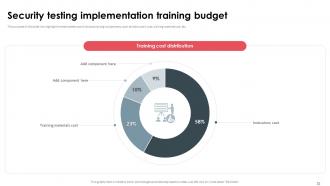
Slide 32: This slide presents the estimated cost of various training components, such as instructors' cost, training material cost, etc.
Slide 33: This slide denotes the budget for implementing security testing components such as security assessment tools, training and workshops, security testing software, etc.
Slide 34: This slide is an introductory slide.
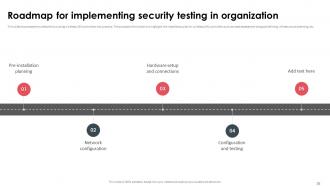
Slide 35: This slide showcases the schedule for putting wireless LAN controllers into practice.
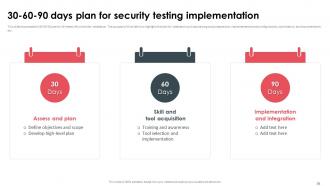
Slide 36: This slide shows the 30-60-90 plan for Wireless LAN controller installation.
Slide 37: This slide is an introductory slide.
Slide 38: This slide marks the security testing tracking and monitoring dashboard components such as planning, design, development, testing, project budget, etc.
Slide 39: This slide denotes the security testing assessment components such as CVSS score, severity, current risk levels for security index, business impact, technical impacts, etc.
Slide 40: This slide is an introductory slide.
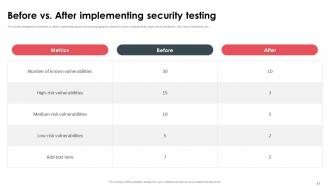
Slide 41: This slide includes the before vs. after implementing security testing based on several known vulnerabilities, high-risk vulnerability, low-risk vulnerability, etc.
Slide 42: This slide is an introductory slide.
Slide 43: This slide represents the security testing case study of - IT health check with objectives, skills used, and approaches to be used.
Slide 44: This slide shows all the icons included in the presentation.
Slide 45: This slide is titled Additional Slides for moving forward.
Slide 46: This slide entails the evolution of security testing from late 1960 when the inception of security testing was unclear to universal practice for all sizes.
Slide 47: This slide showcases the suitable graph/chart.
Slide 48: This slide is a Timeline slide. Show data related to time intervals here.
Slide 49: This slide depicts a Venn diagram with text boxes.
Slide 50: This slide contains a Puzzle with related icons and text.
Slide 51: This slide is Our Goal slide. State your firm's goals here.
Slide 52: This slide is an Idea Generation slide to state a new idea or highlight information, specifications, etc.
Slide 53: This slide presents a Roadmap with additional text boxes.
Slide 54: This slide is a thank-you slide with address, contact numbers, and email address.
Security Testing Powerpoint Presentation Slides with all 62 slides:
Use our Security Testing Powerpoint Presentation Slides to effectively help you save your valuable time. They are readymade to fit into any presentation structure.































FAQs for Security Testing
So basically you want to catch vulnerabilities before the bad guys do. Test your login systems, make sure data protection actually works - all that stuff. Honestly, trying to break your own app feels super weird at first but it's worth it. Check how your system handles sketchy input too. Oh and compliance boxes need checking if that applies to you. Don't save this for the end though - start early with some automated scans. You can always level up to proper pen testing later once you've got the basics down.
So basically, functional testing checks if your stuff actually works - like "does this login button do what it's supposed to?" Security testing is totally different though. It's looking for ways hackers could mess with your app, like bypassing that login completely. You'll run functional tests constantly with every build. Security testing? That's more strategic - you do it throughout development but really ramp it up before launch because shipping vulnerable code is honestly terrifying. My advice: keep them separate. Different tools, different thinking required. Don't try to cram security checks into your regular test cycles.
SQL injection is still *everywhere* - it's honestly embarrassing at this point. XSS pops up constantly too, along with broken authentication and those insecure object references where you can just change a URL parameter to see someone else's data. Half the time it's just basic stuff like default passwords nobody bothered changing. Access control issues are probably the worst offenders though. People can see whatever they want because permissions got set up wrong. Oh, and security misconfigurations - that's like 90% of what I find during testing. OWASP Top 10 is still your best starting point for coverage.
Honestly, just figure out what would absolutely wreck you if it got hacked - that's your starting point. Customer data, payment stuff, anything exposed to the internet. Map out those crown jewels first. Then think like the bad guys (I know, sounds cheesy but it actually works). Score your threats by how likely they are vs how much damage they'd do. Don't try to test everything at once though - you'll burn out fast. Pick your top 5-10 scariest scenarios and really nail those down before moving to the smaller stuff.
Honestly, automated tools are lifesavers for security testing. They handle all the boring, repetitive scanning so you don't have to manually check every single input field for SQL injection or XSS. Speed-wise, they blow manual testing out of the water. The downside? They throw a lot of false positives at you - kinda annoying but whatever. I usually run them first to get a baseline scan of everything, then focus my time on manually digging into the sketchy stuff they found. Works way better than trying to test everything by hand from scratch.
So threat modeling is like having a game plan instead of just randomly testing stuff. Map out where attackers could get in and what they'd actually want to steal. Then you can focus your testing on the real risks - like if databases are exposed, hit those SQL injection tests hard. Way better than running generic scans that find a million useless issues. I'd start by sketching out your system's entry points and data flows first. Honestly, it saves so much time compared to the spray-and-pray approach most people use. You'll actually test what matters instead of chasing false positives all day.
First thing - get written approval before you touch anything, seriously. Document everything as you go and make sure you're crystal clear on scope so you don't accidentally nuke production (been there, it's terrifying). Use tools you trust and triple-check your targets. Wrong server = resume update time. Work with the security team, have rollback plans ready. Oh, and don't screenshot sensitive data you find - I've seen people get fired for that. The paperwork's boring but get that scope agreement signed first. Trust me on this one.
Dude, you gotta build security into your pipeline from day one instead of slapping it on at the end. Get SAST, DAST, and dependency scans running automatically with every build - treat them like unit tests. Your devs need basic secure coding training so they're not blindsided by vulns every sprint. Here's the thing though - security people should actually sit in on sprint planning instead of swooping in later to torpedo everything. Also set up threat models that grow with your features. Honestly, the whole "security as code" approach just works better than the old gatekeeping method.
Dude, compliance standards are basically your cheat sheet so you don't have to guess what to test. OWASP Top 10 shows the nastiest web vulnerabilities hackers actually use - it's like their greatest hits album. PCI-DSS breaks down exactly what you need for credit card stuff. Honestly beats trying to figure out threats from scratch. Map your pen tests and code reviews to these since they're pulled from real attacks. Oh and start with OWASP if you're doing web apps - way more practical than the other frameworks I've seen.
Honestly, you can't just tack security on at the end anymore. Get your devs and testers doing threat modeling sessions together - basically sitting around thinking like hackers trying to break your stuff. It's weirdly addictive once you get going. Set up code reviews that actually hunt for the usual suspects: SQL injection, XSS, all that fun stuff. Automated scanning tools help too, just make sure both teams can actually read the results. The real trick? Make everyone own security from day one. Developers need to write cleaner code upfront, testers should be plotting attacks early. Nobody gets to punt it to the security team later.
Dude, the main issue is you're basically testing blind - no source code, no clue how stuff works internally. Documentation is usually garbage too, and vendors love hiding their security flaws. Can't tweak anything to test weird edge cases either since licensing locks you out. Oh, and good luck staying current when updates happen whenever they feel like it. Honestly though? Just hammer their APIs and external surfaces. That's where you'll actually find stuff worth reporting. Way more productive than banging your head against their black box.
Attackers keep finding new ways to mess with systems - AI-powered attacks, cloud screwups, supply chain hacks are everywhere now. Can't just stick with the same old OWASP tests from years ago, honestly. Your testing has to keep up with whatever fresh hell they're cooking up. I'd say plug into threat intel feeds and security forums to catch new patterns early. Also, don't make security testing some end-of-project checkbox thing. Run it continuously throughout development - way more effective that way.
Track coverage stuff first - like what percentage of OWASP Top 10 you're testing and how much code your SAST tools actually hit. Then focus on outcomes: detection rates, false positives, time to fix critical bugs. Mean time to detection is clutch because it shows if you're catching things fast enough. Oh, and definitely watch for repeat vulns - same issues showing up means something's broken in your process. I'd start with maybe 3 metrics tops. You can always add more later but tracking everything from day one just creates noise.
Start with just one or two security tools - don't overwhelm yourself trying to add everything at once. SAST tools work great early in the build to catch code issues. Then throw DAST into your staging environment for testing live apps. Container scanning is a must (seriously, some of those base images are disasters waiting to happen). Tools like Snyk help flag sketchy third-party libraries too. The key thing? Make sure your team actually gets what the results mean, otherwise you're just creating noise.
Honestly, AI and IoT are making security testing way more complicated. Traditional testing just doesn't cut it anymore - you've got adversarial inputs messing with AI models, IoT devices with garbage default passwords everywhere, and attack surfaces that keep multiplying. I swear most IoT manufacturers don't even think about security. You'll need to start testing machine learning validation, API security for all those connected devices, plus way more network stuff. The tools are getting better but threats move faster than teams can handle. First step though? Figure out what AI/IoT gear you're actually using.
-
Crisp and neat slides. Makes it fun and easier to curate presentations.
-
My search for complete decks ended with SlideTeam. Such a surplus collection of HD PowerPoints. Moreover, their standard and widescreen formats have helped me in delivering bullseye presentations.