


Best Practices For Workplace Security Powerpoint Presentation Slides




Try Before you Buy Download Free Sample Product
 Impress Your
 Audience
 100%
100% Editable
 Save Hours
 of Time


Workplace safety refers to the provision of a safe working environment, with the limitation of elements that can cause damage, injury, and other negative outcomes in the workplace. Check out our professionally designed Workplace Safety And Security Procedures PowerPoint presentation. First, this deck covers the problems related to workplace incidents which include occupational diseases, occupation of fatal and injured employees, and safety violations by employees. Additionally, it covers the causes of accidents and the impact of accidents on employees and organizations. It also highlights why there is a need for workplace safety with detailed objectives. Moreover, this deck covers how to examine risks and hazards, It also lays emphasis on hazard identification and their control measures which includes air compressor hazards and safety guidelines, fire hazards and safety guidelines, Injuries from power tools with safety guidelines, chemical hazards with safety guidelines, and drug and alcohol abuse with safety guidelines. At last, it includes the recommended practices for safety management, penalties for non compliance, and the positive impact of workplace safety in an organization. Download this deck now.
People who downloaded this PowerPoint presentation also viewed the following :
Content of this Powerpoint Presentation
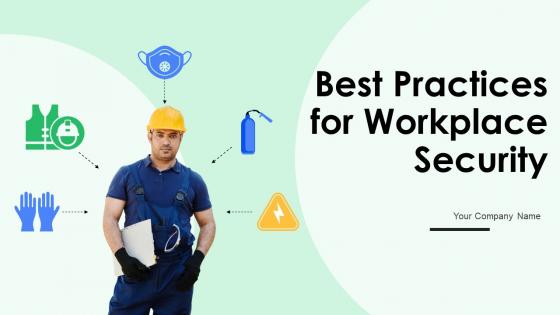
Slide 1: This slide displays the title Workplace Safety and Security Procedures.
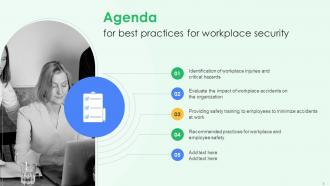
Slide 2: This slide displays the title Agenda.
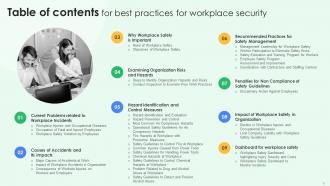
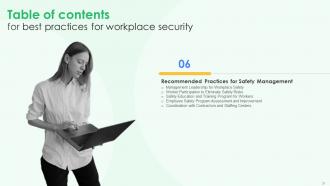
Slide 3: This slide exhibit table of content.
Slide 4: This slide exhibit table of content that is to be discuss further.
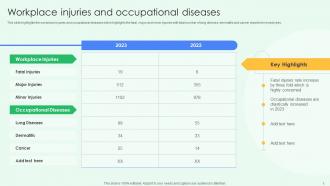
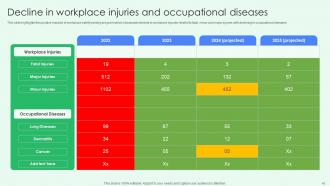
Slide 5: This slide highlights the workplace injuries and occupational diseases which highlights the fatal, major and minor injuries.
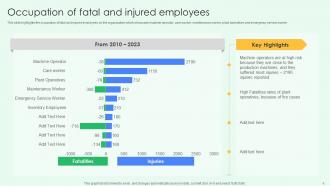
Slide 6: This slide highlights the occupation of fatal and injured employees on the organization.
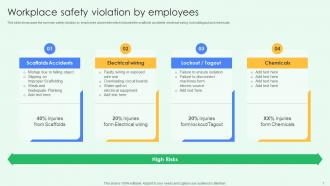
Slide 7: This slide showcases the common safety violation by employees at worksite which includes the scaffolds accidents, electrical wiring, lockout/tagout and chemicals.
Slide 8: This slide exhibit table of content that is to be discuss further.
Slide 9: This slides highlights the key reason of accidents at work which includes direct cause and indirect cause.
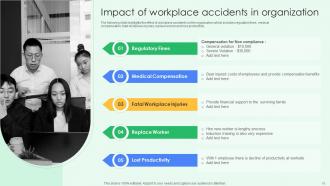
Slide 10: The following slide highlights the effect of workplace accidents on the organization which includes regulatory fines, medical compensation, fatal workplace injuries.
Slide 11: This slide highlights the consequences of accidents on workers and employers which includes loss of job, loss of income, and damage to organization equipment's etc.
Slide 12: This slide exhibit table of content that is to be discuss further.
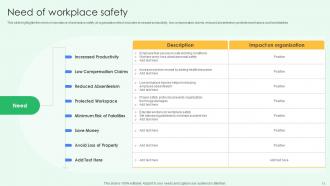
Slide 13: This slide highlights the need or importance of workplace safety at organization.
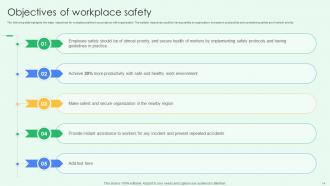
Slide 14: The following slide highlights the major objectives for workplace safety in accordance with organization.
Slide 15: This slide exhibit table of content that is to be discuss further.
Slide 16: This slide highlights the four steps to identify the organization risks.
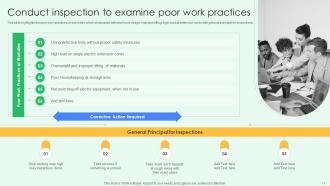
Slide 17: This slide highlights the poor work practices at worksites which showcases defective tools usage, improper lifting, high load at extension cords.
Slide 18: This slide exhibit table of content that is to be discuss further.
Slide 19: The following slide showcases the hazard identification and evaluation and workplace.
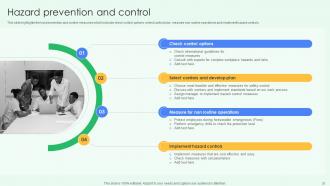
Slide 20: This slide highlights the hard prevention and control measures which includes check control options, select control plan, measure non routine operations.
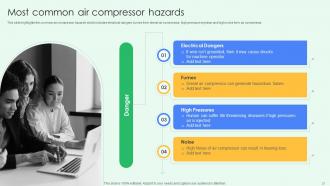
Slide 21: This slide highlights the common air compressor hazards which includes electrical dangers, fumes from diesel air compressor, high pressure injection.
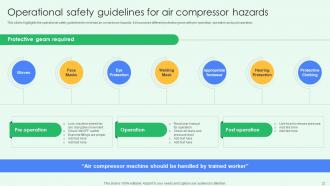
Slide 22: This slides highlights the operational safety guidelines to minimize air compressor hazards.
Slide 23: This slide highlights the different fire hazards including flammable materials, dust and debris, and smoking at workplace with mitigation strategies.
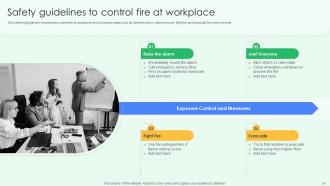
Slide 24: This slide highlights the measures to control fire at workplace which includes steps such as raise the alarm, fight fire and evacuate from the worksite.
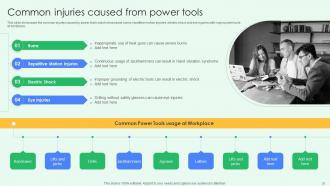
Slide 25: This slide showcases the common injuries caused by power tools which showcases burns, electric shock and eye injuries with major power tools at workplace.
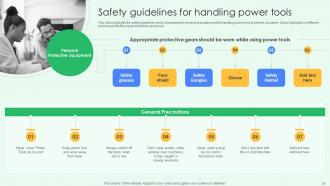
Slide 26: This slide highlights the safety guidelines which showcases the general precautions while handling power tools to prevent accidents.
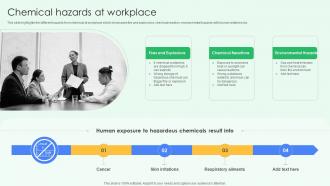
Slide 27: This slide highlights the different hazards from chemical at workplace which showcases fire and explosions, chemical reaction, environmental hazards.
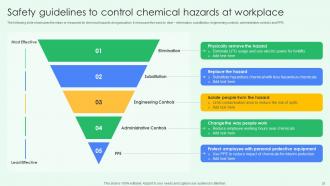
Slide 28: The following slide showcases the steps or measures for chemical hazards at organization.
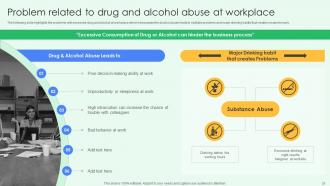
Slide 29: This slide highlights the problems with excessive drug and alcohol at workplace which showcases the alcohol abuse leads to multiple problems.
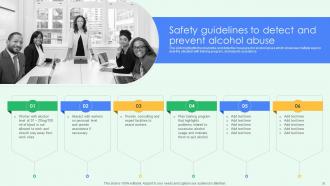
Slide 30: This slide highlights the preventive and detective measures for alcohol abuse which showcase multiple ways to deal the situation.
Slide 31: This slide exhibit table of content that is to be discuss further.
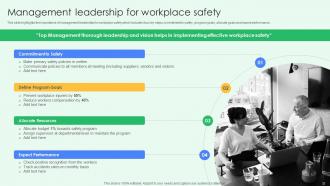
Slide 32: This slide highlights the importance of management leadership for workplace safety.
Slide 33: This slide highlights the worker participation to remove safety risks.
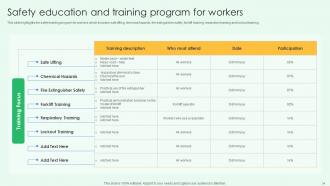
Slide 34: This slide highlights the safety training program for workers which includes safe lifting, chemical hazards, fire extinguisher safety, forklift training.
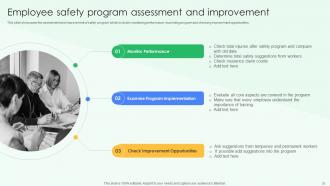
Slide 35: This slide showcases the assessment and improvement of safety program which includes monitoring performance, examining program and checking improvement opportunities.
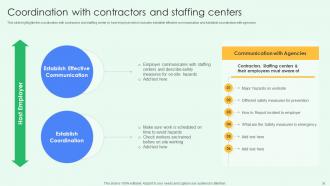
Slide 36: This slide highlights the coordination with contractors and staffing center by host employer which includes establish effective communication.
Slide 37: This slide exhibit table of content that is to be discuss further.
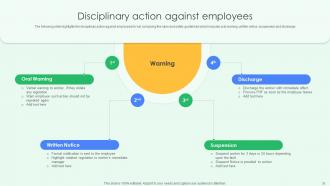
Slide 38: This slide highlights the disciplinary action against employees for not complying the rules and safety guidelines.
Slide 39: This slide exhibit table of content that is to be discuss further.
Slide 40: This slide highlights the positive impacts of workplace safety training program which showcases decline in workplace injuries.
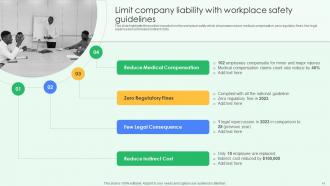
Slide 41: This slide highlights the positive impacts from the workplace safety which showcases reduce medical compensation, zero regulatory fines, few legal repercussion.
Slide 42: This slide exhibit table of content that is to be discuss further.
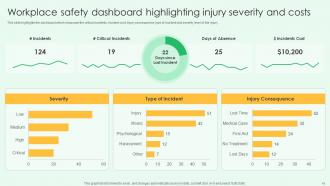
Slide 43: This slide highlights the dashboard which showcase the critical incidents, incident cost, injury consequence, type of incident and severity level of the injury.
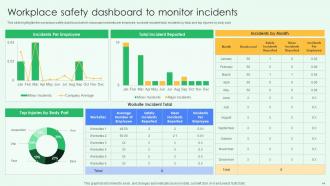
Slide 44: This slide highlights the workplace safety dashboard which showcase incidents per employee, worksite incident total, incidents by total and top injuries by body part.
Slide 45: This slide presents title for additional slides.
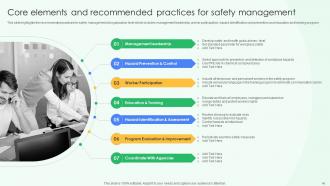
Slide 46: This slide highlights the recommended practices for safety management at organization level.
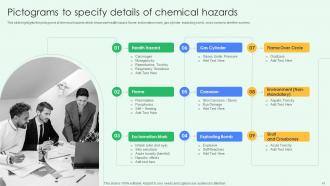
Slide 47: This slide highlights the pictograms of chemical hazards which showcase health hazard, flame, gas cylinder, exploding bomb, cross bones to alert the workers.
Slide 48: This slide presents your company's vision, mission and goals.
Slide 49: This slide display About us.
Slide 50: This slide shows details of team members like name, designation, etc.
Slide 51: This slide depicts posts for past experiences of clients.
Slide 52: This slide exhibit Timeline
Slide 53: This slide exhibits ideas generated.
Slide 54: This slide shows puzzle for displaying elements of company.
Slide 55: This slide display Location.
Slide 56: This slide display Our target.
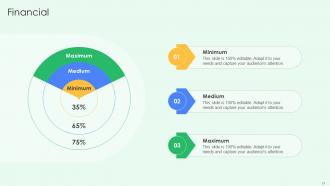
Slide 57: This slide display Financial.
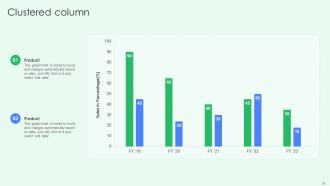
Slide 58: This slide display Clustered column for different products.
Slide 59: This is thank you slide & contains contact details of company like office address, phone no., etc.
Best Practices For Workplace Security Powerpoint Presentation Slides with all 64 slides:
Use our Best Practices For Workplace Security Powerpoint Presentation Slides to effectively help you save your valuable time. They are readymade to fit into any presentation structure.






















FAQs for Best Practices For Workplace Security
So you'll want to cover four big areas: physical stuff like cameras and access controls, digital protection with strong passwords and VPNs, training your team, and having a response plan ready. Honestly, most places totally mess up the training part - your employees will click on anything if they don't know better. Do a security assessment first to see where you're actually vulnerable, then build around those gaps. Oh, and don't forget about visitor policies and regular audits. The data handling procedures are boring but super important too.
First thing - list out everything you need to protect. Physical spots, computer systems, wherever you keep the good stuff. Figure out what threats actually matter for your type of business (like, a restaurant worries about different stuff than a law firm). Get your team together and play out some "what if" scenarios - honestly, other people will catch things you totally missed. Check who has access to what and make sure your response plans aren't garbage. Oh, and write it all down because you'll forget half of it otherwise. Update when things change.
Dude, seriously - train your people well because they're either gonna save you or sink you. Most breaches happen when someone clicks the wrong email or forgets to lock their screen. Yeah, firewalls are great, but Sarah from accounting clicking that "urgent invoice" link? That's game over. Teach them to recognize sketchy emails and use decent passwords. Oh, and make the training actually interesting - nobody learns from those mind-numbing PowerPoints we all hate. Do it regularly too. Your team will spot threats before your fancy security software does.
Honestly, access control is a total game-changer for workplace security. You can track who's going where and when, which is super helpful for audit trails. Different permission levels work great too - like your finance team gets locked-down access while common areas stay open for everyone. The best part? If someone gets fired, you just disable their credentials instead of hunting down physical keys (learned that one the hard way at my last job). Oh, and you'll catch weird after-hours activity in restricted areas. Start with your most sensitive spots first and expand from there.
Definitely get pre-registration set up with photo ID checks - that's non-negotiable. Temporary badges help too so everyone knows who's not supposed to be there. Background checks for contractors, obviously, and give them access cards that only work where they actually need to go. We had some random guy end up in our server room last year because nobody was paying attention! Super awkward. Sign-in/sign-out logs are clutch, and honestly? Don't feel bad about requiring escorts in sensitive areas. Just because someone looks official doesn't mean they belong everywhere.
Okay so first thing - figure out what sensitive stuff you actually have and who's touching it. Multi-factor authentication is a must, and encrypt anything moving between systems. Your team needs phishing training because people will click on literally anything (learned this the hard way). Set up solid access controls so random people can't get to important data. Regular backups too, obviously. Oh and create clear policies about where data can go - can't have people just emailing customer info around. The trick is baking security into your daily routine instead of treating it like some separate thing you'll deal with later.
Open offices are tricky security-wise. Keycard readers at entrances are a must, plus cameras in common areas - just don't aim them at desks because that's creepy. You want clear sight lines so people notice strangers wandering around. Set up visitor zones where guests need escorts, and definitely get locked storage for sensitive stuff since everything's so exposed. Oh, and make certain areas off-limits to visitors entirely. The whole thing's about finding that sweet spot between being secure and not killing the collaborative atmosphere everyone wants.
Hey! So security can't be an afterthought - gotta bake it right into your remote policy. VPN and multi-factor auth are non-negotiables. The real pain though? Actually getting everyone to stick with the rules consistently. Set clear device guidelines, require security training (I know, I know, but it helps), and have a solid plan for reporting sketchy stuff or lost laptops. Public WiFi rules are huge too. Here's the thing - if you make security feel punitive, people will just work around it. Get your team involved in writing the guidelines so they'll actually follow them.
So basically you want a clear chain - start with your boss or security team, plus some 24/7 hotline for the scary stuff. Write everything down RIGHT when it happens because your brain will totally blank on details later (learned this the hard way). Have specific people assigned to handle containment, investigating, and talking to everyone. Oh, and make sure people know what needs immediate reporting - like breaches or physical threats - versus the stuff that can wait 24 hours like weird emails. Keep all the contact info somewhere people can actually find it, and honestly? Run practice drills or people will just panic when it's real.
Just be upfront about it from day one. Tell your team exactly what you're monitoring - emails, badges, cameras, whatever. Nobody wants to feel like they're being watched 24/7, but honestly? Most people are cool with it when you explain it's about preventing data breaches and protecting company stuff, not nitpicking their every move. Focus on security, not micromanaging. Have clear policies that actually explain the "why" behind everything. Only collect what you really need and keep it secure. Oh, and give people a way to complain or ask questions - that feedback thing really does help build trust.
Ugh, the worst part is new tech always brings security holes you never saw coming. Your team's still learning how everything works while dealing with vulnerabilities nobody anticipated. Integration gets messy - nothing talks to your existing security tools properly. Employees are the real wildcard though. They'll use new systems in ways that completely sidestep your protocols, guaranteed. Then departments start sneaking in their own unauthorized apps behind IT's back. Honestly? Run a security assessment first, every time. And just accept that users will break something unexpected - saves you the headache later.
Honestly, security works best when it's not just the IT team's headache. Those boring password PowerPoints? Skip them. Do phishing simulations instead - they actually freak people out in a good way. My old company used to do these and wow, did they work. Make reporting sketchy stuff super easy, and don't make people feel dumb for asking questions. Actually celebrate when someone spots something fishy! Keep talking about it regularly too, not just once a year. Oh, and definitely don't make it feel like you're scolding everyone all the time.
Dude, social engineering is honestly terrifying because it skips right past all your fancy security tech. Instead of hacking systems, they just trick your employees into handing over passwords or clicking sketchy links. Like, one fake "urgent" email from the "CEO" and boom - someone's giving away access. These attacks usually open the door for bigger stuff like ransomware or data theft. Your best bet? Train your team regularly and make sure people don't feel stupid for double-checking weird requests. I've seen companies get wrecked because someone was too embarrassed to verify a suspicious email first.
Honestly? Every 6 months is ideal, but at minimum do it yearly. Cyber threats evolve so damn quickly now, plus your company's probably grown or changed since your last review. Had any close calls or actual breaches? Drop everything and review immediately. But here's the thing - don't just update policies to check a box. Your team needs to actually understand what changed, otherwise you're just creating fancy paperwork nobody follows. Oh, and set that calendar reminder right now before you forget!
Honestly, your office layout matters way more than most people think for security. Make sure you've got clear sightlines so everyone can spot who's wandering around. Force visitors through reception instead of letting them slip in random doors. Keep your sensitive stuff - like server rooms - buried deep in the building, not right by where delivery trucks pull up. I know open offices are all the rage, but they're awful if you're dealing with confidential work. Oh, and don't forget network closets - I've seen too many just sitting there unlocked. Walk around your space sometime and think like a bad guy would.
-
You can rely on SlideTeam whenever you run out of designs for your presentation. Thank you so much SlideTeam!
-
“Love it! I was able to grab an exciting proposal because of SlideTeam.”