


Quality Testing Powerpoint Presentation Slides




Try Before you Buy Download Free Sample Product
 Impress Your
 Audience
 100%
100% Editable
 Save Hours
 of Time


Check out our insightfully designed Quality Testing template. It deals with a risk based approach to quality management, which is essential in the pharmaceutical industry since it affects customer health and safety. Our Risk based approach deck covers several aspects of quality risk management, including assessing, controlling, communicating, and reviewing quality concerns. It also includes details on various tools and methodologies used for quality risk assessment, as well as information on stakeholder risk tolerance capacity and a tracker for potential risks in the future. Additionally, our QRM PowerPoint Presentation showcases the processes involved in risk assessment, like identifying, analyzing, and evaluating risks, and risk control processes, like risk reduction, acceptance, and control policy. It also includes risk communication and review processes. Further, our quality assurance PPT describes several risk management methodologies, including risk ranking and filtering, fault tree analysis, hazard operability analysis, etc. Finally, it provides information on risk tolerance capacity and a risk tracker. Get access to this powerful template now.
People who downloaded this PowerPoint presentation also viewed the following :
Content of this Powerpoint Presentation
Slide 1: This slide introduces Quality Testing. Commence by stating Your Company Name.
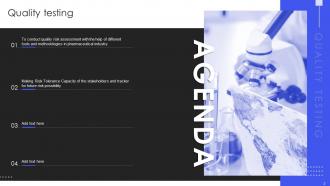
Slide 2: This slide depicts the Agenda of the presentation.
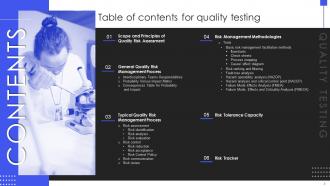
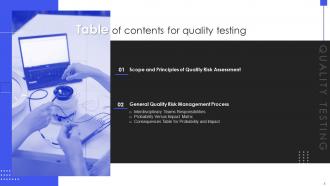
Slide 3: This slide incorporates the Table of contents.
Slide 4: This slide highlights the Title for the Topics to be discussed further.
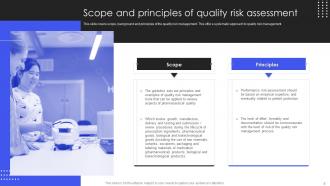
Slide 5: This slide covers scope, background and principles of the quality risk management.
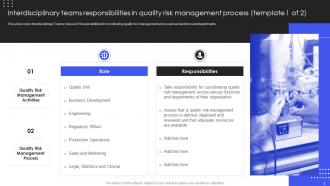
Slide 6: This slide portrays the Interdisciplinary teams responsibilities in quality risk management process.
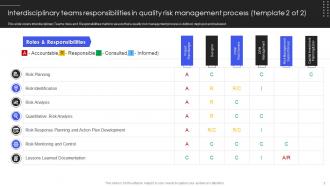
Slide 7: This slide continues the Interdisciplinary teams responsibilities in quality risk management process.
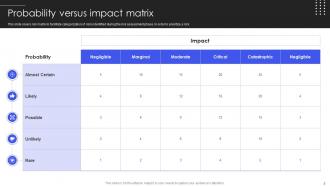
Slide 8: This slide showcases the Probability versus impact matrix.
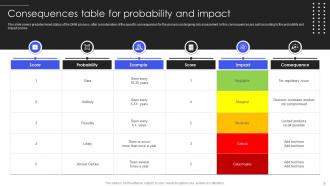
Slide 9: This slide reveals the Consequences table for probability and impact.
Slide 10: This slide presents the Heading for the Contents to be discussed next.
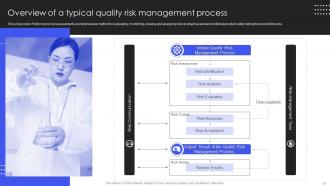
Slide 11: This slide displays the Overview of a typical quality risk management process.
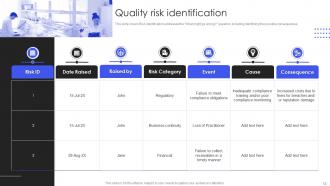
Slide 12: This slide exhibits the Quality risk identification.
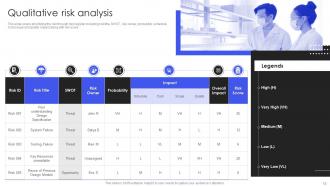
Slide 13: This slide depicts the Qualitative risk analysis.
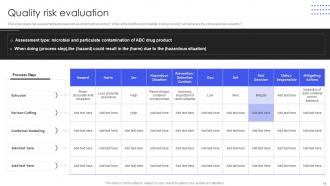
Slide 14: This slide covers risk assessment purposes.
Slide 15: This slide includes the Title for the Ideas to be further covered.
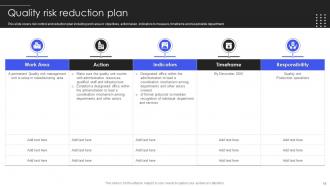
Slide 16: This slide represents the Quality risk reduction plan.
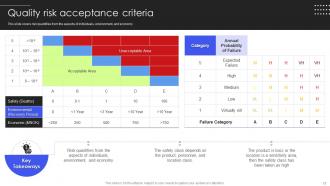
Slide 17: This slide talks about the Quality risk acceptance criteria.
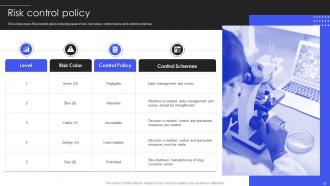
Slide 18: This slide portrays the Risk control policy.
Slide 19: This slide contains the Heading for the Ideas to be discussed in the following template.
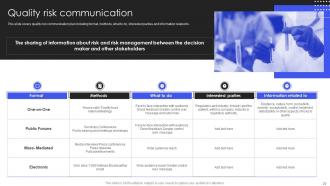
Slide 20: This slide highlights the Quality risk communication.
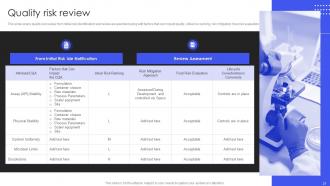
Slide 21: This slide illustrates the Quality risk review.
Slide 22: This slide exhibits the Title for the Contents to be covered further.
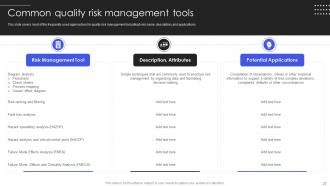
Slide 23: This slide covers most of the frequently used approaches for quality risk management.
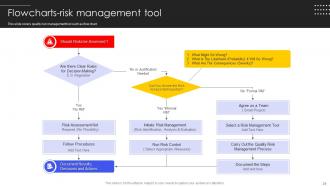
Slide 24: This slide presents the Flowcharts-risk management tool.
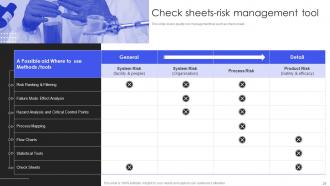
Slide 25: This slide shows the Check sheets-risk management tool.
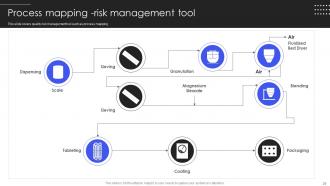
Slide 26: This slide displays the Process mapping -risk management tool.
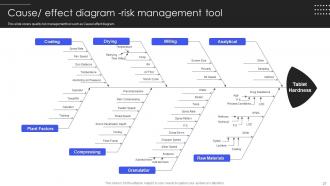
Slide 27: This slide illustrates the quality risk management tool such as Cause/ effect diagram.
Slide 28: This slide depicts the Heading for the Topics to be discussed in the next template.
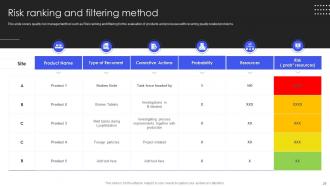
Slide 29: This slide talks about Risk ranking and filtering method.
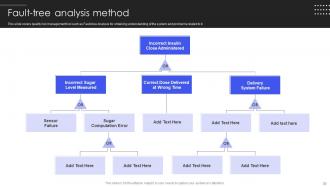
Slide 30: This slide indicates the Fault-tree analysis method.
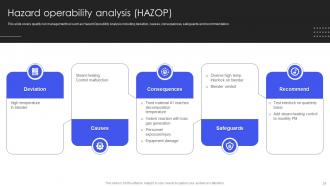
Slide 31: This slide portrays the Hazard operability analysis (HAZOP).
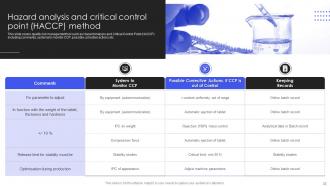
Slide 32: This slide includes the Hazard analysis and critical control point (HACCP) method.
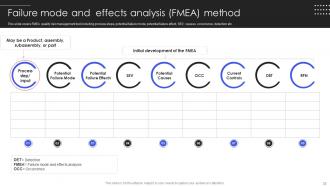
Slide 33: This slide exhibits the Failure mode and effects analysis (FMEA) method.
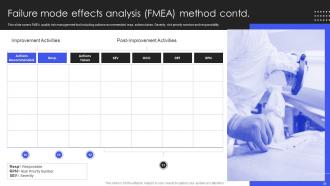
Slide 34: This slide covers FMEA quality risk management tool.
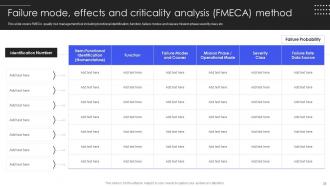
Slide 35: This slide exhibits the Failure mode, effects and criticality analysis (FMECA) method.
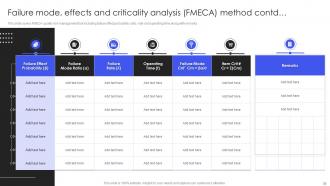
Slide 36: This slide continues the Failure mode, effects and criticality analysis (FMECA) method.
Slide 37: This slide showcases the Title for the Topics to be covered in the forth-coming template.
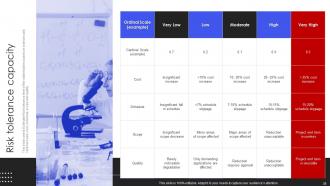
Slide 38: This slide focuses on the Risk tolerance capacity.
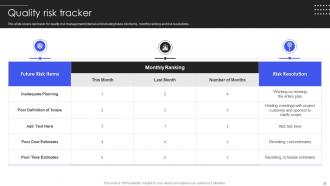
Slide 39: This slide shows the Quality risk tracker.
Slide 40: This is the Icons slide containing all the Icons used in the plan.
Slide 41: This slide is used for depicting some Additional information.
Slide 42: This slide contains the Post it notes for reminders and deadlines.
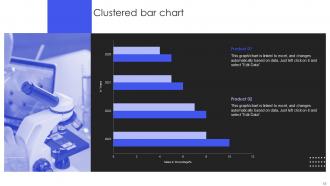
Slide 43: This slide reveals the Clustered bar chart.
Slide 44: This slide depicts the company's Mind map.
Slide 45: This slide exhibits the SWOT analysis.
Slide 46: This is Our target slide. State your organizational targets here.
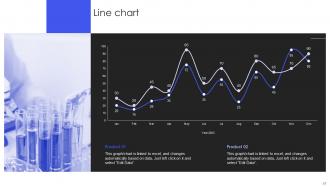
Slide 47: This slide showcases the Line chart.
Slide 48: This slide elucidates the firm's Timeline.
Slide 49: This is the Thank you slide for acknowledgement.
Quality Testing Powerpoint Presentation Slides with all 54 slides:
Use our Quality Testing Powerpoint Presentation Slides to effectively help you save your valuable time. They are readymade to fit into any presentation structure.







FAQs for Quality Testing
You'll want four main things for solid quality testing: decent test planning (scope + goals), mixing automated and manual testing, managing your test data well, and keeping communication open with devs. Automation is a lifesaver for regression stuff, but manual testing catches the weird edge cases and usability issues that scripts totally miss. Track things like defect density and test coverage - otherwise you're just guessing if it's working. Oh, and definitely audit what you're doing now first. Find your biggest gaps and tackle those before adding new processes.
Honestly, automated testing is a lifesaver. It catches bugs way more consistently than doing everything manually. You can literally set tests running overnight and wake up to results – beats staying late clicking through the same stuff over and over. Your team gets to work on interesting problems instead of testing that login screen again (ugh). I'd start small though, maybe automate your most boring repetitive tests first. Even if you only automate like 20% of the manual work, you'll suddenly have tons more time for the exploratory testing that actually matters.
Honestly, user feedback is like a reality check for your testing. Your automated tests can miss so much - users always find weird edge cases you never thought of. Something might work perfectly but still feel awkward to actually use, you know? That's stuff your functional tests won't catch. The trick is building good feedback channels and then - this is the important part - actually doing something with what people tell you. Don't just collect complaints and ignore them. Users will tell you what really matters way better than any test suite can.
So yeah, the methodology totally dictates your testing approach. Agile means you're constantly testing during sprints - way more collaboration with devs but honestly less paperwork, which I love. Waterfall? You test everything at the very end after development's supposedly finished. That can be brutal if you find big problems late. DevOps throws automated testing straight into the CI/CD pipeline, which is pretty slick. Lean's all about cutting waste from your testing processes. Bottom line - just match whatever your team's actually doing instead of working against them. Makes life so much easier.
Ugh, where do I even start? People think testing is just bug hunting when it's actually about preventing them in the first place. Then there's this idea that only testers care about quality - like, no, that's everyone's job. Don't get me started on "automation will replace manual testing" because that's just not reality. My biggest pet peeve though? When people say testing slows things down. Good testing catches problems early when they're way cheaper to fix. Oh, and nobody can test software to be completely bug-free - that's literally impossible. Build quality in from the start, not as an afterthought.
Honestly, good documentation is like having a cheat sheet for your own work. Document your test cases and results so you're not sitting there later thinking "wtf did I even test last week?" Trust me, deadline panic makes your memory terrible. New people on the team will actually thank you instead of bugging you with questions every five minutes. Start with your most important test scenarios first. You'll spot inconsistencies way faster, and tracking bug patterns becomes so much easier. It's basically your safety net when everything goes sideways.
Honestly, start with defect density - that's bugs per line of code. Test coverage percentage is huge too, shows what's actually getting tested. The escape rate though? That one's brutal, measures how many bugs make it to production. I swear that metric has given me more stress than it should lol. Mean time to detection and resolution matter too for the bugs you do catch. These four will give you solid visibility into whether your testing process is actually working or just... existing. Start there and you'll know pretty quick if customers are finding issues before you are.
Look, you gotta be ruthless about what actually matters. Test the high-risk stuff and critical paths manually, but automate the boring repetitive checks so you're not going insane. I learned this the hard way - trying to test everything by hand means nothing ever ships. Map out your must-test scenarios vs the nice-to-haves first. Then use risk-based testing to figure out what needs deep attention versus just a quick smoke test. Honestly, the hardest part is defining "good enough" for each release based on your timeline. But once you nail that down, you'll stop spinning your wheels on stuff that doesn't move the needle.
Before writing any tests, nail down your performance goals and what user loads you're actually expecting. Test in an environment that's as close to production as possible - seriously, I've watched teams completely whiff because they tested on some janky dev setup. Monitor response times, throughput, and how your resources are holding up. Start with lighter loads then ramp up to peak scenarios gradually. Both your app and infrastructure need watching during this whole process. Oh, and run these tests early and often. Don't wait until right before launch when you can't fix the big problems anymore.
Honestly, just automate your test suites at different pipeline stages - that's the easiest way to get started. Unit tests should fire on every commit, then integration tests when stuff merges to main. Performance testing before prod deployments is clutch too. Jenkins and GitHub Actions make this dead simple to set up, though I'm partial to GitHub Actions lately. The whole point is failing fast - bad tests block deployment automatically. Put your quickest, most important tests up front in the pipeline. I'd start with whatever manual tests you're already doing and just automate those first.
Yeah, remote testing is rough - bugs get lost between team members and reproducing issues becomes impossible when everyone's on different setups. Timezone chaos doesn't help either. What saved us was getting really strict about documentation (Confluence works great) and standardizing environments with containers. Regular syncs are crucial, honestly more than you'd think. Bug reports need screenshots/videos or nobody knows what you're talking about. Oh, and invest in decent collaboration tools early. We learned that the hard way after spending weeks chasing phantom bugs that only happened on Jim's weird laptop config.
Look, exploratory testing catches all the weird stuff your scripted tests totally miss. Your scripts are great for known bugs and regressions, sure. But exploratory? That's where you actually think like a user and randomly click around until something breaks. Honestly, some of my best bug finds have come from just messing around in areas that "felt off." Run your baseline scripts first, then go explore the sketchy parts. When you find something good during exploration, write a proper test for it later. It's like having both a map AND the freedom to wander off the trail.
So regression testing is basically making sure you don't break stuff that already works when you add new features. Think of it as your backup plan - because users will definitely call you out if something stops working lol. What happens is you change code, then run tests on the old functionality to catch any mess-ups before launch. Honestly, manual testing gets old fast, so automate whatever you can. I'd start with your most important user flows first - like login, checkout, whatever keeps the lights on. Those are your money makers anyway.
Map your test cases straight to business requirements and user stories first. That's your base. Then prioritize stuff that actually hits customer experience and revenue - not random checklist items. Honestly, I've watched teams burn hours on weird edge cases that maybe 0.01% of users will ever hit. Why? Focus on features that drive real business value instead. Chat with your product managers regularly too. Oh, and set clear success metrics upfront so you'll know if your testing is protecting what actually matters to the business.
Honestly, AI testing tools are where it's at right now - they're cranking out test cases automatically and getting scary good at predicting bugs. Most teams are doing shift-left testing now, catching issues way earlier in the dev cycle. IoT testing is huge too since literally everything connects to wifi these days (seriously, why does my coffee maker need updates?). Cloud platforms make scaling easier without blowing your budget on servers. My advice? Start small with some AI pilots now. Manual testing's not gonna cut it much longer, and you don't want to be scrambling to catch up later.
-
Placing an order on SlideTeam is very simple and convenient, saves you a lot of your time.
-
Illustrative design with editable content. Exceptional value for money. Highly pleased with the product.