

Malware Attack Powerpoint Ppt Template Bundles





Try Before you Buy Download Free Sample Product
 Impress Your
 Audience
 100%
100% Editable
 Save Hours
 of Time


Explore the intricate realm of cybersecurity threats with our comprehensive PPT on Malware Attack.Delve into the ominous world of malware threats and gain insights into their evolving techniques. Uncover the dangerous implications of crypto ransomware, understanding how it encrypts valuable data for ransom. This presentation sheds light on the perplexing maze ransomware, a potent variant that has challenged cybersecurity professionals. Learn about the strategies to detect, prevent, and mitigate malware in cyber security effectively. With engaging visuals and insightful analysis, our PPT equips you with the knowledge to fortify your digital defenses against these insidious cyber threats.
People who downloaded this PowerPoint presentation also viewed the following :
Malware Attack Powerpoint Ppt Template Bundles with all 25 slides:
Use our Malware Attack Powerpoint Ppt Template Bundles to effectively help you save your valuable time. They are readymade to fit into any presentation structure.
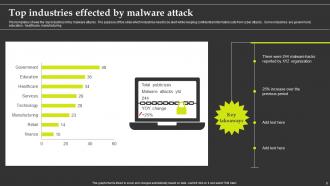
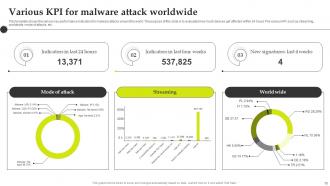
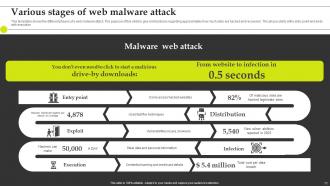
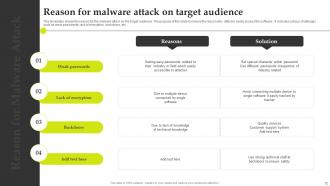






FAQs for Malware Attack Powerpoint
Dude, ransomware is probably the worst thing happening right now - they literally lock up all your files and demand money. It's insane how good they've gotten at this stuff. Phishing emails are everywhere too, tricking people into clicking sketchy links or downloading malware. Then there's BEC scams where hackers pretend to be your boss to steal cash or data. Oh, and supply chain attacks are getting popular - they hack software companies to get to everyone else. Honestly, just train your people to spot weird emails and keep your backups offline.
Honestly, get some good endpoint detection tools that watch for weird behavior patterns. Network monitoring too - catches sketchy traffic most people miss. Companies screw up because they're still using those old signature-based antivirus programs (which are kinda useless now tbh). When something hits, you need a playbook ready. Isolate the infected machines right away, figure out how they got in, then see what data got touched. Train your people regularly - they'll spot phishing attempts way better. Speed's everything here. The quicker you catch and contain it, the less it spreads through your whole network.
Dude, seriously - train your people. Most attacks happen because someone clicks the wrong thing. Phishing emails are everywhere now, and those fake "urgent invoice" attachments? Total trap. I'd run practice tests where you send fake suspicious emails to see who bites. Sounds mean but it works. Teach them about sketchy downloads and why random USB drives are bad news. Social engineering is getting crazy good these days. Short training sessions beat long boring ones - people actually remember stuff that way. It's like 90% of your security right there.
So basically ransomware locks up all your files and won't let you access them until you pay - total nightmare scenario. Spyware's sneakier though, it just sits there stealing your passwords and tracking what you do online. Adware's mostly just annoying with constant pop-ups, but honestly some of the newer stuff can be pretty sketchy too. The whole point is different for each one. Ransomware wants your money right now, spyware's playing the long game with your data, and adware just wants to bombard you with ads. Keep your antivirus running and you'll catch most of this stuff.
Dude, the legal stuff is honestly terrifying. Customers will sue you for their compromised data, regulators hit you with massive fines (especially in healthcare/finance), and if they think you were negligent? Criminal charges are on the table. Those breach notification laws are confusing as hell - every state's different. Your cyber insurance will help but won't cover everything, trust me on that. The smart move is having your incident response plan ready NOW and calling lawyers the second something happens. Don't make any statements first - I've seen companies screw themselves that way.
Look, backups are literally your only real defense against ransomware. You'll want offline or immutable storage - can't stress this enough because I've watched companies get wrecked when their backups were on the same network that got hit. Follow 3-2-1: three copies, two different storage types, one offsite. Automate the whole thing so you're not relying on someone remembering to do it. Oh, and actually test your restores regularly - sounds obvious but you'd be surprised how many people find out their backups are trash right when they need them most.
So AI threat detection is absolutely crushing it right now - catches new malware way faster than those old signature systems. There's also behavioral analysis that watches how programs actually behave instead of just scanning files. Zero-trust is everywhere now (never trust, always verify). Machine learning can predict attacks before they even happen, which is honestly pretty wild. Oh, and deception tech is cool - fake honeypots that bait attackers into exposing themselves. You should definitely check out EDR solutions since they bundle most of this stuff together.
Yeah so basically malware just follows whatever tech is trendy. Cloud stuff got huge, so hackers went after that. Now with AI they're making these insanely convincing phishing emails - like, I saw one the other day that honestly fooled me for a second. Mobile brought its own headaches, IoT devices are basically security nightmares waiting to happen. Remote work didn't help either since everyone's using VPNs now. Best thing you can do? Keep your stuff updated and don't trust new tech right away. Give it time to get the bugs worked out first.
Ok so basically you need passwords that are actually hard to crack - like 12+ characters with a mix of everything. Something like "BlueTiger$2024!" instead of the usual "password123" garbage everyone uses. Don't reuse the same password everywhere either, I know it's annoying but hackers love that stuff. Honestly, just get a password manager like Bitwarden - it'll do all the heavy lifting for you. Also turn on two-factor auth wherever you can. Start with your email and bank accounts first since those are the ones that'll really screw you over if they get hacked.
So network segmentation is like putting up walls between different parts of your network. If malware hits one section, it can't just hop over to everything else - kinda like fire doors in buildings, you know? I'd start with your most critical stuff and wall that off from regular user computers. Different departments can be separated too. When someone inevitably clicks a bad email link (happens to everyone), the mess stays contained instead of nuking your whole system. Honestly, it's one of those things that seems obvious once you set it up but saves your ass later.
Dude, just keep your software updated. I know, I know - those update notifications are the worst timing ever. But here's the thing: most malware attacks use old vulnerabilities that updates already fixed. So when you ignore those patches for weeks, hackers basically have a roadmap to mess with your computer. It's like they're trying every door in the neighborhood and yours is the one that's still unlocked. Set everything to auto-update at night while you sleep. Trust me, dealing with ransomware later is way worse than losing five minutes to restart your laptop.
Most malware attacks aren't even about fancy hacking - they just mess with people's heads. Attackers use fake urgent emails, pretend to be IT support, or create those "CEO needs this ASAP" scams. They're banking on you clicking before you think. Phishing emails are still huge, but honestly the social engineering stuff is what gets most people. Even smart folks fall for it sometimes because these scams keep getting better. Best thing you can do? Train your team to slow down and double-check anything that feels rushed or asks for sensitive info.
Get good antivirus first - that's non-negotiable. Update everything constantly because hackers basically live for old vulnerabilities. Your team needs training on spotting sketchy emails (I swear, people will click anything). Set up automatic backups now, before you need them. Ransomware is brutal if you're not prepared. Don't give everyone admin access either - most people don't actually need it. Oh, and patch your operating systems religiously. These steps will stop like 90% of the crap that hits small businesses.
Honestly, threat intel is like getting a heads up on what hackers are planning before they hit you. You get real-time data about new malware, attack patterns, and sketchy domains that are targeting companies in your space. Way better than just sitting there waiting to get hit. My team uses it to update our security tools with fresh signatures and block bad stuff before it even reaches us. The tricky part is finding feeds that actually matter for your industry - there's so much junk out there. But when you find good intel? Game changer for training your people on what's coming next.
Look, when malware hits (and it will), having a solid incident response plan is the difference between a bad day and a complete disaster. Your team won't be running around like chickens with their heads cut off - they'll know exactly what to do. Isolate infected systems first, then hit your contact list and get recovery rolling. Honestly, I've seen companies without plans stay down for days while losing tons of data. Don't be that guy. Set up your decision trees and recovery priorities now. It's basically like a fire drill but for your network.
-
A big thanks to SlideTeam! An incredible and diverse library of templates helped me with my business project presentation.
-
Their templates are super easy to edit and use even for the one like me who is not familiar with PowerPoint. Great customer support.