


Malware Analysis Antivirus Software Comparison Chart




Try Before you Buy Download Free Sample Product
 Impress Your
 Audience
 100%
100% Editable
 Save Hours
 of Time


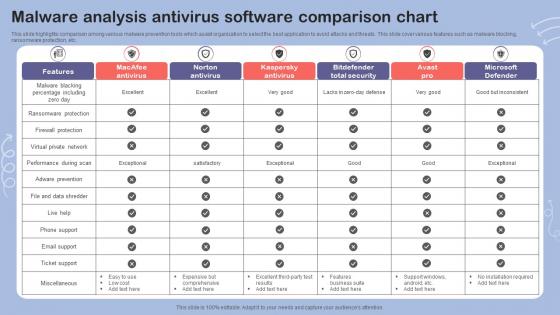
This slide highlights comparison among various malware prevention tools which assist organization to select the best application to avoid attacks and threats. This slide cover various features such as malware blocking, ransomware protection, etc.
People who downloaded this PowerPoint presentation also viewed the following :
Malware Analysis Antivirus Software Comparison Chart with all 6 slides:
Use our Malware Analysis Antivirus Software Comparison Chart to effectively help you save your valuable time. They are readymade to fit into any presentation structure.





FAQs for Malware Analysis Antivirus
So there's a bunch of different malware types to watch out for. Viruses spread through files, worms jump between networks on their own. Trojans pretend to be legit software - super sneaky. Then you've got ransomware that'll encrypt everything and demand payment (total nightmare). Spyware quietly steals your info while rootkits bury themselves deep in the system. Adware's mostly just annoying pop-ups, but honestly it can lead to worse infections. Learning their typical signatures and how they communicate over networks is your best bet. Oh, and each one spreads differently too, which helps when you're trying to figure out what you're dealing with.
Honestly, you need both methods - they catch different stuff. Static analysis is your quick first pass - you're looking at code structure and file signatures without running anything risky. Super fast and safe. Dynamic analysis actually executes the malware in a sandbox so you can watch what it does - network calls, file changes, all that sneaky behavior. Thing is, modern malware is pretty clever about hiding. Static might catch packed files that dynamic misses, but dynamic reveals those delayed payloads that sit quiet initially. I'd start with static for the obvious wins, then throw it in dynamic to see what you missed.
So you know how regular antivirus just looks for known bad stuff? Behavioral analysis is way smarter - it watches what programs actually *do*. Like if something starts encrypting a bunch of files or making weird network calls, that's sketchy regardless of what it claims to be. Super useful for new malware that hasn't been seen before. You can test suspicious files in sandbox environments too, which is honestly pretty cool to watch. I'd definitely set up some behavioral monitoring if you haven't already - catches stuff that slips through everything else.
Ugh, malware obfuscation is such a pain. Basically they hide their nasty code using encryption and packing techniques. Static analysis becomes pretty much worthless at that point. You'll end up doing way more dynamic analysis instead - feels like you're constantly chasing ghosts, honestly. Best bet is using automated unpacking tools and running stuff in sandbox environments. Memory dumping works great too since you can catch the malware when it's actually running and not all disguised. Don't rely on just one method though. Mix it up or you'll miss things.
Start with network stuff - weird outbound traffic, sketchy DNS queries, connections to bad IPs. File changes are massive red flags too. New executables popping up, system files getting messed with, random registry edits. Process behavior tells you tons - look for stuff running from weird spots or trying to escalate privileges. Oh, and check persistence mechanisms like scheduled tasks. Honestly, I'm terrible at remembering all this during analysis, so I just dump everything into a running list. Makes it way easier when you're building detection rules later.
So ML is actually pretty sick for malware detection - way better than those old signature-based systems. It spots behavioral patterns and weird file structures that would totally fly under the radar otherwise. Zero-day attacks? Polymorphic malware? No problem. The models just keep learning from new samples, which is honestly the coolest part. You'll catch way more threats while cutting down false positives too. I'd start with ensemble methods since combining different ML approaches beats relying on just one. Your system basically becomes this threat-predicting machine that adapts automatically.
Always get written permission first - can't stress that enough. Never touch systems you don't own, obviously. Sandbox everything so you don't accidentally break stuff (or worse, spread malware around). I made that mistake once and it was not fun explaining to IT. Document your process religiously for legal coverage. When publishing findings, think about who else might read it - helps defenders but also gives bad actors a roadmap. Responsible disclosure is the way to go. Keep research legit and you'll be fine.
So basically you throw the sketchy file into a sandbox - it's like a fake computer that runs in isolation. The malware thinks it's doing damage but really it's just messing around in a virtual machine you can delete later. Pretty clever setup honestly. You get to watch what it does, see what files it touches, track network stuff, all without actually risking your real system. Just double-check your isolation is solid first though - learned that one the hard way once. Way better than crossing your fingers and hoping for the best.
Dude, ransomware will absolutely wreck your business - we're talking locked files, dead systems, the whole nightmare. The costs are insane too, not just ransom money but all that downtime. If you get hit, isolate everything fast then grab Wireshark for network analysis and disassemblers to pick apart the malware. Sandbox testing works great, though the smart ransomware actually detects VMs now which is honestly pretty impressive. Prevention's way better obviously - solid backups, segment your network, and train people not to click sketchy stuff. Oh and actually practice your response plan because winging it during a crisis never ends well.
Dude, malware analysis is like getting the other team's playbook before the game. You reverse-engineer their stuff and see exactly how they're breaking in - buffer overflows, crappy authentication, sketchy APIs, all that. Then you can fix those same weak spots in your own code before they hit you. Way better than just guessing what might go wrong, you know? I always tell people to update their coding standards right after finding this stuff - don't just sit on it. Oh and the threat models too, obviously. Short version: steal their tricks to build better defenses.
Ugh, evasion techniques are killing me lately. Malware's getting so heavily obfuscated - like, I spent 4 hours yesterday just trying to unpack one sample. Polymorphism everywhere, anti-analysis tricks, the works. AI-generated stuff is starting to show up too which is... great. Volume's insane so you're constantly behind. Oh and they're way better at spotting VMs now, so your sandbox setup needs to look legit. Honestly? Automate your triage workflow if you haven't already. Saves tons of time upfront. Keep your analysis box looking as normal as possible too.
Dude, sharing threat intel is honestly a game-changer for malware analysis. You're basically tapping into this huge collective brain where everyone pools their IOCs and attack patterns. Way better than trying to figure everything out solo, you know? You'll spot new malware families faster, connect campaigns you'd miss otherwise, and get solid attribution insights. Plus it helps you focus on samples actually worth diving deep into. I'd start with MISP or similar platforms - even dropping basic indicators gets you access to tons of valuable intel. The community aspect is pretty cool too.
Get IDA Pro or Ghidra for disassembly first - honestly can't believe NSA just gave Ghidra away for free but whatever, it's amazing. Wireshark handles all your network stuff. You'll need a sandbox too, so grab Cuckoo or just use VMware. Process Monitor and API Monitor are clutch for watching malware in real-time. YARA's great for pattern matching. Oh, and definitely get REMnux as your Linux distro since it comes with everything already installed. My take? Don't try learning everything at once. Pick one tool from each category and actually get good at it first.
So when you analyze malware from incidents, you're basically reverse-engineering what the attackers did - their methods, infrastructure, all that stuff. Pretty cool actually. Take those insights and update your detection rules, patch whatever vulnerabilities they used, and spot similar threats before they become problems. I find it weirdly satisfying to pick apart how these things work, honestly. The trick is documenting everything you learn and feeding it back into your security setup. Start with recent samples from your own incidents and look for patterns. It's like turning defense into offense, if that makes sense.
Dude, the threat landscape is getting wild. AI-powered malware that adapts on the fly is becoming a real thing. Fileless attacks are nasty too - they just hang out in memory so traditional scans miss them completely. Supply chain hits are everywhere now, like when bad actors compromise legit software updates. Since everyone's going cloud-first, those threats are blowing up. Ransomware-as-a-service keeps getting scarier honestly - these groups are way more organized than they used to be. IoT botnets are still a mess, and attackers love using legitimate admin tools because it's harder to spot. Set up sandbox environments that mirror these new attack methods. Oh, and get hooked into some solid threat intel feeds - you'll need the heads up.
-
Out of the box and creative design.
-
Great templates that you can use in your next keynote or conference. They are perfect for quick and visually-engaging delivery.