

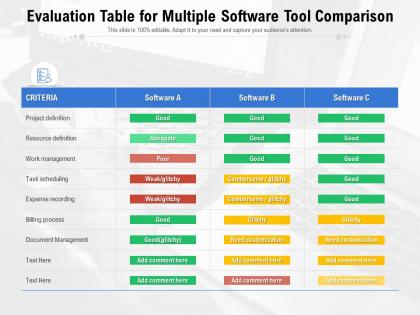
Evaluation table for multiple software tool comparison




Try Before you Buy Download Free Sample Product
 Impress Your
 Audience
 100%
100% Editable
 Save Hours
 of Time


Our Evaluation Table For Multiple Software Tool Comparison are topically designed to provide an attractive backdrop to any subject. Use them to look like a presentation pro.
People who downloaded this PowerPoint presentation also viewed the following :
Evaluation table for multiple software tool comparison with all 2 slides:
Use our Evaluation Table For Multiple Software Tool Comparison to effectively help you save your valuable time. They are readymade to fit into any presentation structure.
FAQs for Evaluation table for multiple
Start with the basics - does it actually fix your problem? Cost matters too (watch out for sneaky fees btw). Make sure your team can actually use it without wanting to throw their laptops out the window. Integration with your current stuff is huge, plus you'll want something that can grow with you. Security's obviously important. Their support better be decent because you WILL need help eventually. Try to find references from companies like yours if you can. Honestly, I'd make a little scoring sheet with all this weighted by what matters most to you. Keeps you from getting hypnotized by some slick demo.
Honestly, UX is everything when it comes to software adoption. People will ditch even the most powerful tools if they can't figure out how to use them. I've watched incredible software die because the interface was garbage, while way simpler competitors took over the market. Users won't stick around if your design looks like it's from 2005 or if basic tasks feel impossible. Here's the thing - don't just let your IT team test new software. They'll adapt to anything. Get actual users involved in testing workflows. Trust me, if someone can't navigate it in the first few minutes, they're gone.
Honestly, integration stuff is make-or-break when you're picking software. First thing I'd do is map out what you're currently using - your CRM, accounting, whatever. Then see how each option connects to that mess. Trust me, I've watched teams fall in love with some fancy tool only to realize later it doesn't talk to their existing systems at all. Suddenly you're stuck doing everything manually or dealing with data scattered everywhere. Users hate that. Sure, the software might look amazing on paper, but if it can't play nice with your current setup? Skip it and find something that actually fits your workflow.
Dude, vendor support is SO much more important than people realize. I learned this the hard way when our system crashed at 2am and support basically ghosted us for hours. Check their actual response times and if they have real 24/7 coverage - not just some automated system. Yeah, cheaper software looks tempting upfront, but you'll blow way more money on downtime later. When you call references, ask specifically about support experiences, not just features. Good support can save mediocre software, but crappy support ruins everything else.
Honestly, measuring software is kinda tricky but here's what works. Performance stuff first - speed, uptime, how much memory it hogs. Then user metrics like adoption rates and satisfaction scores (though those surveys can be annoying to set up). The unsexy but critical things? Security holes, maintenance costs, how well it handles traffic spikes. Business impact matters too - ROI, productivity bumps, fewer errors. Here's the thing though: don't go overboard tracking everything. Pick maybe 3-5 metrics that actually relate to your situation. You'll get way clearer data that way instead of drowning in numbers.
Dude, definitely do the free trials before buying anything. I've gotten screwed over by software that seemed amazing until I actually used it. The demos let you test it with your real data instead of just trusting their fancy marketing stuff. Plus you can see if the interface is actually user-friendly or just pretty screenshots. Support quality becomes obvious pretty quick too when you're fumbling around trying to figure things out. Short trials are usually a red flag - means they're probably hiding something. Companies with longer trial periods? They're not worried about you finding problems.
Honestly, the worst thing you can do is get obsessed with feature lists. Like, you'll spend forever comparing every tiny thing when maybe 20% actually matters for what you need. Skip the demos too - they're total BS, basically just fancy theater to make everything look amazing. Instead, test it with your actual data and get the people who'll be using it every day involved in the decision. Oh, and don't forget the real costs add up way beyond that initial price tag. Definitely do a trial run first.
Okay so scalability is massive when you're picking software long-term. You don't want to be stuck switching platforms later when you outgrow something. Check if it can handle more users, bigger data loads, all that stuff as you expand. Vendors always oversell their capabilities though - ask for real examples of clients who actually scaled up successfully. Look at both adding more servers and just beefing up what you have. Oh and definitely stress-test it during your trial with realistic data. That's when you'll see if it actually works or just sounds good on paper.
Dude, software updates are huge - seriously don't sleep on this part. Find vendors who actually stick to regular update schedules and won't leave you hanging. I've watched so many teams get totally screwed when their software just died or needed crazy expensive migrations out of nowhere. Check their track record first, then dig into what future upgrades will actually cost you (time and money). Also make sure you can test stuff before pushing it live to everyone. Oh and backwards compatibility - that's clutch if you don't want headaches later.
Honestly, community reviews are where you'll find the real dirt that sales demos won't tell you. Check out G2 or Capterra for patterns across tons of users - way better than listening to one sales guy. Reddit can be harsh but you get the truth about whether stuff actually works long-term. Watch for fake reviews though, they're literally everywhere now. I always focus on recent ones that match what I need. Oh and those 3-star reviews? They're usually the most honest since people aren't totally pissed or overly excited. Skip the 1 and 5-star extremes.
Start with the basics - authentication, encryption, and who gets access to what. Multi-factor auth is non-negotiable these days. Role-based permissions and audit logs are huge too. Ask about their patching schedule because some vendors are weirdly slow with security updates. SOC 2 or ISO 27001 certs matter if you're in a regulated space. Their incident response history tells you a lot - have they handled breaches well before? I'd make a simple scorecard with all this stuff so you can actually compare vendors side by side instead of just going with your gut.
Dude, don't just look at the sticker price - that's where everyone screws up. You gotta calculate what it'll actually cost over like 2-3 years. Throw in licensing, setup, training your team, ongoing support, plus all the integration headaches. Data migration always costs more than they tell you, trust me on that one. Your productivity's gonna tank during the switch too, so factor that mess in. Just make a basic spreadsheet with the real numbers, not their shiny marketing prices. That's how you'll see what you're actually signing up for.
Dude, customization is everything when picking software. Map out what you absolutely need to change before you even start looking - interfaces, workflows, reports, whatever. I learned this the hard way with a tool that looked amazing but couldn't handle our weird approval process. Don't just sit through their standard demo either. Make them show you exactly how to customize the stuff you care about. Some platforms look flexible but you'll hit walls fast when you try tweaking basic functions. Better to know upfront if it'll actually work for your team's chaos.
Yeah mobile is huge now - definitely put it in your top 3 criteria. People work from their phones constantly, even for business stuff. If it doesn't work well on mobile you're basically screwed from the start. Don't just trust what they tell you either - actually test it yourself during the demo. I've seen too many "mobile-friendly" apps that technically load but are awful to use. The whole responsive thing needs to actually function, not just cram a desktop version onto a tiny screen. Oh and B2B tools aren't exempt from this anymore, everyone expects it now.
Make a simple matrix listing your must-haves vs nice-to-haves first. Get demos from your top 3-5 picks and have the people who'll actually use it test them out - not just management. Write everything down because honestly, you'll blank on the details later. Definitely call some of their current customers in similar businesses. Oh, and check out their product roadmap plus how good their support is. Don't just look at upfront costs either - calculate what you'll spend over 2-3 years total. Try testing with your actual data during trials if they'll let you.
-
Topic best represented with attractive design.
-
Commendable slides with attractive designs. Extremely pleased with the fact that they are easy to modify. Great work!
-
Excellent work done on template design and graphics.
-
Unique design & color.