

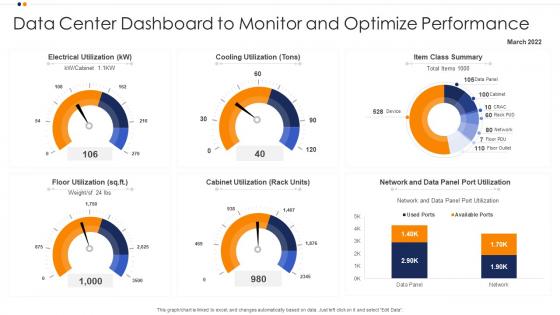
Data Center Dashboard Snapshot To Monitor And Optimize Performance




Try Before you Buy Download Free Sample Product
 Impress Your
 Audience
 100%
100% Editable
 Save Hours
 of Time


Our Data Center Dashboard Snapshot To Monitor And Optimize Performance are topically designed to provide an attractive backdrop to any subject. Use them to look like a presentation pro.
People who downloaded this PowerPoint presentation also viewed the following :
Data Center Dashboard Snapshot To Monitor And Optimize Performance with all 7 slides:
Use our Data Center Dashboard Snapshot To Monitor And Optimize Performance to effectively help you save your valuable time. They are readymade to fit into any presentation structure.





FAQs for Data Center Dashboard Snapshot To Monitor
So for your dashboard, definitely start with PUE - that's your power efficiency baseline. Temperature and humidity are obvious must-haves, plus server uptime because downtime is expensive. Network performance metrics too, obviously. Storage capacity is huge - trust me, scrambling for space at 2am isn't ideal. I'd track cooling efficiency and power per rack. Response times and SLA stuff matter since they actually impact users. Oh, and any critical alerts need to be front and center. Honestly though? Don't overcomplicate it initially. Get these core ones dialed in first, then add whatever your team's actually looking at every day.
Dude, real-time monitoring is clutch - you'll catch problems way before they wreck your day. Like when a server's running too hot or power's spiking dangerously. Set up alerts for the big stuff first: CPU temps, power draw, cooling status. Your dashboard basically babysits everything 24/7 instead of you doing rounds every few hours. Honestly beats the hell out of finding out something crashed at 3am. Temperature, humidity, network traffic - you can see it all instantly. I probably prevent more outages now than I even realize.
Honestly, I'd start with something like Nagios or Zabbix for your base monitoring - they'll grab all your infrastructure data. Raw metrics are basically worthless though, so you'll need Grafana or similar to actually visualize everything properly. Make sure whatever you pick can pull from all your stuff - servers, network gear, cooling systems, the whole deal. Oh and don't go crazy at first. Pick one solid monitoring tool that your team can actually handle, then add more later. I learned that the hard way when we tried to implement everything at once.
Honestly, visual dashboards are a game-changer for data center stuff. You'll spot problems immediately instead of scrolling through endless spreadsheets (which is soul-crushing, tbh). Heat maps show temperature issues right away, and graphs make server usage trends super obvious. Your team can actually predict when you'll need more capacity instead of scrambling later. The colorful charts are easier on your eyes too - way better than staring at rows of numbers all day. Trust me, set up visual alerts over text ones. You'll wonder how you ever managed without them.
So predictive analytics is basically like having a crystal ball for your data center. Machine learning spots patterns in temps, power draw, and how your equipment's behaving - then flags stuff that's about to break. We're talking days of warning before a server craps out on you. Pretty wild, honestly. Historical data helps forecast when you'll max out storage or need more cooling. Instead of weekend emergency calls (been there, done that), you can actually plan maintenance during normal hours. I'd start with whatever systems would hurt most if they went down - that's where you'll feel the difference right away.
Honestly, dashboards are a lifesaver when everything goes sideways. You get that bird's eye view of what's dead, what's limping along, and where to throw your resources first. Track your RTO and RPO stuff so you know if you're actually hitting targets or just pretending everything's fine. I always set up automated alerts for the critical thresholds - learned that one the hard way during a 2AM outage where I was manually refreshing screens like an idiot. Plus you can watch backup statuses and failover processes across all your sites. Makes the whole disaster recovery thing way less chaotic.
Focus on failed login attempts, weird network traffic, and privileged access stuff first. Patch compliance rates matter too, plus vulnerability scans and any sketchy devices connecting. Most people totally miss privilege escalation alerts though - that's honestly where attackers usually get you. Set up automated notifications instead of just checking dashboards when you remember to. Real-time threat detection is huge because finding out about breaches during your coffee break the next morning is way too late. Trust me on the automation part.
Start with keyboard navigation - that's where most people get stuck. Add high contrast colors and make your text big enough to actually read. Alt text on all your graphs and buttons is a must. Honestly, half the dashboards I've used look great but you can't do anything without a mouse, which is super frustrating. Let users customize font sizes and color themes too. Oh, and test with real screen readers like NVDA or JAWS - don't just assume it'll work. The pretty ones are usually the worst offenders.
Get your data formats standardized first - seriously, this step will save you so much headache later. Use APIs instead of manual uploads because CSV files become a nightmare really quickly. I'd set up automated checks to catch weird data early, and make sure everything refreshes on the same schedule. You don't want to mix today's numbers with last week's stuff. Document where each metric comes from too. Your team will thank you when they're not playing detective trying to figure out why the numbers don't match. Start with your biggest KPIs and build out from there.
Honestly? Cloud's the way to go unless you've got some weird compliance thing going on. Way faster to get running, and your team can jump in from literally anywhere - which is huge if people work remotely. You don't have to deal with server maintenance or any of that headache stuff either. On-premises gives you more control over security, sure, and some industries basically force you into it. But then you're stuck handling all the updates and hardware problems yourself. Cloud plays nicer with other tools too. I mean, unless you already have solid infrastructure or regulatory requirements, I'd definitely go cloud route.
Honestly, data overload is gonna be your worst enemy. You'll have metrics flying at you from servers, network stuff, cooling, power - it's insane how much there is. People just freeze up when they see dashboards packed with everything. Real-time updates are another headache. Need those alerts firing instantly, but that can totally tank your system performance. Plus integrating different vendor APIs? What a mess - everyone uses their own weird formats. Start small though. Pick maybe 3-4 KPIs that actually matter to your day-to-day operations, then expand based on what people genuinely look at. Trust me on this one.
Honestly, just start with one metric and build from there - don't try to automate everything at once. Most dashboards have REST APIs, so you can write simple scripts to pull data from your monitoring tools (Nagios, Zabbix, whatever you're using) every few minutes. Push that straight to your dashboard automatically. If you're not into coding, Zapier works pretty well for this stuff too. I'd grab something basic like server CPU usage first, get that pipeline rock solid, then add network stats and temps later. The whole point is eliminating manual work between your monitoring and dashboard.
Honestly, AI-powered analytics are changing everything for data center dashboards. The real-time anomaly detection is pretty sick - you can actually predict failures before stuff breaks. Plus with all this edge computing happening, you need visibility everywhere, not just your main site. Manual monitoring is basically dead at this point, especially once you start scaling up. The "single pane of glass" concept finally works thanks to better APIs. I'd start looking at platforms with machine learning built in now rather than later. Oh, and automated capacity planning saves you so much headache - wish I'd known about it sooner.
So basically, dashboards let you see your energy usage in real-time instead of waiting around for monthly reports. Way better than those awful spreadsheets we used to mess with. You can spot trends, track cooling costs, and see your PUE metrics all on one screen. Set up alerts for random spikes - trust me, they happen more than you'd think. I'd start with whatever's burning the most energy first, then tackle the smaller stuff. Plus you can compare your numbers against industry benchmarks to see if you're actually doing okay or just telling yourself you are.
Make sure it's responsive so everything adjusts for phone screens. Touch-friendly buttons are a must - nobody's got time for tiny tap targets. Speed matters big time since people are on cellular. I'd focus on your top 5 critical metrics first, then build from there. Charts need to actually be readable, not just desktop versions squeezed down. Put your alerts and status stuff right up front where you can't miss them. Oh, and honestly? Most mobile dashboards I see are total garbage because teams just shrink the desktop version and call it done. Don't be those people.
-
The designs are very attractive and easy to edit. Looking forward to downloading more of your PowerPoint Presentations.
-
Awesome presentation, really professional and easy to edit.