

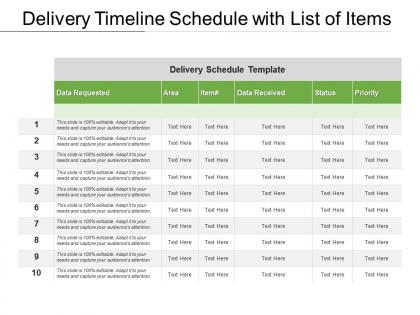
Delivery timeline schedule with list of items




Try Before you Buy Download Free Sample Product
 Impress Your
 Audience
 100%
100% Editable
 Save Hours
 of Time


Come up with ideas impossible to beat with our Delivery Timeline Schedule With List Of Items. It helps create an indomitable impression.
People who downloaded this PowerPoint presentation also viewed the following :
Delivery timeline schedule with list of items with all 5 slides:
Get away fastwith our Delivery Timeline Schedule With List Of Items. Leave the competition gasping for breath.


FAQs for Delivery timeline schedule with
Honestly, it depends on what you're asking for. Basic slide decks? Maybe 2-3 days tops. But custom graphics and fancy animations will stretch it to 1-2 weeks easily. The real killer though is revision rounds - I've watched projects drag on forever because people take ages to give feedback. Oh, and having your content ready matters way more than you'd think. We can't design layouts when we don't know what's going where. Pro tip: send a detailed brief upfront and bundle your feedback together instead of sending random changes every day.
Knowing your audience saves you SO much time on template development. You won't be guessing what people want or second-guessing every little decision. Talk to 3-4 people from your target group first - seriously, do this before you design anything. Once you know their skill level and how they actually work, everything clicks. No more endless revisions or adding features nobody cares about. The whole approval process gets easier too since stakeholders can see you're not just making stuff up. It's honestly the difference between having directions and driving around randomly hoping you'll find the right place.
Dude, complexity kills timelines more than anything else. Basic designs with standard parts? Those fly through production. But throw in custom features or weird materials and suddenly everything's crawling. It's like that time I tried making croissants instead of just buying them - way more steps, way more chances to mess up. Complex stuff needs extra planning, special tools, tons of quality checks. Plus you'll probably end up doing revisions. Honestly, figure out what you absolutely need vs what would just be cool to have. That way if things get tight, you won't panic about what to cut.
Honestly, feedback loops feel like they slow things down at first - total pain. But here's the thing: you're way better off catching problems early than dealing with massive revisions later. I learned this the hard way on a project last year. Build in actual review points with your main stakeholders, not just random comments from whoever's loudest that day. Sure, it's extra work upfront. You'll save yourself from those endless back-and-forth cycles though. Templates that actually work for users vs ones that look pretty but miss the mark? Easy choice.
Definitely go Agile or hybrid for template stuff. Break it into sprints so you can test early and pivot fast - waterfall will kill you on these projects, trust me. Kanban works too if sprints feel too rigid for your team. Templates are weirdly deceptive because everyone thinks they know what they want until they see the first draft. Keep stakeholders in the loop constantly. You'll need way more feedback rounds than expected, probably 2-3 minimum. Oh, and start with a solid backlog of requirements upfront - saves headaches later.
Honestly? Revisions usually tack on 1-3 business days, but it really depends on what you're asking for. Quick stuff like color tweaks or text changes - those get done same day most of the time. But if you're talking major layout overhauls or new slides, yeah that'll set you back further. The real killer though is all the back-and-forth with stakeholders (ugh, don't get me started). My advice? Be super specific about what needs changing, and definitely try to bunch all your feedback together instead of sending random edits all week long. Trust me on that one.
Ugh, client feedback delays will kill you every time. They always want "just one tiny tweak" that turns into three more revision rounds - I swear it's like clockwork. Then there's scope creep during reviews, which is honestly the worst. Technical stuff bites you too, especially waiting on other teams for integrations or data you need. Your designer will probably get yanked onto some "urgent" project halfway through. Here's what works: bump your timeline estimates by 30% (trust me on this) and set hard limits on revisions upfront. Otherwise you'll be stuck in feedback hell forever.
Dude, these automation tools are seriously worth it. I went from spending entire days on presentations to getting stuff done in like an hour. The setup takes some time upfront, but once you've got workflows running, they'll auto-fill your templates and handle all that annoying formatting crap. Plus they can spin out different versions for various audiences without you touching anything. Honestly, the back-and-forth revision nightmare basically disappears. My advice? Start with whatever template you use most - that's where you'll see the biggest time savings. No more copy-paste hell.
You can usually handle small stuff without messing up your timeline - color changes, basic layout tweaks, swapping standard parts. Morrison project taught me that lesson the expensive way lol. Anything needing new tooling or built-from-scratch development? That's gonna push you back for sure. Custom integrations and specialized materials are timeline killers. I always tell clients upfront: if the customization takes more than 20% of base dev time, we need to talk alternatives. Better to have that awkward conversation early than scramble later.
Yeah, so those crazy busy periods totally mess with our turnaround times. Back-to-school season in August/September is insane - everyone wants educational templates. Same thing happens end-of-year when corporate clients are scrambling for presentation stuff. Holiday rushes are the worst honestly, like everyone magically remembers they need templates on the same day. Our normal 3-5 day delivery? Forget about it during peak times - you're looking at 7-10 days easy. Here's what I learned though: order your September stuff in July. Trust me, you'll thank yourself later when you're not waiting forever like everyone else.
Track delivery time, template accuracy, and how many revisions you're doing per project. Also keep an eye on team capacity and how long clients take to approve stuff. Revision cycles are honestly the best indicator - if you're going back and forth constantly, something's off with your initial delivery. Nobody wants to be stuck in email hell over the same template! Time-to-completion is pretty obvious but super important, especially with those crazy campaign deadlines. Oh, and first-pass approval rates will tell you if you're actually nailing it from the start. Start with those three metrics and you'll have a decent foundation to work from.
Dude, getting your designers and devs to actually talk makes such a difference. I'm not even exaggerating - you'll cut delivery time by like 20-30%. The whole thing just flows better when they're chatting from the start instead of playing telephone later. Your designers won't create these impossible mockups, and developers won't build something totally different from what was intended. Honestly, I've watched teams burn through weeks fixing stuff that one quick convo could've prevented. Just throw them in the same Slack channel day one. Works every time.
Honestly, you'll save yourself so much stress if you build a template library first. Like, actually spend time upfront making modular slide pieces you can just swap around. I used to wing it every time and wow, bad idea - so many 2am coffee runs that could've been avoided! Give yourself at least 24 hours between finishing content and your actual deadline. Trust me on this one. Also make a super quick checklist for fonts, colors, alignment stuff. Nothing fancy, just the basics so you're not catching typos five minutes before presenting. The whole thing is really about doing the boring prep work early so you're not panicking later.
Dude, rapid prototyping is seriously a lifesaver for template projects. You can test ideas super early instead of building everything out first and then finding problems. Mock up the main sections quickly, get feedback, make changes fast. I learned this the hard way on a project last year - those late revisions are brutal and mess up your whole timeline. Catching design issues and content problems early? Way cheaper to fix. Honestly, just start with basic wireframes next time. You'll be shocked how much smoother approvals go.
Honestly, just tell people upfront what to expect and keep talking to them throughout the whole process. I always add extra time to my estimates - nobody's ever mad about getting something early, but they'll definitely lose it if you're late. Even when nothing's happening, send quick updates. People hate being left in the dark more than actual delays sometimes. Oh, and give them tracking links or whatever so they can check status themselves instead of bugging you constantly. If something goes wrong, don't wait - tell them right away with a real timeline, not some optimistic BS.
-
Visually stunning presentation, love the content.
-
Excellent products for quick understanding.