

Device Network Server Maintenance Checklist




Try Before you Buy Download Free Sample Product
 Impress Your
 Audience
 100%
100% Editable
 Save Hours
 of Time


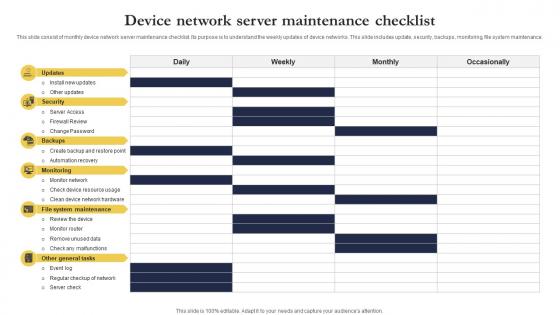
This slide consist of monthly device network server maintenance checklist. Its purpose is to understand the weekly updates of device networks. This slide includes update, security, backups, monitoring, file system maintenance.
People who downloaded this PowerPoint presentation also viewed the following :
Device Network Server Maintenance Checklist with all 9 slides:
Use our Device Network Server Maintenance Checklist to effectively help you save your valuable time. They are readymade to fit into any presentation structure.








FAQs for Device Network
Dude, your server's basically screaming at you when response times drag and timeouts keep happening. Packet loss is another huge red flag - same with devices randomly dropping connection. CPU or memory pegging above 80%? You're gonna have a bad time. Error logs stacking up means something's broken too. Oh, and check disk space regularly because running out sucks way more than you'd think. Security alerts are obviously bad news. Honestly, just set up some monitoring so you catch this stuff before your users start blowing up your phone.
Honestly, shoot for monthly checks but quarterly is probably more realistic unless you've got a huge team. Basic stuff monthly - health monitoring, logs, performance metrics. Then do the bigger maintenance quarterly like firmware updates and hardware inspections. Critical systems might need more attention obviously. I learned this the hard way when our main server died on a Friday night because we'd been putting off maintenance for like 6 months. Set those calendar reminders now before you forget - trust me, when things get crazy busy that's when you'll skip it and regret it later.
You're gonna deal with connectivity drops constantly - devices just ghost your server for no reason. Authentication failures happen all the time too. Memory leaks are sneaky bastards that build up slowly. Oh, and certificates expire way more often than they should, which is honestly annoying as hell. Database connection pools max out during busy periods. Network timeouts are probably the most common thing you'll see though. I basically live with my monitoring dashboards open now. Set up alerts for this stuff early so you're not scrambling when users start freaking out.
Honestly, monitoring tools are lifesavers - they catch problems before everything goes to hell. You'll avoid those nightmare 3am calls (been there, not fun). They handle most of the tedious checking automatically too. The cool part is tracking performance over time so you know when to actually do maintenance instead of just guessing. Most generate compliance reports without you lifting a finger. Really though, the biggest shift is going from constantly putting out fires to staying ahead of issues. Oh, and definitely start with alerts on your most critical stuff first.
Test everything in staging first - seriously, nobody wants to be the person who kills the network on Friday at 5pm. Schedule your updates during maintenance windows and have a rollback plan ready. Document version numbers and config changes as you go. Automated tools are your friend for keeping things consistent across multiple servers. Oh, and double-check your backups are current before you start anything. Give stakeholders plenty of heads up about downtime too. Trust me, surprised users are angry users, and that's never fun to deal with.
So first thing - map out your network and find those single failure points that'll bite you later. Then stagger your maintenance windows so you're never hitting redundant systems at the same time. Like if you've got dual switches, don't touch both in the same window (trust me on this one, I've been there). Test your failover stuff beforehand too. Oh and build this redundancy thinking into your actual planning process from the start - way easier than trying to bolt it on after. The whole point is avoiding that "oh crap" moment when everything goes dark.
Dude, you HAVE to document everything with server maintenance. I'm talking network diagrams, config backups, maintenance schedules, incident logs - the whole nine yards. Trust me on this one. Track every change, when it happened, who did it. Otherwise you'll be staring at some random config at 3am wondering why Bob decided to reroute half the network through a potato. Been there, done that, bought the t-shirt. Start documenting now even if it feels tedious. Your future self will literally worship you when stuff inevitably breaks.
Document everything - seriously, compliance auditors are ruthless about this stuff. Schedule maintenance only during your approved windows and get those change approvals beforehand. Don't skip the audit trails either. Your team needs to know exactly which standards apply to your gear. I learned this the hard way when we got dinged on a surprise audit last year. Automated logging is your friend here, saves tons of headache later. Keep stakeholders in the loop throughout. Honestly, just bake compliance into your regular maintenance routine from day one instead of scrambling later.
Honestly, don't skip maintenance on your servers - I learned this the hard way. Downtime becomes a nightmare when things aren't patched regularly. Dust kills hardware way faster than people realize, and performance just gets worse over time. Security holes pile up too. When you finally do need updates, everything's incompatible and becomes this whole expensive mess to fix. My old boss used to say "maintenance is cheaper than disasters" and he wasn't wrong. Just set up monthly check-ins before something crashes during your busiest week.
Dude, automated maintenance is a game changer. Instead of scrambling when everything breaks at 2pm, the system catches problems early with constant health checks. Patches get applied overnight when nobody's working. If something does fail, it'll switch to backup systems automatically - no panic calls needed. Honestly, I wish I'd set this up years ago instead of being the guy always fixing fires. You just configure some monitoring alerts and schedule routine tasks. Way less stressful than reactive maintenance, trust me.
Schedule maintenance during slow hours if you can swing it. Rolling updates are clutch - don't take everything offline at once like some kind of maniac. Load balancers help too since you can shift traffic away from whatever you're fixing. Honestly, prepping scripts ahead of time will save your sanity. I used to just improvise and it was a disaster every time. Watch your resource usage while you work and always have a backup plan ready. Oh, and give your team a heads up about timing so they're not blindsided when things get sluggish.
Honestly, you want to nail down four things: detect, assess, communicate, resolve. Don't alert on every tiny thing - that's just noise. When something real hits, figure out the impact fast and tell people immediately. I mean it, even if you're still figuring stuff out. Document everything while you troubleshoot so whoever takes over isn't starting blind. Oh, and make sure you have escalation contacts ready beforehand - trust me, hunting for phone numbers during an outage is the worst. We run mock scenarios quarterly and it's saved us multiple times.
Dude, you'll crush competitors who just ignore their networks until stuff breaks. Your systems run smoother, customers stay happy, and you're not scrambling during outages like everyone else. Catching problems early saves insane money too - I've literally watched companies blow 10x more on emergency fixes than basic upkeep would've cost. Security stays tight with current patches. The best part? Your setup becomes predictable while competitors are always putting out fires. Oh and monthly health checks are a solid starting point if you're not already doing them.
Man, moving to the cloud totally changed how I handle maintenance. No more weekend trips to fiddle with servers in some freezing cold room - you can monitor everything from your couch now. Updates get pushed out with just a few clicks instead of that manual patching nightmare. I probably save like 15 hours a week on boring hardware stuff. The trick is getting your monitoring dashboards set up right from the start, plus automated backups (learned that one the hard way). You'll actually have time to work on cool projects instead of just putting out fires constantly.
Get your team trained on whatever server hardware and OS you're actually using, plus basic networking and security stuff. Documentation is your best friend - seriously, you'll thank me when something breaks at 2am and you can't remember the fix. Everyone should get real practice with monitoring tools, backups, and how to handle incidents. Communication training matters too because nobody wants to deal with confused users during an outage. Build up a knowledge base with your go-to solutions and make sure people rotate through different tasks. Otherwise you're screwed when Dave takes his two-week vacation.
-
Easily Understandable slides.
-
This visual representation is stunning and easy to understand. I like how organized it is and informative it is.