Digital products features ppt slide templates
You must be logged in to download this presentation.
Try Before you Buy Download Free Sample Product
Audience
Editable
of Time
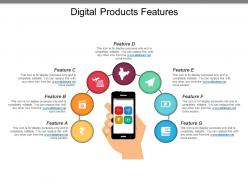
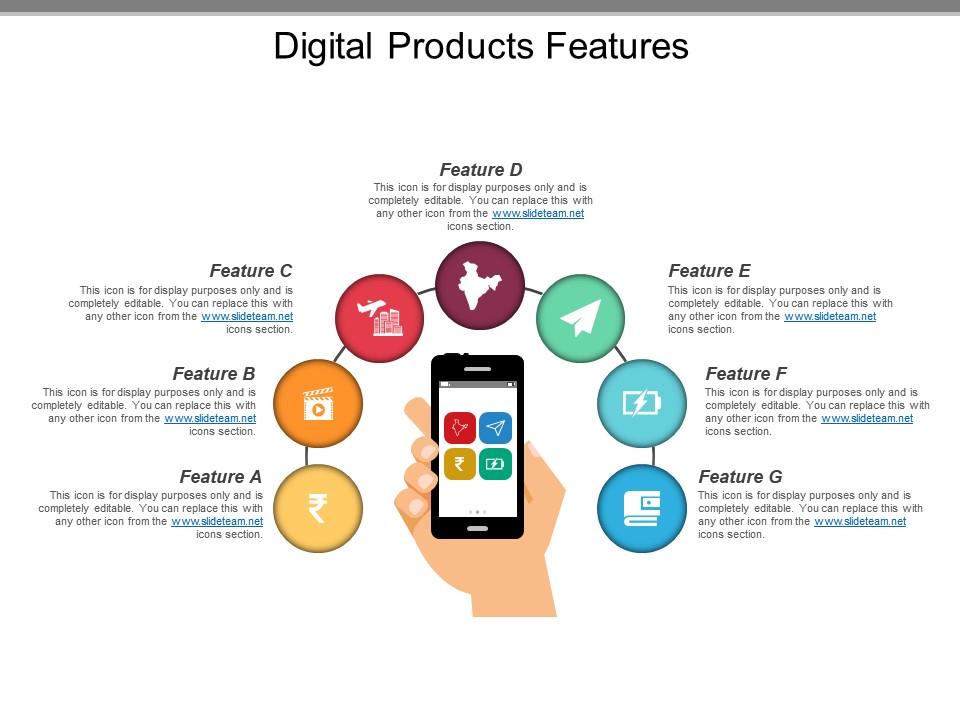
Are you planning to add a new product to your product line? If yes then make use of our digital products features PPT slide template to share the knowledge on what the product should be like. Consider the digital age we are in, it becomes essential for the business professional to craft a product which is equipped with almost all the features of the digital product as illustrated in this online marketing of products PowerPoint model. The multiple uses of PowerPoint icon for each exclusive feature is a noteworthy attribute of the presentation itself. Our designers have placed mobile phone clipart in the center from which connectors are drawn to touch each of the feature icons. Sufficient text space has also been given in this online product shopping PowerPoint PPT graphic, to let you write some detail about each product feature. So now you can bid goodbye to the era when designing a PPT slide meant investment of time and efforts. Simple customization of the predesigned template is sufficient to add magic to the show. Commemorate very eve with our Digital Products Features Ppt Slide Templates. Create an air of cheer and celebration.
People who downloaded this PowerPoint presentation also viewed the following :
Digital products features ppt slide templates with all 5 slides:
Make the wisest decision to enable you to captivate your audience by using our versatile Digital Products Features Ppt Slide Templates in your presentation. They will emphatically define your message.
FAQs for Digital products features
Honestly, it's all about customization flexibility without losing the visual vibe. People want that drag-and-drop ease but also need to mess with colors and fonts - most templates just break when you add real content though, which is super annoying. You'll want multiple export options (PowerPoint, Google Slides, all that). Throw in some bonus stuff like icons or graphics. Oh and sentence rhythm matters way more than I thought it would for design flow. Focus on actual problems people have with presentations instead of just making something that looks cool but doesn't work.
Flexibility is honestly make-or-break for templates. Users want to tweak layouts, colors, fonts - the stuff that makes it feel like *theirs* instead of some generic thing. I've watched gorgeous templates flop hard because they were too locked down. But here's the thing - too many options can be just as bad. You don't want people drowning in choices. Figure out the 3-5 things users care about most (usually colors and layout), nail those first. Then you can add more based on what people actually use. It's kinda like... give them control but not *too* much control, you know?
Oh man, UI design can totally make or break your templates. I've watched people open a confusing interface and just nope right out of there - they'd rather start from zero than deal with clutter. You want everything super obvious, like where to edit text or drop in new images. Short sentences work. But the real goal is keeping users focused on their actual content instead of wrestling with your tool. Honestly, the best templates feel almost invisible - people just flow through customization without thinking about it. Test with real users though, not just your team!
Templates work because people's brains love patterns. Your eyes automatically know where to look for stuff instead of hunting around every time. It's basically like muscle memory but for reading. When someone doesn't have to decode your layout, they can actually focus on what you're saying. The cognitive load thing is real too - I notice it when I'm scrolling through messy content vs. organized stuff. Consistent formatting just makes everything easier to process. Stick with the same structure for similar content types. People will remember your materials way better, and honestly? They'll actually come back to reference them later.
Dude, you definitely want live cursors so you can see where everyone's working. Comment threads are clutch - way better than endless email chains. Auto-save history is a lifesaver when someone inevitably deletes the wrong slide. I'd also look for role permissions so you can decide who actually edits vs just views. Oh, and notifications that don't spam you constantly. The sync speed matters too - there's nothing more frustrating than staring at your screen waiting for changes to show up. Find something that works across all your devices and you're golden.
Dude, you NEED mobile responsiveness for presentations. Nobody wants to pinch and zoom around your slides - it's honestly annoying as hell. When stuff adapts to different screens automatically, people actually stick around and finish viewing your content. Your engagement rates will be so much better because users can tap buttons and read everything without going cross-eyed. Most folks are gonna check it on their phone first anyway, so might as well make it work everywhere. Oh, and test on real devices - not just shrinking your browser window like I used to do.
Hey! So right now everyone's obsessed with minimalism - tons of white space and really bold fonts that pop. Interactive stuff is huge too, like animated transitions (static slides are honestly dead at this point). Dark mode templates are literally everywhere now. Oh, and people are ditching those fake stock photos for hand-drawn illustrations that feel more real. Data viz has gotten way more sophisticated - you'll see these dynamic charts built right into templates. I've been scrolling through Behance lately and that's where all the good trends show up first if you want to stay ahead of things.
Honestly, just throw some interactive charts right into your templates instead of those mind-numbing data tables. Progress bars work great for goals, timelines for project stuff, heat maps for performance - you get the idea. Match your visual to what you're actually trying to say. Bar charts for comparing things, line graphs when you're showing trends. And seriously, skip the pie charts if possible (they're kind of terrible). People will catch on to patterns so much faster when they can actually see what's happening instead of staring at endless spreadsheet rows. Figure out your main point first, then pick whatever visual tells that story best.
Dude, interactive templates are a game changer for keeping people awake during presentations. Your audience actually pays attention when they can click buttons, see hover effects, or vote in polls. Static slides feel so 2015 now – everyone's expecting some kind of interaction. You can build these cool non-linear presentations where people pick their own adventure through your content. Sales teams love this stuff. Start small though – just add some hover animations or clickable nav buttons. Trust me, people notice right away when there's something to actually *do* instead of just sitting there.
Yeah, brand consistency is huge for templates - probably the biggest thing to get right. Your colors, fonts, and logos should look identical across everything. Otherwise you'll look kinda all over the place professionally, which sucks. The time savings are crazy too since people won't have to guess what font to use or whatever. I'd start with a style guide that nails down your main brand stuff first. Then just stick to those rules when you're making different template versions. It's honestly one of those things that seems obvious but so many companies mess it up.
Alt text for images is huge - don't skip that. High contrast colors and keyboard navigation are must-haves too. Screen readers break on so many templates, it's honestly ridiculous how often devs ignore this. Your text needs to scale without destroying layouts, and interactive stuff needs visible focus indicators. WCAG AA contrast ratios are your friend here. Oh and if you're doing video, caption placeholders save headaches later. Test with real accessibility tools before launching - I learned that one the hard way. Short version: these features aren't optional anymore.
Honestly, user feedback is like having a crystal ball for your product roadmap. Look at support tickets first - patterns there tell you what's actually broken. Usage data shows which features people ignore (probably means they suck). I'd set up surveys, maybe do some user interviews if you have time. App store reviews are gold too, though people mostly complain there. The trick is grouping everything into themes, then figure out what'll move the needle most. Your users live in the product way more than you do, so they'll spot stuff your team completely missed. Start small and build from there.
Start with user permissions - lock down who can actually see and edit your stuff. Version control is clutch here, plus audit logs so you know exactly who messed with what. Encrypt everything (both stored and when it's moving around). Watermarks help too if it's really sensitive content. Oh, and definitely audit your current sharing setup first - I bet you'll find random people have access to things they shouldn't. Permissions always get messy over time. DRM's worth considering for your most important templates.
Look, multimedia stuff actually works because people get bored staring at wall-to-wall text. Videos help explain tricky concepts way better than paragraphs do. Interactive charts let people click around - honestly way more fun than bullet points (which I'm probably guilty of overusing myself). Audio clips work great for testimonials too. Different people learn differently - some need visuals, others are all about hearing things. Don't go crazy though. Maybe one multimedia thing every few slides? See how your audience responds first.
Start with basic view tracking - that's your foundation. Check completion rates and how long people actually stick around. The drop-off data is brutal but super helpful (I always cringe seeing where people bounce). Most platforms show slide-by-slide breakdowns now. Heat maps are gold if you can get them - they reveal where viewers really focus. Don't forget click-through rates on any links you embed. Geographic stuff helps too, depending on your audience. Honestly, I'd avoid getting too deep into analytics rabbit holes early on. Get those core metrics first, then expand once you know what normal looks like for your content.
-
Thanks for all your great templates they have saved me lots of time and accelerate my presentations. Great product, keep them up!
-
Great product with effective design. Helped a lot in our corporate presentations. Easy to edit and stunning visuals.