

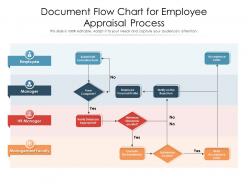
Document flow chart for employee appraisal process





Try Before you Buy Download Free Sample Product
 Impress Your
 Audience
 100%
100% Editable
 Save Hours
 of Time


Our Document Flow Chart For Employee Appraisal Process are topically designed to provide an attractive backdrop to any subject. Use them to look like a presentation pro.
People who downloaded this PowerPoint presentation also viewed the following :
Document flow chart for employee appraisal process with all 2 slides:
Use our Document Flow Chart For Employee Appraisal Process to effectively help you save your valuable time. They are readymade to fit into any presentation structure.

FAQs for Document flow chart for
Goal setting kicks things off - you and your employee hash out expectations right at the start. Throughout the year, keep documenting stuff and giving feedback (though honestly, most managers totally blow this part off). Then comes prep time where you both fill out evaluation forms before the actual sit-down meeting. That's where you dig into performance, what they're crushing, areas to work on. Wrap it up with an action plan for next time. The whole thing works way better as an ongoing conversation rather than some dreaded annual event - your people will actually appreciate it that way.
Honestly, flow charts are game-changers for performance reviews. Your employees won't be sitting there wondering if they missed some random deadline. Managers stop forgetting which forms go where (because let's be real, there are always too many forms). Map out the timing, who does what, and where decisions get made. It's basically GPS for the whole process - sounds cheesy but it actually works. Your HR people will love you for it since they won't spend half their day answering "wait, what am I supposed to do next?" emails. Trust me on this one.
Don't overcomplicate it - I've literally seen flow charts that look like someone threw spaghetti at a wall. Too many approval layers will kill you. Skip the unclear decision points and actually include spots where employees can give input. Oh, and calibration between managers? Super important or everything gets inconsistent real fast. You'll be tempted to map out every weird edge case, but resist that urge. Start simple with your main process. Managers need to follow it without a PhD, you know? Add the complex stuff later if you absolutely have to.
So basically, an appraisal flow chart is like giving everyone a clear map of what happens during reviews. No more "um, what step are we on again?" moments. Your team knows when to prep their self-assessments, you know when to gather feedback, and the actual meeting timing is set. It keeps things way less awkward honestly. Both of you can prep properly instead of winging it. I'd definitely share it with your people beforehand - they'll thank you for not keeping them in the dark about the whole process. Makes conversations way more productive too.
Get HR and your direct managers on board first - they're gonna be your main allies. Pull in employees too since they're the ones actually dealing with this stuff day-to-day, and honestly, they catch things management totally misses. If you're using any tech for tracking, grab someone from IT early. Legal should probably weigh in too, especially on the documentation side and performance improvement steps - trust me, you don't want compliance issues later. Oh, and start small with like 3-4 people to draft the initial version, then get wider feedback. The people who'll actually use this thing daily matter way more than whoever just signs off on it.
Honestly, going digital with appraisals is a game changer. You'll get automated reminders so nothing slips through the cracks, plus everything gets stored in one place instead of random spreadsheets everywhere. Real-time tracking shows exactly where each person is in their review cycle. The 360 feedback thing becomes so much simpler too - no more chasing people down via email (which is the worst). Analytics help you spot patterns and figure out who your top performers are. My advice? Start small and just digitize whatever system you're using now. Even basic project management software beats the chaos most companies deal with during review season.
Mix quantitative stuff with qualitative measures. Goal percentages and role-specific KPIs are obvious starting points, plus hard numbers like sales or project completions. Behavioral stuff matters too - teamwork, communication, leadership potential. Honestly, 360-degree feedback is where you get the real insights from peers. Self-assessments and manager notes round it out. Oh, and make sure you've got clear scoring for everything or you'll just end up with a bunch of useless data that doesn't help anyone make decisions. The whole thing should actually guide you somewhere.
Honestly, the trick is adding those circular arrows that loop back to earlier steps. So after the manager review, maybe you loop back to goal-setting if priorities shifted. Or back to self-assessment if someone wants to add more details they forgot. Most flowcharts I see are just straight lines - super boring and unrealistic! The final review meeting should definitely circle back to ongoing check-ins too. That's where the real magic happens anyway. Show that feedback can shake things up and send you backwards, not just push forward. Maybe sketch out a couple scenarios where you'd actually want to loop back?
Honestly, goal-setting is where the whole appraisal thing kicks off. You sit down with your employee and hammer out specific, measurable objectives right at the start. Those become your measuring stick later when it's evaluation time. Without clear goals upfront, you're basically just winging it - and nobody wins that way. The goals you set feed into your mid-cycle check-ins and final reviews. Just make sure they're realistic from the get-go. Trust me, you'll thank yourself later when you're not scrambling to figure out what "good performance" even looks like.
Honestly, visuals are a game-changer for appraisal charts because nobody wants to stare at another wall of text from HR. Colors help people track different stages. Icons make each step super clear. I always add arrows so employees know exactly where they're at in the process – sounds basic but you'd be surprised how often that's missing! Green checkmarks are perfect because people instantly get that they've finished something. Progress bars work great too. Oh, and throw in some simple illustrations if you can. Makes the whole thing feel way less scary and more like you're actually guiding them through it instead of just dumping info on them.
Definitely start with the "why" behind each step - nobody wants another bureaucratic maze. I'd walk through a concrete example like "here's exactly how Sarah's review flows from start to finish." Show them where they actually get input or can push back on things. Flowcharts are honestly boring unless you make them interactive. Give people time to ask about the confusing bits, especially timelines and responsibilities. Oh, and send it digitally afterward - trust me, they'll need to reference it later when they're panicking about deadlines. Makes the whole thing way less mysterious.
Your company's vibe basically determines the whole appraisal setup. Hierarchical places need tons of approval steps and formal sign-offs everywhere. Flat orgs? They might just skip middle management completely. If you're somewhere collaborative, expect peer feedback sessions - they drag on forever but actually help. Startups usually do quarterly check-ins or constant feedback instead of the traditional annual grind. Oh, and don't just copy some random template online. Map it to how decisions really happen at your place, not how they're supposed to happen on paper.
Document everything clearly - you don't want to be scrambling to justify decisions later. Build in multiple checkpoints so no one person has all the power. The biggest trap? Being inconsistent between employees - that's lawsuit territory right there. Include appeal processes too, and honestly your criteria need to be job-specific and measurable, not "Sarah has great energy" type stuff. I'd definitely run this past legal before you launch it. Trust me, they'll catch things you missed. One person's bias can torpedo the whole system if you're not careful.
So first thing - audit your current flow chart and see where bias might sneak in. Add mandatory bias training for managers before they even touch evaluations. Build in review steps where a diverse panel can spot patterns or unconscious bias in the ratings. Your flow chart should require standardized criteria and behavioral examples instead of just subjective gut feelings. Include a feedback step so employees can actually say if the process felt fair to them. Honestly, most companies totally underestimate how crucial this stuff is. Oh, and make sure you're varying sentence structure - some short, others longer with natural flow.
Honestly, if your company already has Visio, just use that - it's pretty much the standard and looks super professional. But I actually prefer Lucidchart because the whole team can jump in and edit at the same time, which is clutch. There's also Draw.io (they renamed it to diagrams.net or something) that's totally free and works fine for basic stuff. Oh, and Canva has flowchart templates too if you want it to look less... corporate-y? I'd probably just stick with whatever tool you're already using for other stuff first, then switch if it sucks.
-
Really like the color and design of the presentation.
-
Great designs, really helpful.
-
Great product with highly impressive and engaging designs.
-
Design layout is very impressive.
-
Out of the box and creative design.