


E government website development powerpoint presentation slides




Try Before you Buy Download Free Sample Product
 Impress Your
 Audience
 100%
100% Editable
 Save Hours
 of Time


Introducing E-Government Website Development PowerPoint Presentation Slides. Introduce digital smartness in governance by incorporating this readily available PPT slideshow. The presentation can effectively discuss the company background with financial statements, factsheet, management team, services, and milestones. You can easily display the tender’s critical highlights, such as tender name, date, value, eligibility criteria, and project details, using an attention-grabbing PPT visual. Furthermore, the client requirements for projects can be effectively discussed by using E-government websites PPT slide deck. Take advantage of content-ready PowerPoint templates to depict e-governance services, including G2C services, government solutions, roll out service models, web/portals mobile application services, government to customer payment service. Depict the reasons for the government to implement e-governance all over. Display the phases of e-governance solution with the help of web design ppt.
People who downloaded this PowerPoint presentation also viewed the following :
Content of this Powerpoint Presentation
Slide 1: This slide introduces E-Government Website Development. State Your Company Name and begin.
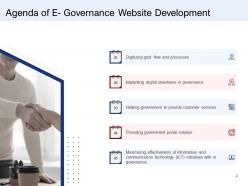
Slide 2: This slide displays Agendas of E- Governance Website Development describing- Digitizing govt. flow and processes, Providing govt. portal solutions, etc.
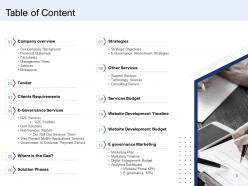
Slide 3: This slide shows Table of contents for the presentation describing- Company overview, Tender, Client Requirements, etc.
Slide 4: This slide displays Company Overview describing- Our Company background, Financial statement, Factsheets, etc.
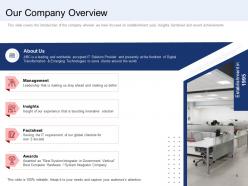
Slide 5: This slide displays Our Company Overview describing - Management, Insights, Factsheet, etc.
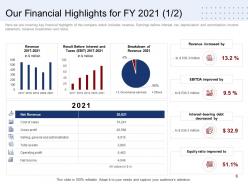
Slide 6: This slide represents Our Financial Highlights for FY 2019 showing data with the of bar graphs and pie charts.
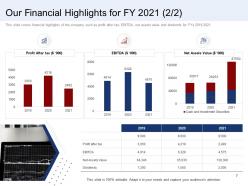
Slide 7: This slide showcases Our Financial Highlights for FY 2019 showing data in tabular form.
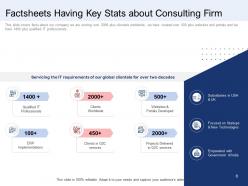
Slide 8: This slide shows Factsheets Having Key Stats about Consulting Firm.
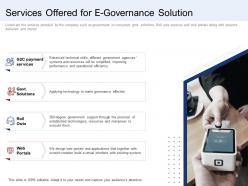
Slide 9: This slide presents Services Offered for E- Governance Solution describing- G2C payment services, Roll Outs, Web Portals, etc.
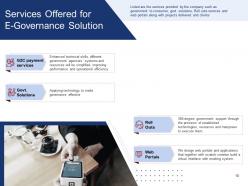
Slide 10: This is another slide showing Services Offered for E- Governance Solution describing- G2C payment services, Roll Outs, Web Portals, etc.
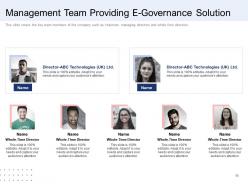
Slide 11: This slide displays Management Team Providing E- Governance Solution.
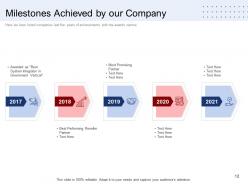
Slide 12: This slide represents Milestones Achieved by our Company with related icons.
Slide 13: This slide represents Tender and Clients Requirements with related imagery.
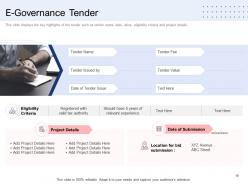
Slide 14: This slide showcases E- Governance Tender describing- Project Details, Eligibility Criteria, etc.
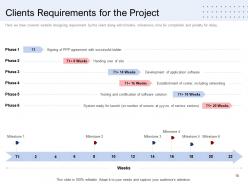
Slide 15: This slide shows Clients Requirements for the Project with weekly milestones.
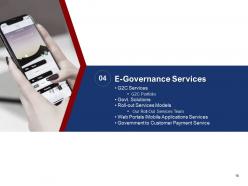
Slide 16: This slide shows E-Governance Services with related imagery.
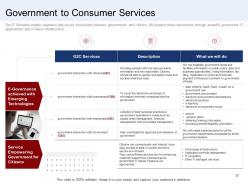
Slide 17: This slide represents Government to Consumer Services describing- G2C Services, Description, etc.
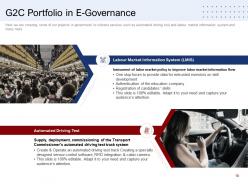
Slide 18: This slide showcases G2C Portfolio in E-Governance describing - Automated Driving Test and Labour Market Information System (LMIS).
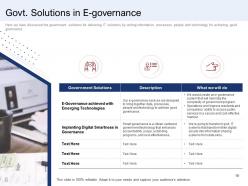
Slide 19: This slide shows Govt. Solutions in E-governance with related icons and text.
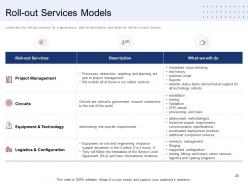
Slide 20: This slide presents Roll-out Services Models describing-- Roll-out Services, Description, etc.
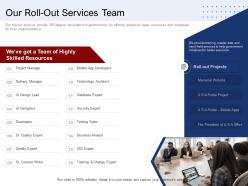
Slide 21: This slide displays Our Roll-Out Services Team with related imagery .
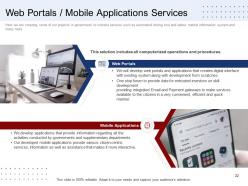
Slide 22: This slide represents Web Portals / Mobile Applications Services.
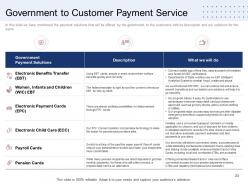
Slide 23: This slide showcases Government to Customer Payment Service.
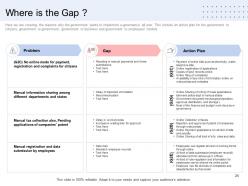
Slide 24: This slide represents Where is the Gap ? describing Problem, Gap, and Action plan.
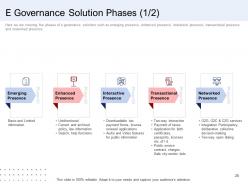
Slide 25: This slide showcases E- Governance Solution Phases like Emerging Presence, Enhanced Presence, Interactive Presence, etc.
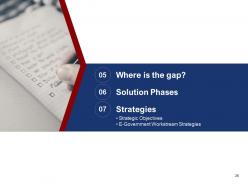
Slide 26: This slide contains titles as- Where is the gap? Solution phases, and Strategies.
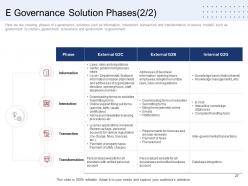
Slide 27: This is another slide showing E- Governance Solution Phases.
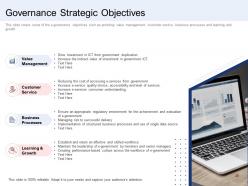
Slide 28: This slide presents Governance Strategic Objectives as Value Management, Customer service, Business processes, and Learning & growth.
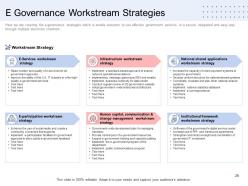
Slide 29: This slide displays E- Governance Workstream Strategies as E services, Infrastructure, E-participation, etc.
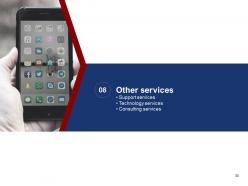
Slide 30: This slide shows Other Services describing- Support Services, Technology Services, and Consulting Services.
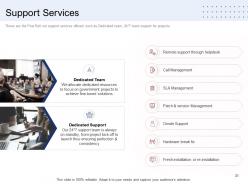
Slide 31: This slide presents Support Services describing- Call Management, Remote support through helpdesk, Hardware break fix, etc.
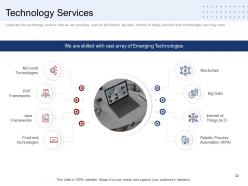
Slide 32: This slide displays Technology Services describing- Microsoft Technologies, PHP Frameworks, Java Frameworks.
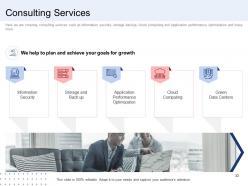
Slide 33: This slide represents Consulting Services describing- Information Security, Storage and Back up, Application Performance Optimization, etc.
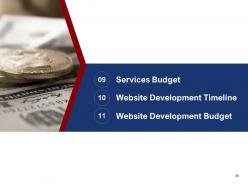
Slide 34: This slide showcases titles as Services Budget, Website Development Timeline, and Website Development Budget.
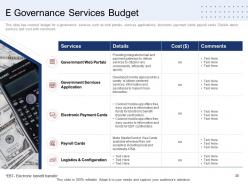
Slide 35: This slide shows E- Governance Services Budget describing- Details, Cost, Services, etc.
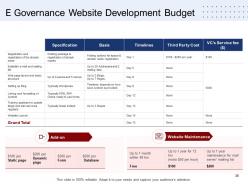
Slide 36: This slide presents E- Governance Website Development Budget.
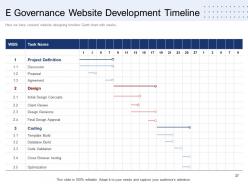
Slide 37: This slide represents E- Governance Website Development Timeline.
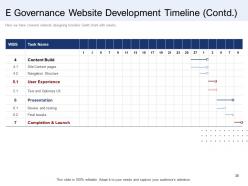
Slide 38: This is another slide continuing E- Governance Website Development Timeline.
Slide 39: This slide shows Services Budget describing- Marketing plan, Marketing timeline, Digital engagement budget.
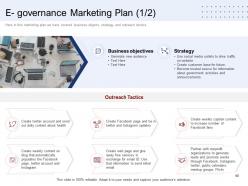
Slide 40: This slide shows E- Governance Marketing Plan describing Business objectives, Strategy, etc.
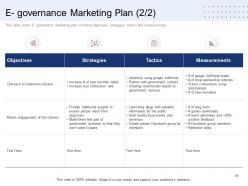
Slide 41: This is another slide showing E- Governance Marketing Plan.
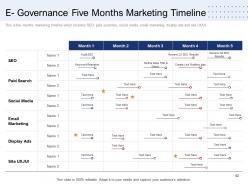
Slide 42: This slide presents E- Governance Five Months Marketing Timeline.
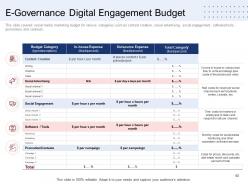
Slide 43: This slide displays E- Governance Digital Engagement Budget.
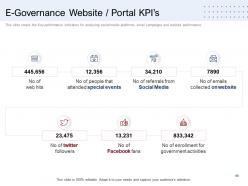
Slide 44: This slide represents E- Governance Website / Portal KPI’s with related icons and text.
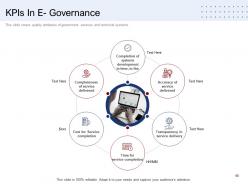
Slide 45: This slide showcases KPIs In E- Governance describing- Time for service completion, Cost for service completion, Completeness of service delivered, etc.
Slide 46: This slide displays E- Government Website Development Icons.
Slide 47: This slide is titled as Additional Slides for moving forward.
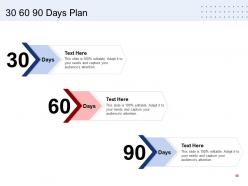
Slide 48: This slide shows 30 60 90 Days Plan with additional text boxes.
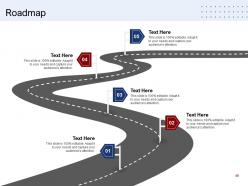
Slide 49: This slide presents Roadmap with icons and text boxes.
Slide 50: This is Our Mission slide. Describe your company's mission here.
Slide 51: This is About Us slide to show company specifications etc.
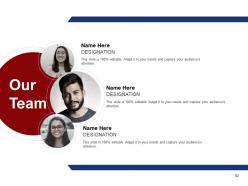
Slide 52: This is Our Team slide with names and designation.
Slide 53: This is Our Goal slide. Show your firm's goals here.
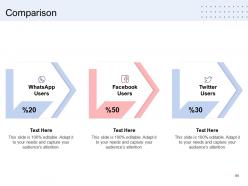
Slide 54: This is a comparison slide to state comparison between products, commodities, etc.
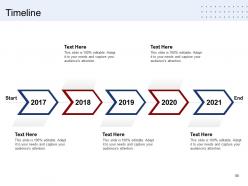
Slide 55: This is a Timeline slide. Show time intervals related data here.
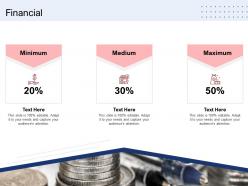
Slide 56: This is a Financial slide. Show your finance related stuff here.
Slide 57: This is a Thank you slide with address, contact number and email address.
E government website development powerpoint presentation slides with all 57 slides:
Use our E Government Website Development Powerpoint Presentation Slides to effectively help you save your valuable time. They are readymade to fit into any presentation structure.
FAQs for E government website development
So first off, do user research - find out what people actually want instead of what bureaucrats think they want. Accessibility is huge - screen readers, mobile, disabilities, all that. Your site needs to work for everyone. Skip the government jargon completely because nobody has time for that nonsense. Mobile-first design since everyone's on their phones anyway. Security's obvious when you're dealing with sensitive stuff. Oh, and build in ways for users to complain when things break. Honestly, clear navigation might be more important than anything else - if people can't find what they need, you've already lost them.
So basically you test with actual people instead of guessing what they need. Run usability tests with folks who have disabilities, different comfort levels with tech, various devices - you'll be shocked at how wrong your assumptions were. The testing shows you real problems like terrible color contrast or forms that completely break with screen readers. Navigation that seems obvious to you? Total maze for someone else. Test early, test often with different groups, then fix stuff based on what they tell you, not what your dev team thinks sounds right.
Dude, the security stuff is honestly brutal but you can't skip it for gov work. Multi-factor auth and encrypted databases are your baseline - no way around it. SSL/TLS for everything, obviously. Most people go with AWS GovCloud or Azure Government since they handle a lot of the compliance headaches. Oh and you'll need FedRAMP certification which... yeah, good luck with that process lol. API security tools and regular vulnerability scans too. Scalability matters but honestly? Start with a security architecture review first or you'll just end up rebuilding everything later.
So basically e-gov sites work by making government stuff actually accessible online - no more waiting in lines forever. They throw in forums, digital town halls, real-time feedback tools so people don't hate dealing with bureaucracy. Mobile-friendly design is huge here, plus personalized dashboards that don't suck. Interactive polls and surveys on new legislation help too. Honestly, most government websites are still pretty awful, but the good ones focus on actual two-way communication. Citizens need to feel like their input matters, not just that they're screaming into the void. Simple interfaces make all the difference.
Okay so multi-layered security is your friend here - strong encryption for transmission and storage, plus multi-factor authentication. Role-based access is huge so people only see what they're supposed to. Be upfront about data collection and let citizens control their info. GDPR is honestly a pain but you gotta nail it. Regular penetration testing will save your butt, and keep everything updated. Oh, and build privacy into every feature from the start - don't try to bolt it on later. Basically treat their data like you'd want yours treated.
Start with the basics - sharing buttons and maybe an embedded feed or two. Link your social accounts prominently since people expect to find you where they already hang out. The weird part is staying professional while actually engaging (seriously, government social media can go sideways fast). You'll need solid comment moderation and quick response plans ready. Oh, and test those social widgets with screen readers - they love to break accessibility. Honestly, just pick one platform first. Don't try to be everywhere at once or you'll burn out your team.
Look, most people are on their phones constantly now, so if your government site doesn't work on mobile, you're screwed. Citizens can't pay taxes or renew stuff when buttons are too tiny to tap or text is unreadable. They'll get frustrated halfway through forms and just bail. Then what happens? Your office gets flooded with angry calls from people who couldn't finish applications online. Honestly, I've seen this tank so many government services. Mobile isn't some nice-to-have feature anymore - it's basic functionality. Fix those forms so they actually work on phones.
Transparency is literally the whole point of government websites. Citizens need to find budget info, meeting notes, policies - all that public record stuff without wanting to pull their hair out. Here's the thing though: dumping everything online isn't helpful if it's buried in massive PDFs. Build good search features and organize things how people actually think, not how your filing system works. Plain language beats bureaucrat-speak every time. Most folks are on mobile now, so design for phones first. I'd start by figuring out what you're legally required to publish, then map out how someone would realistically hunt for that information.
Honestly, the biggest pain points are always legacy systems that don't play nice with new tech, plus budget fights and people who just hate change. Citizens get super paranoid about their data (fair enough), and don't even get me started on accessibility - so many teams mess that up from day one. Oh, and you'll have users who can barely handle email next to people expecting Netflix-level UX. Pretty frustrating mix. I'd say start with small pilot programs though. Get feedback early and often because fixing things later is a nightmare. Way better to test stuff out first than rebuild everything when it doesn't work.
Here's what I'd do - start simple with just one or two feedback options, like a quick rating thing after purchases and maybe a survey that pops up occasionally. Generic "Contact Us" buttons are pretty much useless, honestly. The key part (which most people skip) is actually responding to what users tell you and then letting them know what you changed because of their suggestions. That's where you'll see real engagement. Track your response rates as you go, then add more feedback spots once you figure out what actually works for your audience.
Start with the basics - track how many people actually complete tasks and measure page load speeds. User satisfaction scores matter too. Bounce rates tell you if folks are finding what they need or just giving up (honestly, government sites have a reputation for being awful). Check your accessibility compliance since you need to serve literally everyone. Mobile usability is huge these days. Don't skip conversion rates for stuff like form submissions. Oh, and set up feedback surveys - people will straight up tell you what's broken if you just ask them.
Oh man, cultural differences are everything when it comes to e-gov sites. Colors mean totally different things across cultures, plus you've got right-to-left vs left-to-right reading patterns to think about. Some places want tons of detail and explanation, others just want the bare minimum info. Navigation expectations? Completely different. What makes people trust a government site in one country might seem sketchy in another - I swear the trust thing is the trickiest part. We totally bombed a Southeast Asia project because we didn't get this right from the start. Do your homework with local users first, seriously.
Dude, this stuff gets complicated fast. ADA and Section 508 compliance is mandatory - no wiggle room there. Privacy laws are a nightmare too, especially with user data collection. Public records requirements are totally different from private sector rules, which honestly trips up a lot of teams. Security regs around authentication matter big time. Procurement laws kick in if you're using outside vendors (which you probably are). My advice? Loop in your legal people from day one. Trust me, fixing compliance issues later is way more expensive than getting it right upfront.
Honestly, partnering with tech companies is probably your best bet for upgrading e-government stuff. You'll get specialized skills your team doesn't have - think cloud providers, AI experts, cybersecurity folks. They can build you chatbots for citizen questions, solid data analytics, enterprise security. All that headache-inducing technical stuff they've already figured out. Find partners who actually get government compliance though, that's huge. Oh, and make sure they can grow with you as things expand. I'd start by listing your worst pain points first, then hunt for companies that specifically tackle those problems.
Honestly, AI chatbots are where I'd start - even basic ones make a huge difference for users. Machine learning will probably change everything though, like having systems that actually predict what people need before they ask. Voice interfaces are getting popular too, which is great for accessibility. Blockchain's interesting for voting and document stuff, but that's still pretty experimental. Oh, and mobile-first isn't even a trend anymore, it's just expected now. The real win is building citizen portals that actually adapt to each person's situation. Don't sleep on this - the governments that figure it out first will have a massive advantage.
-
Excellent work done on template design and graphics.
-
Appreciate the research and its presentable format.
-
Best Representation of topics, really appreciable.