Entry And Exit Criteria For Software Testing

Rating:
80%
Entry And Exit Criteria For Software Testing
Slide 1 of 6
Favourites Favourites

Try Before you Buy Download Free Sample Product

Audience Impress Your
Audience
Editable 100%
Editable
Time Save Hours
of Time
The Biggest Sale is ending soon in
0
0
:
0
0
:
0
0
Rating:
80%
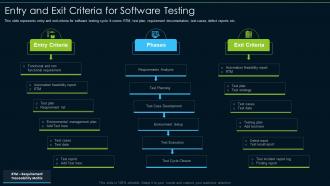
This slide represents entry and exit criteria for software testing cycle. It covers RTM, test plan, requirement documentation, test cases, defect reports etc. Presenting our set of slides with Entry And Exit Criteria For Software Testing. This exhibits information on three stages of the process. This is an easy to edit and innovatively designed PowerPoint template. So download immediately and highlight information on Entry Criteria, Phases, Exit Criteria.

FAQs for Entry And Exit Criteria

Look at test coverage first - are you hitting the important stuff? Defect detection rate matters too (actually catching bugs vs just running tests). Then there's the whole time vs quality thing. Pass/fail ratios tell you a lot, plus whether you're finding issues early or scrambling at the end. That's always painful when it happens. But honestly? "Effectiveness" depends on what you're trying to achieve. Different projects need different things based on risk and goals. Track these consistently for a few releases and you'll start seeing what actually matters for your specific situation. The patterns become way clearer once you have real data.

Focus on what you'll be running over and over - that's your automation goldmine. API tests are way easier to automate than UI stuff, just saying. Check your timeline too. Manual testing gets you started fast but gets pricey quick. Automation costs more upfront but saves your sanity later. I usually go with: same test 5+ times? Automate it. Map out your test cases first and flag the boring, repetitive ones. Also consider if your team actually knows how to build the automation - that matters more than people admit.

So test coverage shows what percentage of your code actually gets tested when you run your test suite. Higher numbers mean you're probably catching more bugs, which is good. But honestly? Don't obsess over hitting 100% - I've seen people waste tons of time on that when their tests were still pretty shallow. You could test every single line and still miss weird edge cases or problems when different parts of your system talk to each other. I'd shoot for like 80-90% coverage, then spend your energy making sure those tests are actually useful instead of just checking boxes.

So basically you want to focus your testing time on stuff that'll actually hurt if it breaks. Don't waste energy testing everything the same way - that's just dumb. Figure out which features are critical and which ones are pretty stable already. High-risk areas get the heavy testing, low-impact stuff gets a quick check. Honestly, this catches way more serious bugs than trying to test absolutely everything. Map out the risky parts with your team first (they usually know where the sketchy code lives). Then adjust how much you test each area. It's like medical triage but for your app.

Honestly, just pick 2-3 metrics that actually matter for your project instead of going crazy with tracking everything. Code coverage is the obvious starting point - you want to hit those critical paths and weird edge cases. Defect detection rate shows if you're catching bugs before they go live, and escaped defects tell you what's sneaking through (ugh, those are the worst). Test execution efficiency is pretty key too - like, how much time are you burning versus the quality you're getting? Oh, and don't forget requirement coverage so you're not missing actual business stuff. Keep it simple at first.

Ok so functional testing is basically "does this thing work" - like can users actually log in, does checkout process money correctly, etc. Non-functional is more about "how well does it work" - is it fast, secure, easy to use. Honestly, functional bugs are the worst because they just straight up break stuff. Users notice immediately. But non-functional problems are sneaky - your app might work but it's slow as hell or has security holes that'll bite you later. You definitely need both though. I'd start with functional to get the basics working, then pile on performance and usability testing. Otherwise you'll ship something that technically works but feels terrible to use.

Honestly, you'll know it's time when you hit your main exit points. Target test coverage? Check. No major bugs showing up in recent cycles? Good sign. Budget and deadlines matter too - can't test forever even though we'd love to sometimes! Risk assessment is key here. If what's left untested is pretty low-risk stuff, you're probably fine to ship. Also watch your defect discovery rate - when it drops way off and you've knocked out your planned test cases, that's usually your cue. My advice? Set these criteria upfront so you don't panic-test when things get crazy.

You've gotta nail down your entry and exit criteria before testing even starts. Entry stuff like "all code's unit tested and sitting in the test environment" or "test cases got reviewed and signed off." Exit criteria? Think "95% pass rate" and "zero critical bugs still hanging around." Honestly, I've watched so many teams blow this off and then wonder why their testing never ends. The trick is being super specific - none of that wishy-washy "testing looks good enough" nonsense. Write it down, get everyone to agree, then stick to it. Trust me on this one.

Dude, skipping testing criteria is like coding with your eyes closed - you're gonna hit bugs you never saw coming. Your software ships broken, users get pissed, and production blows up. Coverage becomes totally random so you can't tell what's actually been tested. When things break later (and they will), good luck figuring out why. Honestly, the debugging alone will make you want to quit. Stakeholders lose faith when quality tanks. Just treat your testing criteria like gospel - write down what you're testing and actually follow it. Trust me on this one.

Ugh, change management is such a pain for testing. Every time requirements shift, you're basically back to square one figuring out what actually needs testing. Your test cases might be totally useless now, or you're missing huge gaps. Build your test framework to be flexible from day one - trust me on this. Document everything so when stakeholders inevitably change their minds again, you can quickly see which tests are screwed. The worst part? Sometimes you'll spend weeks on test suites that just get thrown out. Keep tight traceability between your requirements and test cases. Makes the constant updates way less awful.

UAT criteria basically make sure your software works how real users expect it to, not just how developers think it should. Writing clear acceptance criteria upfront forces everyone to think from the user's perspective - their workflows, pain points, actual goals. Honestly, it's like a reality check before launch. You'll catch usability issues, confusing interfaces, and missing features that would've frustrated users later. Getting actual users involved in testing makes them feel heard too, which builds confidence in your product. Oh and try writing your UAT scenarios as user stories - keeps them grounded in real needs instead of technical mumbo jumbo.

Honestly, regulatory compliance turns testing into a whole different beast. You'll need proper documentation for everything - traceability, formal validation, the works. Quick smoke tests? Yeah, forget about that approach. Healthcare, finance, aerospace - they've all got these crazy strict standards like FDA 21 CFR Part 11 and SOX that basically dictate your entire testing process. Way more planning upfront, detailed test cases, audit trails you can actually follow. It's kind of a pain but makes sense when you think about it. First step is figuring out which regs apply to you, then compare what you're doing now against what's required. You'll probably find some gaps to fill.

Honestly, just bake agility right into how you write test criteria. Work with your team each sprint to tweak acceptance criteria based on what you're actually learning - don't try to nail everything down upfront. Get developers and product owners involved in writing the criteria together. Trust me, it cuts down on so much annoying back-and-forth later. Keep things lightweight but clear enough that people know what they're building. If requirements shift mid-sprint? No big deal, adjust the criteria. Oh, and definitely review how your criteria worked last sprint during planning - helps you get better at it.

So there's a few ways to tackle this. Risk-based is probably your best bet - just hit the high-impact stuff first. Code coverage works too if you're trying to catch untested areas or code that changes a lot. Honestly, I've found that prioritizing by customer/stakeholder requests is clutch because they feel heard, you know? Fault history's another solid option - basically test the things that always seem to break. Some people do requirements-based for traceability but that can get pretty tedious. Most teams I know mix a couple approaches. Just figure out what matters most for your project first - is it risk? Coverage? Business value? Then pick whatever method fits that.

Mobile testing is way more complex than web stuff. You're dealing with different screen sizes, operating systems, battery drain, offline mode - the whole mess. Web apps just need to work across browsers and look decent on different screens. With mobile, there's push notifications, camera access, GPS, app store approval requirements. Performance expectations are brutal too - users want instant loading and zero battery impact. Honestly, testing across all the device combinations can drive you crazy. I'd start with a device matrix covering whatever phones/tablets your users actually have. Focus on the popular ones first.

Ratings and Reviews

80% of 100
Review Form
Write a review
Most Relevant Reviews
  1. 80%

    by Doug Carroll

    Unique research projects to present in meeting.
  2. 80%

    by Clay Castillo

    Professional and unique presentations.

2 Item(s)

per page: