


ERP Project Management Powerpoint PPT Template Bundles CRP




Try Before you Buy Download Free Sample Product
 Impress Your
 Audience
 100%
100% Editable
 Save Hours
 of Time


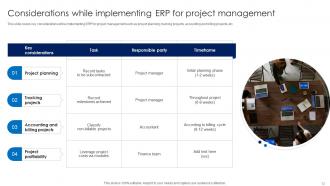
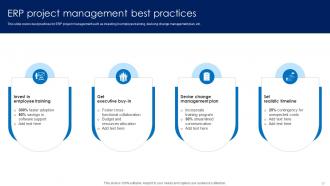
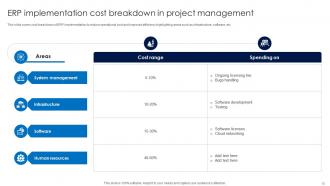
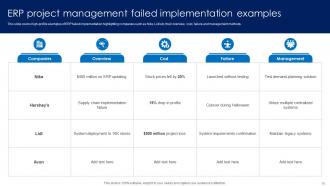
Project management in ERP Enterprise Resource Planning involves coordinating various aspects of implementing and maintaining ERP systems. It includes defining project scope, identifying key stakeholders, creating timelines, allocating resources, and managing risks. Successful ERP project management requires a balance between technical expertise and effective communication. Project managers play a crucial role in ensuring that ERP implementations align with organizational goals, meet user requirements, and stay within budget. They must navigate challenges such as data migration, system integration, and user training. Continuous monitoring and adaptation are essential to address evolving business needs and technology advancements throughout the ERP project lifecycle. Overall, skilled project management is integral to the success of ERP initiatives, ensuring seamless integration and optimized business processes.
People who downloaded this PowerPoint presentation also viewed the following :
ERP Project Management Powerpoint PPT Template Bundles CRP with all 31 slides:
Use our ERP Project Management Powerpoint PPT Template Bundles CRP to effectively help you save your valuable time. They are readymade to fit into any presentation structure.















FAQs for ERP Project Management Powerpoint PPT
So there are 6 main phases: project kickoff, gathering requirements, system design, implementation/config, testing, then go-live. Oh and post-implementation support - which honestly most teams completely forget about but you really need it. Requirements and implementation will eat up most of your time and budget. Each phase needs sign-offs before you move on. Don't let anyone rush you through requirements gathering, even if they're being pushy about timelines. Trust me on this - spending extra time upfront will save you from wanting to pull your hair out during implementation.
Start with your actual pain points - what's driving you crazy right now? Skip the vague "improve efficiency" garbage and get specific. Like "cut order processing time by 30%" or "stop making accounting enter the same data twice." Seriously, I've watched so many of these projects crash because nobody knew what they were actually trying to fix. Get your department heads involved early or they'll fight you later. Pick your battles too - you can't solve everything at once. Write it all down with numbers you can actually measure. That way you'll know if it's working or just burning money.
Dude, you absolutely need everyone on board for ERP projects or they'll crash and burn. Get the executives backing you with money and resources, but don't forget the actual users - they're the ones stuck with it every day. I've watched so many projects tank because IT thought they could just guess what people wanted (spoiler: they couldn't). Map out who matters early on. Keep talking to them throughout the whole thing. Regular feedback sessions will save your sanity later when someone inevitably goes "wait, this doesn't do what I need." Trust me, involvement upfront beats damage control any day.
Honestly, you've gotta bake risk management into every single phase - can't just slap it on at the end. During planning, map out what could go wrong: data migration nightmares, scope creep (ugh, always happens), vendor delays, users fighting the change. Assign someone to own each risk and build actual buffer time for the scary ones. Weekly check-ins are clutch because ERP projects love throwing curveballs. Keep your risk register updated religiously - I learned this the hard way on my last project. Being ahead of problems instead of chasing them will literally save your sanity.
Honestly, map out your current processes first - don't try to force your workflow into whatever system looks prettiest. Make a list of absolute must-haves vs things that would just be nice. Get people from each department involved early because they'll catch stuff you totally missed. Those flashy features look cool in demos, but you probably won't use half of them. Pick something that can grow with you and has decent support (learned that one the hard way). Oh, and budget extra for setup and training right from the start - you'll need way more than you think.
Honestly, change management is what'll make or break your ERP project. Most people think the tech side is hardest, but that's usually pretty straightforward. The real nightmare? Getting everyone to actually use the new system properly instead of fighting it every step of the way. You've got to sell people on WHY you're doing this whole thing first - like way before you flip the switch. Find some cheerleaders in each department who can talk up the benefits. Train the hell out of everyone too. I've seen too many companies skip this part and then wonder why their expensive new system sits there collecting dust while people create workarounds.
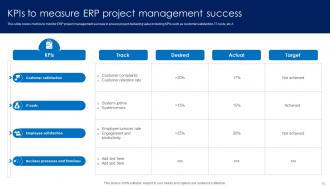
Track your budget and timeline stuff, obviously, plus system uptime once you go live. But honestly? The business side matters more - user adoption rates, how much faster processes actually get, ROI if you can figure it out (good luck with that in year one). User satisfaction scores are huge too. Oh, and training completion rates - people always forget about those but they're super telling. Set up some kind of dashboard early on. Trust me, you don't want to be digging through spreadsheets when your boss suddenly needs numbers for the board meeting.
Start with weekly meetings where teams actually talk in normal English - none of that tech speak that makes everyone's eyes glaze over. Get Slack or Teams going for quick check-ins too. Honestly? Go overboard with communication during ERP stuff because it's a nightmare when people don't know what's happening. Build a dashboard so everyone sees the same timeline and who's waiting on what. Oh, and pick one person from each department to be your translator - they'll help their team understand the technical bits and flag problems fast. Trust me, you'll thank yourself later.
Ugh, data quality issues are the absolute worst part - your old system's garbage really shows when you try to move it somewhere new. Format mismatches will drive you crazy too, plus duplicate records everywhere. Here's what saved my butt: audit everything first, clean it up before you even think about migrating. Map out how each field translates between systems (boring but necessary). Set validation rules to catch mistakes during transfer. Oh, and definitely test with sample data first! Trust me, you don't want your first migration attempt happening when your whole team's watching on launch day. That's just asking for stress.
Dude, seriously - don't skimp on training. I've seen companies blow their entire ERP rollout because they figured people would just "figure it out." Spoiler: they don't. Your team needs to understand why they're doing things, not just clicking buttons. Otherwise you'll get those annoying workarounds that mess everything up later. Set up multiple ways for people to get help too - some prefer calling, others want to just shoot an email. Honestly? Whatever you think you need for training budget, double it. Trust me on this one.
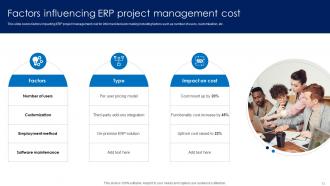
Go with the standard setup first - only customize when you absolutely have to for something business-critical. Yeah, I get it, everyone wants to tweak things to match how they currently do stuff. But honestly? The more you mess with it, the more you'll hate yourself during upgrades. Aim for using the ERP's built-in features like 80% of the time. Save customization for things that actually give you a real edge over competitors, not just "well this is how Bob from accounting likes his reports." Oh and definitely document everything - finance will thank you later when they see the real costs.
Honestly, just go with Agile or maybe a hybrid thing where you do waterfall planning but agile sprints for the actual work. Microsoft Project's solid for timelines, and Jira's pretty much the standard for dev tracking. But here's the thing - none of that tech stuff matters if people hate using the new system. User adoption will make or break you way more than which PM tool you pick. Confluence for docs, Slack for chatting. Don't overthink it though, just use whatever your team already knows instead of learning something new mid-project. Oh, and definitely map out all your stakeholders first.
Dude, get everyone to sign off on a detailed requirements doc upfront - those signatures matter way more than you'd think. Set up a formal change process so any new requests need written approval and impact analysis. Been burned on this before during an ERP project where "small tweaks" became a half-year nightmare. Regular stakeholder meetings help catch scope creep early. You absolutely need a PM who can push back and say "that's phase two territory." Oh, and document everything! Make sure leadership sees what these changes actually cost - that usually gets their attention real quick.
Oh man, scope creep will kill you every time - lock that down first or you'll be adding "just one more feature" forever. Data migration is way messier than anyone thinks, so start cleaning that stuff up months early. Leadership buy-in sounds boring but it's everything. Don't go crazy with customizations either, you'll waste months building workflows nobody actually wants to use (been there!). Get champions in each department who can actually make decisions, not just pass messages up the chain. And seriously, throw money at training - people hate change.
Cloud ERP is way faster than on-premises - we're talking 6-12 months instead of over a year. The vendor handles all the infrastructure headaches, so you don't deal with hardware purchases or server setup. Your team can actually focus on configuring the system and getting people ready for changes. Data migration is still a pain though, that hasn't changed. Plus you'll need to think through how it connects with your current systems. Honestly, the time you save on technical stuff should go straight into training your users properly.
-
The design is very attractive, informative, and eye-catching, with bold colors that stand out against all the basic presentation templates.
-
I am a big fan of their newsletters because that is how I found my perfect requirement at the time of urgency. Thank God, I kept opening those.