

Event management organizational chart powerpoint templates




Try Before you Buy Download Free Sample Product
 Impress Your
 Audience
 100%
100% Editable
 Save Hours
 of Time


Our Event Management Organizational Chart Powerpoint Templates are an effective filter. They ensure all errors get blocked.
People who downloaded this PowerPoint presentation also viewed the following :
Content of this Powerpoint Presentation
According to Allied Market Research, the events industry will grow to $1,552.9 billion by 2028.
Today, we have an endemic desire to celebrate every occasion. Right from celebrating a toddler’s birthday to a company’s product launch, every arrangement has to be exceptional. The expanding scope of the event industry is taking every sector under its canopy. Be it the big corporate giants, the entertainment industry, or even a household, everyone wants their events to be bigger and better. This is a compelling reason for outsourcing the task to a professional organization, which can deliver the best and, hence, ensure the exponential success of any event.
This, in turn, has caused a staggering expansion of event management organizations. The success of an event planning organization depends on how well it manages the coordination, planning, and execution of an event. Collecting and organizing data has now become more crucial than ever. Our team has designed a very functional Event Management Organizational Chart PowerPoint. This template becomes an essential aid for the coherent planning and execution of any event. A vast array of events, like conferences, product launches, or even a wedding, needs proper planning. Catering to all aspects, including staff allocation, time, venue, or theme, becomes vital. You can now oversee all the spheres and plan the groundwork. This template being 100% editable, is a great pick to display the event overview, hence enabling a smooth execution.
Let’s explore!
Template 1: Event Management Organizational Chart PPT
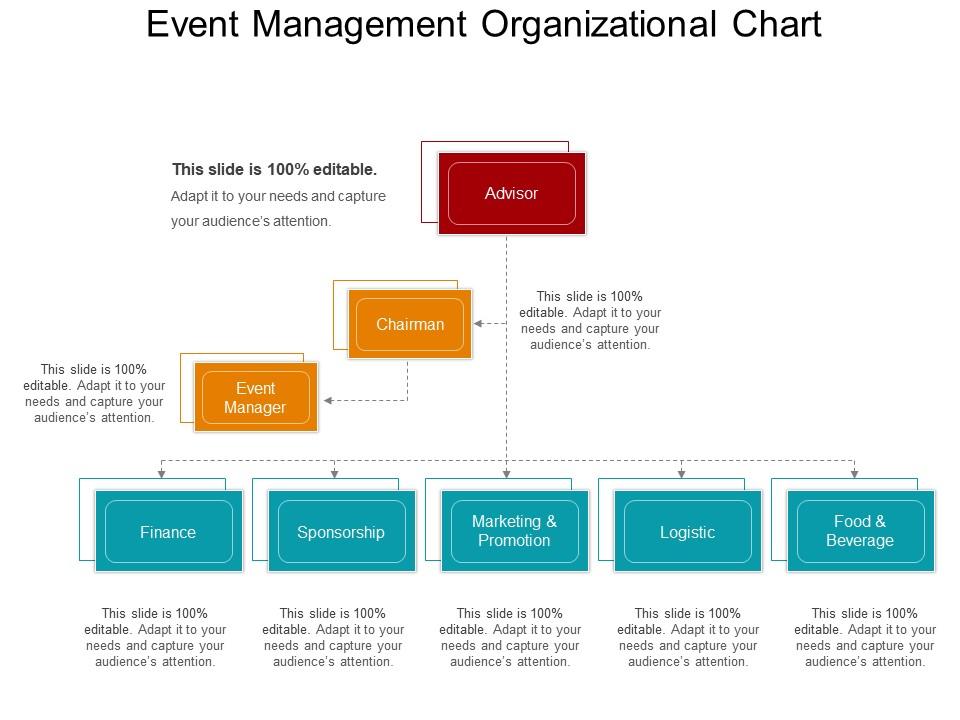
This PowerPoint slide presents an Event Management Organizational Chart that outlines the hierarchy and functional areas critical to event planning and execution. The chart delineates roles from the Advisor and Chairman at the top, to core management areas handled by the Event Manager, including Finance, Sponsorship, Marketing & Promotion, Logistics, and Food & Beverage. This slide is essential for visualizing the structure of event management teams, facilitating clear communication, and efficient organizational planning.
Conclusion
Event management is a broad term that includes “administrative assistants, coordinators and event technologists.” Despite a varied nomenclature, a systematized planning and execution of decisions remains a commonly pursued goal. Success and a lasting imprint can only be achieved by taking care of every detail with utmost precision.
Event organizers need a tailored solution to meet their varied needs. The Event Management PPT can give you the freedom to keep record of even the miniscule details. The structured flow and clarity of the template accurately outlines the hierarchy, allocation of roles, managing finances and sponsorships, and successfully juggling the field of logistics and hospitality.
Event management organizational chart powerpoint templates with all 5 slides:
Advise folks on deals with our Event Management Organizational Chart Powerpoint Templates. Impress them with your awareness of each factor.
FAQs for Event management organizational
Honestly, start with your timeline and budget - those two will make or break you. Figure out what you're actually trying to accomplish first, then work backwards. I swear, everything costs like 30% more than you expect, so pad that budget. Map out who's doing what on your team and have backup plans ready because something always goes wrong. Venue logistics are a nightmare if you don't think them through early. Oh, and don't skip the post-event stuff - you'll want those evaluation metrics later. Get a decent project management tool and build in extra time for each phase. Trust me on the buffer time thing!
Honestly, tech can make such a huge difference for your attendees. Event apps are clutch - people love customizing their schedules and doing those real-time polls. QR codes speed up check-ins like crazy, which is a godsend when you've got long lines. If you're going hybrid, live streaming keeps remote people engaged too. AR/VR stuff is fun but only if your budget's there for it. Oh, and social media walls always get people posting more throughout the day. My advice? Pick maybe 2-3 features that actually fix problems instead of cramming in every cool gadget you see. Less is more here.
Okay so first thing - list out literally everything. Venue, food, staff, marketing, all of it. Trust me, those weird random costs always show up so add like 10-15% extra from the get-go. I use spreadsheets to track actual spending vs what I planned (boring but it works). Check in weekly instead of panicking later. Oh and definitely set spending limits for your team - otherwise someone's gonna blow the budget on fancy napkins or something. The trick is just staying consistent with tracking instead of winging it.
Check your attendance numbers and budget first - that's the easy stuff. Survey people ASAP though, seriously within like 2-3 days max because everyone forgets everything after that. Also grab feedback from your team and vendors while you're at it. Social media buzz is worth checking too, even if it feels a bit vain lol. The biggest thing? Write down what sucked and what didn't while it's fresh in your head. Compare everything back to whatever goals you set originally - leads, engagement, whatever. Future you will thank you for documenting this stuff properly.
Honestly, social media is a game-changer for events. People scroll Instagram and Facebook looking for weekend plans anyway, so meet them where they are. I'd start posting a few weeks early - tease some behind-the-scenes stuff to build excitement. Create a Facebook event page because it makes sharing ridiculously easy for people. The best part? When attendees post photos and tag your event, you get free marketing that feels way more authentic than anything you could create. Oh, and don't forget event-specific hashtags - they actually work better than I expected.
Hey! So accessibility can't be an afterthought - gotta bake it in from the start. First thing is venue hunting: ramps, accessible bathrooms, elevators, good seating spots. Communication's huge too - ASL interpreters, captions, large print stuff. Oh and survey people ahead of time about what they need! Some folks get totally overwhelmed by strobing lights or super loud music (honestly, don't blame them). Make sure your contact info's easy to find on registration so people can reach out directly. Dietary restrictions are another big one you don't want to miss.
Ugh, tech problems are THE worst part - connection issues, platform crashes right when someone's giving their keynote. Time zones mess with your head too. I swear you're constantly troubleshooting someone's wifi or dealing with their dog barking in the background. Reading the room becomes impossible when everyone's tiny faces on screen. That natural networking vibe? Gone. Speaker management gets tricky since you can't physically help them fix anything. Do tons of rehearsals though - seriously saved me multiple times. Oh, and backup plans for literally everything because something WILL go wrong.
Your brand identity is like a magnet for events - it pulls people in and keeps them interested. Consistent branding makes attendees instantly recognize what they're getting into. Look at Apple events versus some random tech meetup, you know? Everything should feel connected - your visuals, messaging, the whole vibe. People get way more engaged when they're experiencing your actual brand story instead of just sitting through another boring event. Oh, and make sure every little detail reflects your personality. When everything clicks together, attendees think "yep, this is totally a [your brand] thing." Short version: cohesive branding = better engagement.
Honestly, start by checking their references and getting everything in writing - I learned that the hard way. Set up regular check-ins instead of waiting for updates. The quiet ones will stress you out later, trust me. Always pad your timelines because stuff takes forever. Oh, and keep backup vendors for anything critical. People flake more than you'd think. Make a contact sheet with multiple people from each company too. That way you're not frantically calling one person who's suddenly MIA when everything's on fire.
Oh man, you really gotta think about cultural stuff - it can totally tank your event if you mess up. Like, what feels like normal networking to us might come across super aggressive in other cultures. I found that out the embarrassing way at this conference in Tokyo lol. Research your attendees beforehand - dietary restrictions, religious stuff, even what colors mean in their culture. Timing matters too. Honestly? Just ask people directly what they'd prefer. Way easier than guessing. If you can swing it, hire someone local who actually knows the cultural nuances. Trust me on this one.
Honestly, going digital with invites and tickets is the easiest first step - saves so much paper. Find venues that actually have green certifications (they exist!) and try to book local vendors instead of flying stuff in from across the country. Seasonal food menus are clutch, and those recycling stations really do work if you label them clearly. Oh, and encouraging carpools or public transit makes a bigger difference than you'd think. Reusable signage instead of those wasteful banners, maybe even hybrid events to cut down travel. But here's the thing - you've gotta plan this stuff upfront, not scramble to add it later.
Okay so you'll want to hit people up right after the event while they still remember stuff. Then - and this is where I always mess up - do another survey like a week later when they've had time to think. Quick calls with your main people help too. Don't just ask "how was it?" Get specific about logistics, content, networking, all that. Document everything somewhere your whole team can actually find it later (not buried in some random email thread). The real trick is showing attendees you actually used their feedback next time around.
Honestly, the AI matching thing is pretty cool - it actually pairs people based on what they're into instead of random luck. Breakout rooms don't suck as much anymore either. Gamification keeps people from zoning out completely, which... let's be real, we all do that. Spatial audio is everywhere now and yeah, it does make virtual stuff feel less robotic. For hybrid events though, don't just make remote people spectators. That's the worst. You want them actually participating, not watching from the sidelines. Test this stuff out on smaller events first before going big.
Survey your audience first - what problems are they actually dealing with? Build sessions around that instead of generic topics. Mix up the format because sitting through back-to-back presentations is brutal (learned that the hard way). Do some workshops, panels, maybe a fireside chat. Each session needs one clear thing people can actually use Monday morning. Oh, and build in buffer time between rooms - nobody likes running around like crazy. I'd probably run your draft by a few people from your target audience first. They'll catch stuff you missed.
Permits, insurance, and liability waivers - get those sorted first. Also check noise rules and fire codes for your venue. Honestly, vendor contracts are where most people mess up, so make those ironclad because something *always* goes wrong. Don't forget ADA compliance stuff, and if you're doing alcohol you'll need licensing. Oh, and data protection laws matter if you're collecting emails or whatever. Find a lawyer who actually knows entertainment law - they're worth it. I keep different checklists for different event types now.
-
Great quality slides in rapid time.
-
Excellent products for quick understanding.