


Generative Ai Powerpoint Ppt Template Bundles





Try Before you Buy Download Free Sample Product
 Impress Your
 Audience
 100%
100% Editable
 Save Hours
 of Time


Our Generative Ai Powerpoint Ppt Template Bundles are topically designed to provide an attractive backdrop to any subject. Use them to look like a presentation pro.
People who downloaded this PowerPoint presentation also viewed the following :
Content of this Powerpoint Presentation
Slide 1: This slide showcase title Generative AI. Your Company Name
Slide 2: This slide highlights the advantages of generative AI to improve business processes.
Slide 3: This slide depicts the comparison between traditional and generative AI.
Slide 4: This slide depicts the cyber security threats generated through the use of generative AI.
Slide 5: This slide showcases the challenges faced during implementation of generative AI and solutions to overcome them.
Slide 6: This slide shows the use cases of generative AI in various industries.
Slide 7: This slide showcases the real-life use cases of generative AI in business processes.
Slide 8: This slide showcases the applications of generative AI in multiple business sectors to help adopt the use of generative AI in multiple sectors in order to automate business processes.
Slide 9: This slide depicts the multiple types of generative artificial intelligence models utilized to help the business utilize suitable types of generative AI in order to meet its business needs.
Slide 10: This slide highlights the key functions of generative AI in the customer support industry.
Slide 11: This slide showcases the best tactics to be utilized during the execution of generative AI.
Slide 12: This slide showcases the critical elements observed within the generative artificial intelligence ecosystem.
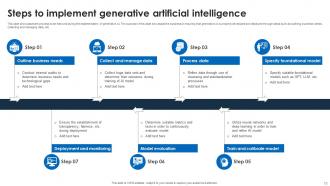
Slide 13: This slide showcases the process to be followed during the implementation of generative AI.
Slide 14: This slide showcases the comparative matrix for multiple generative AI platforms.
Slide 15: This slide depicts the generative AI functions in financial services.
Slide 16: This slide showcases the examples of utilizing generative AI in healthcare and medical services.
Slide 17: This slide showcases the examples of utilizing generative AI in healthcare and medical services.
Slide 18: This slide showcases Generative AI technologies that can help the business grow and transform.
Slide 19: This slide showcases multiple trends that are contributing to the growth of Generative AI market.
Slide 20: This slide showcases various applications of Generative AI that can help to enhance supply chain management and optimize logistics.
Slide 21: This slide showcases multiple applications of Generative AI to help Fintech companies to increase revenue and product sales.
Slide 22: This slide showcases multiple applications of Generative AI to help healthcare companies to improve the operational efficiency.
Slide 23: This slide showcase Content creation icon through use of generative AI
Slide 24: This slide showcase Generative artificial intelligence icon for business use
Slide 25: This slide showcase Generative AI icon to enhance customer service performance
Slide 26: This slide showcase Icon for generative AI in patient healthcare industry
Slide 27: This is a Thank You slide with address, contact numbers and email address.
Generative Ai Powerpoint Ppt Template Bundles with all 35 slides:
Use our Generative Ai Powerpoint Ppt Template Bundles to effectively help you save your valuable time. They are readymade to fit into any presentation structure.












FAQs for Generative Ai Powerpoint
Honestly, the speed alone makes it worth trying. You'll knock out professional templates in minutes instead of spending hours tweaking layouts. All that annoying stuff like matching colors and picking fonts? The AI just handles it automatically. What I love most is how you can mess around with tons of different styles super quickly - just throw some prompts at it and see what sticks. Oh, and your brand stays consistent across everything, which is huge for team stuff. Next time you need a deck, just tell it your brand colors and vibe. Way better than starting from scratch.
So basically, generative AI looks at your rough ideas and builds out the whole visual story for you. It'll suggest images that actually make sense, create design themes that don't look like garbage, and even make graphics that fit your narrative. No more endless scrolling through stock photos that kinda work but not really. The AI figures out what you're trying to say and makes visuals that back it up. What's crazy is how it connects dots you wouldn't think of yourself. Plus it keeps everything looking consistent throughout your deck while matching the vibe you want. Just give it your main message and watch it do the heavy lifting.
Yeah, they totally work across different industries! Just throw in specific prompts and you'll get stuff that actually fits your field - healthcare, tech, finance, whatever. The AI has tons of data so it gets what each industry needs visually. Marketing teams end up with colorful, fun layouts while legal gets those boring but clean professional ones (sorry lawyers lol). Same tool, totally different vibes. You just gotta be super specific when you prompt it - like "finance presentation for quarterly reports" instead of just "presentation." Works way better that way.
So first thing - check if the colors and fonts actually match across all the slides. You'll want different layout options too (like title slides, content ones, charts) or you'll be screwed halfway through. Make sure you can easily swap out their colors and fonts for yours. Oh and definitely preview it with your real content first - I learned that one the hard way. Some of these AI templates have weird placeholder text that makes zero sense. The whole design shouldn't fall apart when you customize it.
Dude, generative AI is perfect for this stuff. You just tell it what you want - like "clean tech presentation" - and boom, multiple template options appear instantly. No more wasting hours on layouts and color schemes. I swear it saves me on those insane deadline days when I'm scrambling. The cool thing is you can keep tweaking and trying different styles without rebuilding everything from zero. Plus the AI actually knows design rules, so even your rushed presentations don't look like garbage. Honestly changed how I work - you should definitely try it out.
Yeah, there are some downsides for sure. AI templates can look super generic - like you've seen the same design a million times before. They're terrible with specific brand stuff too, especially if your company has detailed style guidelines or weird formatting requirements. Honestly, you'll probably end up tweaking things manually anyway since the AI never quite gets your content structure right. But here's the thing - they're actually pretty solid as starting points. Just don't expect to use them as-is. You'll need to customize everything to make it feel like it's actually yours, not some robot's idea of a presentation.
Honestly, you've gotta customize those AI templates or they'll look super generic. I've seen people just dump their content into whatever the AI spits out - yikes. Colors should match your brand, obviously. Then tweak the layout so it actually flows with what you're saying. The visual stuff needs to back up your main points too. Oh, and don't forget the little details that make it feel like *yours*, not some random template everyone else is using. AI gives you a solid starting point, but that's literally just step one. Put in the work to make it yours.
Honestly, those AI templates are game-changers for engagement. They pump out custom graphics and suggest layouts way faster than doing it yourself. Most of us can't design anyway, right? The AI does the visual stuff while you focus on your actual message. Your audience stays hooked because everything looks super polished. I mean, who has time to spend hours on design work anymore? You can even get it to tailor content for different audiences. Try generating a few template variations for your next presentation. See which one hits better with people.
Honestly, AI's gonna get crazy personalized soon. Templates will auto-adjust for your audience and industry - like, actually smart stuff. Voice-to-slide creation is already popping up, which is kinda neat I guess. Real-time collab will probably get way better too, with AI jumping in to suggest changes while your team's editing together. Custom graphics that actually match your content instead of random stock photos? That's coming for sure. I'd mess around with current AI design tools now so you're not scrambling later when PowerPoint gets these features.
Compare your presentation metrics from before and after - engagement scores, feedback ratings, completion rates. Time saved on deck creation is probably the biggest win though. Your stakeholders will definitely notice the visual consistency improvement. Track whether people actually stick with the AI templates or go back to their old ways. Short survey works too - just ask presenters and audiences about clarity, visual appeal, effectiveness. The sweet spot is when creation time drops AND audience scores go up at the same time. Oh, and watch how often teams ditch the templates for manual formatting.
Honestly, just start with Microsoft's own stuff - Designer and Copilot are already baked into PowerPoint and they've gotten surprisingly good lately. You're probably already paying for them with Office 365 anyway. Canva's AI tools are solid too, plus Beautiful.AI and Gamma export nicely to PowerPoint if you want something different. Oh, and Tome's pretty slick but it's more of its own thing entirely. I've been messing around with Pitch recently too - same deal though, standalone platform. But yeah, definitely try the Microsoft tools first since there's literally no learning curve.
Yeah, so AI basically learns from tons of existing designs and mixes them up to create something new - kinda like how you'd get inspired by Pinterest boards but make your own thing. It's not straight-up copying, so copyright issues aren't really a problem. Though honestly, I'd still peek at any specific icons or fonts they use just to be safe. Most AI platforms deal with the legal stuff already, but definitely check their terms if you're planning to use these commercially. You don't want any surprises later, you know?
So regular templates are just static designs where you dump your content in. AI ones get made fresh based on what you actually need. You give it prompts about your topic and audience, and it builds something custom instead of forcing you into some random pre-made thing. The personalization is honestly crazy good - it picks colors, layouts, even suggests images that actually make sense for your content. Best part? You don't have to deal with that annoying "ugh this template is close but not quite right" situation we've all been in. Just be specific when you prompt it about your audience and goals.
Honestly, those AI PowerPoint templates are a lifesaver when you're drowning in grading. Just throw in your topic like "photosynthesis" or whatever you're teaching, and boom - slides with decent content and visuals appear. Takes like 2 minutes instead of hours. Most come with interactive stuff too - quizzes, discussion questions that actually get kids talking. Obviously you'll need to tweak things to fit your style, but it beats staring at a blank slide wondering where to start. Oh, and maybe try something simple first? I went too ambitious with my first attempt and it got weird lol.
Honestly, they're way easier to use than I expected! You literally just type what you want and get something decent back. Most of them are built for people like us who can't design to save our lives. The drag-and-drop stuff is pretty intuitive, plus they have these preset styles that actually look professional. Sometimes the formatting gets weird though - I had one randomly switch my fonts halfway through, which was annoying. But still beats spending forever making slides from scratch. You'll probably need like 10 minutes of tweaking instead of hours of frustration.
-
Enough space for editing and adding your own content.
-
I loved the hassle-free signup process. A few minutes and, I had this giant collection of beautiful designs.