


Instagram Company Profile Powerpoint Presentation Slides





Try Before you Buy Download Free Sample Product
 Impress Your
 Audience
 100%
100% Editable
 Save Hours
 of Time


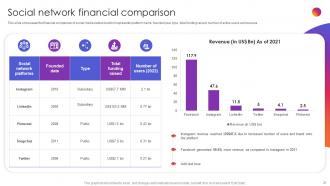
A company profile provides an overview of the most critical points about an organization which helps the investors and stakeholders to evaluate the business value and performance. Check out our professionally designed Instagram Company Profile PowerPoint presentation. Firstly, the profile covers the executive summary, company introduction, mission, vision, core values, business model, worldwide presence, company history and milestones, etc. Also, this profile shows the management team, key stats and figures, revenue growth from 2015 to 2021, Instagram platform annual users, advertising users and growth rate, users breakdown by geography, etc. Moreover, this PowerPoint covers users distribution by age and gender, story reach percentage by content type, Instagram advertising audience by placement type, the average post engagement rate of business accounts, social media comparison by active users, and financial comparison on the basis of founded date, type, total funding raised, number of users and revenue. At last, this PPT captures the technology stack and SWOT analysis. Download our 100 percentage editable social media company profile and get access to our highly researched and skillfully designed products.
People who downloaded this PowerPoint presentation also viewed the following :
Content of this Powerpoint Presentation
Slide 1: This slide introduces Instagram Company Profile. State your company name and begin.
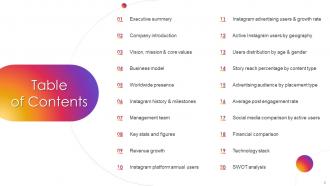
Slide 2: This slide shows Table of Content for the presentation.
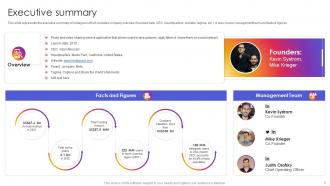
Slide 3: This slide represents the executive summary of Instagram which includes company overview.
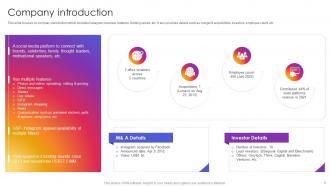
Slide 4: This slide focuses on company introduction which includes Instagram overview, features, funding raised, etc.
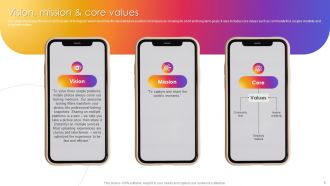
Slide 5: This slide showcases the vision and mission of Instagram.
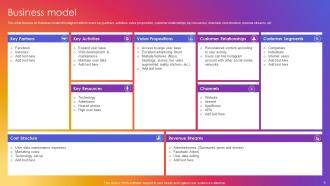
Slide 6: This slide focuses on business model of Instagram which covers key partners, activities, value proposition, etc.
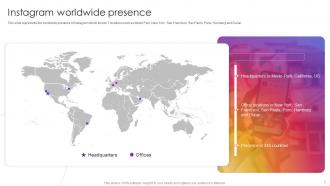
Slide 7: This slide represents the worldwide presence of Instagram.
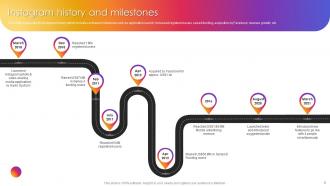
Slide 8: This slide showcases Instagram history and milestones.
Slide 9: This slide showcases the management team of Instagram.
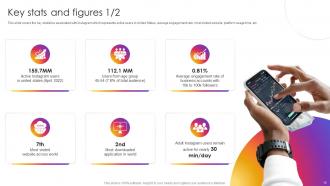
Slide 10: This slide covers the key statistics associated with Instagram.
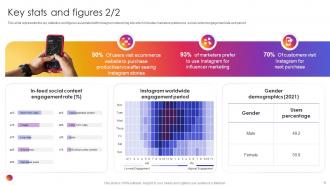
Slide 11: This slide shows Instagram worldwide engagement period.
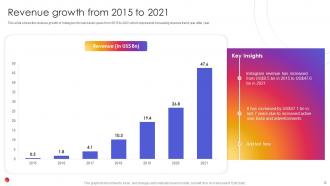
Slide 12: This slide shows the revenue growth of Instagram for last seven years.
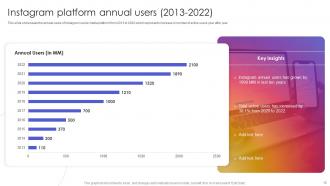
Slide 13: This slide presents Instagram platform annual users (2013-2022).
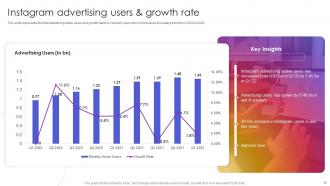
Slide 14: This slide displays Instagram advertising users & growth rate.
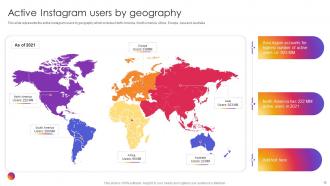
Slide 15: This slide represents Active Instagram users by geography.
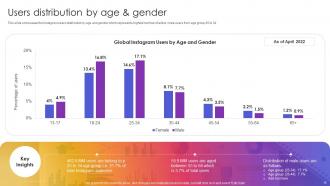
Slide 16: This slide showcases Users distribution by age & gender.
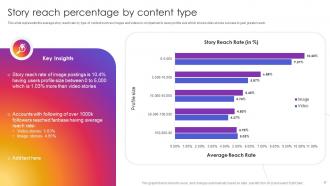
Slide 17: This slide represents the average story reach rate by type of content.
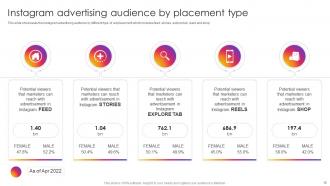
Slide 18: This slide showcases Instagram advertising audience by placement type.
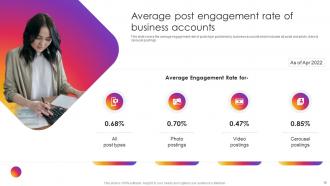
Slide 19: This slide shows Average post engagement rate of business accounts.
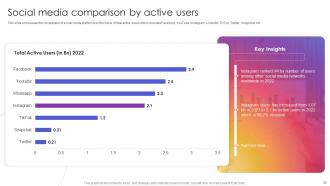
Slide 20: This slide presents Social media comparison by active users.
Slide 21: This slide displays Social network financial comparison.
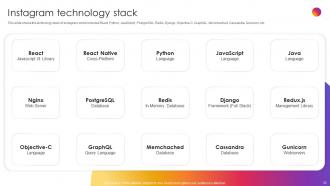
Slide 22: This slide shows the technology stack of Instagram which includes React, Python, JavaScript, etc.
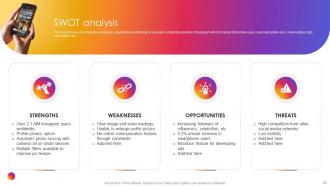
Slide 23: This slide focuses on strengths, weakness, opportunities and threats to evaluate competitive position of Instagram.
Slide 24: This slide contains all the icons used in this presentation.
Slide 25: This slide is titled as Additional Slides for moving forward.
Slide 26: This is Our Mission slide with related imagery and text.
Slide 27: This is Our Target slide. State your targets here.
Slide 28: This is a Timeline slide. Show data related to time intervals here.
Slide 29: This is Our Goal slide. State your firm's goals here.
Slide 30: This slide contains Puzzle with related icons and text.
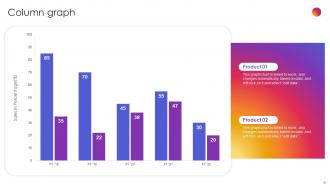
Slide 31: This slide displays Column chart with two products comparison.
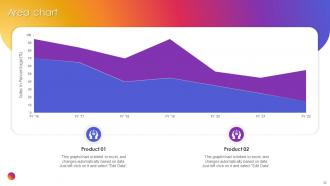
Slide 32: This slide depicts Area chart with two products comparison.
Slide 33: This is a Thank You slide with address, contact numbers and email address.
Instagram Company Profile Powerpoint Presentation Slides with all 38 slides:
Use our Instagram Company Profile Powerpoint Presentation Slides to effectively help you save your valuable time. They are readymade to fit into any presentation structure.






FAQs for Instagram Company Profile
Okay so first things first - get your logo as your profile pic and write a bio that actually explains what you do. Username should match your brand name if possible, but honestly good luck finding anything available these days! Switch to a business account for sure - you'll get analytics and contact buttons. Throw your location in there if you have a physical store or office. Use keywords people might search for in your bio. That link in your bio is gold - swap it out whenever you're pushing something new instead of just leaving it to your homepage forever. Oh and keep updating your bio when you launch new stuff!
Your bio needs to hook people in those first few seconds - most decide whether to follow almost instantly. Start with your best stuff at the top since you only get 150 characters. Line breaks help tons, and emojis work great as bullet points. Don't forget a call-to-action and your value prop. That bio link is gold, so either use Linktree or switch it up for campaigns. Oh, and actually update your bio sometimes! I see so many people with outdated holiday promos from like three months ago. Your branded hashtags are cool if they're short enough to fit.
Oh highlights are perfect for this! They're like your best content that stays up permanently instead of vanishing after 24 hours. I'd organize them into categories - maybe "Products," "Behind the Scenes," stuff like that. New people visiting your page can instantly see your good stuff without digging through old posts. Honestly, they're way more useful than I initially thought they'd be. Just make sure you update them semi-regularly and use covers that actually look decent - nothing worse than pixelated highlight covers, you know? They're basically your digital storefront window.
Your profile pic matters way more than you'd think - it's literally the first thing people notice in comments, DMs, everywhere. Logos are perfect for brands since they build recognition fast. Just keep it simple! I've seen so many companies try fancy detailed graphics that turn into a blurry mess when they're thumbnail size. If your logo's too complex, go with a simplified version or just use the icon part. Honestly, the circle crop catches everyone off guard. Test how yours looks super tiny first - what makes total sense to you might be completely unreadable to everyone else.
Stories are great for all that messy behind-the-scenes content - office vibes, work in progress, random updates. Way more casual than your polished feed posts. Honestly, I find them more engaging than regular posts anyway. Definitely save your best ones in highlights, especially team stuff or product demos. Don't forget location tags and hashtags for visibility. Oh, and consistency matters but don't stress too much about making everything perfect - that's kinda the whole point of Stories, you know?
Go check your Instagram Insights first - that's where all the good stuff is. Look at which posts got the most likes, saves, and shares. The demographics will probably shock you tbh, I'm always wrong about who's actually following me vs who I think is. Also peek at when your followers are online so you're not posting into the void at 3am. Honestly the timing thing made a huge difference for me. Take your top 5 posts from last month and see what they have in common. Then just make more of whatever's working and stop doing the stuff that flops.
Start by fixing your bio - throw in some keywords and tell people what to actually DO. Post stuff that doesn't suck and actually helps your followers somehow. Hashtags matter, but don't just copy whatever's trending. Find ones that aren't too niche but aren't oversaturated either. Honestly, engaging with people is huge - comment real responses, not just "love this!" garbage. Collaborate when it makes sense for both sides. Oh, and timing matters way more than people think. Figure out when your audience is online and post then. Consistency beats perfection every time.
Honestly, just start reposting customer photos and videos - but ask first and tag them properly. Make a branded hashtag so people know to use it. Also keep an eye on your company tags to find good stuff people are already posting. UGC contests work pretty well too if you want to get fancy with it. The thing is, real customer photos beat those super polished marketing shots every time. People can smell fake from a mile away, you know? I'd reach out to customers who've already tagged you and see if they're cool with you sharing their posts. Way easier than starting from scratch.
Okay so Instagram Shopping is basically like turning your profile into a little store. People can buy stuff straight from your posts and stories without having to leave the app - which honestly makes such a difference because nobody wants to jump through hoops to buy something. You can tag products in photos and set up a whole shop tab. The analytics are pretty solid too, shows you what's actually selling. I've heard conversion rates go way up once people get it running smoothly. I'd say just connect your product catalog first and tag maybe your top 3-4 products to see how it goes.
Okay so first thing - pick your colors and stick with them! Like 2-3 max. Then use the same filter or editing style on literally everything because wow, it actually makes your whole feed look so much more put-together when people are scrolling. I always use Preview or Planoly to plan out how my posts will look next to each other before I hit publish. Your captions need the same vibe too - casual, professional, whatever works for you. Oh and make a little brand doc with your colors and fonts so if anyone else posts they don't mess up your whole aesthetic!
Make your CTA super specific to what you actually want people to do - "Book a Consultation" or "Download Our App" beats boring "Learn More" every time. Match it to where you're sending them too. Like, if it's your email signup, just say "Join Our Newsletter." I swear, generic CTAs are such a waste of bio space! Keep it short since you only get 150 characters total. Oh, and test different ones monthly - what works for my audience might totally flop for yours. The whole "Shop Now" thing gets overused, but honestly it still converts if that's your main goal.
Your Instagram bio is golden real estate - cram your values into those 150 characters. Then use highlights for stuff like "Our Mission" or behind-the-scenes content that actually shows your values working. Regular posts should weave in your mission through storytelling and employee spotlights. Honestly, generic "we care" graphics are so overdone and nobody buys them anymore. Show your impact instead of just talking about it. Start by checking if your current bio even reflects what you stand for - you'd be surprised how many don't.
Oh man, biggest thing? Don't write your bio like it's War and Peace - just say what you do clearly. Switch to a business account first (I can't tell you how many people forget this basic step). Make sure your username actually matches your brand or at least something people can find when they search. Use your actual logo for the profile pic, not some weird stock image. Add your website and contact info in those little fields they give you. Fill out literally everything - Instagram likes complete profiles better. Honestly just spend like 10 minutes going through each section before you launch it.
Honestly, Reels are where it's at right now - the algorithm is pushing them hard. I'd start by turning your best content into 15-30 second videos. Behind-the-scenes stuff works great, or quick tips about your business. Yeah, you'll have to hop on trending sounds and hashtags (feels weird at first but whatever, it gets views). They show up in the Reels feed AND Explore page, so you're hitting way more people than regular posts. Just stay consistent and don't overthink it - my cousin started doing this and her engagement went crazy.
For Insta, focus on engagement rate first - likes, comments, shares per post. Follower growth matters too, obviously. Then check your reach and impressions to see who's actually viewing your stuff. Profile visits and website clicks are gold since people are curious enough to dig deeper. Story completion rates? Way more important than you'd think, trust me. Saves and shares are clutch indicators - means your content's worth keeping or passing along. Oh, and don't get caught up in all the fancy analytics right away. Master these basics first, then worry about demographics and optimal posting times later.
-
“Easy to use. I always wanted to have a quick search for products and SlideTeam has helped me have it.”
-
The designs are super attractive. Me and my team love using SlideTeam’s presentations.