


Salesforce Company Profile Powerpoint Presentation Slides




Try Before you Buy Download Free Sample Product
 Impress Your
 Audience
 100%
100% Editable
 Save Hours
 of Time


A company profile provides an overview of the most critical points about an organization which helps the investors and stakeholders to evaluate the business value and performance. Check out our professionally designed Salesforce Company Profile PowerPoint presentation. Firstly, the profile covers the executive summary, company overview, core values, company history, global presence, salesforce facts and figures, products, CRM software solutions, and other salesforce solutions. Additionally, It includes CRM customer 360 software with Slack, MuleSoft platform, Heroku platform, Tableau tool, Salesforce, and other coding-based systems, the importance of CRM management system, benefits and uses of Salesforce. Moreover, it covers sales, service cloud CRM pricing, M and A deals, global clients, customer reviews, awards, new product innovation, revenue, cash flow, and financial performance comparison. Lastly, it covers worldwide CRM applications market share, SWOT analysis, and ESG leadership. Download our company profile ppt templates now.
People who downloaded this PowerPoint presentation also viewed the following :
Content of this Powerpoint Presentation
Slide 1: This slide displays the title Salesforce Company Profile.
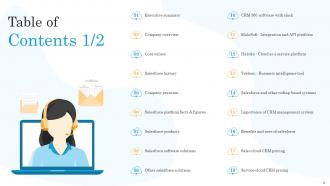
Slide 2: This slide exhibit table of content.
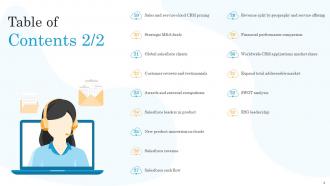
Slide 3: This slide exhibit table of content.
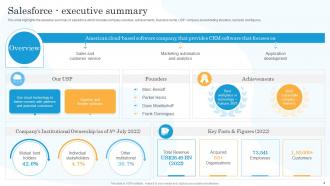
Slide 4: This slide highlights the executive summary of salesforce.
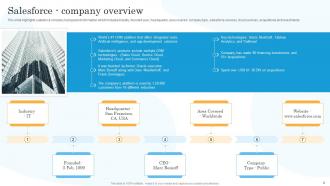
Slide 5: This slide highlights salesforce company background information.
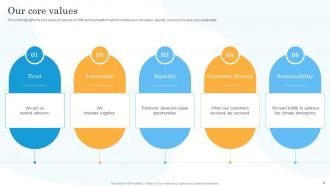
Slide 6: This slide highlights the core values of salesforce CRM and cloud platform.
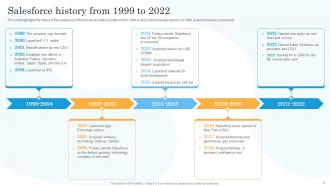
Slide 7: This slide highlights the history of the salesforce CRM and cloud solutions platform from 1999 to 2022.
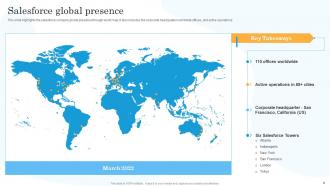
Slide 8: This slide highlights the salesforce company global presence through world map.
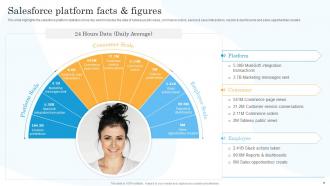
Slide 9: This slide highlights the salesforce platform statistics.
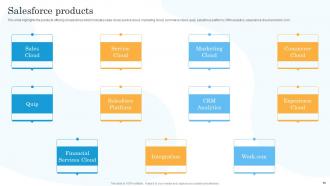
Slide 10: This slide highlights the products offering of salesforce which includes sales cloud, service cloud, marketing cloud, commerce cloud etc.
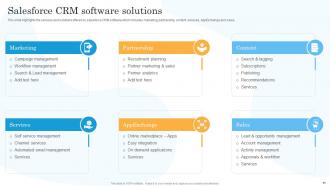
Slide 11: This slide highlights the services and solutions offered by salesforce CRM software.
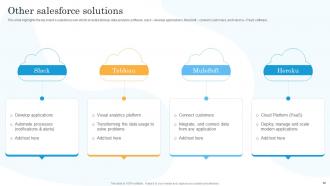
Slide 12: This slide highlights the top brand’s salesforce own which includes tableau data analytics software, slack – develop applications etc.
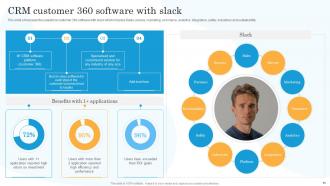
Slide 13: This slide showcases the salesforce customer 360 software with slack.
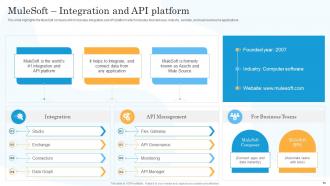
Slide 14: This slide highlights the MuleSoft company which includes integration and API platform.
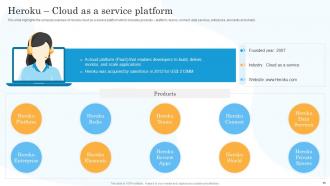
Slide 15: This slide highlights the company overview of Heroku cloud as a service platform.
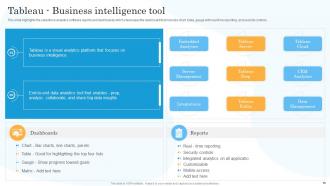
Slide 16: This slide highlights the salesforce analytics software reports and dashboards which showcases the dashboard.
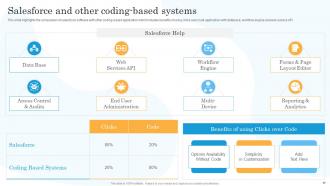
Slide 17: This slide highlights the comparison of salesforce software with other coding-based application.
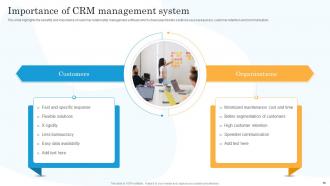
Slide 18: This slide highlights the benefits and importance of customer relationship management software.
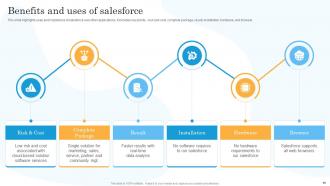
Slide 19: This slide highlights uses and importance of salesforce over other applications.
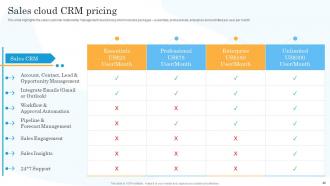
Slide 20: This slide highlights the sales customer relationship management cloud pricing.
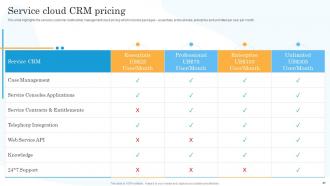
Slide 21: This slide highlights the services customer relationship management cloud pricing which includes packages – essentials, professionals, enterprise etc.
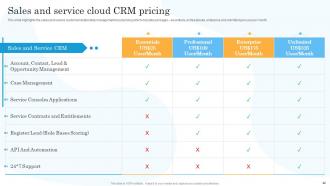
Slide 22: This slide highlights the sales and service customer relationship management cloud pricing.
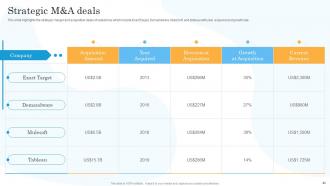
Slide 23: This slide highlights the strategic merger and acquisition deals of salesforce.
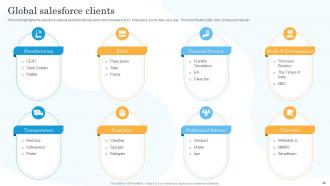
Slide 24: This slide highlights the salesforce national and international clients which includes CEAT, Pepe jeans, puma, titan etc.
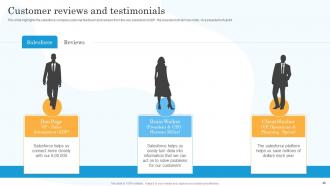
Slide 25: This slide highlights the salesforce company customer feedback and reviews from the vice president of ADP, the president of Herman miller, Vice president of sprint.
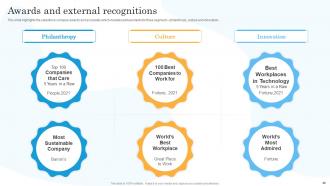
Slide 26: This slide highlights the salesforce company awards and accolades which includes achievements for three segment – philanthropy, culture and innovation.
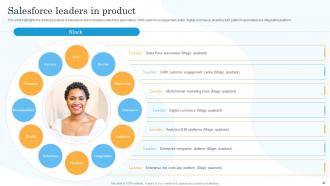
Slide 27: This slide highlights the leading products of salesforce which includes sales force automation, CRM customer engagement center etc.
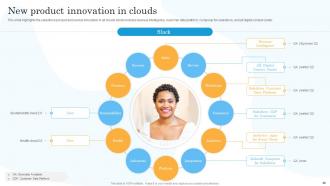
Slide 28: This slide highlights the salesforce product and service innovation in all clouds which includes revenue intelligence, customer data platform etc.
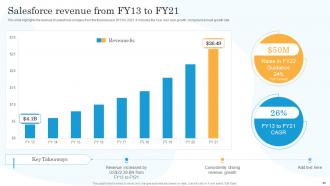
Slide 29: This slide highlights the revenue of salesforce company from the financial year 2013 to 2021.
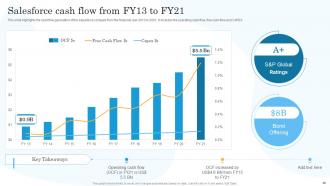
Slide 30: This slide highlights the cash flow generation of the salesforce company from the financial year 2013 to 2021.
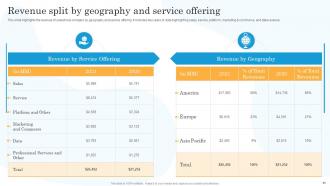
Slide 31: This slide highlights the revenue of salesforce company by geography and service offering.
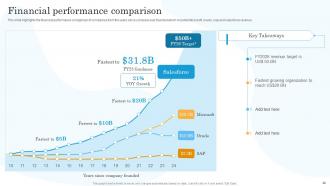
Slide 32: This slide highlights the financial performance comparison of companies from the years since company was founded.
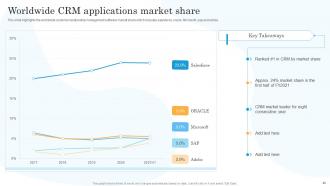
Slide 33: This slide highlights the worldwide customer relationship management software market share which includes salesforce, oracle, Microsoft, sap and adobe.
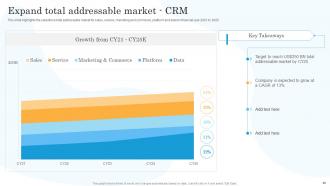
Slide 34: This slide highlights the salesforce total addressable market for sales, service, marketing and commerce, platform and data for financial year 2021 to 2025.
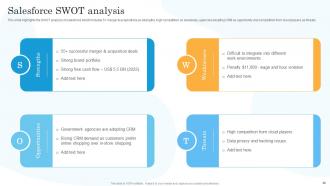
Slide 35: This slide highlights the SWOT analysis of salesforce.
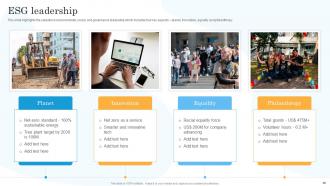
Slide 36: This slide highlights the salesforce environmental, social, and governance leadership.
Slide 37: This is the icons slide.
Slide 38: This slide presents title for additional slides.
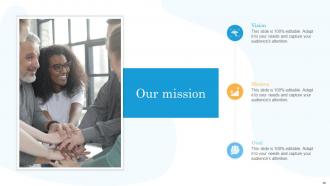
Slide 39: This slide presents your company's vision, mission and goals.
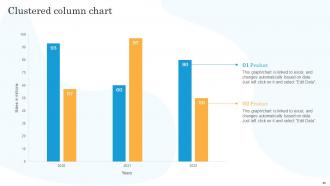
Slide 40: This slide exhibits yearly Clustered column chart for different products.
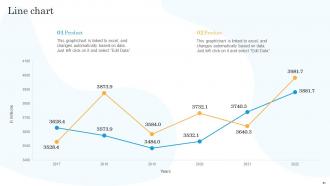
Slide 41: This slide exhibits yearly profits stacked line charts for different products.
Slide 42: This slide showcase Our target.
Slide 43: This slide depicts 30-60-90 days plan for projects.
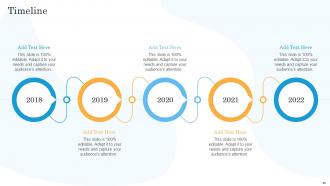
Slide 44: This slide exhibits yearly timeline of company.
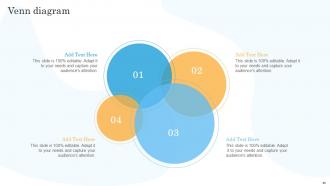
Slide 45: This slide display Venn diagram.
Slide 46: This slide depicts posts for past experiences of clients.
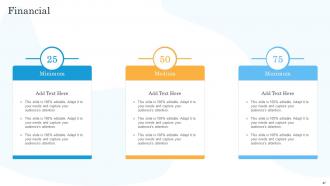
Slide 47: This slide showcases financials of company.
Slide 48: This is thank you slide & contains contact details of company like office address, phone no., etc.
Salesforce Company Profile Powerpoint Presentation Slides with all 53 slides:
Use our Salesforce Company Profile Powerpoint Presentation Slides to effectively help you save your valuable time. They are readymade to fit into any presentation structure.






FAQs for Salesforce Company Profile
Honestly, Salesforce is a game-changer once you get the hang of it. All your customer stuff lives in one spot instead of scattered everywhere. The automation saves me so much time - workflows handle the boring repetitive tasks automatically. Pipeline visibility is huge too. You can actually see what's happening with deals instead of guessing. Their reporting blows Excel out of the water, which probably sounds obvious but I was stubborn about spreadsheets for way too long. It grows with your team nicely. My advice? Start basic with Sales Cloud, then mess around with automation later.
Honestly, Salesforce customization is where it really shines. Custom fields and objects let you build stuff that actually fits how your team works. Process Builder and Flow are solid for automating your business logic - no coding needed which is nice. Page layouts can be tweaked so your reps aren't drowning in irrelevant fields. Lightning App Builder is surprisingly user-friendly for custom interfaces too. My advice? Map out what you're doing now first. Then don't go crazy - tackle one thing at a time or you'll end up in customization hell. Trust me on that one.
Dude, Salesforce is a total lifesaver for all that boring admin work. Once you set it up right, it'll automatically push leads through your pipeline, fire off follow-up emails, and assign tasks without you touching anything. The real-time dashboard thing is clutch too - no more awkward "uh, let me check" moments when your boss asks about deals. Honestly took me forever to figure out the workflows at first, but now I can't imagine going back. My advice? Map out what you're doing now, then pick the most annoying repetitive stuff to automate first.
So Salesforce connects with marketing tools like HubSpot, Marketo, and Mailchimp through their built-in connectors or AppExchange apps. You can sync leads, contacts, and campaign data back and forth between systems. Setup's honestly kind of a pain if your data's messy, but once it works you'll see the whole customer journey from first click to sale. Oh and they own Pardot too if that matters. Start with whatever pre-built connectors exist - way less headache than building custom API stuff. Check AppExchange first before you go down any rabbit holes.
Okay so first thing - clean your data before it even gets near Salesforce. Trust me on this one. Use Data Loader for big imports, though the regular import wizard is totally fine for smaller stuff. Set up a sandbox to test everything first. I know it's extra work but you'll thank me later when you find all the weird issues. Map out your field dependencies ahead of time too, especially required fields. Oh and don't try cramming everything into one giant migration - break it into chunks. Start with your most important objects. Document as you go (boring but necessary) and always backup your source data first.
Honestly, Salesforce is a game-changer for customer support. It centralizes every interaction so your team can see a customer's full history - past issues, purchases, all of it. The case management is really solid for organizing tickets. Nothing gets lost. Automated workflows are clutch too - urgent stuff gets routed to the right people instantly. Your agents can find answers quicker with the knowledge base, and the reporting shows you exactly where things are breaking down. Oh, and definitely set up proper case routing first - trust me on this one, it'll save you so many headaches later.
Dude, Salesforce dashboards are seriously a lifesaver. You know how you're always drowning in spreadsheets trying to figure out what's actually working? These things turn all that chaos into charts you can actually read. Real-time data, customized to whatever metrics you care about - sales, customer stuff, whatever. I'm honestly not sure how we survived before this. My advice? Pick like 3-4 key numbers you always worry about and build a simple dashboard around those first. You'll probably kick yourself for not doing it sooner. Makes decisions way less stressful when you can see what's happening.
So Einstein is Salesforce's AI thing that layers over your current data and automates a bunch of manual work. Lead scoring is where I'd start - it's super straightforward and you'll actually see results in your pipeline right away. It predicts your best converting leads, scores opportunities automatically, and suggests optimal contact timing. The predictive stuff works surprisingly well once it learns your data patterns. You also get AI insights in dashboards and automated email replies through Einstein Reply. Honestly, the whole setup feels way less intimidating than I expected when I first heard about it.
Honestly, skip the PowerPoint death march and just throw people into Salesforce from day one. Different roles need different training though - your sales team doesn't care about the same stuff marketing does. What works best is having them practice with your actual company data in a sandbox where they can't mess anything up. Roll features out slowly instead of overwhelming everyone at once (learned that one the hard way). Pick some tech-savvy people in each department to be your go-to helpers for random questions later. People actually remember this stuff when they're solving real problems, not watching slides.
Start with Salesforce's Security Health Check - it'll show you exactly what needs fixing. Set up field-level security and profile permissions to control data access. Two-factor authentication is absolutely mandatory now, no exceptions. Regular security audits are clutch for catching issues early. Encrypt your sensitive fields and add IP restrictions if you can. Here's what people forget though - third-party apps can be backdoors, so audit those permissions too. Oh, and definitely set up alerts for weird login activity. The Health Check thing sounds boring but honestly it's the fastest way to spot your vulnerabilities.
Dude, you should definitely switch to Lightning. The interface is so much cleaner and you can actually drag and drop stuff to customize your dashboards - no developer needed. Classic on mobile is honestly painful to use, but Lightning actually works well on phones. Plus you get way better reporting and Einstein AI features that Classic doesn't even have. I mean, Salesforce is killing Classic anyway so you'll be forced to migrate at some point. The performance boost alone makes it worth it. Trust me, once you make the switch you won't want to go back to that old clunky system.
Just go with Salesforce Essentials tbh - $25/user/month and it's got everything you actually need. Check if you qualify for nonprofit or education discounts first though, could save you some cash. Their startup program is pretty solid too if that applies. Honestly, resist the urge to go crazy with all the bells and whistles at first. Start basic - contact management, sales tracking, that's it. My buddy made that mistake and got overwhelmed trying to set up everything at once. You can always upgrade when business picks up and you're not pinching pennies anymore.
Dude, biggest mistakes I see? People jump straight into customizing everything instead of learning how Salesforce actually works first. Map out your sales process before you even log in - trust me on this one. Your data needs to be clean before you migrate it or you'll hate yourself later. Training is huge too because your team will just ignore the whole thing if they don't get it. I know it's tempting to recreate your current workflow exactly, but that's backwards thinking. Start basic, get everyone actually using it daily, then slowly add the fancy stuff. Oh and seriously - resist going crazy with customizations right away.
So Marketing Cloud is basically Salesforce's answer to multi-channel stuff. It connects email, social, mobile, web, ads - all in one spot which is nice. You can set up these customer journeys that automatically fire off different messages based on what people do. Like someone opens an email, then gets a text, then sees your ad later. The cool part is Journey Builder actually shows you a visual map of the whole thing. Data flows between everything too, so you're not juggling separate tools (thank god). Honestly just start with one simple journey first - don't go crazy right away.
Oh man, Salesforce is actually pretty solid for getting teams on the same page. Chatter's probably the best feature - it's like Facebook but for work stuff, where you can tag people on deals and share updates without drowning in emails. Deal rooms are clutch for working opportunities together. You can also build dashboards everyone can see, so nobody's guessing what's happening with the pipeline. The file sharing works well too, though honestly I still end up using Slack sometimes out of habit. But yeah, definitely set up some Chatter groups first - makes a huge difference in how smoothly everything runs.
-
I am a big fan of their newsletters because that is how I found my perfect requirement at the time of urgency. Thank God, I kept opening those.
-
The team is highly dedicated and professional. They deliver their work on time and with perfection.