

Facebook Company Profile Powerpoint Presentation Slides




Try Before you Buy Download Free Sample Product
 Impress Your
 Audience
 100%
100% Editable
 Save Hours
 of Time


A company profile provides an overview of an organizations most critical points, which helps the investors and stakeholders evaluate the business value and performance. Check out our professionally designed Facebook Company Profile PowerPoint presentation. Firstly, the profile covers the executive summary, company overview, mission, vision, core values, employee count and diversity, business model, company history and milestones, etc. Also, this profile shows the management team, organizational structure, product team, strategic partnerships, major acquisitions, users breakdown by gender and age, monthly active users, etc. Additionally, these slides include active users by geography and country, Facebook posting by type, advertising audience by region, and advertisements clicks and taps. Moreover, this PPT covers financial details such as revenue, net income, revenue split by segment and geography, annual expenses, and total assets. Also, this PowerPoint captures comparison on the basis of users and revenue. At last, this presentation exhibits business growth strategies, SWOT analysis, and CSR initiatives. Get access to our powerful social media company profile template now.
People who downloaded this PowerPoint presentation also viewed the following :
Content of this Powerpoint Presentation
Slide 1: This slide introduces Facebook Company Profile. State your company name and begin.
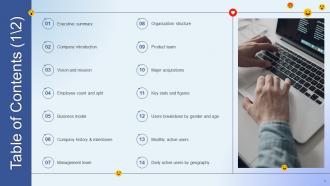
Slide 2: This slide shows Table of Content for the presentation.
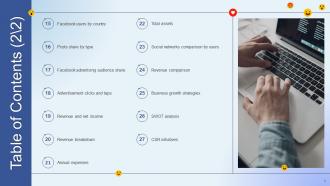
Slide 3: This is another slide continuing Table of Content for the presentation.
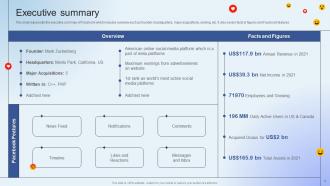
Slide 4: This slide represents the executive summary of Facebook.
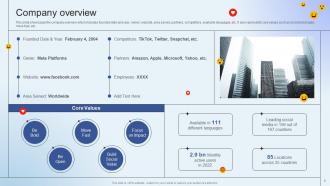
Slide 5: This slide showcases the company overview.
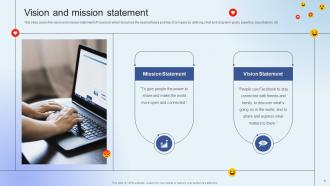
Slide 6: This slide shows Vision and mission statement.
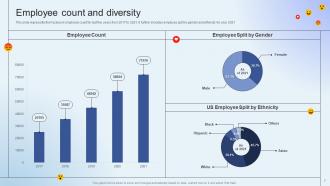
Slide 7: This slide presents Employee count and diversity.
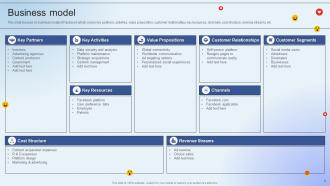
Slide 8: This slide focuses on business model of Facebook.
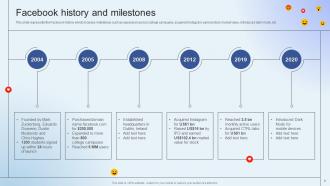
Slide 9: This slide displays Facebook history and milestones.
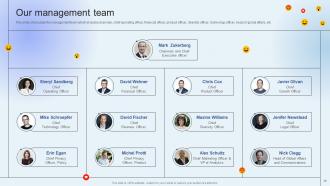
Slide 10: This slide showcases the management team which includes chairman, chief operating officer, financial officer, etc.
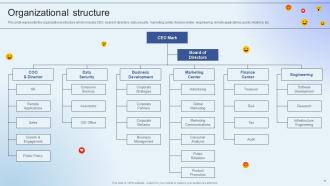
Slide 11: This slide represents the organizational structure which includes CEO, board of directors, data security, etc.
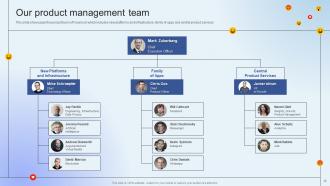
Slide 12: This slide showcases Our product management team.
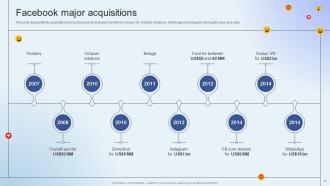
Slide 13: This slide shows Facebook major acquisitions.
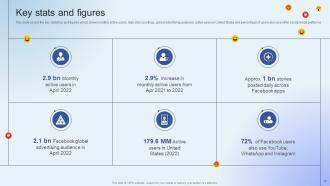
Slide 14: This slide covers the key statistics and figures which shows monthly active users, daily story postings, etc.
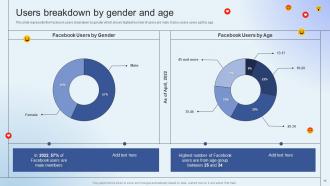
Slide 15: This slide shows Users breakdown by gender and age.
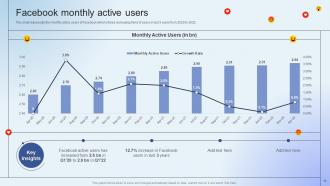
Slide 16: This slide represents the monthly active users of Facebook.
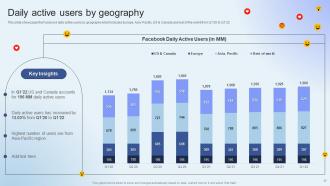
Slide 17: This slide showcases Daily active users by geography.
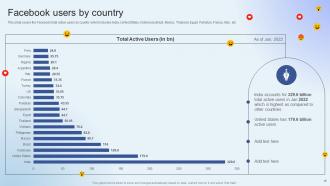
Slide 18: This slide covers the Facebook total active users by country.
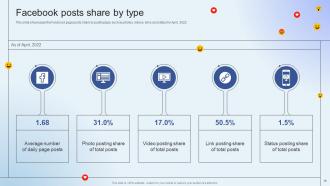
Slide 19: This slide showcases the Facebook page posts share by posting type.
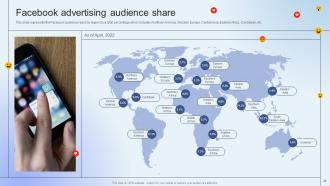
Slide 20: This slide shows Facebook advertising audience share.
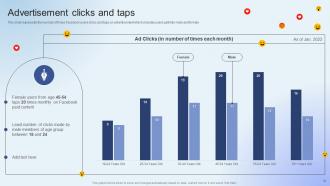
Slide 21: This slide represents the number of times Facebook users clicks and taps on advertisement.
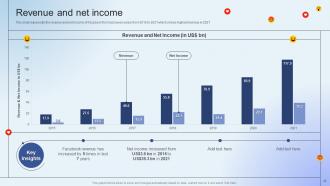
Slide 22: This slide represents the revenue and net income of Facebook from last seven years.
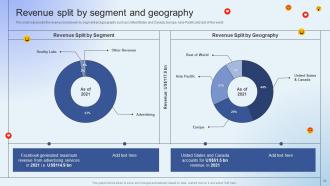
Slide 23: This slide showcases Revenue split by segment and geography.
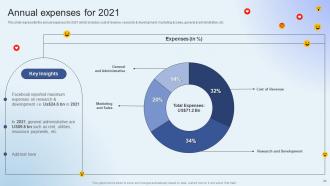
Slide 24: This slide represents the annual expenses for 2021 which includes cost of revenue, research & development, etc.
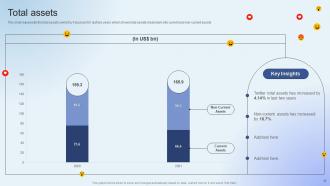
Slide 25: This slide represents the total assets owned by Facebook for last two years.
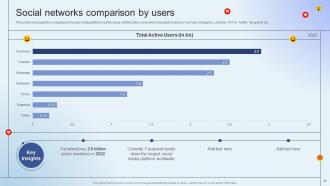
Slide 26: This slide showcases Social networks comparison by users.
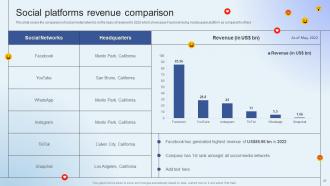
Slide 27: This slide shows Social platforms revenue comparison.
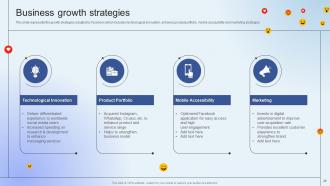
Slide 28: This slide represents the growth strategies adopted by Facebook.
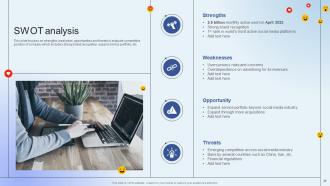
Slide 29: This slide focuses on strengths, weakness, opportunities and threats.
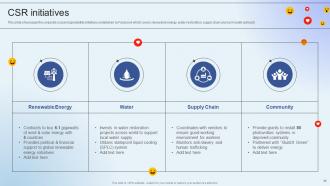
Slide 30: This slide showcases the corporate social responsibility initiatives undertaken by Facebook.
Slide 31: This slide contains all the icons used in this presentation.
Slide 32: This slide is titled as Additional Slides for moving forward.
Slide 33: This is Our Mission slide with related imagery and text.
Slide 34: This is About Us slide to show company specifications etc.
Slide 35: This is Our Team slide with names and designation.
Slide 36: This slide depicts Venn diagram with text boxes.
Slide 37: This slide shows Post It Notes. Post your important notes here.
Slide 38: This slide contains Puzzle with related icons and text.
Slide 39: This slide provides 30 60 90 Days Plan with text boxes.
Slide 40: This is a Thank You slide with address, contact numbers and email address.
Facebook Company Profile Powerpoint Presentation Slides with all 45 slides:
Use our Facebook Company Profile Powerpoint Presentation Slides to effectively help you save your valuable time. They are readymade to fit into any presentation structure.





FAQs for Facebook Company Profile
Okay so first things first - get a solid profile pic (your logo's perfect) and make sure all your contact info is actually correct. I can't tell you how many businesses mess this up. Your cover photo should show some personality, not just be boring. Write an "About" section that actually explains what you do clearly. Mix up your posts - don't just promote stuff constantly. Throw in some behind-the-scenes content and customer stories. Oh and get a custom username if you can, makes you way easier to find. Reply to messages fast too. Honestly I'd start by just fixing the basic info first, then work on the fun stuff.
Okay so first thing - go fix your bio and cover photo if they're unclear about what you actually do. Can't believe how many businesses skip this basic stuff! Post 3-5 times weekly with a good mix: behind-the-scenes shots, customer stories, maybe some industry tips. Quick responses to comments help a ton. Ask questions in your posts too. Also update your hours and contact info - seriously check that everything's current. I'd start there actually, just audit your whole page for outdated stuff first. Then focus on posting consistently and engaging with people who comment.
Your Facebook branding is like your digital storefront - people need to instantly get who you are. Use your actual logo as the profile pic (sounds obvious but you'd be surprised). Make sure your cover photo shows what you do, not some random stock image. Everything should feel connected - same colors, same voice in your posts. I've seen too many businesses post like they have multiple personality disorder. Short posts, longer ones, doesn't matter as long as they all sound like YOU. Quick scroll test: if someone can't figure out your vibe in 10 seconds, you're doing it wrong.
Your profile and cover photos are basically your storefront - people judge fast. Logo works great for profile pics since it stays recognizable even tiny. For covers, show what you actually do or your team vibe. Nothing bugs me more than blurry, stretched-out images (seriously, takes two seconds to check!). Keep your colors and fonts matching so people spot your stuff in their feeds. Short sentences work. Mix in longer ones that actually flow naturally when you're explaining something important. Update when you've got news or seasonally. Each photo represents your business, so don't phone it in.
Post 3-5 times a week - consistency matters way more than you'd think. Videos and photos crush text posts every time, so show off your company's personality with behind-the-scenes stuff. When people comment, actually respond to them! Cross-promote on your other socials and throw it in email signatures too. Facebook ads work even with like $20/week for targeting new followers. Here's the thing though - don't just pitch your products constantly. Give people something useful first. Oh, and start tracking engagement rates this week so you can see what's actually working for you.
So Facebook Insights is actually super useful for this stuff - it shows you which posts blow up and when your followers are scrolling. Check what's working: maybe your photos crush text posts, or people engage more in the morning. Most people totally sleep on this data which is crazy to me! Go back through your best posts from last month and see if there's a pattern. Could be timing, topic, whatever. Then just post more of that when you know your audience is actually online. Way better than guessing what'll work.
Honestly, skip the generic promotional stuff - people scroll right past that garbage. Behind-the-scenes content works way better, plus customer stories and educational posts about your industry. Ask questions to get people talking, share tips they can actually use. Visual stuff is huge too - photos, videos, whatever you've got. User-generated content and testimonials are gold because they build trust without you having to sell yourself. I'd start with 3-4 posts a week, see what gets engagement, then just do more of whatever's working. It's really that simple.
Honestly, just update it when stuff actually changes - new hours, phone number, services, whatever. I wouldn't worry about doing it on some random schedule because that's pretty much a waste of time. But if something does change? Get on it right away. Nothing's worse than someone showing up when you're closed because your hours were wrong online. Maybe do a quick check every few months to catch anything you missed. The whole point is keeping it accurate, not constantly messing with it for no reason. Your customers just want the right info when they need it.
Honestly, speed matters most - get back to them within an hour if you can, but 24 hours max. Use their name and actually address what they're saying instead of those copy-paste responses that sound terrible. For complaints, I always do a quick public reply then move it to DMs so it doesn't turn into a whole thing on your page. You can totally set up templates for common stuff to save time, just tweak them a bit so they don't sound like a robot wrote them. Oh, and if you can't fix something right away, tell them exactly what's next and when you'll follow up.
Honestly, Facebook profiles work because they let you actually talk to your customers instead of just selling at them. Post behind-the-scenes stuff, reply to comments, share what your company stands for - that's how people start feeling connected to your brand. Like, when someone sees you're actually listening and being real with them, they'll stick around way longer than just for one purchase. The key is staying consistent with posts and genuinely engaging back when people comment. That's where the magic happens, not in some fancy marketing strategy.
Okay so first thing - you gotta follow Facebook's basic rules and community guidelines, obviously. Be honest about your business details and don't mislead people. GDPR applies if you're collecting any user data, which honestly most businesses do these days. Finance and healthcare have their own nightmare regulations on top of everything else. Make sure your About section is accurate. I'd seriously get a lawyer to check your content before you post anything promotional - better safe than sorry with this stuff, especially since Facebook can be pretty trigger-happy with suspensions.
Dude, reviews are everything for your Facebook business page. People check those stars before they'll even consider your company - I do it all the time when I'm looking for a new place to eat or whatever. No reviews or bad ones? That's basically telling customers to go somewhere else. The star rating shows up right next to your name too, so it's like instant credibility. You gotta ask happy customers to leave reviews. And yeah, respond to all of them professionally, even the crappy ones. Trust me, it makes a huge difference in whether people actually reach out or just keep scrolling.
Honestly, start with engagement stuff - likes, comments, shares, saves. That's what actually matters since it shows people care about your content. Track your follower growth and page views too, obviously. Reach and impressions are good to know but don't get too hung up on them (the algorithm keeps screwing over organic reach anyway). If you're trying to drive traffic somewhere, definitely watch your click-through rates. Oh and check who's following you - make sure it's actually your target audience and not just random people. I'd pull all this weekly so you can spot trends.
Oh this is actually easier than you'd think! Cross-promote your Facebook stuff in your email newsletters and on other socials. Facebook's pixel is clutch - it'll retarget people who visit your website with ads. The scheduling tools help you coordinate everything timing-wise too. Most people totally sleep on syncing Facebook events with their email campaigns and blog posts, which is honestly kind of wild to me. Just keep your branding consistent across everything. Oh, and definitely add those Facebook social proof widgets to your site - easy credibility boost. Don't forget to throw your handle in email signatures too.
Don't rush the setup - that's where most people mess up. Create a proper business page, not a personal profile (Facebook will eventually catch on and shut you down). Fill out every single field, especially hours and contact info. Nothing's more annoying than finding a business page with zero useful details. Get decent photos too - blurry ones make you look unprofessional. Oh, and verify your page ASAP for that checkmark. Start posting right away so it doesn't look like a ghost town when people find you.
-
Templates are beautiful and easy to use. An amateur can also create a presentation using these slides. It is amazing.
-
Kudos to SlideTeam for achieving the high success rate in delivering the top-notch slides.