

Interior Design Business Plan Powerpoint Presentation Slides





Try Before you Buy Download Free Sample Product
 Impress Your
 Audience
 100%
100% Editable
 Save Hours
 of Time


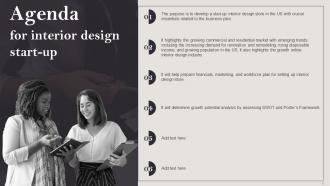
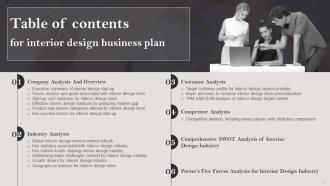
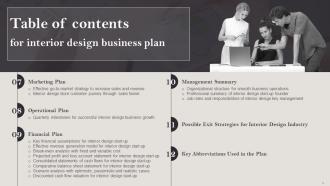
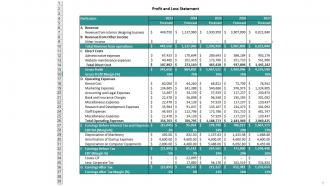
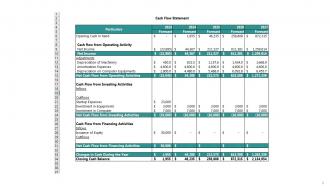
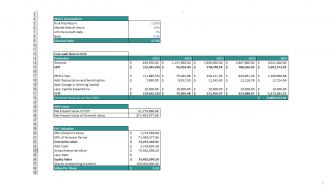
Starting and maintaining an interior design business looks simple but can be challenging To reduce stress, you must take the necessary measures to guarantee that it will endure. Grab our professionally curated Interior Design Business Plan presentation. It overviews the interior designs current situation and outlines your growth strategy for the following five years. Our Interior design service industry deck outlines your companys objectives and your plan for achieving them, and it helps you with your ideas. Further, our Space planning PPT discusses Porters framework and how it affects the interior design industry, market gaps, and opportunities. It also includes the market sizing, including TAM, SAM, SOM, go to marketing strategy, sales funnel, etc. The plan also contains a financial review that offers a comprehensive 5 year analysis while considering market circumstances. Lastly, it consists of the revenue model, balance sheet, cash flow statement, break even analysis, DCF valuation, and profit and loss statement. Download this completely editable PPT to get our well researched and expertly crafted offering.
People who downloaded this PowerPoint presentation also viewed the following :
Interior Design Business Plan Powerpoint Presentation Slides with all 86 slides:
Use our Interior Design Business Plan Powerpoint Presentation Slides to effectively help you save your valuable time. They are readymade to fit into any presentation structure.







FAQs for Interior Design Business Plan
So you'll definitely need to nail down your target market and what services you're offering. Pricing strategy is crucial too - don't undervalue yourself! The marketing plan is where most people get stuck, but honestly it's how you'll actually land clients. Since interior design is super competitive, spend real time on analyzing your competition. Cash flow projections are a pain but they'll save you later - I swear everyone underestimates how long it takes to get paid in this business. Oh, and if you're starting from scratch, map out those startup costs early. Portfolio strategy matters too obviously.
First figure out who you're targeting - residential, commercial, or both? Talk to people in your area about what they actually need and what they're willing to spend. Scope out the competition too. What are they charging? Where are they totally missing the mark? That's where you swoop in. I'd honestly just drive around the neighborhoods you want to work in - check out home values, see if people are renovating, get a feel for the vibe. Census data's pretty helpful for the boring demographic stuff. But seriously, actually talking to potential clients beats staring at spreadsheets any day.
Honestly, saying "everyone who needs design help" is kinda pointless for planning. Pick actual segments - homeowners, developers, commercial clients, luxury market, whatever fits your vibe. Think about income brackets, age ranges, where they live. Are you going after first-time buyers or empty nesters? Growing families have completely different budgets and needs than retirees downsizing. I'd start with maybe 2-3 specific groups you can actually handle well. Demographics matter way more than you think - lifestyle preferences, geographic stuff, all that. Focus on who you realistically want to work with instead of casting this massive net.
Okay so basically you're trying to figure out what other designers in your area are doing - their prices, who they target, what services they offer, all that stuff. I spend way too much time stalking competitors on Instagram but honestly it's super helpful lol. Look for what they're NOT doing that you could jump on. Maybe nobody's doing eco-friendly design or working with smaller budgets? That's your opening right there. Don't just copy everyone else though - find what makes you different and use that to stand out. Then price yourself smartly based on what you learned.
Okay so you're looking at a few thousand just for the boring stuff - business registration, insurance, licenses. Your state might be cheaper or more expensive, who knows. Design software subscriptions are gonna hit your wallet hard (AutoCAD isn't cheap), plus you need a computer that won't crash every five minutes. Marketing's where people usually cheap out but honestly don't - get a decent website and portfolio together. Sample libraries and measuring tools too, obviously. I mean, you could scrape by with like $5-10k if you're really careful, but $15-20k makes everything less stressful. Make a spreadsheet and figure out must-haves vs nice-to-haves.
First thing - figure out who you actually want to work with. Luxury clients? Families on a budget? Commercial stuff? Pick a lane because trying to appeal to everyone is honestly a disaster. Your whole vibe needs to match - logo, Instagram, everything. Way too many designers skip this step then complain about getting the wrong clients. Write down exactly why someone should pick you over the competition. Then make sure your portfolio and pricing actually back that up. Oh, and create some basic brand rules for yourself and don't randomly change fonts every week like my friend Sarah does.
So you're gonna need to pick your business structure first - LLC or corp, whatever works. Each state's licensing rules are totally different (some are super strict, others don't care much), so definitely look that up early. Liability insurance is a must, obviously. Client contracts will save your butt later, trust me. If you're working from home, check zoning laws - some neighborhoods are weird about home businesses. Oh, and protect your design work with IP stuff. The professional requirements in some states can really mess with your launch timeline if you don't plan ahead.
Honestly, you've got to find what actually makes you different - not that generic "I'm creative and listen" stuff everyone uses. Do you specialize in tiny apartments? Have a thing for eco-friendly materials? Maybe your psychology background means you design spaces that actually help people feel better. Focus on busy professionals or families with grandparents living in. The goal is making the right people think "YES, this designer totally gets my situation" instead of trying to be everything to everyone. Pick whatever you're genuinely excited about and go all-in on that angle.
Okay so you'll need to nail down five main projections. Revenue forecasting is huge - figure out how many projects you can realistically handle and what you'll charge. Map your monthly expenses too (rent, software, marketing, all that stuff). Spring gets crazy busy with renovations while winter's usually dead, so factor that in. Cash flow projections are honestly the most important thing because clients pay whenever they feel like it. Oh, and calculate your break-even point so you know how many projects keep the lights on. I'd go 18 months out minimum.
Look, your portfolio is everything in this business. People literally can't hire you without seeing what you can do - interior design is way too visual for that. I mean, would you trust someone to redo your living room based on them just talking about their "style"? Definitely start with whatever you can get your hands on. Help friends for free, create some mock-ups, even photograph small projects. The whole industry runs on visual proof, so you've gotta build that up fast. Without it, you're basically asking strangers to gamble thousands on you.
Start with Instagram and Pinterest - visual stuff is everything in your field. Your website needs killer before/after shots too. Honestly, happy clients will become your best marketing since word-of-mouth is massive in this industry. I'd partner with real estate agents and contractors rather than blow money on traditional ads (they're pricey and don't really show off your style anyway). Home shows and networking events are worth your time - you'll actually meet people face-to-face instead of hoping they stumble across your content online. Client experience should be your top priority though.
Oh totally! Design software like SketchUp or AutoCAD will save you so much time with 3D modeling. Project management stuff like Asana keeps everything organized - clients, timelines, all that chaos. The 3D renders seriously impress people during presentations, it's like magic to them. For the business side, get a CRM system for tracking leads and QuickBooks handles invoicing (way better than spreadsheets, trust me). Cloud storage means you can access files from anywhere. My advice? Pick just one or two tools that fix your biggest headaches first. Don't go crazy trying to set up everything at once - you'll burn out.
Honestly, eco-friendly design is where the money is now. Clients are obsessed with sustainability and they'll literally pay extra for it. You should definitely source green materials and maybe get LEED certified - sounds fancy but it's not that hard. The cool thing is sustainable stuff often saves cash long-term because it's more durable and energy efficient. I mean, even my super bougie clients who used to only care about looks are asking about recycled materials now. Market yourself as the eco designer and you'll stand out. It's good business AND you won't feel guilty about destroying the planet.
Honestly, it's all about staying in touch and going above what they expect. I respond fast to messages and always give real timelines - learned that one the hard way after losing some early clients! Track their birthdays and project dates in whatever system works (I use a basic spreadsheet). Holiday cards are clutch, or just texting about design trends you think they'd love. Your past clients will refer everyone they know if you don't disappear after the project ends. I set quarterly check-ins but sometimes just reach out when I see something that reminds me of their space.
Honestly, the biggest trap is trying to design for everyone - that's a recipe for disaster. Cash flow's gonna be brutal too since projects take forever and payments are all over the place. Budget way more than you think for startup costs (software alone will kill you). Also, I know it sounds obvious, but actually research your competition. Even if your town seems desperate for designers, someone's already doing this work. Figure out their pricing before you randomly guess at yours. Oh and nail down exactly what services you're offering upfront. Trust me on this one.
-
Professionally designed slides with color coordinated themes and icons. Perfect for enhancing the style of the presentations.
-
The visual appeal of the templates is just unparalleled! I was so worried about the design of my presentation but SlideTeam made it all so easy.