


Introduction to software project improvement powerpoint presentation slides




Try Before you Buy Download Free Sample Product
 Impress Your
 Audience
 100%
100% Editable
 Save Hours
 of Time


The Software Process Improvement SPI methodology is characterized as a set of tasks, tools, and techniques for planning and implementing improvement activities with specific goals in mind, such as speeding up growth, improving product quality, or lowering costs. Check out our efficiently designed template on Introduction to Software Project Improvement that will evaluate organization process maturity and implement the improvement measures within the company. We have focused on the current statistics of a software company, current challenges, factors that lead to software project failure, challenges, and project management solutions. The template observes the processs gaps and inefficiencies and then focuses attention on the software process improvement methodology. We have outlined the 7-step process improvement such as mapping, analyzing, redesigning, assigning, implementing, communicating, and monitoring. Businesses can understand the reasons for project failure and then improve on the companys project stability. The proposal covers the software process improvement, its costs, impact of process improvement, and various dashboards related to this process have been discussed in this module. Book a free demo with an expert team and customize the 100 percent editable template based on your needs. Get access now.
People who downloaded this PowerPoint presentation also viewed the following :
Content of this Powerpoint Presentation
Slide 1: This slide displays title i.e. 'Introduction to Software Project Improvement'.
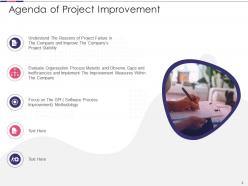
Slide 2: This slide presents agenda.
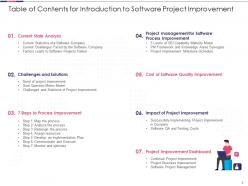
Slide 3: This slide exhibits table of contents.
Slide 4: This slide shows title for 'Current State Analysis'.
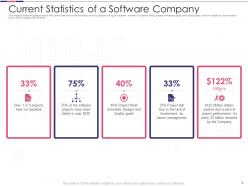
Slide 5: This slide provides the glimpse about the current statistics of the company.
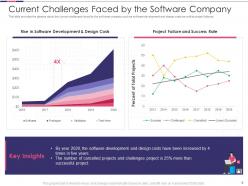
Slide 6: This slide provides the glimpse about the current challenges faced by the software company.
Slide 7: This slide provides the glimpse about the factors which leads to software project failure.
Slide 8: This slide depicts title for 'Challenges and Solutions'.
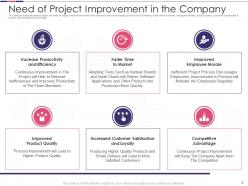
Slide 9: This slide provides the glimpse about the need of project improvement within the company.
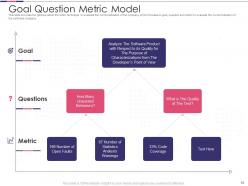
Slide 10: This slide provides the glimpse about the GQM technique to evaluate the current situation of the company.
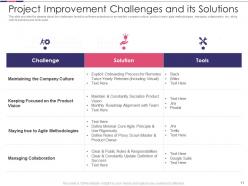
Slide 11: This slide provides the glimpse about the challenges faced by software projects.
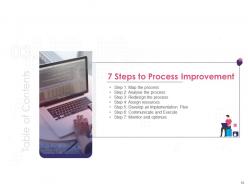
Slide 12: This slide highlights title for '7 Steps to Process Improvement'.
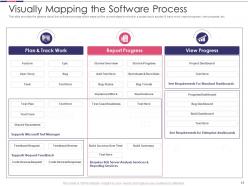
Slide 13: This slide provides the glimpse about the software process which maps out the current steps involved in a project.
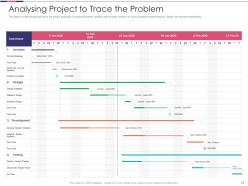
Slide 14: This slide provides the glimpse about the project analyzing to trace the problem faced by the company.
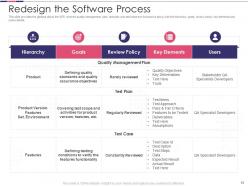
Slide 15: This slide provides the glimpse about the SPR wherein quality management plan, test plan and test case.
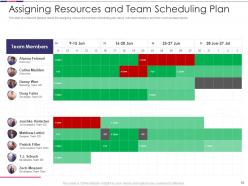
Slide 16: This slide provides the glimpse about the assigning resources and team scheduling plan along with team members and their work across projects.
Slide 17: This slide provides the glimpse about the implementation plan along with specific tasks and timeline.
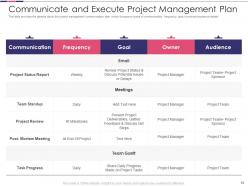
Slide 18: This slide provides the glimpse about the project management communication plan.
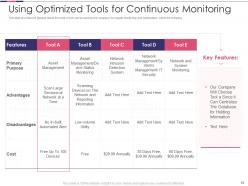
Slide 19: This slide provides the glimpse about the tools which can be used by the company for regular monitoring and optimization within the company.
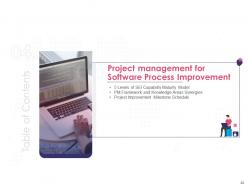
Slide 20: This slide illustrates title for 'Project management for Software Process Improvement'.
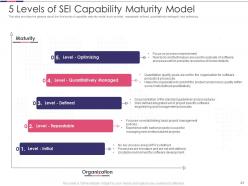
Slide 21: This slide provides the glimpse about the five levels of capability maturity model.
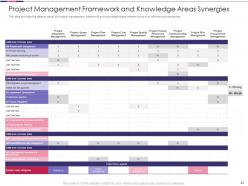
Slide 22: This slide provides the glimpse about the project management framework and knowledge areas wherein focus in on different process areas.
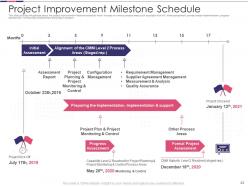
Slide 23: This slide provides the glimpse about the project improvement milestone schedule.
Slide 24: This slide displays title for 'Cost of Software Quality Improvement'.
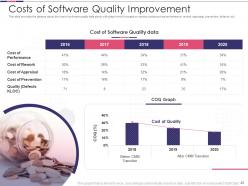
Slide 25: This slide provides the glimpse about the cost of software quality data along with graph.
Slide 26: This slide presents title for 'Impact of Project Improvement'.
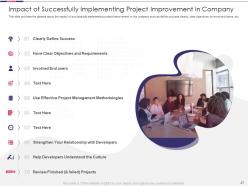
Slide 27: This slide provides the glimpse about the impact of successfully implementing project improvement in the company.
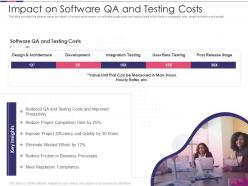
Slide 28: This slide provides the glimpse about the impact of project improvement on software quality audit and testing costs.
Slide 29: This slide exhibits title for 'Project Improvement Dashboard'.
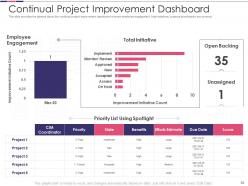
Slide 30: This slide provides the glimpse about the continual project improvement dashboard wherein employee engagement.
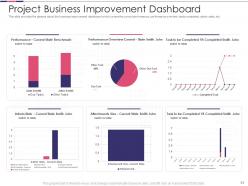
Slide 31: This slide provides the glimpse about the business improvement dashboard which covers the current performance, etc.
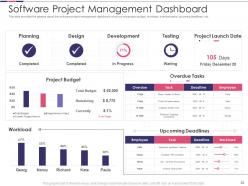
Slide 32: This slide provides the glimpse about the software project management dashboard.
Slide 33: This is the icons slide.
Slide 34: This slide presents title for additional slides.
Slide 35: This slide shows about your company, target audience and its client's values.
Slide 36: This slide shows details of team members like name, designation, etc.
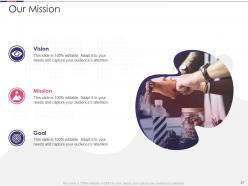
Slide 37: This slide presents your company's vision, mission and goals.
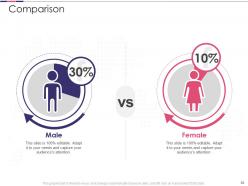
Slide 38: This slide highlights comparison of products based on selects.
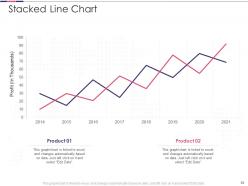
Slide 39: This slide exhibits yearly profits stacked line charts for different products. The charts are linked to Excel.
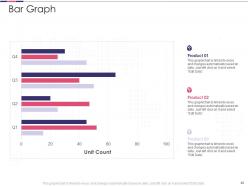
Slide 40: This slide displays quarterly bar graph for different products. The charts are linked to Excel.
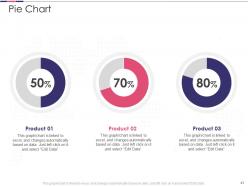
Slide 41: This slide presents pie charts for different products. The charts are linked to Excel.
Slide 42: This slide exhibits ideas generated.
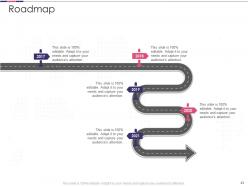
Slide 43: This slide shows roadmap.
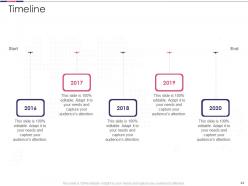
Slide 44: This slide exhibits yearly timeline.
Slide 45: This is thank you slide & contains contact details of company like office address, phone no., etc.
Introduction to software project improvement powerpoint presentation slides with all 45 slides:
Use our Introduction To Software Project Improvement Powerpoint Presentation Slides to effectively help you save your valuable time. They are readymade to fit into any presentation structure.






FAQs for Introduction to software project improvement
Honestly, just focus on the basics first - are you hitting deadlines and staying on budget? Those matter way more than fancy metrics. Check if people actually use what you're building (I've seen so many projects nobody touched after launch, it's wild). Bug rates and team velocity are solid indicators too. When your devs spend all day fixing broken stuff instead of building new features, something's wrong. Don't overthink it though. Pick maybe 3-4 things that actually matter for your project and check them weekly. You'll go crazy trying to track everything.
So here's the deal with Agile - it basically creates these feedback loops that catch problems way earlier. Short sprints mean you're not spending months building something wrong. Daily standups actually work (I was skeptical too) because people finally communicate instead of working in silos. Sprint reviews keep everyone on the same page. The whole iterative thing is clutch when requirements change mid-project, which they always do. You can pivot instead of being stuck with some rigid plan from six months ago. If you're just starting out, try simple sprint planning and retrospectives first. Don't overthink it.
So CI is like having a safety net that catches bugs while they're still tiny and easy to fix. Your code gets automatically built and tested every time someone pushes changes - way better than discovering problems right before a deadline when everyone's losing their minds. It keeps your codebase deployable all the time, which honestly has saved me so many late nights. Plus you avoid those awful merge conflicts since everyone's integrating regularly. Oh and start simple - just get basic builds and tests running first. You can get fancy with the other stuff later once it's working smoothly.
Honestly, just bake feedback into your sprints instead of saving it all for the end. Do weekly demos or set up async sessions where people can actually play with the features. I learned this the hard way - waiting until the end is brutal for everyone. Also, give them structured forms to fill out. Otherwise you'll get useless stuff like "make it prettier" (ugh). The key thing though? Actually show them how you used their input in the next version. People love seeing their ideas come to life, and they'll stay way more engaged.
So honestly, you'll want to look at delivery stuff first - velocity, cycle time, how your sprints are burning down. Quality metrics matter too though. Defect rates, code coverage, customer happiness scores. Oh and don't sleep on team health! Code review turnaround times, whether your devs are actually happy (miserable developers = terrible code, trust me). Technical debt is huge - shows if you're just rushing everything. Deployment frequency too. But seriously, start small. Pick like 3-4 metrics that address your biggest headaches right now, then build from there once you get into a rhythm.
Honestly, collaboration can make or break your whole project. Good teams catch bugs early and ship faster because everyone's actually talking to each other. When communication sucks though? You're gonna get duplicate work, integration hell, and everything takes forever. Nobody reviews code properly either, which is how you end up with garbage making it to production. Also the knowledge sharing just doesn't happen - like when someone figures out a solution but keeps it to themselves. Set up solid communication from the start. Regular check-ins help too, even if they feel annoying at first.
Start by planning like a pessimist - seriously, just assume everything will break at some point. Code reviews and automated testing are your best friends for catching stuff early. I'd break the project into smaller chunks so you can pivot fast when things go sideways (and they will). Communication saves your butt more than anything though - get people talking about roadblocks before they become disasters. Oh, and do retrospectives after each sprint. Learning from your mistakes is way cheaper than repeating them.
Honestly, documentation is like your project's brain - without it, you're just stumbling around making the same mistakes over and over. I've seen teams waste weeks solving problems that were already figured out before. It helps everyone understand the "why" behind decisions, not just the what. New people joining your team will actually thank you for it instead of bugging you with a million questions (though they'll still have some, obviously). The trick is actually keeping docs current - most people write them once then never touch them again. Start with whatever's driving you crazy right now. That's where you'll feel the difference immediately.
Honestly, start with whatever's driving you crazy right now - that's your biggest win. Git for version control is a no-brainer, but CI/CD through GitHub Actions or Jenkins will literally save your sanity on deployments. For tracking stuff, Jira or Linear beats those endless "wait, what's the status?" Slack threads. Oh, and SonarQube has caught so many dumb mistakes before they hit production - seriously worth it. Once you're live, DataDog or New Relic for monitoring is clutch. Don't try to implement everything at once though, you'll just overwhelm your team.
Honestly, UX can make or break your whole project. I've watched perfectly good apps die because users couldn't figure out basic stuff - it's brutal. Poor design means people bail fast, and then you're stuck with angry stakeholders wondering why adoption sucks. The smart move? Get user feedback super early, even on rough wireframes. Yeah, it feels weird showing unfinished work, but trust me - catching problems now beats rebuilding everything later. Plus you'll dodge tons of support headaches down the road. Test early, test often.
Don't just hunt for bugs - actually help your teammates get better at coding. Be specific with feedback and throw out alternatives instead of just "nope, this sucks." Set up response time expectations so people aren't sitting around forever. Honestly, I've watched way too many reviews devolve into arguments over tabs vs spaces. Let automated tools handle the nitpicky style stuff. You'll want to focus on the actual logic and architecture instead. Oh, and smaller PRs are your friend - nobody's thoroughly reviewing a 500-file monster.
Honestly, when your team can experiment without stressing about failing, they learn way faster and come up with better solutions. Quick tests show you what actually works instead of just assuming. It beats being stuck doing things the old way forever. People stay way more interested too - repetitive work kills motivation, right? The trick is making small experiments normal, not some big deal. Maybe test one tiny process change for a sprint and see how it goes. Low stakes, but you might be surprised what you discover.
So DevOps is basically about getting your dev and ops teams to actually work together instead of throwing things over the fence at each other. Automation saves you from those 2am deployment nightmares - trust me on that one. You'll catch bugs way earlier since the feedback happens faster, plus rollbacks become super easy when things go sideways. The monitoring tools are honestly pretty sweet too. I'd say start with some basic CI/CD stuff and automated testing. Don't try to do everything at once or you'll just stress everyone out.
Honestly? Start doing quick post-mortems after every project. Write down what worked, what sucked, and those "why didn't we think of this sooner" moments. I used to skip this step because who has time, right? But then we'd make the same dumb mistakes over and over. The trick is actually using what you document - turn those lessons into checklists or process tweaks for next time. Don't just dump everything in some shared drive that becomes a graveyard. Make it part of your planning routine so you're not constantly reinventing the wheel.
Dude, you're spot on about training being crucial. I've seen projects crash and burn because people didn't know what they were doing. When your team actually has the skills they need, you'll get cleaner code and way fewer bugs to fix later. Everyone stops second-guessing themselves too, which honestly makes everything move faster. The trick is keeping it ongoing - not just some one-off workshop that everyone forgets about in two weeks. Figure out where your team's weakest right now and start there. It's probably more obvious than you think.
-
Great designs, really helpful.
-
Use of different colors is good. It's simple and attractive.
-
Perfect template with attractive color combination.
-
Use of different colors is good. It's simple and attractive.